

One platform, every GPU cloud. Deploy H100s to B300s across multiple providers. On-demand, no lock-in, from a single dashboard.
Remote
Joined January 2023
- Tweets6.5K
- Following13
- Followers118K
- Likes4.7K



$36,000. That's the engineering bill before you save a dollar switching off H200.
AWS claims Trainium 3 cuts training and inference costs 30-50% versus H200 and B200. The claim skips the migration itself.
The switch actually takes:
- About 3 weeks of engineering work
- 2 engineers full time
- $150/hr loaded rate
That's roughly $36,000, before any savings start.
Break-even against H200 spot pricing needs about 109 billion tokens run through a model Trainium 3 actually supports.
What's your monthly token volume?


Padding a fine-tuning run doesn't just waste GPU time, it changes the bill directly.
Same LoRA fine-tune (Llama 3.1 8B, rank 16, batch 16, 2,048 max length) on a single H100 SXM5, run twice. Padded: 58 minutes, 61% of tokens wasted on padding, $2.55. Packed: 31 minutes, about 2% waste, $1.36.
Throughput nearly doubles, 3,900 to 7,300 tok/s, and eval loss barely moves (0.842 vs 0.839). No accuracy tradeoff, only a wasted one.
If your trainer supports sequence packing, turn it on before you touch anything else


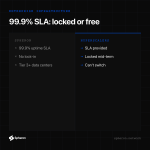
99.9% uptime SLA sounds standard until you check what backs it: Tier 3+ certified data centers, InfiniBand connectivity, and full root or bare-metal access, not a shared VM you're hoping behaves.
No lock-in means you can leave the moment a provider misses that number. Most hyperscaler contracts don't give you that option mid-term.
Enterprise-grade without the enterprise contract.

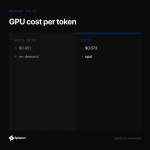
Same workload, 6x cost spread: B200 spot inference runs about $0.073 per million tokens. H100 PCIe on-demand runs about $0.451 per million, per MLPerf Inference v6.0 numbers published this April.
Picking hardware by hourly sticker price gets this backwards. Price it per token instead:
- B200 spot: cheapest here, newest generation
- H200 on-demand: middle ground, proven stack
- H100 PCIe on-demand: most expensive per token despite the lowest hourly rate
Compute the token cost before the hourly rate.


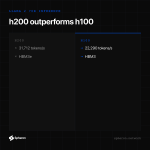
H200 hits 31,712 tokens/s on Llama 2 70B inference. H100 hits 22,290. That's 42% more throughput from the same core architecture.
The difference isn't compute, it's memory: H200 carries HBM3e instead of H100's HBM3, at meaningfully higher bandwidth.
If your workload is memory-bandwidth-bound, which most LLM inference is, the upgrade from H100 to H200 is closer to a new generation than a refresh.


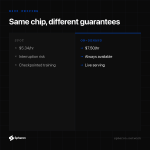
Spot B200 on Spheron runs $5.34/hr. On-demand is $7.50/hr. That's 29% cheaper for the exact same chip.
The catch is interruption risk: spot can be reclaimed, on-demand can't.
Pick spot for checkpointed training runs that can resume on their own. Pick on-demand for anything serving live traffic.
Same hardware, two very different guarantees behind the same invoice line.

Three chips, same benchmark, same model. Speed barely moved between them. Cost per token did: a 6x gap separated the cheapest from the priciest.
MLPerf Inference v6.0: Nvidia B200 ran at $0.073 per million tokens on spot pricing. H100 PCIe hit the same job at $0.451 per million on-demand. B200 also pushed about 17,500 tokens per second on Llama 2 70B, and beat H200 by 2.5x on GPT-OSS 120B.
Pick by scale:
- Job small enough that any chip clears your deadline: pick on throughput
- Running at volume: pick on cost per token
Full MLPerf v6.0 breakdown
Drop your target model and token volume below. We'll tell you which chip wins on your numbers.


"LMCache makes vLLM 15 times faster."
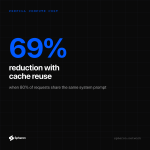
That number only holds at one setup: 200 concurrent requests, 80% of each prompt reusing a shared system prompt.
At that setup, on a 128K-token system prompt:
- Prefill compute drops 69%
- Time to first token: 11s to 1.5s
That's a ceiling, not a default. Change the concurrency or the reuse rate and the multiplier moves with it.
What prefix-reuse rate does your own traffic actually see?

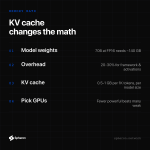
A 70B model at FP16 needs about 140 GB before loading a single token of context. Most teams never budget past that.
The demo runs fine on short prompts. Production conversations run longer, and the same deployment runs out of memory in production, not in testing.
The missing line item is KV cache: the memory that holds every token already in the conversation.
- Add 20-30% overhead for activations, memory already spent
- KV cache: roughly 0.5 to 1 GB per 1,000 tokens of context for a 7B model
- Cache grows faster per token as model size goes up, not just with context length
Pick fewer, more powerful GPUs when splitting the model would cost more in overhead than it saves.

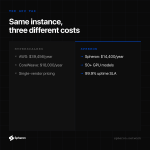
Same GPU instance, one year, on demand. Priced October 2026:
- Spheron: $14,400
- CoreWeave: $18,000, 25% more
- AWS: $39,456, 174% more
That's a $25,000 gap for the same instance type, same hours. These are Spheron's own list-price numbers, not an independent audit.
CoreWeave and AWS are single cloud providers with overhead baked into the rate card. Spheron is a marketplace: it aggregates spare capacity from certified Tier 3+ data centers and passes the lower cost through instead of adding a markup.
Real bills shift with region, support tier, and reserved discounts. Request a quote and run your own number against this.

504 tokens/sec on the L40S. 168 on the L40.
Same model, same batch size. Two GPUs NVIDIA sells as a matched pair, and the gap comes down to one feature.
The L40S has a Transformer Engine that switches layers between FP8 and FP16 while the model runs. The L40 doesn't have it. Same 48 GB GDDR6 memory, same 864 GB/s bandwidth on both cards.
NVIDIA's spec sheet says that engine is worth 2x: 733 TFLOPS dense FP8 on the L40S vs 362 on the L40. In production, serving Llama 3.1 8B at batch size 8, it lands at 1.5-1.8x. Bandwidth runs out before the extra FP8 compute gets used.
The L40S also draws more power: 350W vs 300W.
- Pick the L40S for FP8-quantized 7B-13B models where you need the throughput
- Pick the L40 only if you're power-capped and don't need FP8


A GPU job that runs out of memory usually doesn't crash. It spills into system RAM instead, running 2-5x slower while you keep paying for every hour.
VRAM moves data at 2,000-4,800 GB/s. System RAM tops out at 50-100 GB/s. That 20-100x gap hits the moment your model doesn't fit in VRAM.
A 70B parameter model in FP16 needs about 140 GB for weights alone. Training adds 2-3x more for optimizer states.
Check before your next run:
- Model weight size at FP16 (+2-3x if training)
- Batch size x sequence length, the main driver of activation memory
- Real VRAM on your GPU, not the spec sheet number
- Whether your framework silently falls back to system RAM
Proof: an M4 Max on unified memory hit 28 tokens/sec on a 70B model at 4-bit. An RTX 4090 spilling into system RAM on the same model managed 10 tokens/sec.
