

Microsoft Sticky Notes: keep track of all the small things.
Redmond, WA
Joined September 2016
- Tweets105
- Following10
- Followers3.5K
- Likes76




Pinned Tweet
Thanks to your incredible feedback, we've updated OneNote's new Sticky Notes feature for Windows. 🎉Check out this blog for all the details: go.microsoft.com/fwlink/?lin…

📢 Poll Time! 📢
We want to hear from YOU! 📝 Do you use the Notes feature in Outlook Web App or the New Outlook for Windows? Share your use cases and frustrations with us. Your feedback helps us improve! 💡
34%Team OWA, hands down!
66%New Outlook, all the way!
29 votes • Final results🎆The 4th of July is right around the corner.
How are you using Sticky Notes to plan for the holiday? 🎉
Sticky Notes retweeted

⚡ Your dream team when you want to supercharge your workflow. Which ones are your favorites?
How many of you are using our screenshot feature on Sticky Notes? Are there any updates you'd like to see in the feature?
27%I use it all the time!
26%I don't use it.
47%I haven't tried it yet.
77 votes • Final resultsMissed our latest blog?
Catch up on all the new features here:
👉msft.it/6018cGFLr

We see you @haridev8281 👏
Any other shortcuts out there?
How has Sticky Notes benefited you?

🎈 The new Sticky Notes experience we've been crafting is now rolling out to all users! 📝 Dive into our tech community blog for the scoop and let us know what you think: go.microsoft.com/fwlink/?lin…
🎉Celebrate Holi by adding a splash of color to your daily notes & tasks! What new colors would you like to see in your Sticky Notes? Our design team would like to know 👀
#ColorYourStickyNotes
Since #Facebook & #IG are down, we're doubling our 💡#TipTuesday! Multitasking on a project? Dock your new Sticky Notes app to your desktop for a side-by-side experience to stay in your flow! Having issues? We're here to help streamline all questions😀
💡#TipTuesday - To return to the website that you took a note or a screenshot from with new Sticky Notes, click on the source that was automatically captured.
For more tips, check out our blog 👉msft.it/6018cGFLr
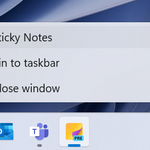
💡#TipTuesday! Pin the new Sticky Notes app to your taskbar for easy access - no need to launch #OneNote🙂
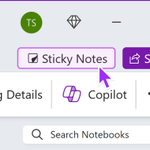
1. Launch the new Sticky Notes from your OneNote app
2. Right click on the Sticky Notes icon in the taskbar
3. Select Pin to taskbar
Share all your helpful tricks below!

ALT Have a persistent Sticky Notes icon to launch at any time, without having to go through the OneNote app.
🎉 #Msft365Insiders, say hello to the new Sticky Notes app on Windows! Create and recall notes more seamlessly than ever, and easily capture and get back to information that matters to you.
Blog: msft.it/6018cGFLr

ALT New Sticky Notes app on Windows!
Become a Microsoft 365 Insider today to get early access to new features and updates: insider.microsoft365.com/
Hey @msonenote, we have a crush on you!💜 Will you be our #Valentine? 😍The first preview of the new #StickyNotes app is coming soon to @MSFT365Insider. You can try it from the latest version of the OneNote app.💛
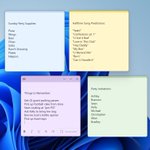
🏈 Are we forgetting anything before #TheBigGame?
Song predictions? Party supplies?"

ALT Quick reminders for all your #BigGame plans!
How do you use Sticky Notes on your PC?
20%Keep them in a list
30%Around my desktop
20%Combination of both
29%Wait, there's an app?
83 votes • Final results
