Pinned Tweet
Your AI installs skills, plugins and repos with your access.
One bad install can reach your email, files and logins.
I run a 10-minute check before anything goes in.
Here it is.
An AI API key is a company card with no spending limit, unless you set one.
This month attackers broke into OpenCode Console, where users of the AI coding agent saved their provider keys.
OpenCode says 1.4% of Console users were hit; TechCrunch reports charges in the hundreds of dollars, a few over $1,000.
Used OpenCode Console? Revoke and replace those keys at each provider now.
The 10-minute fix for everyone else:
1. List every tool where you've pasted an AI API key: coding agents, automations, bots.
2. Give each tool you keep its own new key.
3. Then revoke the old shared keys and any key for a tool you've stopped using.
4. In OpenAI: Settings, Organization limits, Edit spend limit, enter a monthly limit, turn on Enforce a hard limit, Save. Calls stop at the cap.
5. In the Claude Console: Settings, Workspaces, one workspace per tool with its own limit, and make that tool's new key inside it.
You're done when every live key has one home, one owner and a hard cap on spend.
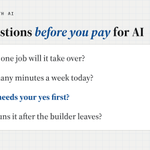
Before you pay anyone to build you an AI employee, make them answer four questions.
Gartner predicts over 40% of agentic AI projects will be canceled by the end of 2027.
1. Which one job will it take over?
2. How many minutes a week does it take today?
3. What will it never do without your yes?
4. Who keeps it running once the builder leaves?
If they can't answer all four, you're paying for a demo.
My assessments start with the first two. Free 30-minute briefing: savetimewithai.io/?src=x
"I write all my content by hand"
is becoming the new
"I'm a jacked Hollywood star and I've never used steroids"
Claude Duet can now buy things for your business through Stripe's Link (US research preview, Pro and Max).
Per Anthropic, every purchase waits for your yes and gets a one-time card good only for that merchant and amount.
My read: that's the right default for an AI employee with a wallet.
So far I've given Duet Gmail, Calendar and Notion, and I'm still mapping its limits.
Before you connect it, find the two no buttons: the Spend Request in the Link app, and Avatar, Payments, Link, Disconnect.
Say you run a 5-person insurance agency, and a client emails at 8 p.m. on a Friday about adding a car.
Nobody sees it until Monday, and by then they may have called someone else.
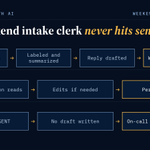
That's the job I'd hand an AI employee first: the weekend intake clerk.
It doesn't quote, bind or promise anything.
It reads what comes in, sorts it, drafts a reply for a person to send, and leaves Monday's list ready.
Set it up in this order, about an hour the first time (my estimate):
1. Pick one inbox it can read, like your shared service address, not the owner's personal email.
2. Write down your request types: new policy, policy change, certificate, billing, claim, other.
3. Paste the prompt below into the tool's standing instructions.
4. Set it to save drafts only, so every reply waits in Drafts for a licensed person.
5. Test it on 10 old emails with the names taken out before it sees a live one.
The prompt:
"You are the weekend intake clerk for [agency name]. For each new email, pick one label: [your request types]. Write a two-line summary and a short reply that confirms it arrived and says when a licensed person will follow up: [your hours]. Never quote a price, confirm coverage, or say a change is done. If the email mentions a claim or a loss, mark it URGENT, don't draft a reply, and alert [on-call person] right away."
You're done when Monday morning's list matches what you'd have sorted by hand, label for label.
Start with the business problem, not the tool.
This should basically always be the first step with anything AI related.
the biggest AI opportunity right now isn't building agents
it's understanding businesses well enough to build the RIGHT agent
marketing agents specifically
every business needs one... almost nobody is building them properly
what i see instead:
> generic "content teams" that pump out forgettable posts
> bullshit automations that feel like spam
> systems built around AI capabilities instead of business needs
flip that
start with the business problem, map the funnel, understand the audience... then build a system that fits like a glove
the AI part is honestly the easy part, understanding businesses is harder
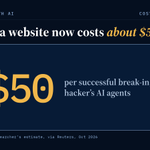
My read: AI just made your shop's website cheap to attack.
One hacker's AI agents broke into sites at 100+ companies, roughly $50 per success, by a NorForge researcher's estimate.
Nobody has to pick you at that price.
Ask whoever runs your site when it was last patched.
Ken Reiners retweeted
My quick takeaways on the Anthropic S-1:
1. This is a historical moment
2. $6.6M in revenue per employee!! Hard to even comprehend how good that is but Anthropic is AI native as it gets so makes sense.
3. I always thought OpenAI would drop their S-1 first
4. Customers spend about 9x more after a year. Net Revenue Retention is approximately 900% as of Sep 30, 2026. Good SaaS companies brag about 120%.
5. Cowork is growing faster than Claude Code did. Goes to show you the demand for consumer products. Duo will probably rip.
6. 3 years ago this company did $41M in revenue. In the first six months of 2026, it did $16.3 billion. I don't think anyone has a mental model for that curve yet, I sure don’t.
7. Nearly half of revenue comes through cloud marketplaces. About 48% comes from customers buying through them. Big companies buy where their budget already lives, and the lesson for founders selling to enterprises is to get listed where your buyers already spend.
8. Their run rate formula is published: the last 28 days of usage times 13, plus subscriptions times 12, which i guess is the new ARR math for founders?
9. It looks like They're merging Cowork into Claude dot au which tells you the chat box era is ending and the "go do the work for me" era is here.
10. Thousands of Anthropic employees are about to become liquid at once, so expect the biggest wave of new AI startups and angel checks San Francisco has ever seen. Reminds me when Facebook went public but this is way bigger.
Let’s go!
11. Buried in the filing, Anthropic says the gap between what Claude can do and how widely it's used is one of its biggest growth opportunities, so the company itself is telling you the models are ahead of the market and someone has to close that gap for dentists, landlords, and plumbers.
12. Whatever happens, exciting times to be building in AI.
Anthropic has filed an S-1 registration statement with the SEC related to its proposed IPO.
Read more: anthropic.com/news/s1-sec
Legal disclaimer: A registration statement relating to these securities has been filed with the SEC but has not yet become effective. These securities may not be sold, nor may offers to buy be accepted, prior to the time the registration statement becomes effective. This post does not constitute an offer to sell or the solicitation of an offer to buy these securities, nor shall there be any sale of these securities in any state or jurisdiction in which such offer, solicitation or sale would be unlawful prior to registration or qualification under the securities laws of any such state or jurisdiction.
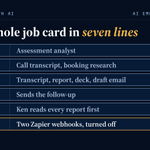
Echo is the first AI employee I put to work, and this is its whole job card.
Before Echo, turning an assessment call into the analysis and the slide deck took me 3 to 4 hours.
Echo gets it done in about 15 minutes, so far.
The card:
Role: assessment analyst
Reads: the call transcript from Granola, plus the client research that runs when someone books
Writes: four files in the client's folder: a clean transcript, the report, the deck, a draft follow-up email
Never: sends the follow-up. It drafts, I send.
Approves: me. I read the report before anything reaches the client.
Log: the same four files every run. A missing file means a failed run.
Off switch: the two Zapier webhooks that feed it. Turn them off and Echo has nothing to work on.
Copy those seven lines and fill them in for the first job you'd hand off.
You're ready to build when Never and Off switch both have an answer.
Want a second pair of eyes on yours? I do a free 30-minute briefing at savetimewithai.io/?src=x
Ken Reiners retweeted
AI consultancies are popping up like mushrooms after rain.
I asked ChatGPT what business to start in 2026 to make money fast. “AI automation agency” came back right under e-commerce.
Goes to show the market is splitting at both ends.
At the bottom, anyone with a $200 subscription can call themselves an AI agency. Check the LinkedIn profiles. Half a year ago, plenty of them were selling life insurance.
At the top, the model labs became services firms.
In May, Anthropic launched an embedded-engineering venture with Blackstone and Goldman Sachs, now called Ode.
A week later, OpenAI launched its Deployment Company with more than $4B behind it.
Then in September, Gartner predicted that 70% of enterprises will abandon agentic AI built by vendor FDEs by 2028. The reason: clients get trapped by rising maintenance costs and can’t change the systems on their own.
So there’s never been more AI implementation for sale, and some companies genuinely don’t need it yet.
You don’t need an AI partner for:
→ Getting your people to use AI. That’s training, certification and daily pressure, almost no engineering involved.
→ Automating marketing and operations content. A ChatGPT subscription in Work mode gets one person most of the way, and those tools get better every week. Don’t overspend here.
→ Prototypes. A $100 to $200 Claude subscription is the right tool for proving something works.
→ A custom platform for a team that doesn’t use AI yet. Have them run their own data through Claude first. You can’t build agents for people who don’t use them.
→ One AI system that runs your whole company. It doesn’t work. Agents coordinating with other agents hasn’t worked for a single Limestone client.
You do need one when:
→ A workflow lives on one person’s laptop. If it stops when they go on vacation, your operations run on their vacation schedule.
→ Something your business depends on has to survive model updates. That takes proper hosting, tests against known-good answers and regular checks for drift.
→ AI sits inside a product many clients use. One prompt shouldn’t let customer A read customer B’s financials.
→ An agent touches regulated data. Build it narrow and deep, one workflow at a time, with every tool on its own access level and every action traceable. Checking politically exposed persons against compliance data is one workflow.
→ A frontier model is overkill for the task. A small or fine-tuned open-source model does it for the cost of hardware. We run a 70-billion-parameter model on our own NVIDIA chips.
One rule applies either way: never vibe-code your ERP, accounting or CRM. Build on top of them.
Whatever you build above that line becomes the company’s asset. Own the code, own the tests, and make sure your team can run it without the people who built it.
If your vendor needs you forever, they’re a consulting firm with AI branding.
If they’re willing to earn your business every month, you might have an actual AI partner on your hands.
That's what we do at @LimestoneHQ.
X algos are brutal to smaller accounts.
Worse than elo hell bronze tier in league of legends. I swear.
If you follow me, do me a favor and drop a like, share, bookmark, comment, or whatever when you see my posts, and I'll be sure to return the favor!
Native AI features like @bot vaults are almost always better than non-native.
The less third party connections and apps you have, the better.
Especially with the major vulnerabilities, exploits and compromises that we are starting to see more and more of
This quoted post is unavailable.
"An owner's top priority must be work only the owner can do"
Couldn't agree more. Yet how many owners are wasting time with busywork anyone can do?
90%?
AI is the answer.
It can't do everything, but it crushes at automating the boring, repetitive, tedious work that no one likes doing, and that doesn't help drive revenue for the business.
If you are an owner that needs help with this, shoot me a DM
Charging less doesn't make you kind
Your D-clients would be another firm's A-clients
Your next A-client should let you drop 3 C-clients
Pricing morality is stopping you from pricing reality
Your most skilled people are wasting time on admin
You'd rather overserve a few than underserve many
Doing more work for more money isn’t better. It's more
Begrudingly serving C-clients at a discount isn't charity
Grade clients by enjoyment and profitability, not volume
Hiring to maintain C-clients is how sweatshops are born
An owner's top priority must be work only the owner can do
If your list was full of A-clients you'd earn double in half the time
Your best clients are showing you who you need to find more of
A-clients more happily pay top rates than D-clients pay a discount
Nobody cares what you think your work is worth. Clients set the price
Being an accounting department pays better than being a bookkeeper
Noisy clients that consume your headspace aren't your money-makers
Using a bad industry vertical ledger pays better than using QuickBooks
Say yes to every request and you end up selling accountants by the hour
The quiet clients you aren't thinking about are the ones making you money
I pay for ChatGPT and Claude, and the first thing I check in any AI tool is whether my chats can train it.
My verdicts as of September, with where the switch lives:
ChatGPT: what I use for heavier building. On a personal plan, go to Settings, Data controls, and turn off "Improve the model for everyone." OpenAI says it doesn't train on Business or Enterprise workspace content by default.
Claude: the one I prefer. On Free, Pro, or Max, go to Settings, Privacy, and switch off "Help Improve our AI models."
Gemini: I think it's kind of crappy, but it plugs into Google Workspace nicely. An admin sets what it can reach under Generative AI, then Gemini app, in the Admin console.
The plan you pay for matters less than whether anyone in your office checked the switch.
Check all three in 10 minutes.
You're done when every account that touches client data has training off or sits on a business plan.
More of these settings checks are coming. Follow along if that helps.
Treat your grok @bot setup like a mini enterprise that takes security seriously.
Or risk a compromise.
Here's a quick win you can implement today
New CVEs, zero-days and actively exploited bugs keep coming, and the computer your bot runs on needs patching every day to keep up.
Reading every advisory by hand turns into a second job, and that's how patching slips.
I split that work between two bots and a morning routine.
1. Add Sentinel, a Grok Bot that watches X around the clock for new CVEs, zero-days and actively exploited bugs. [SENTINEL LINK]
2. Get a builder bot. If you don't have one, spin it up with the dr eggbot template, which designs and creates Grok Bots. x.ai/bot/_jOdbfkB16zxu7MRcmR…
3. Have Sentinel hand each day's advisories to the builder bot.
4. Tell the builder to check your bot's computer read-only first, then patch.
5. Set a routine for 9 every morning that reads Sentinel's findings and applies only checksum-verified patch bumps. Anything bigger, like repo PRs, major versions or secrets, waits for your approval.
Each morning, look at what it applied and what it's holding for your yes.
This morning I ran it on my own setup.
This week's advisories covered LiteLLM, Node, Next.js, Pillow, Go, certifi, PHP and WordPress.
The builder updated Node, Go, Pillow and certifi, each checked against official checksums, plus venv packages, pip and uv.
It found nothing compromised, and since there's no Next.js, WordPress or PHP on the box, it left those alone.
I approved each change.
I'm a Navy cyber vet, and nothing big gets touched without my yes.
When did the computer under your bot last get a patch?
Copilot Cowork runs scheduled tasks as you, and they can see whatever you can see.
Find the off switch before you need it.
Open My tasks, then the Scheduled tab. Each task there can be paused.
You're done when you know which ones you could stop today without breaking work.
Stay safe online.
Here is what I do:
1. I use a password manager (Passwords, which comes preinstalled on Apple's ecosystem)
2. I have 2FA enabled everywhere.
3. If the site supports hardware keys, that's what I use. I have 3 YubiKeys 5C. I keep them in different locations. These keys are a bit more inconvenient, but they make it 1000x harder for anyone in the world to access your stuff.
4. If there is no hardware key support, I enable Passkeys and store them on my computer or phone.
5. I do not send authentication codes via text messages unless there's no other alternative to enable 2FA. SMS codes are vulnerable to SIM swapping and interception.
6. My iPhone uses an alphanumeric password. This is much better than a simple 6-digit PIN.
7. I also use a long, complex password on my laptop. It's inconvenient, but if someone steals it, they'll have a hard time breaking in.
8. I enabled Number Lock and SIM Protection with my phone carrier so hackers can't swap my SIM or steal my phone number.
9. I enabled Stolen Device Protection on my iPhone.
10. I have full disk encryption on every device that supports it (starting with my laptop and phone).
11. I have automatic updates enabled on my computers and my phone. I never skip an update, and also update the browser every time I get the notification.
12. I check every critical account every 3 months and make sure security is updated. Critical accounts are your bank, email, social media, and investment accounts. I make sure I don't have old emails, 2FA using SMS, etc.
Gmail's AI Inbox starts rolling out to most paid Google Workspace business domains on October 26 (US, English for now), and Google says there is no admin control for it.
It pulls to-dos and deadlines out of your email and summarizes your most important topics across threads.
For an office that handles client data, that means AI reading client threads is becoming part of Gmail itself, with no admin switch.
You do still control how far the Gemini app reaches into Gmail, Drive, and Calendar.
Check it in 5 minutes (you need the Gemini Settings admin privilege):
1. Sign in to the Google Admin console.
2. Go to Menu, then Generative AI, then Gemini app.
3. Scroll to Apps and open Workspace apps.
4. Decide on purpose whether Gemini can reach Workspace apps (Gmail, Drive, Calendar, and the rest), then select Save.
You're done when you can name which Google AI features read client email, and which of those you chose.
New CVEs, zero-days and actively exploited bugs keep coming, and the computer your bot runs on needs patching every day to keep up.
Reading every advisory by hand turns into a second job, and that's how patching slips.
I split that work between two bots and a morning routine.
1. Add Sentinel, a Grok Bot that watches X around the clock for new CVEs, zero-days and actively exploited bugs. [SENTINEL LINK]
2. Get a builder bot. If you don't have one, spin it up with the dr eggbot template, which designs and creates Grok Bots. x.ai/bot/_jOdbfkB16zxu7MRcmR…
3. Have Sentinel hand each day's advisories to the builder bot.
4. Tell the builder to check your bot's computer read-only first, then patch.
5. Set a routine for 9 every morning that reads Sentinel's findings and applies only checksum-verified patch bumps. Anything bigger, like repo PRs, major versions or secrets, waits for your approval.
Each morning, look at what it applied and what it's holding for your yes.
This morning I ran it on my own setup.
This week's advisories covered LiteLLM, Node, Next.js, Pillow, Go, certifi, PHP and WordPress.
The builder updated Node, Go, Pillow and certifi, each checked against official checksums, plus venv packages, pip and uv.
It found nothing compromised, and since there's no Next.js, WordPress or PHP on the box, it left those alone.
I approved each change.
I'm a Navy cyber vet, and nothing big gets touched without my yes.
When did the computer under your bot last get a patch?
The Fed's small-business survey found the top problem for owners planning to adopt AI is finding tools that fit their business: 54% said so.
I think that's the wrong place to start.
Start with the tool, and you spend a month on demos for a job nobody wrote down.
Start with the task, and the tool list gets short fast.
On my assessment calls, I open with one question: if AI could do one thing for you in the next 90 days, would it be more money, hours back, or a better result for clients?
Then this sheet, about 10 minutes:
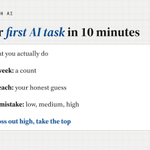
Task: one line, what you actually do
Times a week: a count, not a feeling
Minutes each: your honest guess
Cost of a mistake: low, medium, or high
Rank by times a week times minutes, then cross out anything marked high.
The top line left is your first AI task.
More on how I run these: savetimewithai.io/?src=x