I fight for DeFi and financial freedom. Follow to fight with me
Joined June 2023
- Tweets3.5K
- Following97
- Followers8.1K
- Likes2.6K




$1w token sale starts in 2 hours
$30M FDV, oversubscription, 100% unlocked on TGE
Competitors:
ethereum:0x8881562783028f5c1bcb985d2283d5e170d88888 $489M
$BC $357M
ethereum:0x046eee2cc3188071c02bfc1745a6b17c656e3f3d $110M
I am not even saying that they have 1/2 to 1/1 MCap/FDV ratio,
and $1W MCap will be pennies
For the token to perform bad, idk what has to happen, because metrics and numbers are saying that it's free money
ofc dyor nfa, but I am in
1wtoken.com/

DeFighter retweeted

ADD A PRIVACY LAYER TO YOUR LLM RIGHT F**KING NOW
You send your card data to LLM to analyze spendings,
does it need your real name, home address, and bank details too?
Clem Delangue, Hugging Face cofounder, put it bluntly:
“Cowork but with local models not to send all your data to a remote cloud!”
Here’s how I’d apply that idea to an agentic system:
Put a local privacy layer BEFORE the cloud model.
• Raw information is processed on your device
• A local LLM helps identify sensitive details
• Names and identifiers become consistent placeholders
• Unnecessary private context gets removed
• Only the checked, minimized version goes to the main model
Example:
“Draft a reply to Sarah Miller at [email protected] about her delayed order #84291.”
Becomes:
“Draft a reply to CUSTOMER_01 about delayed ORDER_01.”
The cloud model writes the response.
Your local system restores the details afterward, keeping the placeholder mapping on your device.
You still use a powerful model for the work that needs it.
You reduce how much personal information it receives.
But build the filter properly:
• Combine the local LLM with rules and dedicated detectors
• Check documents, tool outputs, and attachments before they leave
• Keep raw data out of cloud logs and traces
• Block uncertain cases for review
• Test whether the filter misses sensitive information
Replacing names alone doesn’t guarantee anonymity. Someone can still be identifiable from the surrounding details.
The question worth asking before every cloud call:
“What information does this model actually need to complete the task?”
Privacy f*cking matters.
Especially when your agent can read far more than you would ever paste into a chat.


DeFighter retweeted

OpenAI CMO (Chief Marketing Officer) released how she uses ChatGPT Dots powered by Astra 6
and this is f**cking insane...
Copy this prompt and you will turn your ChatGPT Dots into a marketing team that works for a $1 Trillion company


DeFighter retweeted
160M views + 653k followers in 3 days
It takes years for real people to get this result,
and 99,9999% is failing anyway,
but the person you see DID IT IN 3 DAYS AND HE IS NOT EVEN REAL
What's also funny, you can build a workflow for creation of similar videos without leaving ChatGPT Dots
Each agent will be responsible for different stuff:
> Scenario
> Angels
> Prompt generation
> Video generation
You need 0 tech knowledge to do this and you are still missing out
Don't check the article, you will regret you didn't do it earlier
I had to answer 15-40 questions a day from my AI agents, so I found a way how to fix it:
Every “Should I continue?” puts the task back in your head.
Here’s how I’d configure ChatGPT Dot to do useful work without constantly pulling me out of mine:
➔ 1. Give it permission to make small decisions
Start by defining what it CAN do independently.
For example:
• Search the sources you approved
• Compare options against your criteria
• Prepare drafts
• Check facts and flag uncertainty
• Revise work that fails your brief
• Save findings in the agreed location
If you asked for research, opening the next relevant source shouldn’t require another conversation.
➔ 2. Define the decisions that belong to you
Keep approval for choices with meaningful consequences:
• Sending a message to someone
• Publishing under your name
• Submitting an application
• Changing the agreed scope
• Accessing something outside the approved sources
For spending, passwords, and irreversible actions, keep the task in your hands.
“Find three suitable options” and “buy one” need different permissions.
➔ 3. Make every question earn the interruption
“Which option do you prefer?” makes you do the comparison.
A useful approval request should include:
• The decision needed
• The recommended option
• Why it fits your goal
• The main tradeoff
• What happens after approval
Example:
“I recommend these three roles because they match your experience and location. Two others require relocation, so I excluded them. Review the shortlist before I prepare application drafts.”
You can judge the recommendation without reopening the entire research process.
➔ 4. Batch related decisions
Imagine asking Dot to prepare a presentation.
You don’t need five separate interruptions about:
• Audience
• Length
• Tone
• Structure
• Call to action
Ask for one proposed brief with those choices together.
Approve the direction once. Let it draft within that brief.
Batch questions that depend on the same decision. Leave unrelated work moving.
➔ 5. Separate progress updates from approval requests
A checkpoint can simply report:
• What the task is
• What’s finished
• What comes next
• Where uncertainty remains
It doesn’t have to end with “May I continue?”
If the next step is already authorized, the update should tell you what’s happening while work continues.
If a real blocker appears, Dot should explain what stopped and the smallest decision needed to unblock it.
➔ 6. Give it an interruption budget
Start with one daily review and aim for fewer than five approval requests.
That’s a target for designing the workflow, not permission to skip necessary approvals.
If you keep exceeding it, review why:
• Is the brief missing important criteria?
• Are harmless decisions waiting for permission?
• Could related questions arrive together?
• Is the task too broad?
Fix the recurring cause before adding more tasks.
Here’s an instruction you can adapt:
“Work independently within the approved brief, sources, and permissions. Make routine decisions using my criteria. Group related questions into one review. For each approval request, include your recommendation, reasoning, and the consequence of approving it. Keep progress updates separate from requests to proceed. If one action needs approval, pause that action and continue any independent authorized work. Never treat silence as approval.”
The first thing I’d measure is how often the work comes back to me before it’s actually ready to review.
A useful agent brings you a shortlist, a draft, or a clear decision.
The article below explains the foundation: a concrete job, a permission ladder, short checkpoints, and a small trial before expanding autonomy.
Use that setup to give Dot room to work and yourself room to focus.
DeFighter retweeted
I made ChatGPT Dots scan internet 24/7 for me to find 6-7 figs opportunities
I physically couldn't scan internet 24/7,
so I gave ChatGPT Dots one job: find opportunities I’d otherwise miss.
A better job. A potential client. A relevant grant. A cheaper tool. An opening for a project.
Here’s how I’d set up a personal opportunity radar:
➔ Step 1: Give it a target
“Find opportunities” is too vague.
Tell it:
• What you’re trying to achieve
• What would make an opportunity relevant
• Your location, budget, or other constraints
• What you’ve already tried
• What you want it to ignore
Example:
“I’m looking for remote marketing roles. Prioritize companies where my experience fits. Exclude senior management roles and listings that require relocation.”
Start with one goal so you can judge whether the results are useful.
➔ Step 2: Choose a few sources worth checking
Give Dot specific sources it can access through connected tools or supported browsing.
Depending on your goal:
• Company career pages
• Industry newsletters
• Grant and scholarship listings
• Product announcements
• Communities discussing problems you can solve
• Your own inbox and saved research
Start with 2–3 sources. Review what it finds before adding more.
➔ Step 3: Define the signals
Tell it what should trigger a closer look.
• Job hunting: a relevant opening or a company expanding your function
• Freelancing: someone describing a problem your service solves
• Building a product: repeated complaints about the same workaround
• Studying: a scholarship matching your eligibility
• Saving money: a price change on something you already planned to buy
• Growing a business: a partnership or distribution opportunity that fits your offer
Ask it to separate confirmed facts from its interpretation.
“A company raised money” is a fact.
“They might need my services” is a hypothesis to investigate.
➔ Step 4: Make every result earn your attention
Ask for a short opportunity card:
• What changed?
• Why does it matter to my goal?
• What’s the source and date?
• What makes me eligible or relevant?
• What’s uncertain?
• What’s the next action?
• Is there a deadline?
A link alone leaves you with the research job.
A useful brief gives you enough context to decide.
➔ Step 5: Set a delivery rule
For example:
“Check these sources every weekday at 9 AM in my time zone. Save relevant findings in one place. Send me the best 3, with your recommendation. Interrupt me outside that schedule only for a qualifying opportunity with an imminent deadline.”
Ask Dot to confirm the saved schedule.
Keep applications, outreach, and purchases behind your approval.
➔ Step 6: Review the first week
For each finding, tell it:
• Useful, bring me more like this
• Relevant, but too late
• Wrong fit, here’s why
• Duplicate, exclude this next time
Update the criteria based on those corrections.
The goal is to receive a few things you’re glad you didn’t miss.
You could start with this:
“Help me build an opportunity radar for [goal]. Ask me about my criteria, constraints, and sources. Propose one recurring task, show me an example result, and wait for approval before scheduling it. Don’t contact anyone, submit anything, or spend money.”
The article below walks through the setup behind this: giving Dot a concrete job, connecting a few tools, setting permissions, and testing a small recurring task first.
Use it to build a radar around something you actually want.
DeFighter retweeted
CHATGPT DOTS + ASTRA 6 JUST KILLED N8N
Want to make a content factory?
Describe the idea. Review each step. Approve what works. Send back what doesn’t.
Here’s how I’d set it up with Higgsfield:
➔ Agent 1: Scriptwriter
You say: “Make a 30-second video about an AI team replacing a marketing agency. Funny, slightly absurd, premium visuals.”
The agent prepares:
• An opening hook
• The voiceover
• On-screen text
• The final payoff
• 3 alternative openings
You reply: “Keep the opening. Make the ending less salesy.”
It revises the script. You approve it. The next agent receives the approved version.
➔ Agent 2: Director
Turns the script into a storyboard:
• What happens in each shot
• How long each shot lasts
• Camera angles and movement
• Transitions between scenes
• Which visuals need generating
You review the plan before spending money on footage.
“Scene 3 is boring. Show five tiny agents arguing around a conference table.”
It updates the scene. You approve.
➔ Agent 3: Visual designer
Creates character references and keyframes using connected image tools:
• Faces and outfits
• Locations and props
• Lighting and colors
• A reference image for each scene
You say: “Use the pink suit. Keep the office darker.”
The approved references become part of the production brief.
➔ Agent 4: Video producer
Uses a configured Higgsfield connection to generate the footage:
• Receives approved prompts and references
• Submits generation jobs
• Saves completed clips
• Brings back previews
• Regenerates rejected shots within your budget
You say: “Keep shots 1, 2, and 4. Regenerate shot 3 with a slower camera.”
The agent retries that shot. The approved clips stay in place.
➔ Agent 5: Editor
Uses connected editing tools or scripts to assemble:
• Approved footage
• Voiceover
• Subtitles
• Music and sound effects
• Transitions and the final export
You get a first cut.
“Cut the intro by one second. Bigger subtitles. Let the final joke breathe.”
It revises the edit and returns another preview.
➔ Agent 6: Quality reviewer
Checks the finished video against your brief:
• Does it follow the approved script?
• Are the characters consistent?
• Are captions readable and correctly timed?
• Is anything missing?
• Does the export match the requested format?
Flags problems and sends them back to the agent responsible.
You approve the final video.
Here’s what makes this workflow useful:
• Every agent owns a specific step
• Every step produces something you can review
• Approved files and decisions move forward together
• Rejected work returns with your feedback
• Changes trigger a check of affected downstream work
• Generation has a budget and retry limit
Your everyday interface could be:
• “Rewrite this hook”
• “Approve the storyboard”
• “Use this character”
• “Regenerate this shot”
• “Tighten the edit”
• “Export the final version”
The tools still need connecting, and generation and editing have their own costs.
But once the setup works, you could run production through a conversation.
You give the direction.
Agents bring you the next decision.
Each approval moves the video closer to finished.
Imagine running a production team from the same chat where you had the idea.
DeFighter retweeted
ChatGPT Dots + Higgsfield = a content farm generating 100M views
Here’s how I’d build it:
➔ Agent 1: Trend hunter
Finds posts and videos gaining traction in your niche using accessible sources and connected tools.
Looks for unusual performance relative to the creator’s normal numbers, how quickly a post is growing, and questions appearing repeatedly in the comments.
Delivers a shortlist with links, available metrics, and an explanation of why each idea deserves attention.
➔ Agent 2: Creative strategist
Breaks down what makes each idea work.
The opening hook. The tension. The visual surprise. The payoff.
Then develops an original concept around your product or niche using that structure.
A viral post about expensive marketing agencies could become a video showing a tiny AI production team running an entire campaign.
➔ Agent 3: Scriptwriter
Turns the concept into a production-ready script:
> first 2 seconds: hook
> next 10 seconds: setup
> next 10 seconds: demonstration
> final 3 seconds: payoff or CTA
> Writes the voiceover, on-screen text, scene descriptions, and 3 alternative openings.
➔ Agent 4: AI director
Converts the script into a shot list and generation prompts.
Defines the character, setting, camera movement, lighting, and visual style.
Keeps a shared reference pack so each scene belongs to the same video.
➔ Agent 5: Video producer
Sends approved prompts to Higgsfield through a configured API workflow.
Tracks generation jobs, saves completed clips, and requests replacements for unusable shots.
Give it a spending limit and a maximum number of attempts per scene. Otherwise one difficult shot can eat the whole budget.
➔ Agent 6: Editor + reviewer
Uses a configured editing workflow to assemble clips, voiceover, captions, music, and transitions.
Checks the finished export for awkward pacing, broken subtitles, visual inconsistencies, and missing scenes.
Delivers a preview with the caption and cover ready for your approval.
➔ Agent 7: Performance analyst
After publishing, reviews whatever analytics you connect or provide.
Compares hooks, watch time, completion rates, shares, and conversions where available.
Feeds those findings into the next batch of briefs.
Here’s the actual stack:
> Dots coordinates the work.
> n8n or a custom script moves briefs, files, and job results between tools.
> Higgsfield generates the footage.
> An editing tool assembles the final video.
> A connected scheduler handles approved publishing.
Example batch:
> 20 candidate ideas
> 5 selected concepts
> 3 opening hooks per concept
> 5 finished videos
results informing the next batch
Start with one niche, one account, and one repeatable format.
Make the production loop work before multiplying accounts.
You still choose the direction and approve the output.
But researching, scripting, prompting, generating, assembling, and preparing every video could become a coordinated workflow instead of six separate jobs.
DeFighter retweeted
astra 6 and dots are f**king insane
you can run small/mid businesses with 0 employees
oh, I meant 10 ai employees that do the job for 10 people
they just cost $2/a month each
paste this prompt into chatgpt to see the set up

DeFighter retweeted

jev + LLM agents is fucking insane
most agents systems are wasting tokens without realizing it
your expensive LLM shouldn't be making every decision
here is the solution👇
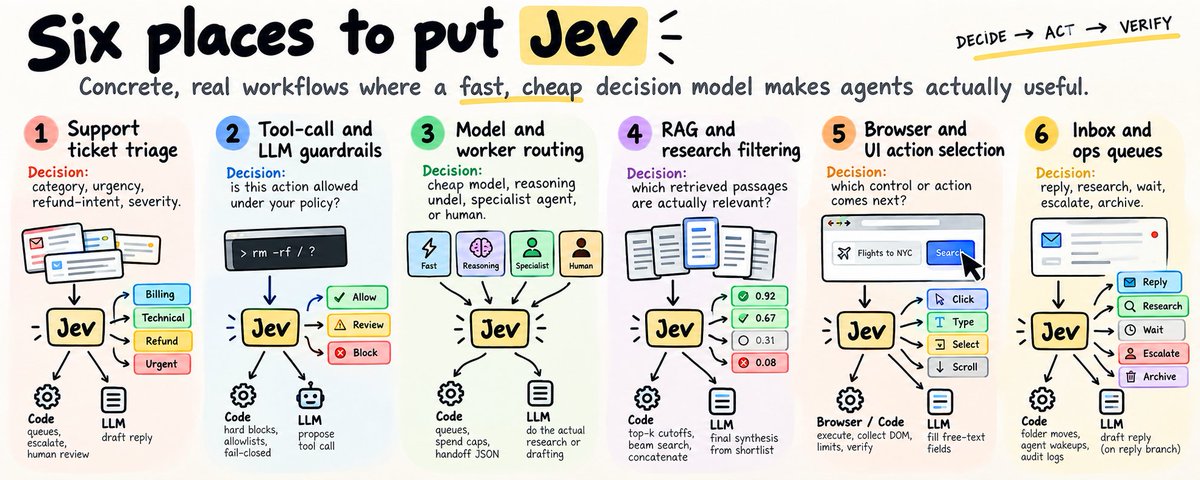
routing, scoring, filtering, yes/no decisions - a lot of this can be pushed to jev
I found an agent that does this calls automatically
connect it to your agent stack and let it observe your LLM traffic.
it maps:
- which agents are making calls
- what each call is actually doing
- model + token usage
- cost per workflow
- repeated decision patterns
then it finds where you're using a $10 hammer for a $0.1 problem instead of: agent -> frontier LLM -> decision
you get: agent -> jev -> decision
while the actual reasoning/generation stays on the LLM, the end result isn't "use less AI." but just stop paying for what you don't need
same task. more efficiency. less expensive. check the difference
DeFighter retweeted
Dots + Astra 6 = a $15,000/month team for $20
Using Astra 6 only through a chat window is like putting a V8 engine in a lawnmower.
Plenty of power. Barely any room to use it.
Here's how it works for my marketing agency:
➔ Agent finder: finds potential clients that match my criteria and explains why each one is worth approaching
➔ Agent researcher: studies the company, its audience, competitors, and current marketing to identify what I can actually offer them
➔ Agent salesperson: turns that research into a personalized outreach message built around a specific opportunity
➔ Agent strategist: maps out how we could deliver: positioning, content angles, distribution, and what to test first
➔ Agent editor: reviews the output, flags unsupported claims, removes generic AI language, and sends weak work back for revision
Each agent has a clear job, defined inputs, and an output the next agent can use.
The researcher doesn't just dump links.
The salesperson doesn't have to guess.
The editor checks whether the offer makes sense before I send it.
I still choose who to approach, approve the message, and handle the relationship.
But I stop doing every step from scratch.
The $15,000 comparison is about the range of work covered. You still need judgment, and you still have usage limits.
The biggest upgrade isn't a clever prompt.
It's turning “help me with marketing” into a workflow that can research, draft, check, and improve its own work.
DeFighter retweeted

it takes 750 days to go from yellow to orange line
the next time the price will touch the orange line
it will be at $428,000 (5x from now)


DeFighter retweeted
Stop judging your AI stack by how smart the chat feels.
Judge it by how many jobs finish while you are offline.
A one-thread setup looks like this:
‣ You open the app
‣ You ask
‣ You wait
‣ You click the next step
A parallel setup looks like this:
‣ Many small workers pick up the boring jobs at once
‣ Failures bounce back into the queue
‣ You only review the risky merges and approvals
Same shift the big labs are demoing in their swarm clips this week.
If every task still needs you in the thread, you are running a chatbot, not a workforce.
Here is how to set up a system like that for your own stack.

DeFighter retweeted
Most "AI trading bots" are just ChatGPT with a wallet plugin.
You ask. It answers. Then you still click buy and sell yourself.
$500/a day on API tokens, $0 made.
A real always-on trading agent works differently:
➔ A strong model scans markets and proposes trades all day
➔ A judgment layer approves, cuts size, or says no
➔ Your code places and cancels orders under hard risk limits
➔ Every step leaves a log you can check in the morning
Same idea people push with Opus + a decide layer for 24/7 desks.
You sleep. The loop keeps working. You review the receipts later.

DeFighter retweeted
JEV + FRONTIER LLM = 10X LOWER COSTS
I tested my agentic system to see if and where I can implement Jev
After I finished 7 days test, the results shocked me:
$850 in tokens spent on decision making, when with Jev it would cost me <$0.20
So I upgraded my system:
> Claude drafts.
> A decide layer picks from a code-built menu.
> Code keeps the final say.
> Every step writes a receipt.
In the writeup they clocked ~1,000 cold frontier decisions at a mid-hundreds bill.
Same thousand through the harness lands in the low-cents range.
How the spend dies:
➔ Plans and patches only from the big model
➔ Illegal routes cut in code before any pick
➔ Decide layer answers or abstains
➔ Live state revalidates, then the tool runs under your normal approval
Steal without copying their stack:
➔ One checkable decision per step
➔ Options prepared in code, not chat vibes
➔ A written path for "not sure"
➔ Logs you can replay when policy changes
The engineer who can show that collapse in a room designs the next system.
Model writes.
Layer chooses.
Code executes.
DeFighter retweeted
TypeSafe shipped an official skill that teaches Claude Code how to build on Jev.
It is one of the cleanest skills I've read.
About 1,300 words. Almost every line blocks the agent from guessing.
What it forces Claude Code to do:
➔ Pull TypeSafe live docs before any code lands
➔ Keep rules, maths, and lookups in normal code; reserve Jev for judgment calls
➔ Pick the right question type: Choice for one of a set, Noul for yes or no, Score for how much
The money line: ask independent questions in one call, not one by one.
TypeSafe ran that pattern in their cookbook. 13 questions in a single call came back 12.2x cheaper and 10x faster with the same answers.
Install in Claude Code:
claude plugin marketplace add typesafe-ai/skills
claude plugin install typesafe@typesafe-ai
The skill is free and MIT licensed.
You'll need a TypeSafe API key to run Jev.

DeFighter retweeted
DID YOU PLAY HORIZON ZERO DAWN? NOW IT CAME TO REAL LIFE
Humanoid robots are just 35% of all types of robots currently being developed
Robots that look like dogs or animals are another 15%
This shit is 300 Kg, can run 40 KM/h, has 100 Km range and can move a lorry with ease
If you think no one gonna use it, just get back to this post in 2 years and you will see how wars are being won using this stuff