

We help you scale smarter with accessible BIM solutions that save you time, money, and effort, built from years of firsthand experience We are active on bskies.
USA
Joined February 2021
- Tweets718
- Following47
- Followers243
- Likes248



Pinned Tweet
I've been quiet the last couple of months on what projects I am working on. I am excited to say, very soon, we will release v2.0 of our Ultimate & Premium Template along with a new Revit add-in to help users standardize their content faster and from one central window.


Working out the structure, layout, and design language for a future construction detail collection. Currently working with a 7.5x7.5 grid, 1", 1 1/2", & 3" scales, TN (maybe set up for tags, who know TN seems to allow easier customer flexibility). Ignore section inaccuracies.

What is the typical size of your firms construction details? Both size and scale. Curious to know if my standards align with what other people do.

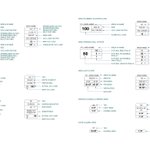
Working on providing options for our code analysis tags. Left column is our new options while the right are our existing tags.
Still working on further changes but we anticipate providing three different options.

Got a little cocky and renamed my scripts to the final suffix...big mistake. After discovering and squashing more bugs I am now at the stage of Final_Final suffixes. Pray the gods will remain favorable to this version.


I've been getting headaches lately, my doctor prescribed the List.Map node to reduce cortisol levels. 🙌👏

Finish material schedule workflow almost done. Create, delete, and update values from one excel file.

I hate dealing with room finish and material schedules. You either use a dummy schedule to log material specs or manage actual material elements (working in the material editor is painful). Hopefully this new import/export workflow will make it less of a chore.

Bike parking stalls should be under Generic Model, Site, Parking or another family category? What are your thoughts?
(I swear if one of you tells me it should be a baluster in a railing family...💀)

It might be overkill for a majority of how firms document parking stalls but at least now you can show options with minimal effort.


When the Revit formula is too complicated to work out on a single line and you have to whip out Notepad.
Updating our code analysis schedules to provide more granular information.

We've begun work on updating our Ultimate Template. This will be more than just aesthetic updates. We are revamping our code compliance workflows, integrating more products we have developed over the past few years, and new Dynamo scripts for easier customization and workflows

Today is the last chance to get a 30% discount on our new Ultimate Detail Item Collection! Use the code 30OFF at checkout. Link in the bio.


Just a reminder those who want to get 30% off our new detail item collection you two days left. Deal ends after July 31st. Use the code 30OFF at checkout. Link in the bio.

Today we released our new Ultimate Detail Item Collection! 🥳 To celebrate, customers can use the code 30OFF to get a 30 percent discount on our new collection. Get it before the end of the week. 👉Link in the bio.

Another pain point firms encounter when adopting our products is customization. 🙅 Not everyone uses the same terminology. 🙅 This collection integrates Dynamo scripts that allow firms to easily update standards without the painful process of manually updating in Revit.✅

One of the issues our upcoming Revit detail item collection address' is documentation. Customers can choose between keynoting or our custom detail item tagging documentation that preloads terminology while also supporting instance based context.

