

Google Maps + organic for local businesses. Solo owner. You work with me, not a roster. Digital Press Releases DM "PR" For information
United States
Joined May 2022
- Tweets3.6K
- Following479
- Followers1.8K
- Likes9.6K


When we look at the web. We see unstructured data.
From this data we have to build an understanding of what's out there. Lets for a moment consider HTML. Hyper text Markup Language is a coding language web browsers, think chrome, safari and fire fox, can process or run the code.
When we start the process of breaking down this language we have tags. So with tags if I was wanting to place significance on a short sentence. That I was wanting to use as a headline. Similar to how a newspaper is written.
Where you have a short series of words, or a short sentence giving you the intro to what you're about to read then we would want to use the <H1> tag.
Now naturally what would follow after the H1 or headline would be similar or about the heading tag, like when we think about the newspaper. Sadly, this is not alwasy true. What you'll often encounter is a page without structure of which is predictable.
This is Google's own form of Hell. They've made billions off this land of unstrcutred data. They see all of our flaws, and yet ignore them or they're so trunamtized they choose to not look in the direction.
So the next time you're frustrated. Choose to see how to understand. It's them who've sacrificed the time and effort for you.
Then you can seek to understand that in order to rank we have to structure our pages in away that is favorable to Google, we can do this first be seeking out what is already ranking as google has already selected them.
A blog page getting traffic for the service keywords is a red flag.
It means keyword cannibalization. Google is serving two pages it thinks answer the same query. Someone types in roof repair, and your How to Roof Repair blog shows up where the roof repair service page should.
How it happens: the blog has roofer 150 times, the money page has it 100 times. Google can't tell which one should rank, so both rank lower than one clean page would.
What I do:
Search Console, Performance, filter by the service keyword. If a blog URL is taking the clicks, that's the conflict.
Separate the two by content. The blog covers the how and the why. The money page carries the keyword, the on page optimization, and a count the blog doesn't beat.
Every link from the blog to the money page uses the keyword as the anchor. Roof repair in Tampa. That tells Google which page the keyword belongs to.
If it still won't settle, point backlinks at the money page with that same anchor.
The blog's job is to hand relevance to the money page, not to take its traffic.
You have to have it compare your pages to the top 3 ranking results.
When you're looking to rank on Google, it's a competition. So we have to beat the current best performers slightly better.
We can know where to place certain factors, but if we don't know the amount to place. You may be under performing in the competition of ranking.
Go search your keyword, then take the top three ranking sites and then compare to the ranking factors in the original tweet.
Use the Grok Bot template, it will do this for you. You just have to hand it your competitors for it to do the delta analysis.

Hey @grok run this list against my 2 websites and tell us what you've found, grade it too.
Playalagartorealestate.com
Urbanrealtytoronto.com

Pull up your site. Does it load as yourdomain.com or yourdomain.com? Whichever one it is, that exact version goes in every link that points at you.
The website field on your Google Business Profile. Your YouTube About. All seven social profiles. Every citation I build. Every backlink. The same version, character for character.
Why: a link to the other version sends Google to a second copy of your site. Two identical websites, and Google reads it as duplicate content. Even when the redirect is in place, that link hands over a little less than it should.
It doesn't matter which version you pick. No URL shorteners either. The full address, the one your site actually serves, everywhere.
My full press release package puts one release in four places. Most people only ever hear about the first one.
The publications. I send one release and it's distributed to Yahoo Finance, Business Insider, USA Today and about 500 more. Each one prints its own copy with the links in the body. 500 to 550 referring domains. Sometimes around 750.
The podcast. Two voices record an episode about the release. It goes out to 55 to 60 platforms, Amazon, Spotify and Apple among them, with two links in every episode description. Apple strips them. The rest keep them.
The video. One video cut from the release, made for YouTube, TikTok, Instagram, Facebook and LinkedIn.
The journalists. An industry story, not about your brand, with your quote in it. I have it pitched to 25 to 30 journalists picked from a list of 150,000 in the US and UK. When one runs it, your site gets a link in that story.
Four places. Every link in all four points at one site. Yours.
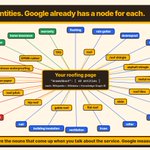
Every entity on a roofing page is a node Google already has. Here's the bot finding all 40 of them.
Entities are just nouns. The nouns that come up when you talk about the service: roofer, roof shingle, flashing, ridge vent, ice dam, home insurance. Google doesn't only count your keyword, it measures these too.
Each one has a Wikipedia page, a Wikidata item and a Google Knowledge Graph ID. I put all three in knowsAbout, one Thing per entity, and the page inherits everything Google already knows about roofing without stuffing it on the page.

Here's every entity you want on a roofing page, and how to wire each one to what Google already knows.
Entities are just nouns. The nouns that come up when you talk about the service. Google doesn't only count your keyword, it measures these too.
The roofing list: Roofer, roof, roof shingle, asphalt shingle, metal roof, roof tiles, slate, flat roof, gable roof, hip roof, roof pitch, flashing, rain gutter, downspout, soffit, fascia, eaves, dormer, skylight, chimney, ridge vent, attic, rafter, truss, tar paper, bituminous waterproofing, EPDM rubber, TPO, hail, ice dam, wind, storm, leak, water damage, mold, home insurance, warranty, building insulation, ventilation, nail.
Why these: Google already has a knowledge graph entry for every one of them, and it boils what's on your page down to a math equation. You don't have to teach it what a ridge vent is. Words are fuzzy. The ID pins it.
How to wire one, in your schema:
Find the Wikipedia page. en.wikipedia.org/wiki/Ridge_…
Find the Wikidata item. Every Wikipedia page has one. wikidata.org/wiki/Q7332722
On that Wikidata page, find the Google Knowledge Graph ID. It's listed as the Freebase ID: /m/0g4dt1
Link the ID as a Google search URL, not the bare ID and not a page on your site: google.com/search?kgmid=/m/0…
Put all three in knowsAbout. One Thing per entity, a two or three sentence description in your own words, then the three URLs in sameAs. The same Thing goes in about or mentions on the page, and every city you serve gets the same treatment in areaServed.
Node after node telling Google you're the expert. You inherit everything it already knows about roofing without stuffing it on the page.
Do the whole list above. Then do it for every city you serve.


Six placements on DR 80+ sites from one press release.
A recent release I sent landed on:
AP News, DR 92
USA Today, DR 92
Business Insider, DR 92
NewsBreak, DR 83
Barchart, DR 81
Manila Times, DR 80
One piece of writing. Each of those is a page about the business with its links in the body, on a domain that has thousands of backlinks of its own.
That's one press release package. DMs open.


The anchor text on my links changes with every round. Same pattern every campaign.
Anchor text is the words you click. It tells Google what the page on the other end is about.
First release: the business name and the naked URL, pointed at the homepage. The Google Business Profile link goes in that same release, because the brand name is the natural anchor for it.
Second release: the brand name with the keyword attached. Your name, then Christmas light installation in Pensacola.
Later releases point at the service pages.
Brand first. Keyword second. Service pages after.
Most local businesses only use a handful of on page ranking factors.
I've made a list of 50 for you. These come from searching hundreds of keywords across dozens of niches.
Title and descriptions:
1. The keyword in the title tag.
2. The title tag starts with the keyword.
3. The keyword in the meta description.
4. The keyword in the social share title (Open Graph).
5. The keyword in the social share description (Open Graph).
6. The keyword in the canonical URL.
Headings
7. How many H1 tags the page has.
8. The keyword in the H1.
9. The H1 starts with the keyword.
10. The keyword in the H2s.
11. The keyword in the H3s.
12. The keyword across H1 and H2 together.
13. The keyword across H1 through H3.
14. The keyword anywhere in H1 through H6.
15. H2s that start with the keyword.
16. H1 through H3 that start with the keyword.
17. Any heading that starts with the keyword.
18. H1 through H3 that are exactly the keyword.
19. Any heading that is exactly the keyword.
20. A heading written as a question.
21. How many headings are questions.
Body copy:
22. The exact keyword in the body.
23. Variations of the keyword in the body.
24. The keyword in the first 100 words.
25. The keyword in paragraphs.
26. The keyword in list items.
27. Sentences that carry the keyword.
28. The keyword in span tags.
29. The keyword in section tags.
30. How often the keyword appears across the whole page: once, ten times, a hundred times.
31. A weighted keyword score, where variations the ranking pages rarely use count for more.
32. Questions on the page, total.
Size:
33. Word count.
34. Word count including hidden text.
35. Paragraph count.
36. Sentence count.
37. Visible text size in KB.
38. Image count.
Links and addresses:
39. The keyword in link text.
40. The keyword in link addresses.
41. The keyword in link addresses, each address counted once.
42. The keyword in full web addresses written in the code.
43. Full http or https addresses written in the code, total.
44. LinkedIn profile links.
45. US phone numbers on the page.
Code:
46. The keyword anywhere in the page code, including what visitors never see.
47. The keyword in scripts and structured data.
48. Styling code written inside the page, in KB.
49. An Apple touch icon.
50. The keyword in image alt text.
Here's a Grok Bot Template that checks all of this for you: x.ai/bot/P1ijZO3rOe1VeNBcQfE…

When I'm optimizing the page I avoid adding more content to the page. I want it hidden from being on page.
Instead I want my SEO in a closed accordion or in a HTML tag 'tabs'.
My seo is hidden to the customer unless they click, for the crawlers they see everything.
Google will send requests to pages even if you don't link to them.
These pages are common trust factors that every business should have on their site.
They are the privacy policy and your terms of service.
When you watch the server logs on a brand new site Google is looking for these pages. Go make sure you have them up.
I've created this grok bot template that will find the 50 on page ranking factors you're missing. x.ai/bot/P1ijZO3rOe1VeNBcQfE…
I don't want clicks on my blog.
Someone clicking a blog post is looking for information. I want the person looking to buy. So the blog has one job: make Google see the money page as relevant, and point at it.
How I wire it:
The money page targets one keyword. Roofing company in Fort Worth. One page, one term.
Four to five posts about that service. The ones I build run around 1,300 words. Each one links to the money page with the keyword in the anchor, and to two other posts.
A blog hub, linked from the homepage, that links to every post. Google goes homepage, hub, post. Two clicks. Not a chain where each post is only found from the one before it.
There's a point where internal links stop moving the page and backlinks take over. But four or five posts pointed at one money page is how a new site gets its first rankings.
An About page is where I tell Google who the owner is. Most of them don't.
What goes on mine, on the page and in the code:
The page. The owner's name, the college they graduated from, the licenses they hold, what they know about, and photos of them on the job. A team of three to five? Every one of them goes on the page too.
Person schema under each name. Job title, who they work for, an image, a description. alumniOf: the school, the degree, the year. memberOf: the organizations. sameAs: their LinkedIn, their Facebook, the rest.
knowsAbout. For every service the owner knows, I link the Wikipedia article, the Wikidata page and the Google Knowledge Graph ID. Anything with a Wikipedia article almost always has the other two.
You're not writing one page about a company. You're building the owner a profile Google can read. That's where the authority comes from.
A laundromat site I audited had a photo named a string of numbers, underscore orig, dot jpg. The alt text said "picture." That's everything Google's first crawler knew about it.
Some Googlebots will try to read what's in the image. The ones that come by first, and most often, don't. They read the file name and the alt text. That's it.
What I do with every photo on a service page:
Name the file before it's uploaded. The service or the product, not the camera's number.
Alt text, two to three sentences describing what's in the photo: the job, the keyword, a variation. Most sites have two or three words there, or nothing.
Your own job photos, not stock. Pull the photos customers leave in reviews onto the page and write alt text on those too.
Alt text is word count, keywords and entities on the page for free, and the customer never sees it. On a visual service like flooring, the pages ranking in Florida carry 42 images. Every one is a place to put it.
How I pick the keyword a service page targets. Same eight steps every time.
Start with the data you already have. Google Search Console shows the queries your site already shows up for. The Performance tab on your Business Profile shows the searches people used to find you. Google is already connecting you to those words.
Google Trends, past five years. I stack every way people say the service: pet sitting, dog sitting, house sitting, home watch, house sitter. Trends won't give you volume. Each line is relative to its own history, zero to 100, so I'm reading which phrasing wins and when it peaks.
Verbs and nouns are different keywords. House sitting and house sitter don't search the same. One of them you don't target.
Scroll down. The related queries on the left are keywords I hadn't thought of. The questions on the right are the blog posts.
Keyword Planner in Google Ads for average monthly searches. A broad brush stroke, not a guarantee. Watch for brands: Fence Co near me looked like a keyword and is probably a company.
Then I Google it. The category tags on the profiles in the pack and the bolded words in the results are what Google thinks is revelavant to the keyword.
Listen to your customers. How they call in and ask for the service is how they type it into Google.
Read the reviews. Yours and your competitors'. Customers describe the service in their own words right there, and those words are keywords.
The first thing I look at on a Google Business Profile is the primary category.
It tells Google exactly what the business does. Too broad or wrong, and you're competing against every business in that bigger category instead of your direct competitors.
My rule: the primary category is the number one source of revenue, stated as the service. A vehicle wrapping company is vehicle wrapping service, not sign studio. A pest control company that also pressure washes is pest control service, and pressure washing goes in as a secondary.

My Press Releases are syndicated.
One release is distributed to the publications. Yahoo Finance, Business Insider, USA Today, about 500 more. Each one prints its own copy. The links are already in the body, so every copy carries them.
One piece of writing. 500 to 550 referring domains. Sometimes around 750.
Not one article. One article, printed hundreds of times, each on its own domain, each pointing at your site.
That's what syndicated means.