

I’m David D. I build AI trading bots , no bullshit, no fake wins, just proof. DaviddTech, AI Trading Lab : https://xitter.cf/t.co/oxiWHfPOU7
World
Joined August 2020
- Tweets3.9K
- Following669
- Followers10.9K
- Likes4K





Pinned Tweet
Every trader should use this website.
You can access 797,000 trading strategies for free.
Every one comes with the profit factor, drawdown, trade count and win rate.
Search, copy the code and backtest the strategies with Claude.
The website is mcp-api.trader.dev/browse.

Every trader should use this.
You can now build a trading bot in your browser with nothing to install.
This website has its own AI chat so the whole process runs on a web page.
Step 1 - Sign up
Visit tradingkit.com, click Sign up, free plan, no card.
Step 2 - Describe the bot
In the chat type:
“Build a trend following strategy on BTCUSDT 4 hour. Supertrend for direction, ATR stop loss and take profit. Fees and slippage on. No trailing stop. Backtest it on the full history available and show net return, max drawdown, profit factor, trade count and buy and hold”
It writes the Pine Script, runs the backtest and shows every trade on a chart.
Step 3 - Read it
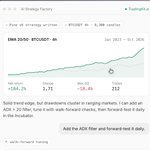
Over 100 trades, drawdown under 20%, profit factor above 1.1 and beating buy and hold means it earns a forward test.
Under that type “optimise the Supertrend length and ATR multiplier with walk-forward checks” and let it tune.
Walk-forward means it tests the new settings on data it did not tune them on so you are not fooling yourself.
Step 4 - Incubate
Click Incubate on the strategy.
It paper trades on live prices every day and records every trade.
Free plan runs 3 strategies for a month.
Step 5 - Alerts
When backtest and incubation match click Alerts and connect Telegram so it messages you every trade.
One alert free and 400 on Starter.
The free plan is 25 credits a day and 10,000 bars per test so start on the 4 hour where that covers years.
99% of backtests fail incubation and that is the step this page makes impossible to skip.

Davidd Tech retweeted
Quit your job.
Start Manual Trading.
Take a risk.
It's how I went from spending 8 hours in front of a screen to 15.
Quit your job.
Start Manual Trading.
Take a risk.
It's how I went from spending 8 hours in front of a screen to 15.
I got my life back by letting bots trade for me.
12 hours a day on charts and no time with my family.
Now 400 tested strategies trade while I sleep.
All 400 are inside Skool ready to use.
72 hours at $39/mo then the price goes up for good:
skool.com/daviddtech/about

GPT-6 built me 184 trading strategies in 8 hours and it just got parallel agents.
ChatGPT Pro now splits one job across several agents working at the same time.
Here's the setup:
Step 1 - Download ChatGPT Pro
chatgpt.com/download and pick GPT-6 Astra Pro.
The $100 plan gives 50 Pro messages a week so one big prompt is plenty.
Step 2 - Give it a backtester
Go to tradingkit.com, click Backtest with your AI and download the ChatGPT plugin zip.
In ChatGPT go to Plugins, Upload plugin archive, pick the zip and click Setup.
Test Prompt: “Run a simple moving average crossover backtest on BTCUSDT 1 hour”
Step 3 - The parallel prompt
“Split this into 4 agents working at the same time. Agent 1 BTCUSDT, Agent 2 ETHUSDT, Agent 3 SOLUSDT, Agent 4 XAUUSD, all on the 1 hour and 4 hour. Each agent builds and backtests trend following strategies using the tradingkit tools for the next 8 hours. Fees and slippage on. No trailing stops. No multi-timeframe. Optimise on two thirds of the history and validate on the final third. Only keep strategies with over 100 trades, max drawdown under 20%, profit factor above 1.1 and that beat buy and hold. Log every result to one shared file”
Step 4 - Read the file in the morning
Expect single digits that pass from hundreds built.
Anything that passed on the final third of data it never optimised on goes to the next step.
Step 5 - Confirm it
Paste the Pine Script into the Pine Editor at tradingview.com and run it yourself.
Step 6 - Incubate
Click Incubate in tradingkit and leave it 3 months with no money before a real account.
OpenAI has not said whether each agent eats your weekly message quota so watch the counter the first night.
Plus more strategies per hour changes nothing about the 99% that fail forward testing.

CONGRESS DOESN'T WANT YOU TO HAVE THIS REPO.
Politicians have to publish every stock trade they make.
Funds and paid apps turn that data into signals and charge you monthly for it.
I built the whole thing and put it on Github for free.
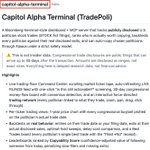
It's called Capitol Alpha Terminal.
Here's how it works:
1. Pulls every stock filing US politicians are legally required to publish.
2. Backtests each one against the day they actually sold, so you see real results.
3. Ranks every politician by who's actually worth copying, and punishes the ones who file late.
4. Connects to Alpaca so it can copy their trades for you automatically.
5. Comes with an MCP server so Claude can run backtests and send you a daily briefing
Repo below 👇


Davidd Tech retweeted

Cool

Everyone said "Hey Grok" was impossible on iPhone. Even Grok said Apple keeps wake words for Siri only. So I kept digging, and I found a way. Now I just say "Hey Grok" and Grok Bot voice chat opens. No extra apps, no cost, all built into iOS.
How to set it up:
1. Make sure your Grok Bot app is up to date
2. Shortcuts app → + → Add Action → search "Grok Bot" → pick "Start Voice Chat with Bot"
3. Settings → Accessibility → Vocal Shortcuts → Set Up → pick that shortcut → type "Hey Grok" and say it 3 times
4. In the shortcut's details, turn on "Allow Running When Locked"
If your phone is locked, iOS asks for one tap first. If Face ID already unlocked it, it's fully hands-free.
Davidd Tech retweeted
Add a kill switch to any trading bot in 10 minutes.
A kill switch is a rule inside the bot that stops it trading the moment your account drops a set amount from its high.
Here is how to add it to yours with Claude:
Step 1 - Install Claude and the backtester
Download Claude at claude.ai/download and open Claude Code.
Go to tradingkit.com, click My Account, copy the line of code and paste it into Claude with:
“Hey there buddy, could you install this globally for me”
Step 2 - Grab a strategy
Any Pine Script strategy you run or one forked from mcp-api.trader.dev/browse.
Step 3 - Add the kill switch
Paste the code with this:
“Wrap this strategy in a risk management layer without changing the entry rules. Add a max drawdown input that stops all trading when equity falls that far from its peak, position size as a percent of equity, a maximum leverage cap, stop loss and take profit on ATR bands and a maximum days in a losing trade before it closes. Default to 20% max drawdown, 2% size, 5x leverage. Every rule on closed candles only”
Step 4 - Test it
“Backtest this on BTCUSDT 1 hour on full history with fees and slippage on and show me trades, max drawdown, profit factor and buy and hold with the risk layer on and off”
Same entries so profit drops a little and drawdown drops a lot.
Step 5 - Confirm it
Paste the wrapped strategy into the Pine Editor on tradingview.com and run it yourself.
The numbers should match.
Step 6 - Reuse it
Save the wrapper and put every future strategy inside it.
Remember: The bot switching itself off at 20% means you never have to be awake to do it.
Switching it back on stays your decision.
Everything here is free apart from Claude.

Add a kill switch to any trading bot in 10 minutes.
A kill switch is a rule inside the bot that stops it trading the moment your account drops a set amount from its high.
Here is how to add it to yours with Claude:
Step 1 - Install Claude and the backtester
Download Claude at claude.ai/download and open Claude Code.
Go to tradingkit.com, click My Account, copy the line of code and paste it into Claude with:
“Hey there buddy, could you install this globally for me”
Step 2 - Grab a strategy
Any Pine Script strategy you run or one forked from mcp-api.trader.dev/browse.
Step 3 - Add the kill switch
Paste the code with this:
“Wrap this strategy in a risk management layer without changing the entry rules. Add a max drawdown input that stops all trading when equity falls that far from its peak, position size as a percent of equity, a maximum leverage cap, stop loss and take profit on ATR bands and a maximum days in a losing trade before it closes. Default to 20% max drawdown, 2% size, 5x leverage. Every rule on closed candles only”
Step 4 - Test it
“Backtest this on BTCUSDT 1 hour on full history with fees and slippage on and show me trades, max drawdown, profit factor and buy and hold with the risk layer on and off”
Same entries so profit drops a little and drawdown drops a lot.
Step 5 - Confirm it
Paste the wrapped strategy into the Pine Editor on tradingview.com and run it yourself.
The numbers should match.
Step 6 - Reuse it
Save the wrapper and put every future strategy inside it.
Remember: The bot switching itself off at 20% means you never have to be awake to do it.
Switching it back on stays your decision.
Everything here is free apart from Claude.
Davidd Tech retweeted
I built a trading bot by talking to Claude.
Here's how you can do the same:
Step 1 - Install Claude
claude.ai/download and open Claude Code.
Step 2 - Connect it to TradingView
Download github.com/daviddme/TradingV… and unzip it.
Open a terminal in that folder and type:
node src/cli.mjs launch.
Log into tradingview.com in the window that opens and open a saved chart.
Copy the config block from the README into Claude Code’s settings and set TV_READONLY to 0.
Step 3 - Build it
Prompt:
“Pick my open TradingView chart. Write a Pine Script v6 strategy for BTCUSDT 4 hour using a Supertrend for direction and an ATR stop loss and take profit. Fees and slippage on. No trailing stop. Compile it, attach it to the chart and read back the Strategy Tester report with net profit, max drawdown, profit factor, trade count and buy and hold”
Claude writes the code, compiles it and reads the numbers straight off the chart.
Step 4 - Read the numbers
Over 100 trades, drawdown under 20%, profit factor above 1.1 and beating buy and hold means it earns a forward test.
Under that say “change the Supertrend length and ATR multiplier and run it again”.
Step 5 - Forward test
Click Incubate on tradingkit.com and leave it 3 months with no money before a real account.
It's all free apart from Claude and your TradingView plan.


I built a trading bot by talking to Claude.
Here's how you can do the same:
Step 1 - Install Claude
claude.ai/download and open Claude Code.
Step 2 - Connect it to TradingView
Download github.com/daviddme/TradingV… and unzip it.
Open a terminal in that folder and type:
node src/cli.mjs launch.
Log into tradingview.com in the window that opens and open a saved chart.
Copy the config block from the README into Claude Code’s settings and set TV_READONLY to 0.
Step 3 - Build it
Prompt:
“Pick my open TradingView chart. Write a Pine Script v6 strategy for BTCUSDT 4 hour using a Supertrend for direction and an ATR stop loss and take profit. Fees and slippage on. No trailing stop. Compile it, attach it to the chart and read back the Strategy Tester report with net profit, max drawdown, profit factor, trade count and buy and hold”
Claude writes the code, compiles it and reads the numbers straight off the chart.
Step 4 - Read the numbers
Over 100 trades, drawdown under 20%, profit factor above 1.1 and beating buy and hold means it earns a forward test.
Under that say “change the Supertrend length and ATR multiplier and run it again”.
Step 5 - Forward test
Click Incubate on tradingkit.com and leave it 3 months with no money before a real account.
It's all free apart from Claude and your TradingView plan.
Davidd Tech retweeted
This repo should be illegal.
It lets Claude run your TradingView account for you: write the Pine Script, run the backtest, read the results and set the alerts.
No API key, no password, runs on your own computer.
Free and open source 👇
github.com/daviddme/TradingV…

This repo should be illegal.
It lets Claude run your TradingView account for you: write the Pine Script, run the backtest, read the results and set the alerts.
No API key, no password, runs on your own computer.
Free and open source 👇
github.com/daviddme/TradingV…
Manual trading is costing you your family.
6 hours a day staring at charts.
Checking positions at dinner and waking at 3am to close a losing trade.
That was me for years and I lost money doing it.
What fixed it was simple.
I backtested my rules, automated the strategies that held up and let bots place the trades.
Every trade now happens whether I am watching or asleep.
I have my evenings back and my results are better than when I sat there all day.
That is what we build inside Skool:
skool.com/daviddtech/about
Grok Bot tip for anyone running a trading bot: make it check your strategy every Monday.
Every strategy stops working eventually and I used to find out by watching my account drop.
Now a Grok Bot does the check for me:
Create a new bot and give it this job:
“Every Monday at 8am re-run the backtest for my strategy called [NAME] on [PAIR] [TIMEFRAME] with fees and slippage on. Compare the last 30 trades to the full history on win rate, profit factor and max drawdown. If any of the three is more than 20% worse than the full history, message me on Telegram and tell me which one and by how much. Never pause or change anything yourself”
Set it as a weekly routine, so it costs almost nothing.

Every stock trader should use this website.
It backtests NVDA, TSLA, SPY and QQQ strategies.
Describe a strategy in plain English and it writes the code, backtests it with fees on and shows every trade:
tradingkit.com

DeepSeek just got 66x cheaper than Claude,
V4.1 Flash came out on Friday at $0.15 per million tokens against $10 for Fable 5.1.
My bots cost me thousands a month in AI bills and this cuts that to almost nothing.
Full free build below:


Just built an AI trading bot for free with DeepSeek.
The bots I run cost me thousands a month in AI bills.
This one costs nothing and you do not need to code or own a TradingView account.
Step 1 - Install OpenCode
Go to opencode.ai and copy the install line.
Open Terminal on your Mac, paste it and hit enter.
Type opencode to open it.
OpenCode is a free version of Claude Code and it comes with free models.
Step 2 - Pick DeepSeek
Type /models and select DeepSeek.
It is about 10 times faster than Claude and free this week.
Step 3 - Give it a backtester
Sign up free at tradingkit.com and click Get unlimited usage.
Download the package zip, drag it into OpenCode and type:
“Hey there buddy, could you install this globally on OpenCode for me”
Log back into tradingkit in the browser when it asks.
Then:
“Hey there buddy, could you do a very simple backtest to make sure the connection works”
Mine came back with an EMA cross on BTCUSDT 1 hour at -11% over 159 trades which is fine because it only proves the link is live.
Step 4 - Leave it for 24 hours
Paste this:
“You are an elite quantitative trading researcher with access to the tradingkit tools. Every 15 minutes for the next 24 hours build and backtest a new strategy on a different pair or timeframe. Fees and slippage on. No trailing stops. No multi-timeframe. Optimise settings on two thirds of the history and validate on the final third to avoid overfitting. Only keep strategies with over 100 trades, max drawdown under 20%, profit factor above 1.1 and that beat buy and hold. Log every result”
That is around 96 strategies by tomorrow.
Step 5 - Incubate the best one
Open the tradingkit control panel and click any strategy to see every trade and the equity curve.
Click Incubate on the one you like.
Tradingkit freezes the backtest and paper trades it for 3 months recording every trade.
Green is the backtest and pink is live.
99% fail here and that is the point.
Step 6 - Automate it
When backtest and incubation look the same click Alerts in tradingkit.
Set fills to entries, stop losses and take profits.
Go to trigger.trade, pick your broker and create API keys with read and trade permission only.
Paste the webhook URL and code back into tradingkit and save the alert.
Your bot now trades without you.
But that's not where it ends.
Go live on a sub-account with a tiny amount first to check execution.
I have broken tens of strategies by taking them live too early.

The era of paying for trading indicators is over.
I built a free tool that lets Claude read every open-source indicator on TradingView.
Ask it for any indicator and it hands you the script in seconds.
Free and open source 👇
github.com/daviddme/tradingv…

Every trader should use this website before going live.
It now has an incubator.
Click it on any backtested strategy and it freezes the backtest and paper trades it for 3 months recording every trade:
tradingkit.com
