
Check @FasluEarly for quick updates from this account without detailed notes 💬 @FasluCommentary
- Tweets935
- Following33
- Followers548
- Likes706
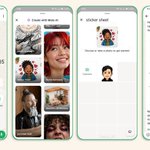

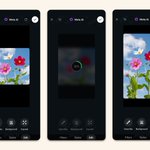


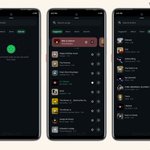


ALT WhatsApp has introduced a dedicated creative shortcut inside Meta AI chats to transform personal photos into artistic styles using ready-made visual templates. Initially spotted under the name Effects, this attachment sheet option is currently labeled as Presets, while appearing as AI Studio for some users as part of interface testing. When opening the attachment menu in the main Meta AI chat or any created topic chat, tapping the Presets option (or the alternative name shown on your device) opens the “Create with Meta AI” screen featuring a collection of around 20 creative visual templates. The display order of these presets may vary for different users. By simply selecting a style and picking a photo from your gallery or taking one with the camera, Meta AI automatically builds the entire prompt to restyle the subject into that chosen aesthetic without needing any manual instructions.


ALT WhatsApp has added a dedicated Text (Aa) tool inside the sticker creator menu to help users generate custom text stickers on the fly. While users can still search keywords in the sticker search bar to generate these five preset templates, this update introduces a focused, dedicated interface specifically designed for crafting custom text stickers directly. To use it, open the sticker tray in any chat, tap Create sticker, and select the new Text (Aa) icon to open the dedicated screen. As you type your text, it instantly generates real-time previews across 5 distinct visual templates : Rainbow, Sticky note, Billboard, Neon, and Flame heart. You can simply tap your preferred design to send it directly into the chat, allowing you to turn typed words into expressive visual stickers without relying only on standard graphic stickers.


ALT WhatsApp has introduced an AI-powered image editing tool called Expand, allowing users to extend photos into a full vertical portrait format without cropping out any key details. Built directly into the drawing editor under the AI restyle tools, this feature uses Meta AI to automatically fill in the missing space above and below standard square or landscape images. To use the feature, select an image in status or any chat, swipe up on ‘Restyle with AI’, tap the Edit tab, and select Expand. The tool analyzes the picture and generates matching elements that blend naturally with the original composition. If you want a different result, tapping the Regenerate button at the top creates a new variation, while the Undo option lets you step back to previous adjustments before sharing.


ALT From the warning prompt, you can immediately block the sender, report them to WhatsApp, or tap Trust to clear the alert if the conversation is safe. Since Scam Alert runs entirely on your device, personal messages never leave your phone and remain end-to-end encrypted. Senders cannot see whether you have this protection enabled. You can manage this setting by going to WhatsApp Settings > Account > Scam Alert. To notify users about this protection, WhatsApp also displays a temporary warning prompt right above the chat filters at the top of the chat list, encouraging users to turn it on, which disappears once managed or dismissed. Additionally, inside the existing 'Request account info' screen, a new 'Scam Alert activity' section has been added. Turning on the 'Allow Scam Alert reports' toggle lets you include device logs of when the feature was activated as part of your downloadable account reports.


ALT WhatsApp has updated the chat privacy setting previously introduced as Advanced chat privacy, now renaming it to Restricted chat. This setting gives users tighter control over sensitive conversations by strictly limiting how messages and shared media can be handled. When Restricted chat is turned on through chat info, media from the chat will not save to the device gallery automatically, while chat exporting and Meta AI features are completely disabled within the conversation. Beyond the protections available earlier, this version directly blocks access across all linked devices, ensuring the chat can only be accessed, sent, and received on your primary phone. This prevents unauthorized access through unofficial clients or AI agents

ALT WhatsApp has introduced a new feature that allows users to star their favorite music tracks directly inside the music picker. A dedicated Starred filter chip is now available to view only your starred songs and search exclusively within them, making it effortless to find and use your favorite tracks whenever you share status updates or updates in WhatsApp Channels. In the music selector, this new Starred filter appears alongside the existing Suggested/Popular, Mood, and Genre chips. Each track now features a star ☆ icon to easily save songs to your starred list, and tapping the filled star ★ icon again unstars and removes them from the collection. If you have starred many tracks, using the search bar while the Starred filter is selected will only look through your starred collection, making it much easier to find specific tracks without having to browse the entire music catalog every time


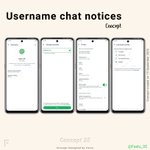
ALT Username chat notices. This can feel unnecessary for those who prefer updating their profile quietly, without alerting unwanted chats. To solve this, I designed my 25th concept; Users get full control over who receives these alerts. You can access it directly from the Username screen or via Settings > Privacy. Like other WhatsApp privacy controls, you can choose Everyone, My contacts, My contacts except, or Nobody. Picking Nobody ensures no notices appear in your chats when you edit or delete your username. I also added a simple privacy link above the Save button on the edit page so users can review settings before saving. Giving control over chat notices helps maintain personal privacy. Seeing many of my previous concepts turn into real features in official WhatsApp updates has been very encouraging. I hope WhatsApp considers adding this feature as well to the app... Concept 25

ALT Username chat notices. This can feel unnecessary for those who prefer updating their profile quietly, without alerting unwanted chats. To solve this, I designed my 25th concept; Users get full control over who receives these alerts. You can access it directly from the Username screen or via Settings > Privacy. Like other WhatsApp privacy controls, you can choose Everyone, My contacts, My contacts except, or Nobody. Picking Nobody ensures no notices appear in your chats when you edit or delete your username. I also added a simple privacy link above the Save button on the edit page so users can review settings before saving. Giving control over chat notices helps maintain personal privacy. Seeing many of my previous concepts turn into real features in official WhatsApp updates has been very encouraging. I hope WhatsApp considers adding this feature as well to the app... Concept 25


ALT WhatsApp recently upgraded its account security by replacing the traditional 6-digit Two-step verification PIN with an Account Password. This password can be used for both logging in and two-step verification. To enable this, create a secure key with at least 8 characters containing both letters and numbers in your account settings. Once saved, Two-step verification turns on automatically, expanding your verification methods to include your Phone number (SMS or call), your newly set Password, and Email (if linked). This setup also lets you mark trusted devices for faster logins, while giving you complete flexibility to change or completely delete the password whenever you prefer

ALT WhatsApp has introduced an update to its status music feature, increasing the music clip duration up to 30 seconds. This effectively doubles the previous 15-second limit. When adding a music track on the music editor screen, a duration selector appears right above the audio scrubber showing the currently selected length (e.g: 30s) Tapping the dropdown arrow opens a Clip duration sheet where you can scroll and choose any custom length from 5 to 30 seconds. Once set, you can scrub to your favorite part of the track and share a longer musical update. This updated duration applies when sharing music as a standalone audio update or pairing it with a photo, since videos already supported music spanning their full length (up to 90 seconds)


ALT WhatsApp recently expanded status shortcuts by allowing users to view and share status updates directly from the settings page (You tab) Your profile picture in settings now features a dedicated plus (+) badge to add new updates, along with a status ring whenever you have an active status posted When a status is active, tapping the profile picture brings up a quick menu with View status and Edit profile options Tapping the plus icon instantly opens the "Add status" bottom sheet, allowing you to share all types of status updates without navigating away from the settings screen

ALT WhatsApp recently updated its message forwarding experience by introducing a modern draggable bottom sheet interface Previously, tapping forward would redirect you to a separate, full-screen contact picker page, taking you away from your active conversation With this new bottom sheet design, the forward picker simply slides up over your current chat. It includes an drag handle at the top, allowing you to easily expand the sheet or swipe it down This keeps you grounded in your chat context without losing your scroll position or interrupting your conversation flow while sharing content to other chats or your status


ALT WhatsApp recently introduced a handy visual update by displaying direct sticker previews in the Chats tab. Instead of just showing a generic text with icon saying "Sticker", you can now see a small thumbnail preview of the actual sticker right next to the message in your chat list. This allows users to instantly recognize the context or emotion of the message at a glance without having to open the conversation. [01 August 2026]

ALT WhatsApp recently introduced an AI content label feature for Channels to meet regional compliance standards Channel admins can apply this label to any shared media generated or edited using AI tools To add it, simply tap and hold the update and select Add AI content label Following the earlier rollout of Paid Partnership tag, once this AI label is added, it cannot be removed

ALT WhatsApp recently redesigned its About status edit screen by placing a collapsible preview card at the bottom of the interface. While earlier designs displayed this differently, the new layout features a dedicated Preview toggle (⌄/⌃) at the bottom that lets you expand or hide the live preview whenever needed. This live preview displays exactly how your About status and emoji badge will appear to other contacts in their chat threads. It gives you a clear, real-time look at your updated profile before saving ⁱⁿᵗᵉʳⁱᵐ ᵃᵈᵐⁱⁿ ᵘᵖᵈᵃᵗᵉ
ALT WhatsApp recently introduced a handy visual update by displaying direct sticker previews in the Chats tab. Instead of just showing a generic text with icon saying "Sticker", you can now see a small thumbnail preview of the actual sticker right next to the message in your chat list. This allows users to instantly recognize the context or emotion of the message at a glance without having to open the conversation. [01 August 2026]

ALT WhatsApp recently expanded the reply options inside the media viewer by adding a direct Gallery shortcut alongside the existing camera icon. Alongside the previously added quick emoji reactions the reply bar now features shortcuts for both the Camera and Gallery. While tapping the Camera icon lets you quickly capture a photo, record a video, or shoot a video note as a quoted reply, tapping the Gallery icon instantly brings up your recent photos and videos. This allows you to select and send media replies effortlessly without having to exit the full-screen view [02 August 2026]

ALT WhatsApp is introducing Parent-managed accounts, specifically designed for pre-teens to stay connected with their families in a secure environment. To get started, parents can link their child's new phone to their own device, allowing them to manage essential settings directly. Once linked, parents or guardians have the authority to decide who can contact the child and which groups they are allowed to join. A key feature of this update is the Parent PIN, which protects all parental controls and privacy settings on the managed device. This ensures that only parents can make changes to the account's reach and safety preferences. Despite these controls, all personal conversations remain protected by end-to-end encryption. WhatsApp plans to introduce even more family-oriented controls throughout the year. This ongoing effort aims to ensure that young users can communicate in a secure environment while providing parents with true peace of mind