





A field worker completing an SAP task needs the right information, not the entire transaction screen.
Identify → Check → Enter → Complete
Keep the mobile workflow focused on what the user needs to do next.

What if AI could directly interact with SAP? Tell it to
“Release purchase order 4500012345”
And AI can interpret the request and carries out the transaction in SAP.
Liquid UI MCP Server makes that possible.
Tell AI what needs to happen. Let it handle SAP.

A warehouse user receiving a PO shouldn’t have to figure out the SAP screen before completing the task.
PO Number → Line Item → Quantity → Populate Details
A clear sequence helps users focus on the receipt, not the navigation.

If an item can identify itself, why enter its details manually in SAP?
RFID captures item data automatically and helps bring it into SAP with fewer manual steps.
See the RFID workflow in action.
youtu.be/YJtdW3XNzsk
“Change the delivery date for this sales order and save it.”
With Liquid UI MCP Server, AI can interact with live SAP screens to navigate transactions and carry out tasks.
You describe what needs to happen. AI works through SAP.
liquid-ui.com/solutions/liqu…

Creating an SAP sales order at Alcon meant navigating 20+ screens and re-entering Salesforce data.
Liquid UI consolidated screens, automated fields and calculations, and transferred order data to SAP with one click. 50% less sales-order processing time.
liquid-ui.com/case-studies/a…
When warehouse work happens faster than SAP updates, inventory visibility and the next operational decision can suffer.
Giving employees access to SAP at the point of work helps keep system records aligned with physical operations.
That’s the value of SAP mobility.

An SAP user doesn’t need every field on the screen.
They need to know what to enter and what to do next.
Keep related inputs together, remove unnecessary fields, and make the next action clear.
Design the SAP screen around the task, not every available field.
Creating an SAP sales order does not require every field displayed.
A focused SAP sales-order screen can:
- Keep required information
- Remove unrelated
- Make workflow easier
Watch the workflow: youtu.be/TjhvojwW0m8
A picker needs to find the material, confirm the pick, and keep moving.
Traditional SAP WM screens mean multiple screens and manual entry.
A scan-first workflow changes that:
Scan → Next step → Confirm
Design SAP around how picking happens on the warehouse floor.

Sales orders and returns don’t have to mean multiple SAP transactions and manual work.
Liquid UI brought key workflows together for a multinational consumer goods company, reducing manual processing time by 40% while keeping its existing SAP backend intact.

The SAP transaction may be complex.
The task doesn’t have to be.
Liquid UI for Windows lets organizations simplify SAP screens around how people actually work.
Fewer fields. Fewer clicks. Less navigation.
Same SAP processes. A more focused experience.
liquid-ui.com/innovations/li…

A change happens in the field. The SAP update still has to happen.
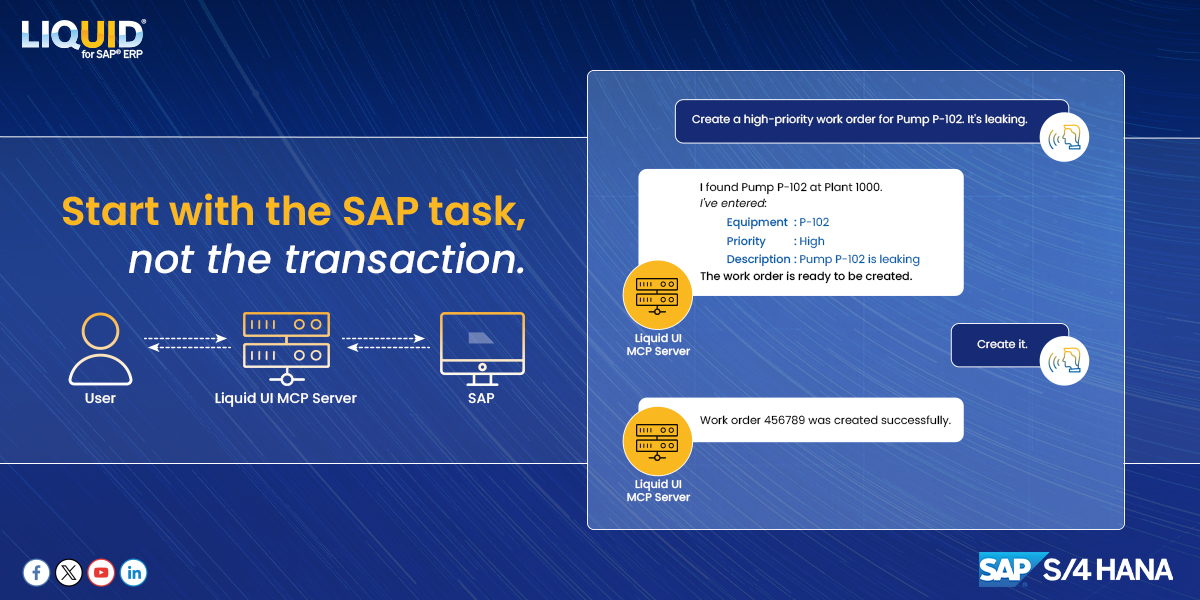
“Update work order 10024567. Set priority to high, note that pump is leaking, and save.”
With Liquid UI MCP Server, AI can navigate SAP and carry out requested transaction.
The user describes work. AI handles SAP.

SAP sales-order entry can mean re-entering information already contained in the customer order.
With Liquid UI Intelligence:
1. Upload customer order
2. Review information AI extracts
3. Create SAP transaction
See the workflow in action. youtu.be/KZ2_yuSaGQ8

Design the SAP starting point around the work users actually perform.
Knowing the warehouse task is one thing. Knowing where to start in SAP is another.
A role-based starting screen can bring frequently used warehouse actions together in one place.

What if you could tell AI:
“Change Order 4500123456 delivery date to Friday and save.”
With Liquid UI MCP Server, AI can read the live SAP screen, navigate the transaction, enter the data, and complete the task.
You describe it. AI works through SAP.
SAP PM becomes harder to use when technician is away from workstation.
A technician finds an equipment issue. They need to check asset, update work order, record details, or add photo.
That creates a gap between where work happens and where SAP is updated.
l1nq.com/yl3z39s

The longer it takes to confirm a job in SAP, more you rely on memory.
When connectivity isn't available at the job site, confirmations may take longer.
What was done?
Which failure code applies?
When was work completed?
Capture confirmation when work happens,even offline.
A repair is complete. The SAP PM work order is still open.
When technicians have to return to a workstation to update SAP, the record can fall behind the work.
See how technician workflows can change in our new 5-minute whitepaper.
Read the whitepaper: liquid-ui.com/resources/sap-…

In food & beverage, temperature checks are part of the daily operation. But the reading still needs to make its way into SAP.
Liquid UI connects operational checks directly to SAP, so information can be captured where the work happens.
Learn More: tinyurl.com/yt992svw
