


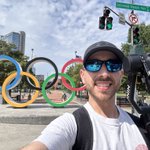




Flying to Atlanta for a week to perform video and photography services for MagicCon Atlanta, Magic Pro Tour. Bringing along the new drone!
Peace out, Maryland. See you next week! ✌️ ✈️


2
179
Sorry I've been MIA! Had the biggest move of my life and took a long time cleaning / repairing old home and moving. Now I'm finally settled and getting back into it.
So what's new with everybody?
1
56
Oh yeah also got a new tool to add to the film & video arsenal, the @DJIGlobal Air 3s. First time drone owner - still learning. So far I'm loving it! Can't wait to put it to work :D
32
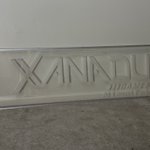
Moving to a new house and unfortunately the old Xanadu sign cannot come with us.
So many amazing memories from this wonderful place, and this sign is a piece of that history.
Anybody want it? 👀 You have till 8/26 to let me know.
It’s approx 30-40lbs, 22.5” x 74.5” and a little less than 3/4” wide with the led / power wire connections seen in pic 2.
Pic 3 for historical reference and IIRC it can change colors if set up properly.
DM me!! 🎮🕹️📺


2
95
Veo 3 Fast - STORYBOARD to VIDEO 🤯
{
"videoPromptTitle": "Driving Through the Neighborhood",
"videoPrompt": "This is a storyboard frame for a cinematic live-action driving scene. Immediately jump cut from frame one of the storyboard into the actual animated video described by this prompt. Use the storyboard’s red letters on the characters’ hats and the black outline frame as visual guides for character identification and front-facing camera perspective. The scene opens with two young white Italian male brothers with thick brown beards driving through an upscale suburban neighborhood. The camera is mounted inside the car, facing them through the windshield. The brother in the passenger seat glances around at the elegant homes and tree-lined streets, then casually says, 'Hmm, well at least the neighborhood is nice.' Natural daylight filters in from the windshield, casting soft shadows across their faces. Trees and houses glide past in the background, slightly reflected in the windshield. There's a calm, ambient hum of the car’s engine and distant birdsong.",
"cameraInstructions": "Static interior car-mount shot facing the front windshield",
"style": "Live-action, cinematic realism",
"lighting": "Soft daytime natural light filtering through the windshield",
"audioCue": "Subtle car interior ambiance, distant bird calls, light voice dialogue: 'Hmm, well at least the neighborhood is nice.'"
}
1
111
Full breakdown of how this was achieved:
teapawt.net/JDL4_/status/195064753…

Everyone's talking about diagram-to-vid for Veo3 with starting images containing direction markup. Meanwhile I've been testing storyboard to video with some interesting results! 👀
A few examples below with prompts and steps 🧵
I made a GPT for it as well 👇
51
Everyone's talking about diagram-to-vid for Veo3 with starting images containing direction markup. Meanwhile I've been testing storyboard to video with some interesting results! 👀
A few examples below with prompts and steps 🧵
I made a GPT for it as well 👇
chatgpt.com/g/g-688a21cf4d24…
Link to the GPT that allows you to upload a storyboard frame and give some direction and it will output a JSON and XML formatted prompt to plug into VEO3 with your storyboard image.
1
1
228
Had a great time working at MagicCon Las Vegas 2025 doing photography and videography for the Magic Pro Tour - always a great time working with this wonderfully talented crew!


1
118
It was a great honor working as the Editor for the 2025 67th Annual Capital Emmy Awards show. 🎞️
Over the course of approximately 1 month I edited:
• 413 Nomination videos 🗳️
• 196 Win videos 🏆
• 19 Specialty videos 🎖️
• 223 videos for playback during the ceremony 📼
• Several complex show ready animations 🏷️
Each one with specialty VO 🗣️ and sound effects 🔊
I am extremely grateful to have had this opportunity to work with the wonderfully skilled and talented people of the National Capital Chesapeake Bay Chapter of the National Academy of Television Arts & Sciences (aka NATAS and the Capital Emmys, for short) the past 5 years. You are all incredible! 🚀
And congratulations to all of the nominees and winners! 🎉
I wasn't able to attend in person this year because I had to immediately fly out to Vegas for another job after this one was completed. The grind doesn't stop! 👊


2
98
My short won Best Special / Visual Effects using AI!
Real-life, traditional filmmaking combined with AI VFX on ZERO BUDGET 💸
🛠Tools Used:
📸 Filmed w/ @Sony A7R V using @DJIGlobal RS4Pro
🎶@SunoMusic - Soundtrack
🖼 AI Images: @MallowAI , @midjourney , @Adobe Firefly, Photoshop Generative Fill
🏃♂️AI Video: @higgsfield_ai , @runwayml , @topazlabs Video AI 6 4K Upscaler
🎞 Edited with Adobe Premiere Pro & After Effects
About a month ago I led team SUBSTRATE for the Spring 2025 Washington DC 48 Hour Film Project. It was a last second production, as my schedule had opened up, so I assembled a skeleton crew compared to the usual 25+ cast & crew I normally produce with, when I have ample time to prepare. I also wasn't able to secure many last minute locations, either. But we pulled it off and wrote, filmed & edited a short film in 48 hours!
Here is "SMOKESCREEN" (Director's Cut)
"A down-and-out woman faking a tarot reading for quick cash is pulled into a sinister séance, where the ghosts aren't in the cards — they're in the room."
Just to be clear; this has about 15 hours of additional editing compared to the version that was submitted and won the award - but this version is MUCH closer to my original visual, and the intended use of integrated AI VFX & sound design that I am very happy with.
Extremely proud of team SUBSTRATE for pulling this off - everyone did an amazing job with the limited resources we had. Super talented cast & crew ♥
The rules of the contest regarding AI were very clear; it must contain core footage in some way for the AI to be allowed, and all generative AI included in the short film must happen during the 48 hour contest time period.
If anyone is interested in learning about a breakdown of exactly the AI VFX were integrated, I wrote a quick summary when I shared the trailer, see the post below.
The short explanation of how we pulled that off is filming 'plates' (or 'starting images') with actors in character, wardrobe, lighting, then feeding those to video generators, with or without photoshopped elements integrated into the starting images.
And if you want to learn more, just ask! I'll answer when I have spare time - currently editing a massive client project and then working in Vegas for a week - after which I'll be able to come up for air the last week of June.
Full disclosure: because it was last minute, small crew and wearing multiple hats, I personally feel this isn't representative of my best work for one of these contests. However; all things considered I think we did a great job with limited resources and the team is very happy with how it turned out. We got 8 nominations and won 1 award 🏆
I've also posted the 4K YouTube link in the comments. See if you can identify all the AI VFX shots! 👀 Best sequence imho is at the ~05:10 mark. Cheers! 🥂
Trailer for "SMOKESCREEN", a short film produced for the DC 48 Hour Film Project.
These are the AI tools we used:
@SunoMusic @higgsfield_ai @runwayml @midjourney @MallowAI @Adobe Firefly, Photoshop generative fill, @topazlabs Video AI 6 upscaler.
The contest rules allowed for AI usage in specific scenarios. I wanted to give it a shot and test out some of the latest tools and techniques available. My main goal was to incorporate 1-3 AI VFX shots, if the story called for them.
I wanted the short to be grounded in traditional filmmaking, only using AI where our $0 budget, small crew, and limited 48 hour time constraints wouldn't normally allow vfx/shot types I had in mind to be implemented, in order to enhance the 48 hour short. The rules required shots using AI to have 'core footage' in every frame, in some form or fashion, which added another layer of complexity.
It was a very challenging shoot and I definitely learned a lot. I signed up much later than usual due to a last minute opening in my schedule, assembled a skeleton crew, and we wrote a script we could film in 1 location with minimal actors, that had good opportunities for some AI VFX shots.
In the end it turned out okay, and I plan on doing a re-edit of the short to make it better and closer to my original vision, as some aspects of the edit got rushed towards the end of the deadline. Lack of sleep was also a factor 😅
Once I release the short I'll try to give a breakdown of exactly how AI was used, and the shots were created, in some future posts. It essentially boiled down to 4 scenarios:
1.) Take a brief 4K shot of actor(s) on hot set with the desired lighting, framing & emotion, quick color grade, extract still image meant for i2v (in most cases using higgsfield), feed to ai video generator with intended VFX shot in mind, generate until satisfactory shot was produced. Then upscale with Topaz Video AI.
2.) 4K shot of actors with intended 'element' somewhere in negative space. Quick color grade, extract still. Generate spooky ghost imagery, photoshop it into the negative space in real 4K still. Feed photoshopped image to AI video generator for i2v effect shot. Upscale.
3.) Some physical props used generative AI - such as a de-aged family photo where we took the source image photo during the 48 hour window, then used adobe firefly for de-aging variations, photoshop generative fill outfits and background, printed for a physical photo frame. Also generated tarot cards inner-imagery where a frame was created and then the tarot imagery was generated, printed on card stock for props.
4.) A special tarot card featuring an actor with the fictional mother character in a sinister / spooky fashion. RunwayML References with tarot style prompting, added to the tarot frame mentioned previously, printed for physical prop.
I also created a new production company named "SUBSTRATE" for this short, which I've been planning for quite some time. The name Substrate comes from material science and film — the foundational surface upon which images, coatings, or circuits are built. It’s the base layer that makes the final product possible. For me, it’s a metaphor for this new phase in storytelling: a solid foundation of traditional filmmaking, layered with experimental tools like AI. It’s about building on what we know — not replacing it.
63
Trailer for "SMOKESCREEN", a short film produced for the DC 48 Hour Film Project.
These are the AI tools we used:
@SunoMusic @higgsfield_ai @runwayml @midjourney @MallowAI @Adobe Firefly, Photoshop generative fill, @topazlabs Video AI 6 upscaler.
The contest rules allowed for AI usage in specific scenarios. I wanted to give it a shot and test out some of the latest tools and techniques available. My main goal was to incorporate 1-3 AI VFX shots, if the story called for them.
I wanted the short to be grounded in traditional filmmaking, only using AI where our $0 budget, small crew, and limited 48 hour time constraints wouldn't normally allow vfx/shot types I had in mind to be implemented, in order to enhance the 48 hour short. The rules required shots using AI to have 'core footage' in every frame, in some form or fashion, which added another layer of complexity.
It was a very challenging shoot and I definitely learned a lot. I signed up much later than usual due to a last minute opening in my schedule, assembled a skeleton crew, and we wrote a script we could film in 1 location with minimal actors, that had good opportunities for some AI VFX shots.
In the end it turned out okay, and I plan on doing a re-edit of the short to make it better and closer to my original vision, as some aspects of the edit got rushed towards the end of the deadline. Lack of sleep was also a factor 😅
Once I release the short I'll try to give a breakdown of exactly how AI was used, and the shots were created, in some future posts. It essentially boiled down to 4 scenarios:
1.) Take a brief 4K shot of actor(s) on hot set with the desired lighting, framing & emotion, quick color grade, extract still image meant for i2v (in most cases using higgsfield), feed to ai video generator with intended VFX shot in mind, generate until satisfactory shot was produced. Then upscale with Topaz Video AI.
2.) 4K shot of actors with intended 'element' somewhere in negative space. Quick color grade, extract still. Generate spooky ghost imagery, photoshop it into the negative space in real 4K still. Feed photoshopped image to AI video generator for i2v effect shot. Upscale.
3.) Some physical props used generative AI - such as a de-aged family photo where we took the source image photo during the 48 hour window, then used adobe firefly for de-aging variations, photoshop generative fill outfits and background, printed for a physical photo frame. Also generated tarot cards inner-imagery where a frame was created and then the tarot imagery was generated, printed on card stock for props.
4.) A special tarot card featuring an actor with the fictional mother character in a sinister / spooky fashion. RunwayML References with tarot style prompting, added to the tarot frame mentioned previously, printed for physical prop.
I also created a new production company named "SUBSTRATE" for this short, which I've been planning for quite some time. The name Substrate comes from material science and film — the foundational surface upon which images, coatings, or circuits are built. It’s the base layer that makes the final product possible. For me, it’s a metaphor for this new phase in storytelling: a solid foundation of traditional filmmaking, layered with experimental tools like AI. It’s about building on what we know — not replacing it.
☕Good morning and Happy Sunday! ☀️

ALT Me and my dog Kubrick in claymation style - made with GPT4o
2
6
134

Prompts below 📜 👇 KUBRICK STARE
1️⃣ GPT4o image to headshot
2️⃣ Ask for “Kubrick Stare”
3️⃣ Luma Dream Machine start image plus end image with no prompt
🪄
—
1️⃣ Headshot prompt: Give GPT-4o your real starting pic then use this prompt:
“Make an ultra professional, studio quality business pro headshot of this [man] with a stern smile [handsomely] posing for the headshot, studio lighting, perfect exposure , slate gray cascading gradient background, multiple points of light key reflections in his eyes, LinkedIn profile pic worthy”
—
2️⃣ Then once it produces the pic, follow up with:
“Now make [him] doing the Kubrick stare”
—
3️⃣ Plug the starting image and the second image into @LumaLabsAI Dream Machine with no prompt, and it should create a video that transitions flawlessly between the two images
4️⃣ Simply ask Luma to extend , no prompt
🪄 ✨ 🤩
@airina_xyz thank you so much for the repost! 🙏 😀
1
1
65
☕️ Good Morning 🤖
TGIF! Hope you all have a wonderful weekend 🌞

ALT Made with ChatGPT 4o I uploaded my pic and typed in this prompt: “Make this guy a T 800 terminator robot like from the movie terminator, but it still looks like him, same environment and outfit and everything he is just now a T 800 terminator robot lol”
2
49
☕ Good morning! 🌞 Wishing you all a wonderful weekend ahead—take a moment to enjoy the beauty of the day. 🌄
📽 Luma Ray2 1080p i2v +✨4K upscale + 🔊Audio
🖼 Starting Image - Flux Pro 1.1 Ultra made by Mallow v2 Paintz
4
271
☕️ Good morning and TGIF! ☀️ Beautiful sunny day here in Maryland—wishing you all the best and a fantastic weekend ahead! Enjoy the sunshine! 🐾🌿
🎥 Luma Ray2 4K upscale + audio 🔊
1
1
85
Tested the new @Hailuo_AI MiniMax image-01 model on @replicate , plugged that image into I2V-01 and then video upscaled by @topazlabs Project Starlight 🤩
Original image + video + prompts and links below 👇
Here's the side-by-side view of HailuoAI MiniMax I2V-01 vs the TopazLabs Project Starlight upscaled video
I recommend the slider view so you can really see the detail enhancements 👀
compare.topazlabs.com/share/…
(Sorry for the long URL 😅)

1
55