

Running a small tech/home channel.
Shanghai, China
Joined June 2011
- Tweets7.5K
- Following427
- Followers601
- Likes4.3K

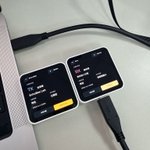


Hermes Agent官方手机客户端,需要的自取。

hermes mobile official testflight
testflight.apple.com/join/U8…
hermes-agent.nousresearch.co…

就感觉有点Windows的毛玻璃加Vibe Coding的配色。

Surge iOS 6 Beta Is Now on TestFlight
Full introduction and release notes: nssurge.com/surge-ios-6
Surge iOS 6 is rebuilt for iOS 26: a new Home screen, Liquid Glass throughout, a faster request list, versioned profiles, and an MCP server for AI agents.
A Free Update
Surge iOS 6.0 is a free update with a huge number of improvements to the interface and the core engine. Only a few new features need an active update subscription: the new Home screen, Profile History, and the MCP server.
If your update subscription has expired, you can now try every feature free for 7 days. Explore what’s new first, then decide whether to renew.
Surge 6 also removes the update-subscription requirement from proxy protocols, every protocol is now available to every Surge user. (WireGuard, Tailscale, and SSH are excluded because they are not proxy protocols.)
About the Design
When you first see the new colors, you might think “this looks like AI slop.” Well, it’s not.
We’ve used this blue-purple palette since Surge v3 in 2018, long before the AI era. Surge iOS 6 builds on it and brings in the design language of Surge Mac 6 and Liquid Glass. We spent a lot of time refining the result.
We redesigned and reorganized almost every screen.
What’s New
- Home: Your network at a glance. Activity, Network, External IP, Bandwidth, DNS, Usage, Top Traffic, Policy Latency, and Events all live on one dashboard.
- Liquid Glass: Configure, policy group cards, and menus use the new iOS 26 material. Menus open right where you tap.
- Requests: Every row shows a site icon, status color, and protocol badge. A filter bar stays pinned to the top of the list.
- Profile History: Every save is a version. Review changes before saving, compare any two versions, and roll back in one tap.
- iPad and iPhone Duo: When there’s room, Surge switches to two panes, so the dashboard stays next to your settings.
- MCP Server: Agents like Claude Code get the same control as surge-cli. MCP apps on the iPhone itself, such as FlowDown and Minis, can drive Surge directly.
- Engine: Tailscale exit node and subnet routes, WireGuard listen port, adaptive QUIC blocking, UDP over SOCKS5 Wi-Fi Access, and no more rule set size limit. All of these are shared with Surge Mac 6.11.
How to join the TestFlight beta: kb.nssurge.com/surge-knowled…
Eric retweeted

Surge iOS 6 Beta Is Now on TestFlight
Full introduction and release notes: nssurge.com/surge-ios-6
Surge iOS 6 is rebuilt for iOS 26: a new Home screen, Liquid Glass throughout, a faster request list, versioned profiles, and an MCP server for AI agents.
A Free Update
Surge iOS 6.0 is a free update with a huge number of improvements to the interface and the core engine. Only a few new features need an active update subscription: the new Home screen, Profile History, and the MCP server.
If your update subscription has expired, you can now try every feature free for 7 days. Explore what’s new first, then decide whether to renew.
Surge 6 also removes the update-subscription requirement from proxy protocols, every protocol is now available to every Surge user. (WireGuard, Tailscale, and SSH are excluded because they are not proxy protocols.)
About the Design
When you first see the new colors, you might think “this looks like AI slop.” Well, it’s not.
We’ve used this blue-purple palette since Surge v3 in 2018, long before the AI era. Surge iOS 6 builds on it and brings in the design language of Surge Mac 6 and Liquid Glass. We spent a lot of time refining the result.
We redesigned and reorganized almost every screen.
What’s New
- Home: Your network at a glance. Activity, Network, External IP, Bandwidth, DNS, Usage, Top Traffic, Policy Latency, and Events all live on one dashboard.
- Liquid Glass: Configure, policy group cards, and menus use the new iOS 26 material. Menus open right where you tap.
- Requests: Every row shows a site icon, status color, and protocol badge. A filter bar stays pinned to the top of the list.
- Profile History: Every save is a version. Review changes before saving, compare any two versions, and roll back in one tap.
- iPad and iPhone Duo: When there’s room, Surge switches to two panes, so the dashboard stays next to your settings.
- MCP Server: Agents like Claude Code get the same control as surge-cli. MCP apps on the iPhone itself, such as FlowDown and Minis, can drive Surge directly.
- Engine: Tailscale exit node and subnet routes, WireGuard listen port, adaptive QUIC blocking, UDP over SOCKS5 Wi-Fi Access, and no more rule set size limit. All of these are shared with Surge Mac 6.11.
How to join the TestFlight beta: kb.nssurge.com/surge-knowled…


Eric retweeted

I just paid $400 once for Final Cut Pro and used it for a DECADE
but Apple has been slooooowly dripping more and more features behind the subscription version in Apple "Creator Studio"
... and I think they're finally about to get me to pay ($129/yr) with this latest update. MotionVFX built-in
apple.com/newsroom/2026/10/a…


Surge Apple TV 支持直接在App中调整节点了,但是图标的右下角高光的UI问题还在。@nssurge


Surge tvOS Beta
- You can now control Surge tvOS directly on the Apple TV. While Surge is running, the start screen has a new column with:
- An outbound mode button. Its menu also turns MitM, Rewrite and Scripting on or off.
- A policy group page. You can select policies, override auto groups, run latency tests and see smart group usage. Group icons set with `icon-url` show the same way as on iOS.
- An external resource page. You can update resources one at a time or all at once.
- Please note that before using the new tvOS version, you need to redeploy using the latest Surge iOS TestFlight version, otherwise it cannot be enabled.
Eric retweeted

Introducing UniFi Network 11—our most impactful release yet.
🔹 30% greater device capacity
🔹 Real-time traffic visibility
🔹 SLA-based SD-WAN routing
🔹 WiFi WAN backup
And for the first time, UniFi is Matter-aware.
ui.social/NET-11


