




Pinned Tweet
Drex Max is here: our multimodal decision model
text, images, and video
34 ms/decision, under 1s at 262K tokens
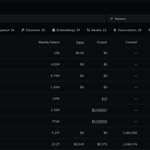
$0.06 / 1M input tokens
available today at nace.ai/drex

Introducing Drex for Search 🔍
Supercharge your agentic search with Decision-powered retrieval
Standard file search holds AI agents back. Drex changes that:
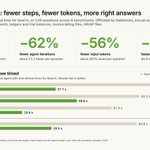
• 62% fewer steps to find answers
• 56% tokens saved
• +4% performance boost across Claude Code, Codex, OpenCode, Hermes, and PI
Validated across 6 professional work benchmarks like OfficeQA (529 real-world queries)
Upgrade your agentic workflows with the File Search API
Try for free: console.nace.ai
Faster agents. Cheaper runs. Sharper accuracy.


Drex 2.0 now runs completely local on Apple Silicon.
Open weights. Sub-200ms latency. Zero cloud dependencies.
• Footprint: 21 GB (4-bit Q4_K_M)
• Hardware: 36 GB+ Unified Memory (Apple Silicon)
Median decision latency (M5 Pro):
• Kapitsa: 113 ms • llama.cpp: 248 ms • Ollama: 282 ms
Hugging Face: huggingface.co/nace-ai/drex-…
GitHub: github.com/nace-ai/drex-deci…

Get $25 in free API credits.
console.nace.ai
Nace AI retweeted

Flint from @Recursive_SI now runs on Kapitsa, our open-source inference engine for Apple silicon (hand-written Metal especially for Flint, no MLX or llama.cpp under the hood).
On an M4 Pro MacBook Pro it does ~128 tok/s, where it’s faster than llama.cpp by 1.9x
Try it:
brew install nace-ai/tap/kapitsa
kapitsa serve --model flint
Claude Code:
kapitsa claude --model flint
github.com/nace-ai/kapitsa

Introducing Flint, @Recursive_SI’s first model: a fast local coding model built with our automated research system, the Eureka Machine.
• Best-in-class fast local coding
• Up to 2x faster than comparable models: 125+ tokens/sec on a MacBook Pro, 150+ on RTX Spark
• Built from scratch in under 4 months
Private, unmetered intelligence on your own machine. Open weights available now on @huggingface, run it locally on your favorite framework or try it for free on @opencode or @pidotdev.


Nace AI retweeted
Drex for Browser Use is here!
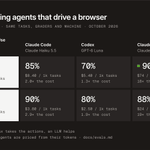
Claude Sonnet level accuracy at the fraction of the cost
1,000 browser tasks:
Drex Harness: $1.30
Claude Code: $24
Codex: $28
Start here: console.nace.ai
On WebArena-Verified, Drex beats Codex with GPT-6 Luna: 73% vs 70%, and cheaper ($4.10 vs $5.40 per 1,000 tasks)

Run Drex harness:
1. Get your Drex API key at console.nace.ai
2. Install the extension from GitHub
3. Paste your key and tell it what to do
github.com/nace-ai/drex-brow…
Drex for Browser Use is here!
Claude Sonnet level accuracy at the fraction of the cost
1,000 browser tasks:
Drex Harness: $1.30
Claude Code: $24
Codex: $28
Start here: console.nace.ai