

I read too much about Linux and open source, so now it's your problem too.
in a terminal near you
Joined October 2009
- Tweets244
- Following58
- Followers127
- Likes0
git log -S "someString" --oneline
Every commit where that string was added or removed. Not --grep, which only reads commit messages.
It works on code that is already gone, too. On a file deleted two years ago it found both commits. git blame just said no such path.

1
21
systemd-analyze security <myapp.service>
No sudo needed, and it grades how much of the machine your unit can reach. A plain one, just ExecStart and Restart, comes back 9.6 UNSAFE.
Five lines took mine to 6.1 and it still served HTTP 200, on a throwaway UID instead of root.

1
12
Cap what one command is allowed to allocate:
systemd-run --user --scope -p MemoryMax=4G <command>
Without a cap, the OOM killer picks a victim when memory runs out and it often isn't the runaway. With one, only that scope dies. Exit 137 tells you it happened.
No sudo needed.

1
12
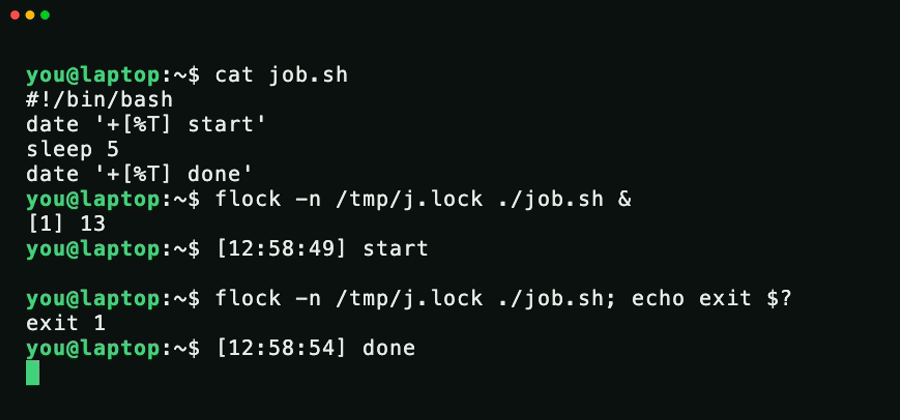
Cron doesn't care that the last run is still going. It fires again and now you have two.
flock -n /tmp/job.lock /path/job.sh
Goes in the crontab line, no change to the script. An overlapping run exits instead of starting.
The catch: it exits 1, so cron mails you. Add -E 0.
1
2
If you spin up a git worktree per agent run, --detach is the wrong kind of tidy.
Git blocks worktree remove while anything is uncommitted. Commit, though, and removal goes through silently. Exit 0, commit unreachable.
The branch you were avoiding is what holds the work.

1
1
16
curl can fake DNS for one command.
curl --resolve app.internal:443:203.0.113.10 https://app.internal/
curl connects to the IP you name, but the Host header and the cert check still use the real name. So you can test a new server before DNS points at it.

1
1
112
Something changed your config and you don't know what.
sudo find /etc -newermt '-1 hour'
Every file under /etc modified in the last hour. Quickest way to see what an installer or a config tool actually touched.

7
df says the disk is full. du can't find the space.
Something still has a deleted file open, and the blocks don't come back until that handle closes.
sudo find /proc/*/fd -lname '*(deleted)*' -printf '%p -> %l\n'
That prints the PID holding it.

1
21
A slow systemd unit isn't always what's making boot slow.
systemd-analyze blame ranks units by start time, so it accuses whatever took longest. But if nothing waited on it, it cost you nothing.
systemd-analyze critical-chain shows the path that actually held boot up.

1
5
The fastest way to see what's listening on a Linux box is sudo ss -tulpn.
The part that trips people up on a Docker host: the process it names is docker-proxy, not your app. That means a container owns the port, and docker ps --format '{{.Names}} {{.Ports}}' says which one.

18
Running a command over and over to see if anything moved? Let watch do it.
watch -d -n1 'ls -lh downloads/'
The flag people miss is -d: it highlights whatever changed. -n1 refreshes every second. Point it at a growing log or a deploy's status file and the change jumps out.
6
Comparing the output of two commands? A pipe only carries one stream. Process substitution hands each command's output over as a file, so you can pass both at once:
diff <(ls prod) <(ls staging)
No temp files. Anything that takes a filename works, not just diff.

3
Most people run ncdu, read the sorted sizes, and quit there.
The part they skip: highlight anything and press d. It deletes that file or folder on the spot, no rm needed. Arrow into the biggest one, find the junk, clear it out.
The tool I reach for the second a server fills up.
6
Ever have scp die at 90% and start over? rsync won't:
rsync -aP src/ user@host:/dest/
The -P is the trick. it keeps the half-copied file, so if the connection drops you run the exact same command again and it picks up where it left off.
1
6
The first command I run when a machine's acting weird:
sudo journalctl -p err -b
Every error since boot, nothing else. No scrolling through info-level noise to find what actually broke.

5
Your command line got too long to edit comfortably?
Hit ctrl+x then ctrl+e. The whole thing opens in your $EDITOR, and once you save and quit, it runs.
Bash has had this forever and almost nobody uses it.
1
25
Half of "why does my laptop wake at 3am" investigations end right here.
systemctl list-timers
Shows every systemd timer on your box and when each one fires next.

8
Sending a file to a machine that isn't on your network, with zero setup:
croc send file.pdf
It prints a code phrase and the exact command to run on the other end. End-to-end encrypted, works across any OS, no account, no port forwarding.

4
