

Co-Founder of https://teapawt.net/t.co/3bA4a3NA2x | AI Builder @ https://teapawt.net/t.co/Ji6S0uCNpa |
Netherlands
Joined November 2023
- Tweets1.4K
- Following799
- Followers481
- Likes734






Nick Kramer retweeted

My AI mentor now plans my week.
It counted fifteen meetings in my calendar this morning and asked me what I was going to drop.
Here is how I connected it to my goals, inbox, and project boards so the thinking actually turns into execution 👇
messerhugo.substack.com/p/my…
AI advice in a chat tab is useless if you still have to manually update your boards.
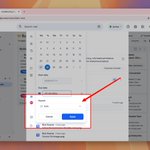
Love how @hu_messer wired his AI mentor into Gmail, Calendar, and tooling.studio. It audits his 15 meetings, checks his 2027 focus goals, and populates his weekly Kanban tasks automatically.
Read his setup: messerhugo.substack.com/p/my…
121
Two weeks after adding an AI agent, a team needs to know whether delivery got faster.
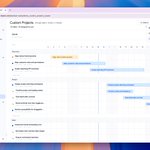
Tooling Studio Time keeps hours attached to the tasks and work notes. Filter the affected tasks, compare the results and export the rows to CSV.
🤖 Made with AI

1
29
What part of your work still feels strangely manual in 2026?
What small recurring things do you still do every day that you keep thinking should have been solved by software already?
1
40
Google Workspace is getting increasingly good at understanding the context around your work.
That makes the gaps between Gmail, tasks, files, contacts and calendars feel even more unnecessary.
I think productivity software is slowly heading toward a place where we stop thinking about which app something belongs in.
We just get the work done where we already are.
76
I still see people copy something from an email, open another app, create a task, paste the context, attach the file and then go back to Gmail.
We have incredibly capable AI now.
Yet removing these five boring steps would probably improve quite a few workdays more than another clever chatbot feature.
Productivity software still has plenty of ordinary problems left to solve.
94
A small update on tooling.studio that makes working in Google Workspace a little smoother.
You can now search Google Drive directly when attaching files to tasks and CRM records in Tooling Studio.
No downloading and re-uploading. Files stay in Drive with the same permissions, and open directly from the linked record.
Also shipped: unread notifications now show as a red dot on the browser favicon.
Though they seem like small improvements, they remove a few more unnecessary clicks from the day.

1
3
121
Recurring Tasks is finally live in Tooling Studio (tooling.studio/).
It's been one of our most requested features, and we wanted to get the details right.
Set tasks to repeat daily, weekly, monthly, yearly, or on a custom schedule. Edit one occurrence, this and future tasks, or the entire series, just like you'd expect.
We also shipped:
✓ Checklist progress bars
✓ Drag-and-drop tag ordering
✓ Several CRM improvements
Thanks to everyone who kept asking for this and sharing feedback. It genuinely helped shape the feature.

1
1
48
One day, people will look at old software teams and wonder why five humans sat in different meetings to translate one user problem into code. :-)
2
2
87
A few years ago I built a small tool because I kept losing work inside Gmail: follow-ups, client notes, tiny tasks, project updates. All the things that sit between email threads, docs, spreadsheets, and memory.
At first it was just for me. Then friends tried it, and after sometime a few teams.
That was when the small details became harder to ignore.
People adopt a tool because it fits the way they already work. Not becasue the demo is clever.
I see the same thing with AI tools now.
A prototype can look great in a demo, but Monday still starts in Gmail, spreadsheets, Slack, docs, calls, and half-finished notes.
If the tool does not fit there, it becomes one more place people have to remember.
For me, this started with a small task board inside Gmail.
The same lesson applies to AI copilots, CRM updates, document workflows, and internal automation.
Adoption usually comes down to something very ordinary:
Does the tool understand the real work well enough that people keep using it after the demo?
🤖 Made with AI

2
2
74
Everyone's calling Google's Declaration of Independence ad cringe.
I watched it twice trying to find the outrage. Still haven't found it.
Here's the whole "AI wrote history" scandal: Gemini takes notes in a meeting. It helps pick an animal for a seal. That's it. That's the thing people are up in arms about.
If anything the ad plays it safe. It never even claims AI touched the actual words. Jefferson still writes the thing.
I think people are mad at the headline they assumed the ad said, not what's actually in it.
Anyone actually watch it before piling on, or are we just vibes-based outraged now?
5
54
Feels like we're moving from the "best model" era to the "best context" era.
Most AI models are already good enough for everyday work.
The difference now is what they can see and what they can do. An assistant with access to your emails, documents, tasks, and business tools is a very different experience from a blank chat window.
I think the next couple of years will be less about bigger models and more about better connections between the software we already use.
21
Any Google Workspace partners or resellers here?
We've been building task management, CRM, and AI workflows inside Gmail, and I'm always interested in hearing what Workspace customers are asking for these days.
Feel free to DM me.
1
1
99
I've started thinking of my inbox as a Kanban board.
Every email is either something I need to do, something I'm waiting on, or something that's done.
The problem is they're all mixed together in one endless list.
Once you make the workflow visible, it's much easier to see what deserves your attention next.
How do you organize your inbox? Labels, folders, or something else?
21
Instead of asking 'What should I finish today?', I try asking 'What will matter tomorrow if I do it today?'
1
1
19
A friend who runs an agency recently told me his CRM wasn't helping his team stay on top of follow-ups.
The funny part was that, the CRM data was fine.
Whenever someone needed to understand what was really happening with a customer, they opened Gmail.
That's where the proposal, questions, delays, negotiations, and next steps lived.
The CRM had the summary. But, the inbox had the story.
It's one reason I've become interested in bringing CRM workflows closer to email instead of asking people to spend more time in another tab.
tooling.studio/sales-crm
🤖 Made with AI

1
21
You finish a customer call and already know what needs to happen next: follow-up tasks, CRM updates, onboarding work, and reminders.
Most people don’t update everything immediately. They move on and try to reconstruct the context later.
We’ve been building MCP into Tooling Studio so AI can work with the actual structure of your workspace: boards, contacts, deals, assignments, and permissions included.
So instead of jumping between systems, you can describe what should happen naturally and let the related updates happen in the right places.
Less context switching and fewer things slipping through the cracks.
1
36
