NymPy (@NymPyOG) header
NymPy (@NymPyOG) profile picture

Conviction in everything | Investing or Coding / Depends on the mood.

Joined October 2021
Replying to @friendtech
Traded 1 sol for a token while it was close to completing the curve and the rest is history lol.
23
Replying to @Blockworks
"Wong" right now
91
I can't choose.
Have a great weekend Apes.😉 #XRP #NFTs
1
218
4/5) There are also other projects that offer this, such as: @RevokeCash . I personally have used @0xPlasma in the past; it is just friendly advice to everyone. Please DYOR on what platform or tool you want to use to Revoke your Token Approvals.
1
1
172
3/5) What you can do is : 1. Connect your wallet. 2. Go to "Portfolio" (On the left menu) 3. You can check every Approval you ever did and Revoke it. (You will need to spend some gas to do the Revoke).
1
1
152
Since the latest exploits and thefts on $ETH, I wanted to give some valuable information to those who might need it or don't know about it yet. -Using Dapps. -What are Token Approvals? -Revoke Token Approvals. We'll go through the revoke process using @0xPlasma platform. 🧵
2
4
3
17
45,140
"The more that you read, the more things you will know." Who is ready for 🧪? #NFTs #XRP
6
10
1
27
3,852
A lot of cool things are coming soon on @BoredApesXRP . Team is working to give you a fun and unique experience. 💯 #crypto #XRPL #Eth
4
21
31
1,461
Yes and very clean ones!
6
81
Replying to @Dexerto
"Google find me the best NFT" Google:
1
27
Going to try @friendtech and see if there are any members from #XRPArmy . To sign up you need referral codes since it's still in beta mode: ft-8dquykqw ft-ms4u8tj8 ft-3xw8wxnp
1
4
6
324
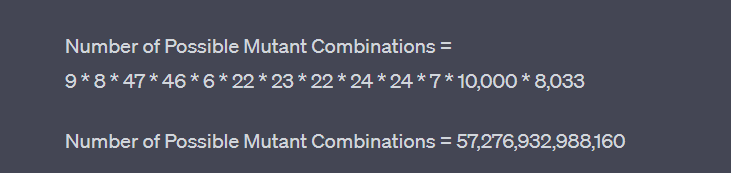
Decided to run some numbers, last night, for mutating a #BoredApe with any #Hog. Seems a very easy task.🫡 #XRPL #NFTs
6
9
1
24
5,448
Replying to @nowmedia @nftnow
On these beauties. @BoredApesXRP
1
4
88
Once you scan the QR code and confirm the transaction, 2 XRP will be deducted from your current balance, and the Trust Line will be created. You are now able to see BAYNANA trust line as shown below. Now you can buy and store BAYNANA tokens in your wallet. 9/9
1
56
6. A new window will appear with a box. Click "Confirm". 7. Then a QR code will appear, which you must scan with your XAMAN (@XummWallet ) wallet. 8/9
2
1
40
4.Below you will see all tokens named "BAYNANA". ⚠️Make sure you are choosing the correct token⚠️ 5.Once you find the token that you wish to set up the trust line for, click "Set TrustLine" as shown below with a red arrow. 7/9
1
51