







Thịnh PT retweeted

Comment je synchronise Obsidian entre mon iPhone et mon PC sans abonnement Obsidian Sync
Je suis un rat, j’avais pas envie de mettre 8 € par mois juste pour synchroniser mes notes.
J’avais déjà un VPS, donc j’ai installé Syncthing dessus et sur mon PC/Mac, puis j’ai relié mon iPhone au VPS avec VaultSync. Ça me fait une synchro sans abonnement en plus. VaultSync (vaultsync.eu/)
Sur iPhone, iOS limite la synchro en arrière-plan. Le plus fiable, c’est d’ouvrir VaultSync. Sauf que j’ai la flemme de le faire à chaque fois et que je sais très bien que je vais oublier.
Du coup, j’ai créé un raccourci sur mon écran d’accueil et je lui ai mis le logo d’Obsidian. Quand je tape dessus, il ouvre VaultSync, attend 3 secondes, puis ouvre Obsidian.
Quand je quitte Obsidian, une automatisation rouvre VaultSync pour envoyer mes modifs, attend 3 secondes et me ramène à l’écran d’accueil.
J’ouvre et je ferme Obsidian comme d’habitude. Le raccourci s’occupe du reste.
Je vous mets les deux captures juste en dessous pour que vous puissiez refaire le raccourci et l’automatisation sur votre iPhone.


Thịnh PT retweeted

Holy f*ck. SpaceXAI founder Elon Musk:
“99% of people still use GrokBot like Google. They ask one question and close the tab
At SpaceXAI, over 80% of our engineers already run teams of 50+ GrokBot agents.
A Chief of Staff plans the day, PMs hand out the work, and the workers ship it overnight.
In 6–12 months GrokBot will be the #1 agentic tool in the world”
In this 32 minutes session, Musk and SpaceXAI engineers break down how to turn a single GrokBot into a coordinated team that keeps working while you're offline.
GrokBot → Chief of Staff → PMs → 50+ Workers → Autonomous Company
The Chief of Staff sets priorities, plans the day, and assigns the work.
PM agents break each job into smaller tasks and check what the workers deliver.
Chatting with GrokBot is easy. Building a team it can actually manage is the step most people skip.
More valuable than most $2,000 agent engineering courses.
Save it and watch today.
Then follow the full guide below to set up your own GrokBot Chief of Staff ↓


Thịnh PT retweeted

Every time we have a new model, I run the same simple prompt on all my projects:
"Read this entire project and find everything that’s broken, inconsistent, inefficient, or no longer needed. Fix what you’re sure about and list the rest for me to review."
highly recommend trying


Thịnh PT retweeted

누구나 영상만 넣으면 Depth 만들 수 있는 사이트 배포!
>> depth.cards/
클로드 구독? 필요 없어!
유료냐고? 로컬로 구동되서 무료야!
언어? 영어/일본어/한국어/중국어 지원!
간단한 튜토리얼은 MV로 대체할테니
원하는 댄스 커버 영상 실컷 만들어보자!


Thịnh PT retweeted

Este tipo explica cómo crear páginas web profesionales con GPT-5.6 Sol.
Un tutorial de 21 minutos donde explica paso a paso cómo construir diseños con un acabado cinematográfico.
🔖 Guárdalo. Vale cada minuto.
Thịnh PT retweeted

ガチで神。
ChatGPTに動画をドラッグして「これ編集して」と打つと、画面の右半分がそのまま動画編集ソフトに変わる。
ChatCutというプラグインが2026年7月9日に公開↓
・文字起こしから不要な部分を消すと、映像もそこごと消える(100以上の言語に対応)
・モーショングラフィックス、AI動画、音楽、ナレーション、効果音を生成
・タイムラインは手で調整でき、手作業の編集にクレジットはかからない
・ChatGPTのデスクトップアプリなら無料プランでも入れられる
映像制作者チームが作った「AIが操縦できる編集ソフト」を解説する↓
Thịnh PT retweeted

AI 영상 크리에이터가 참고하면 좋은 웹사이트
AI 영화/광고/쇼츠/수상작과
AI 영상 공모전 정보를 한 눈에서 볼 수 있음
aikive.com/
AI 영상 공모전 수상자/아티스트 인터뷰 페이지
활용한 툴, 노하우 등을 얻을 수 있음
aikive.com/community/magazin…


Thịnh PT retweeted

🎥 موقع مجاني يجمع أشهر حركات الكاميرا المستخدمة في فيديوهات الذكاء الاصطناعي مع أمثلة مرئية لكل حركة، ويمنحك Prompt جاهز لتعديله واستخدامه في Kling وSeedance وHiggsfield وRunway وغيرها.
Thịnh PT retweeted
AI 영상 제작에 필요한 카메라 무브먼트 프롬프트 웹사이트
aicameramovements.com
This quoted post is unavailable.

Thịnh PT retweeted

POV: It's 2026, and someone captured an ordinary day on a 35mm camera.
No dramatic story.
No perfect poses.
Just warm sunlight, candid smiles, quiet streets, and little moments worth remembering.
📸 Prompt Seedance 2.0 ↓
Prompt: Main subject from image1 lock her completely. Face, hairstyle, body proportions, skin tone, outfit, accessories, and overall appearance must remain perfectly identical throughout the entire video.
She is a sweet and naturally beautiful Indonesian girl, 18 years old, soft warm tan skin, expressive dark brown eyes, long black hair tied into a casual messy bun with loose bangs, youthful smile, minimal makeup, wearing a simple white oversized T-shirt, light blue denim jeans, white sneakers, and carrying a vintage brown canvas camera bag. Around her neck hangs a classic 35mm analog film camera.
Theme:
"A Day With My Camera"
A relaxing weekend in 2026, following a girl who loves documenting ordinary moments with her analog camera. The video should feel authentic, nostalgic, and effortlessly beautiful.
Everything takes place around modern Indonesia in 2026:
quiet neighborhood streets, small coffee shops, city parks, bookstores, pedestrian sidewalks, and cozy residential areas.
The entire video must look like it was filmed naturally by her best friend using a modern mirrorless camera. Absolutely no posing, no influencer behavior, no scripted acting. Every smile, glance, and movement feels spontaneous and real.
Camera language is the highest priority.
Natural handheld movement.
Gentle camera sway.
Occasional focus breathing.
Real autofocus adjustments.
Slight framing imperfections.
Natural motion blur.
Documentary-style tracking shots.
Soft depth of field.
Authentic available sunlight.
Premium lifestyle vlog aesthetic.
Sequence:
She walks out of her house while adjusting the analog camera hanging around her neck, smiling softly as morning sunlight lights up her face.
She stops beside a quiet street and photographs flowers, bicycles, passing people, and little everyday details with genuine curiosity.
She enters a cozy camera store, happily choosing a fresh roll of 35mm film before carefully loading it into her camera.
Walking through the city, she photographs random candid moments: children playing, street cats, trees moving in the breeze, reflections on café windows, and interesting architecture.
She sits alone inside a cozy café reviewing her newly taken photos, smiling while enjoying an iced latte.
Golden hour arrives. She slowly walks through a city park while continuing to shoot photographs, warm sunlight creating beautiful natural lens flares.
She notices the person filming her, laughs shyly, lifts her analog camera toward the lens as if taking one final photo of the viewer.
The camera gently lowers while she keeps smiling naturally.
Recording suddenly cuts off mid-motion like a real weekend vlog ending.
Lighting:
Bright natural morning sunlight transitioning into warm golden hour.
Color:
Natural realistic skin tones.
Soft warm colors.
Subtle filmic contrast.
No exaggerated grading.
Audio is strictly natural.
Birds.
Footsteps.
Camera shutter clicks.
Film advance lever.
Coffee shop ambience.
Light wind.
Distant traffic.
People talking naturally.
Leaves moving.
No music.
No narration.
No subtitles.
No logos.
No watermark.
Ultra-realistic.
Looks exactly like a real lifestyle vlog filmed in 2026.


Thịnh PT retweeted

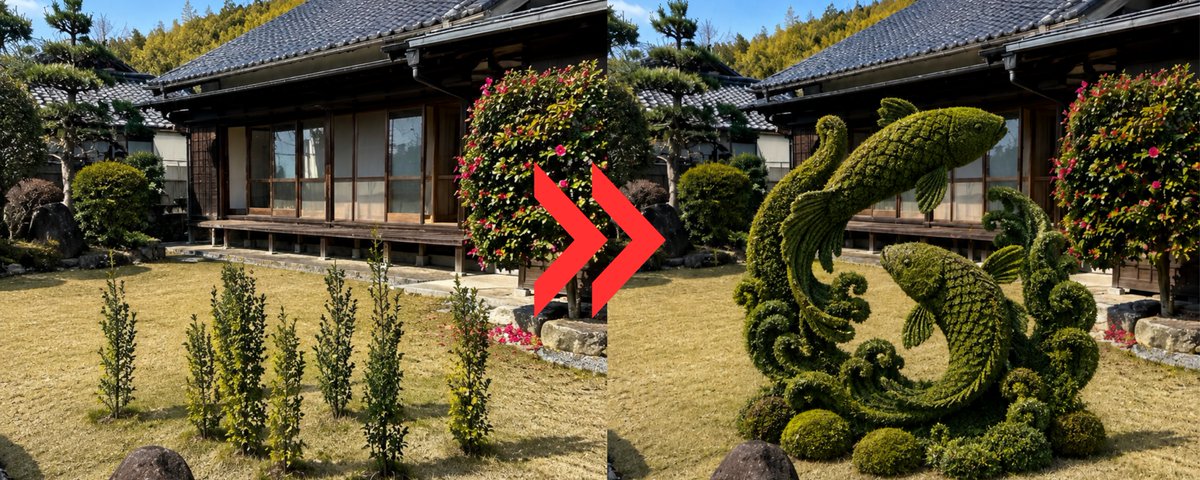
ビーチで砂のオブジェが完成していくショート動画
①ChatGPTで画像生成
②Seedance2.0で動画化
トピアリー動画と同じ流れで、砂像バージョンも作れます◎
引用元のプロンプトをアレンジすれば作れます👇🏻
🤖 Made with AI

Thịnh PT retweeted

My GitHub skill for Seedance V2 are free. I keep updating it all the time. No need to pay anyone; use it as the base for your own skill building. It also works with other video models. I will have an independent one for Kling and Grok Imagine later when they get to the Seedance V2 level.


Thịnh PT retweeted

Cinematographers learn 12 camera moves in film school.
Most AI creators don't know a single one. Because nobody told the camera what to do.
.
.
Here they are:
→ Push-in — moves toward the subject
Builds tension. Creates intimacy. Use it slowly.
→ Pull-back — retreats to reveal
Isolation. Scale. Endings. The reveal shot.
→ Pan — horizontal rotation, camera stays fixed
Suspense lives in what you haven't shown yet.
→ Tilt — vertical version of the pan
Tilt up on a hero. They look powerful immediately.
→ Tracking shot — camera travels with the subject
Energy. Forward motion. You feel like you're there.
→ Arc / orbit — circles the subject
Hero moments. Product showcases. Keep it under 30 degrees.
→ Crane / jib — sweeps vertically on a boom
Grandeur. Scale. The "god-view" of cinematography.
→ Zoom — focal length changes, camera doesn't move
Flatter look than a dolly. Fast zoom = music video energy.
→ Dolly zoom — camera goes one way, lens goes the other
Background warps. Subject stays still. Pure psychological dread.
→ Whip pan / crash zoom — extreme speed for transitions
Shock. Comedy. Stops the scroll every time.
→ Handheld — natural shake, no stabilisation
Add "subtle" or the model goes full earthquake.
→ Static + angles — low, high, Dutch, bird's-eye, worm's-eye
Low angle = power.
Dutch angle = unease.
Bird's-eye = scale.
The mistake everyone makes: stacking multiple moves into one prompt. One move. One clip. Always.
And add "slow" to almost everything. Slow moves hide what AI can't render cleanly. Fast moves expose every flaw.
