

A powerful Playbook Platform to organize Playbooks, Scout Cards & Presentations efficiently through Microsoft® Visio & PowerPoint. Request a Virtual Demo ⬇️
Joined October 2019
- Tweets1.8K
- Following1.4K
- Followers6.8K
- Likes4.3K
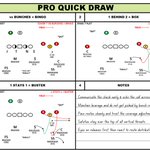




Four boxes. Three checks. One page your DBs can actually study.
That's the @ProQuickDrawPQD way.

Organize it fast. Teach it better.
4 Box templates in Pro Quick Draw = cleaner installs and sharper execution.


Still drawing each play from scratch? Edit one, hit Fn + F12, and save the variation.
Build out your drawings library faster with PQD Playbook.
No resizing, no reformatting. Your drawing drops in already fitted to your template.
Select your template, browse your Master Library, and double-click your drawing. That's it! #ProQuickDraw
Select your template, browse your Master Library, and double-click your drawing. That's it! #ProQuickDraw
One way to build out your PQD playbook faster...
1. Select a drawing and click edit.
2. Adjust the drawing.
3. Hit Fn + F12.
4. Save the new variation.
5. Repeat.
Sunday cutups used to eat your whole day…
Now the Cutup Generator sorts your tags automatically — down & distance, formation, personnel — the moment your rules are set, you get your Sunday back.
The PQD x @Go_Rout Integration
1. Select your play cards.
2. Export to GoRout.
3. Share to every device.
Seamless communication of play assignments on the field
Coaches -- What do you call a template that has 6 individual spaces for drawings?
78%6-Box
22%6-Up
0%Other (Comment ⬇️)
9 votes • Final resultsSet your definitions once; let the Cutup Generator do the rest.
Get it before this weekend — have your whole film library organized before your staff's weekly meeting.
This one workflow will save you time every single week — here's how to build your opponent formations like a super user 👇
Coaches: What's your busiest day of the week for cutups?
27%Saturday
73%Sunday
0%Other (Comment ⬇️ )
11 votes • Final resultsWith Copy to Clipboard in PQD:
1. Snip your clip or image
2. Open PQD
3. Click Clipboard
4. It drops right into your next open space
5. Title it. Done.
That's it. That's the workflow.
