

Work/ed w/ @theresaaFN @VaqzDE @zysacovfx @sammy999zz @davefnr_ Get started here: https://xitter.cf/t.co/rucPQACqKd
Joined April 2026
- Tweets124
- Following6
- Followers205
- Likes199


Pinned Tweet
Insane Fortnite Benchmark🚀
AMD ryzen 7 5700X
RTX 5060 TI
16GB DDR4 - 3200 MHz
Fortnite map code "6016-0463-0988"
Average FPS +108,2 % ↑
1% Percentile FPS +144,0 % ↑
0.2% Percentile FPS +142,6 % ↑
PureTweaks is doing hes job, if you want your PC fully optmized book a optimization now on our website link is down below.

‼️THIS SERVICE IS STEALING YOUR FPS AND YOU PROBABLY DON’T EVEN KNOW IT‼️
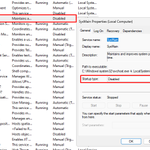
SysMain (the old Superfetch) is a Windows service that constantly monitors what apps you open and tries to preload them into your RAM so they start faster. On paper it sounds useful, but on a normal gaming PC with an SSD and enough RAM it mostly just causes unnecessary disk activity and small CPU spikes in the background. That shit can create micro stutters and inconsistent frametimes while you’re playing Fortnite, Valorant or whatever.
A lot of people notice smoother gameplay and less random hitching after disabling it. App launches can get a tiny bit slower, but for pure gaming performance it’s usually a win.
How to disable it fast:
Win + R → type services.msc → Enter
Find SysMain
Right click → Properties
Startup type → Disabled
Click Stop (if it’s running) → Apply → OK
That’s it. It won’t start again on the next boot.
Want your PC fully Optimized go to our website and book a optimization now! link is down below👇


Lifetime Pure Tweaking Uitility x3 GIVEAWAY🎉
- 1,400+ Tweaks
- Daily Updates
- 60 - 100 prozesses
- Game Priority (Forntite, Valo, FiveM, Minecraft and soon more games will be added)
- Full Driver Debloat for AMD and NVIDIA (.nip and nvcleanstall)
- Windows Debloat
To enter:
Follow @PureTweaks_
Join Our discord link is in the comments or in our bio!
@ 2 friends
♥️ + ♻️
Send proof in the comments.
winner will be rolled in 4 days, Good luck everyone🍀

❗BEST ETHERNET SETTINGS❗
in our discord is a list of every setting you should disable, link is down below.

Pure Tweaks is looking for Esports Organizations & Content Creators to partner with!
We are currently looking for new Partners who are interested in promoting Pure Tweaks and our Optimization Services.
What we offer:
🟢 20% Commission on every sale made with your code
🟢 Custom 20% Discount Code for your Community
🟢 Free Full Optimizations for 2 Players / Creators
🟢 30% Discount on Full Optimizations for the rest of your Roster
🟢 Custom OBS Overlay with your Discount Code
What we expect:
🟢 Active Promotion of Pure Tweaks
🟢 At least 1 Post / Shoutout per Month
🟢 Using our Custom OBS Overlay while Streaming
If you are an Esports Organization or Content Creator and are interested in working with us, feel free to send us a DM for more information.
📩 DMs are open!


❗BEST DISCORD SETTINGS❗
Turn Off these settings for the best input dela on discord:
Clipping
Game Overlay
Hardware Accelaretion
These settings improve input delay and overall performence.


This was only one "tweak" that would help your PC with performence, if you want your PC completely optimized then go to our website and book a optimization now! halloween sale right now and you can get 30% off any order 👇
PureTweaks.com/tweaks discord.gg/QKTtY8j4py

Pure Tweaks retweeted
Lawn Chair Sunburn☀️ || Nolife Highlights #2
youtube.com/watch?v=WAyCChbx…
youtube.com/watch?v=WAyCChbx…
youtube.com/watch?v=WAyCChbx…
youtube.com/watch?v=WAyCChbx…

Pure Tweaks retweeted
🚨 NVIDIA USERS: DISABLE THIS SETTING! ⚠️
NVIDIA has introduced a new feature in the latest NVIDIA App update that you should know about.
It's called "Allow AI agents to control NVIDIA App" and allows external AI agents to interact directly with your NVIDIA software.
⚠️ What exactly does this feature do?
NVIDIA has integrated a local MCP (Model Context Protocol) server into its application.
This allows compatible AI assistants to access certain NVIDIA App functions and control them through automated commands.
HOW TO DISABLE IT:
Open NVIDIA App → Navigate to Settings → Open the Features section → Scroll down to Connect Agents & Apps → Find "Allow AI agents to control NVIDIA App".
Switch it OFF.
Your normal NVIDIA driver functionality, game settings and other standard NVIDIA App features will continue working.
🔁 & 💖
If you want the best possible performance out of your PC, lower input delay, higher FPS and better overall system responsiveness, check out our PC Optimization services on our website, link in bio.

🚨 NVIDIA USERS: DISABLE THIS SETTING! ⚠️
NVIDIA has introduced a new feature in the latest NVIDIA App update that you should know about.
It's called "Allow AI agents to control NVIDIA App" and allows external AI agents to interact directly with your NVIDIA software.
⚠️ What exactly does this feature do?
NVIDIA has integrated a local MCP (Model Context Protocol) server into its application.
This allows compatible AI assistants to access certain NVIDIA App functions and control them through automated commands.
HOW TO DISABLE IT:
Open NVIDIA App → Navigate to Settings → Open the Features section → Scroll down to Connect Agents & Apps → Find "Allow AI agents to control NVIDIA App".
Switch it OFF.
Your normal NVIDIA driver functionality, game settings and other standard NVIDIA App features will continue working.
🔁 & 💖
If you want the best possible performance out of your PC, lower input delay, higher FPS and better overall system responsiveness, check out our PC Optimization services on our website, link in bio.
❗The Best OBS Settings❗
These are the best OBS Settings for best Delay / FPS
If you want your PC fully optimized for the best FPS and the best delay, book a optimization now on our website link is down below.