

Quarterzip's voice and screen-share agents unlock one-to-one guidance for your entire user base across the customer lifecycle.
San Francisco / Melbourne
Joined June 2025
- Tweets20
- Following6
- Followers31
- Likes51





Quarterzip retweeted

hit the streets of sf and asked people what they think of ai
surprisingly many said they don't like it or trust it, even in the city building the stuff
I don't think that's anti ai, it's just a fair reaction to how it's been built so far
Quarterzip retweeted
most users have no idea what your product can actually do
the industry has normalised friction, treating the symptom not the cause
@QuarterzipAI flips it: product experts that show up proactively in the flow

Quarterzip retweeted

Every AI tool you've used in the last 2 years has the same interface:
A text box with a blinking cursor.
Quarterzip threw it away entirely.
Instead of building another chat wrapper, they built an AI that watches your screen share and guides you visually - like having a colleague sit next to you and point at things.
No SDK installation.
No browser extension.
No IT approval ticket.
Just a picture-in-picture window that sees everything you see. Any tool, any tab, any workflow.
Picture this:
- You’re onboarding to a new tool
- You brace yourself for a barrage of forgettable tooltips and painful ‘educational’ flows
- Instead, you click ‘Start Onboarding’ and you’re prompted to share your screen
- You share, and you’re placed directly in the app, with a helpful AI assistant in the corner that sees everything you see
- It’s trained on the help docs, all past onboarding calls, and can guide you through the journey whilst answering any question you might have along the way
They launched a week ago. Already running hundreds of AI-powered onboarding sessions a day with Apollo and Grab.
And the growth loop is elegant - every person who gets onboarded through Quarterzip sees the brand sitting inside the PIP window.
Product usage drives distribution.
I broke down the full strategy in this week's newsletter (link below)


Quarterzip retweeted
in 1997 microsoft thought they cracked software complexity with clippy
annoying, zero context, same advice for every user. so they killed it
then we rebuilt it as tooltips. same logic, better UI
25+ years of insane software evolution but the interface layer hasn't moved. still navigating complex tools with static hints
it's time to move on
Quarterzip retweeted
new software used to feel like a break through
now it ships faster than anyone can keep up
we're closing that gap
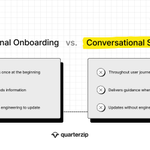
voice + vision = conversational screenshare
this is how it works:

Quarterzip retweeted
Introducing the Quarterzip AI Free Tier: Conversational screenshare agents for any product.
What if your onboarding felt like a real product expert, not a pile of tooltips?
Quarterzip AI lets you create customer facing voice agents that guide users through product workflows in real time. Personalized. Dynamic. Built in minutes, not weeks. No engineering required.
➤ Understands what’s on screen, in real time
➤ Works across your product and third-party apps
➤ Guides users 24/7 in any language
➤ Reveal what drives activation, retention, and growth
Just share your screen and build.
We’re opening it up today.
Get started for free. No credit card required.
Comment “Quarterzip” or repost and we’ll unlock 1 month free.
Quarterzip retweeted
We sold @Redactiveai, launched @Quarterzipai the next week.
People keep asking why we didn't take a break. Here's why we jumped straight back in:
Quarterzip retweeted
Voice is fundamentally the most interesting input modality anyone's ever been able to use.
Not because it's trendy. Because it enables hands-free computing.
You can interact with software while doing something else. Your hands are occupied, your eyes are on your work, but you can still get help, ask questions, navigate workflows.
Hands-free isn't a feature. It's a rethinking of how humans interact with software when they're trying to learn it.