





Pinned Tweet
🚨 𝗗𝗜𝗦𝗖𝗢𝗥𝗗 𝗖𝗢𝗨𝗟𝗗 𝗕𝗘 𝗛𝗨𝗥𝗧𝗜𝗡𝗚 𝗬𝗢𝗨𝗥 𝗙𝗣𝗦 🚨
Kill unnecessary background features. Cut resource usage. Optimize Discord for smoother competitive gaming.
𝗠𝗔𝗫𝗜𝗠𝗨𝗠 𝗙𝗣𝗦 + 𝗟𝗢𝗪𝗘𝗥 𝗢𝗩𝗘𝗥𝗛𝗘𝗔𝗗
Best Discord Settings for Windows 10/11 👇
That mouse stutter during a gunfight could’ve cost you the kill. Before you blame your mouse check Windows.
Microsoft confirmed a Windows 11 bug that could cause mouse input to stutter in some games. They already released a fix on October 13.
If you've been messing with your sens trying to figure out whats wrong, check this first.
Open Settings, go to Windows Update then Update history. Look for KB5127648 or a newer cumulative update. That patch covers Windows 11 24H2, 25H2 and 26H2.
If you're behind on updates check for updates and restart after installing.
This won't fix every mouse stutter, but its worth checking before spending money on another mouse when yours might not even be the problem.

MW4 & DMZ PC CONFIG 📁
Been on MW4 multiplayer for a few hours through the New Zealand method. For anyone getting ready to play, here’s a performance focused config to try.
Download here: dropbox.com/scl/fi/mez2u4kk1…
Set your RendererWorkerCount using the starting values in the photo below. Results vary by CPU so test what runs best on your setup.

Competitive gamers chasing higher FPS and better 1% lows check this out.
NVIDIA 621.01 came out on top among the four drivers compared in this RTX 3070 test.
Compared with the average of the other three drivers, 621.01 delivered:
0.92% higher average FPS - 153.1 vs. 151.7.
1.14% higher 1% lows - 138.5 vs. 136.9.
seems to be stable in Apex Legends , MW4 , Fortnite , and other AAA titles. if you have any questions, feel free to ask below.

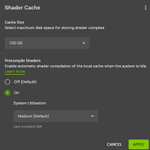
NVIDIA users, this setting can help reduce shader stutter after driver updates. it’s off by default.
It’s called Auto Shader Compilation.
It rebuilds previously generated DX12 shaders before you play, which can mean less shader compilation interrupting your game.
Open NVIDIA App, then Graphics, Global Settings and Shader Cache.
under Precompile Shaders, select On, open the three dot menu and select compile Now. let it finish before launching your game.
It’s a beta feature. new installs still need their first in game shader compilation, and this won’t fix every cause of stutter.
was this already enabled on your PC?

Custom stick curves that stay with your controller.
Introducing Controller Studio in Radiant Optimizer.
Keep your native app for firmware and manufacturer settings. Use Radiant to build detailed curves, compare saved designs and preview how closely your controller can reproduce them before saving.
Up to 20 design points. Separate curves for each stick. One workspace for supported GameSir and Flydigi controllers.
Curves save onboard, so Radiant doesn’t need to stay running.
We saved custom curves to both sticks on an Apex 5, moved it to another PC and read them back. Both matched.
Starting with:
• GameSir G7 Pro 8K
• Flydigi Vader 5 Pro
• Flydigi Apex 5
Features vary by model and firmware.
Controller Studio is completely free and will stay free.
We’re building toward support for every controller that allows onboard customization.

You can download it here for free no sign up needed. radiantoptimizer.com

Want your controller added? Have a feature idea? Tell us in our Discord suggestions channel. Need help? Open a ticket.
discord.gg/h9NAR4Q2tb

The “25 games in your browser” post and the links are gone now. X withheld them after a DMCA notice from Irdeto on behalf of Activision.
I shared the list so you guys could find something fun to play. Hopefully you got some enjoyment out of it.
It was really cool seeing those OG games running in a browser, and even cooler seeing how many of you were just as excited about them as I was.❤️
🚨 YOU MIGHT NOT BE GETTING THE SPEED OF RAM THAT YOU BOUGHT.
Check it out yourself RIGHT AWAY:
Task Manager -> Performance -> Memory -> Speed
If it is less than the advertised speed of the RAM, then it could mean that XMP / EXPO is TURNED OFF.
Solution:
BIOS -> Turn on XMP (Intel) / EXPO (AMD)
In compatible systems, it can help with memory latency and increase the frames per second in games.
The speed that you bought vs. actual speed: 👇

🚨 Windows 11 may be costing you FPS and this is about to matter even more.
Beginning in October, Microsoft will start enabling Memory Integrity on more eligible PCs.
Memory Integrity / HVCI adds an extra layer of security, but testing has shown it can reduce gaming performance on some systems.
Check yours:
Windows Security → Device Security → Core Isolation → Memory Integrity
If you’re chasing max FPS, this is one setting worth knowing about.
⚠️ Turning it off reduces security, and some anti-cheats may require it on.
Security or max FPS?

Built for players who care about every frame.
Optimize Windows, gaming settings & background usage with Radiant Optimizer.
One-time purchase. No subscription.
radiantoptimizer.com

🚨 WINDOWS 11 GAMERS: THIS SETTING CAN ACTUALLY REDUCE FRAME LATENCY 🚨
If you play DX10/DX11 games in Windowed or Borderless mode, turn on “Optimizations for windowed games.”
It uses the newer flip presentation model for compatible games.
Full breakdown below 👇

Built for players who care about every frame.
Optimize Windows, gaming settings & background usage with Radiant Optimizer.
One time purchase. No subscription.
radiantoptimizer.com
🚨 DIGITAL VIBRANCE IS A MUST FOR COMPETITIVE GAMING 🚨
If your game looks washed out, bumping NVIDIA Digital Vibrance can make enemies, loot, and the environment easier to see.
Some monitors already have strong color out of the box, while others may need more than 70%.
Start around 70%, then adjust until visibility looks best without crushing detail.

🚨 𝗬𝗢𝗨 𝗠𝗜𝗚𝗛𝗧 𝗕𝗘 𝗨𝗦𝗜𝗡𝗚 𝗛𝗔𝗚𝗦 𝗪𝗥𝗢𝗡𝗚 🚨
Hardware Accelerated GPU Scheduling is NOT a guaranteed FPS or latency boost but some setups actually need it enabled.
DLSS Frame Generation users especially need to know this.
Who should use ON vs OFF 👇
Save this before changing yours.
HAGS: ON or OFF? 👀

Built for players who care about every frame.
Optimize Windows, gaming settings & background usage with Radiant Optimizer.
One-time purchase. No subscription.
radiantoptimizer.com
See posts like this are exactly why PC optimizers and tweakers get a bad reputation.
There are legitimate Windows optimizations, configurations, and utilities that can measurably improve system behavior and performance in the right circumstances.
But this isn't one of those claims.
The "Text and image generation" page is primarily showing permissions and recent activity for apps capable of using Windows provided on device AI models. Having those permissions enabled does not mean Windows is secretly running AI in the background while you game, nor is it evidence that disabling them will increase FPS or reduce latency.
Be careful who you take optimization advice from. Every tweak should have a technical explanation, measurable reasoning behind it, and ideally testing to support the claim.
Exaggerating or inventing performance benefits to market an optimizer gives the entire optimization community a bad name.
There are plenty of real optimizations to talk about. We don't need to make them up.
unavailable