







Aadarsh retweeted

FOR 30 YEARS, INSTALLING A SOFTWARE UPDATE PROTECTED YOU. TODAY, GOOGLE CONFIRMED THAT RULE IS DEAD
Google Threat Intelligence Group Just dropped a report officially stating: "The era of autonomous attacks have arrived"
Most accounts on X are just reposting the two sentence headline, but if you actually read the technical breakdown Google and Mandiant just published, what they caught running in the wild is terrifying:
1. The "Patch to Exploit" Trap (exploit_agent)
- Google uncovered an autonomous LLM framework on an exposed staging server called exploit_agent. The second a company publishes a security patch, this AI compares the code before and after the fix, reverse engineers the exact vulnerability the developer just patched, writes a working exploit, and attacks unpatched servers automatically with zero human involvement.
2. Multi Agent Hacking Swarms (ARTEX, CAIRN, PentAGI)
- Threat actors aren't sitting at keyboards typing commands anymore. Google confirmed Attackers are deploying multi agent swarms where different AI models split up the intrusion, one scans the network, one writes the exploit, and one drops web shells. They already caught CAIRN targeting the US aerospace sector.
3. Poisoning Developer Coding Assistants
- The report reveals espionage groups are now manipulating autonomous AI coding assistant configurations so software engineers unknowingly drop back doors into their own company codebases during local execution.
Look at Google's literal conclusion in the report: "Defending against machine speed threats at human speed isn't feasible"
How long until human security teams are completely locked out of the loop and cybersecurity is just defense AI's fighting attack AI's at millisecond speed?

Hackers are now using LLMs to continuously scan software updates, spot newly fixed bugs, and build attacks before teams can apply the fix — all without human involvement. That’s according to the latest report from the Google Threat Intelligence Group.
We're helping defenders counter automated threats with Google AI Threat Defense, which combines Gemini and other frontier models to find and fix flaws before attackers can exploit them.
sometimes we are not waiting for the right time. we are just waiting to feel ready and that feeling can take forever.
2
1
31
☁️ Azure Learning Series | Day 16 of 20
📘 Topic: Azure PowerShell
Managing Azure resources does not always require the Azure portal. You can also control your cloud environment using PowerShell scripts and commands.
What is Azure PowerShell?
Azure PowerShell is a collection of Microsoft PowerShell modules used to create, configure, manage and automate Azure resources.
The recommended module is called Az.
How does it work behind the scenes?
You open PowerShell locally or in Azure Cloud Shell.
Import and use the Az module.
Sign in using Connect-AzAccount.
Azure authenticates you through Microsoft Entra ID.
Select the correct subscription using Set-AzContext.
Run a cmdlet such as Get-AzResourceGroup.
Azure processes the request and PowerShell returns the result.
Some useful Azure PowerShell commands:
🔹 Install the Az module:
Install-Module -Name Az -Repository PSGallery -Force
🔹 Sign in to Azure:
Connect-AzAccount
🔹 List subscriptions:
Get-AzSubscription
🔹 Select a subscription:
Set-AzContext -Subscription "Production"
🔹 List resource groups:
Get-AzResourceGroup
🔹 Create a resource group:
New-AzResourceGroup -Name "rg-demo" -Location "CentralIndia"
Why should cloud engineers learn it?
• Automate repetitive Azure operations.
• Manage resources using reusable scripts.
• Retrieve and filter resource information.
• Perform bulk operations across environments.
• Integrate Azure management into operational workflows.
One useful concept: Verb-Noun naming
PowerShell cmdlets follow a consistent naming structure.
Get-AzResourceGroup
New-AzResourceGroup
Remove-AzResourceGroup
Get retrieves information, New creates resources, and Remove deletes resources.
Important: Always verify your active subscription before executing changes. For automation, prefer managed identities or service principals over interactive user sign-in. Microsoft Entra user sign-ins require MFA for Azure PowerShell since September 2025.
Azure PowerShell is especially useful when you need repeatable, scriptable control over your Azure environment.

5
58
every time i buy a new phone, i tell myself this one will last for years.
then a new model comes out with one extra camera feature and suddenly i'm comparing specifications again.
1
4
78
there are two types of people at lunch.
those who eat on time, and those who say "just five more minutes" until its suddenly 3 PM.
1
3
73
one small cloud habit that can save money... check your unused resources regularly.
old test virtual machines, disks, public IPs and storage can keep costing money even when nobody is using them.
a little cleanup every month is worth it.
3
26
went online to buy one small thing... somehow ended up checking headphones, phones, watches and laptops.
didn't buy anything, but my shopping cart is now living a better life than me.
1
4
65
the best thing about AI tools is that they help you start things you kept delaying.
but i still believe you should understand the work before trusting the result. a useful assistant is great, blindly trusting it is not.
2
26
I have started enjoying simple mornings more than anything else. a good cup of tea, some quiet time and no rush to go anywhere.
maybe this is what a perfect morning looks like.☀️☀️
4
24
good morning! a fresh week is here, hopefully we get some good news, finish a few pending tasks and find enough time to enjoy the little things. have a good monday!💫
3
4
73


Aadarsh retweeted

When I started learning agentic AI, I kept running into three names: LangChain, LangGraph, LangSmith. They sound almost the same. What does each one actually do? Do you need all three?
Let me clear the confusion for you in 30 seconds.
>> 𝗜𝘁 𝘀𝘁𝗮𝗿𝘁𝘀 𝘄𝗶𝘁𝗵 𝗮𝗻 𝗟𝗟𝗠.
It can answer questions, write code, and summarize documents.
But it can't reach your database, call your APIs, or remember last week's conversation on its own.
So developers wrapped code around it: prompts, document retrieval, API calls, output parsers. Everyone ended up writing the same glue code, and switching models meant touching the whole app.
>> 𝗟𝗮𝗻𝗴𝗖𝗵𝗮𝗶𝗻 𝗳𝗶𝘅𝗲𝘀 𝘁𝗵𝗶𝘀.
It gives you ready-made building blocks to connect models, tools, retrievers, and prompts into one working app.
Then we see the problem
- A simple chain works when every step follows the last one.
- Real agents don't behave like that.
If a tool fails, the agent must retry.
It has to pick between two paths.
It needs a human to approve an action.
Or the app crashes halfway through a long task.
Handling all that with loops, flags, and custom retry code gets ugly fast.
>> 𝗟𝗮𝗻𝗴𝗚𝗿𝗮𝗽𝗵 𝗳𝗶𝘅𝗲𝘀 𝘁𝗵𝗶𝘀.
You build workflows where steps can loop, branch, share state, and resume after a failure.
Think of it as a stateful workflow engine for AI agents.
Now you ship it.
Real users are on it.
Then someone says, "The agent gave me a wrong answer."
Your logs look healthy. But what actually went wrong?
- Was the retrieved context bad?
- Did a tool return wrong data?
- Did the model ignore your instructions?
- Did your last prompt change break something?
- And what did that one request cost?
Normal app logs won't tell you.
>> 𝗟𝗮𝗻𝗴𝗦𝗺𝗶𝘁𝗵 𝗳𝗶𝘅𝗲𝘀 𝘁𝗵𝗶𝘀.
It traces each run, shows prompts and tool calls, tracks latency and token usage, and lets you test outputs against datasets before you roll out changes.
Think of it as observability plus evaluation for LLM apps.
𝗧𝗼 𝘀𝘂𝗺𝗺𝗮𝗿𝗶𝘀𝗲
LangChain → connects LLMs to tools, APIs, and data
LangGraph → manages state, loops, retries, human approvals
LangSmith → traces, debugs, and evaluates quality
You don't need all three on day one.
- Start simple. Add LangGraph when your workflow needs state and branching.
- Add LangSmith when you need to see what's happening in production.
Don't try to learn every framework. Learn the problem each tool solves.
☁️ Azure Learning Series | Day 15 of 20
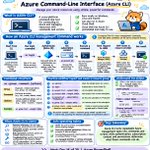
📘 Topic: Azure Command-Line Interface (Azure CLI)
Imagine managing 50 Azure resources manually through the portal. Checking configurations, listing resources, switching subscriptions and creating resource groups can become repetitive.
This is where Azure CLI becomes useful.
Azure CLI is a cross-platform command-line tool that lets you connect to Azure and manage resources using commands from Windows, Linux, macOS or Azure Cloud Shell.
How does it work?
Open a terminal or Azure Cloud Shell.
Authenticate using az login.
Azure CLI obtains an authentication token through Microsoft Entra ID.
Select the subscription you want to work with.
Run commands to manage Azure resources.
Azure processes the request and returns the result to your terminal.
Some useful commands:
🔹 Check CLI version:
az version
🔹 Sign in:
az login
🔹 List subscriptions:
az account list --output table
🔹 Check active subscription:
az account show
🔹 Switch subscription:
az account set --subscription "Production"
🔹 List resource groups:
az group list --output table
🔹 Create a resource group:
az group create --name rg-web-prod --location centralindia
Why should cloud engineers learn Azure CLI?
• Automate repetitive cloud operations.
• Manage multiple Azure resources efficiently.
• Write reusable Bash scripts.
• Integrate Azure operations into CI/CD pipelines.
• Retrieve resource information for troubleshooting.
• Deploy infrastructure using command-line workflows.
Important: Always verify your active subscription before running commands, especially in production. For automation, use an appropriate workload identity such as a managed identity or service principal rather than relying on an interactive user login.
Azure CLI is more than a collection of commands. It is an important tool for building repeatable and automated Azure operations.

1
6
130