

Building in public 🚀 Full Stack Developer | CP | System Design | AI ✨ Learn. Build. Ship. Repeat. ✨ 😎
Mumbai, India
Joined December 2021
- Tweets1.3K
- Following402
- Followers479
- Likes2.5K




Pinned Tweet
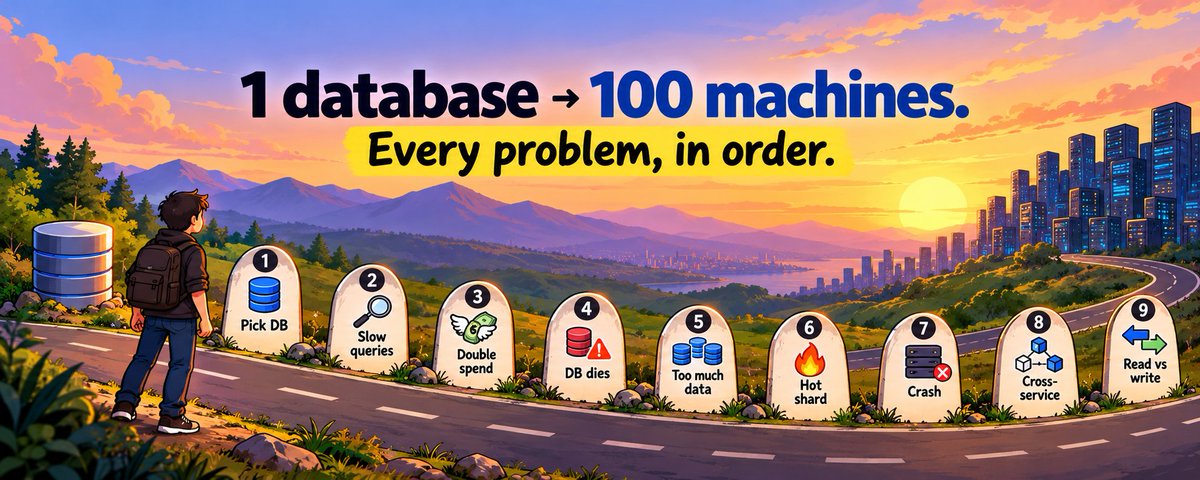
Your app works with 100 users. At 1 million, it breaks.
Not because your code is bad. Every database breaks in the same 9 ways, in the same order.
Here’s each one, and how real systems fix it.
Save this before your next interview 🔖👇
Sahil Sahu retweeted

someone built a swimmable underwater world in one 97 KB HTML file with Fable 5.2
link in the comments
Sahil Sahu retweeted
Claude Fable 5.2 looks insane
69.9% on FrontierSWE, 74.6% on Terminal-Bench Science, 89.3% on OSWorld
The jump over 5.1 is massive, especially in agentic coding and robotics
The AI race is getting interesting again


Sahil Sahu retweeted
🚀 Learn System Design with me
Day 53 [Part 1/2]: Elasticsearch – The Inverted Index
Imagine searching for a word across millions of documents.
Reading every document one by one would be extremely slow.
Elasticsearch solves this using something called an Inverted Index, built on the Lucene library.
1. What Is an Inverted Index?
A normal approach maps documents to the words they contain.
An inverted index does the opposite.
It maps each word to the list of documents containing that word.
For example:
Kafka → Doc 1, Doc 3, Doc 5
Redis → Doc 2, Doc 3
Systems → Doc 1, Doc 2, Doc 5
Searching for "Kafka" immediately gives us the matching documents without scanning everything.
2. How Is Text Processed?
Before indexing, Elasticsearch analyzes the text:
Tokenization: Splits text into individual words.
Lowercasing: Converts words to lowercase.
Stemming: Can reduce words like "running" and "runs" to "run".
Stop words: Can remove common words like "the" and "is".
The same analysis is applied to search queries.
3. How Does Searching Work?
Suppose we search for: "Distributed AND Systems"
Elasticsearch retrieves the document lists for both words and intersects them to find documents containing both.
These lists are called postings lists and are stored in a way that makes searching efficient.
4. How Does It Scale?
Elasticsearch divides an index into smaller pieces called shards.
Each shard can search independently, and multiple shards can work in parallel across different nodes.
5. When Do New Documents Become Searchable?
Elasticsearch writes data into small, immutable segments.
After a refresh, these segments become searchable.
By default, Elasticsearch refreshes approximately every second, making search near real-time rather than instantly consistent.
The key takeaway?
An inverted index turns full-text search from scanning millions of documents into looking up words and their matching document lists.
[Part 2/2]: Elasticsearch Relevance Scoring - how it decides which search result should appear first.

🚀 Learn System Design with me
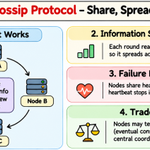
Day 52: Gossip Protocol
Imagine a system with hundreds of servers.
Every server needs to know which other servers are alive and which have failed.
But having one central server track everything creates a single point of failure.
That's where the Gossip Protocol comes in.
1. How Does It Work?
Each server randomly selects a few other servers and shares information about the cluster with them.
This information includes which servers are alive and their latest status.
Those servers share the updated information with others, allowing it to spread throughout the cluster.
2. How Does Information Spread So Fast?
Each server shares information with multiple peers instead of contacting every server individually.
As more servers spread the information, the entire cluster learns about changes within a short time.
3. How Does It Detect Failures?
Servers exchange heartbeat information to indicate that they're alive.
If a server stops responding for long enough, other servers begin to suspect it has failed.
A temporary network delay doesn't necessarily mean the server is dead, so systems often use additional checks before declaring a failure.
4. What Happens If Servers Disagree?
For a short time, some servers might believe a node is alive while others suspect it has failed.
Eventually, information spreads and their views converge.
This is called eventual consistency.
The key takeaway ?
Gossip Protocol allows servers to share information and detect failures without depending on a central coordinator.
It's used in distributed systems like Cassandra to keep cluster membership information updated.
Tomorrow: Elasticsearch - how to search through millions of documents efficiently.

Sahil Sahu retweeted
🚀 Learn System Design with me
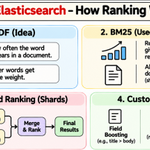
Day 53 [Part 2/2]: Elasticsearch – How Ranking Works
Finding matching documents is only half the job.
A search might return thousands of results, but users usually click only the first few.
So how does Elasticsearch decide which result comes first?
1. What Is TF-IDF?
TF-IDF is a classic technique for measuring how relevant a document is to a search query.
It considers two things:
Term Frequency (TF): How often a search word appears in a document.
Inverse Document Frequency (IDF): How rare that word is across all documents.
For example, the word "the" appears everywhere, so it carries little information.
But "Kubernetes" might appear in fewer documents, making it a stronger signal.
2. What Is BM25?
Elasticsearch uses BM25 as its default similarity algorithm.
It improves upon TF-IDF in two important ways:
Repeating a word 100 times doesn't make a document 100 times more relevant. The score has diminishing returns.
Document length matters. A matching term in a short document can carry more weight than the same term buried in a very long document.
3. How Does Distributed Ranking Work?
Remember, Elasticsearch uses multiple shards.
Searching happens in two main phases:
Query Phase: Each shard finds its top matching documents and sends their IDs and scores to the coordinating node.
Fetch Phase: The coordinating node combines the results, selects the final top documents, and fetches their full data.
This avoids transferring entire documents from every shard.
4. Can We Customize Ranking?
Yes!
You can influence ranking using:
Field Boosting: Give title matches more importance than body matches.
Recency: Prefer recently published documents.
Popularity: Give popular documents a higher score.
The key takeaway?
Search isn't just about finding matching documents. It's about ranking the most relevant results first.
Elasticsearch uses BM25 and customizable scoring to make that happen.
Tomorrow: Object Storage - where should images, videos, and other large files actually live ?

🚀 Learn System Design with me
Day 53 [Part 1/2]: Elasticsearch – The Inverted Index
Imagine searching for a word across millions of documents.
Reading every document one by one would be extremely slow.
Elasticsearch solves this using something called an Inverted Index, built on the Lucene library.
1. What Is an Inverted Index?
A normal approach maps documents to the words they contain.
An inverted index does the opposite.
It maps each word to the list of documents containing that word.
For example:
Kafka → Doc 1, Doc 3, Doc 5
Redis → Doc 2, Doc 3
Systems → Doc 1, Doc 2, Doc 5
Searching for "Kafka" immediately gives us the matching documents without scanning everything.
2. How Is Text Processed?
Before indexing, Elasticsearch analyzes the text:
Tokenization: Splits text into individual words.
Lowercasing: Converts words to lowercase.
Stemming: Can reduce words like "running" and "runs" to "run".
Stop words: Can remove common words like "the" and "is".
The same analysis is applied to search queries.
3. How Does Searching Work?
Suppose we search for: "Distributed AND Systems"
Elasticsearch retrieves the document lists for both words and intersects them to find documents containing both.
These lists are called postings lists and are stored in a way that makes searching efficient.
4. How Does It Scale?
Elasticsearch divides an index into smaller pieces called shards.
Each shard can search independently, and multiple shards can work in parallel across different nodes.
5. When Do New Documents Become Searchable?
Elasticsearch writes data into small, immutable segments.
After a refresh, these segments become searchable.
By default, Elasticsearch refreshes approximately every second, making search near real-time rather than instantly consistent.
The key takeaway?
An inverted index turns full-text search from scanning millions of documents into looking up words and their matching document lists.
[Part 2/2]: Elasticsearch Relevance Scoring - how it decides which search result should appear first.
🚀 Learn System Design with me
Day 54 [Part 2/2]: CDN – How Content Delivery Works
Imagine your server is in India, but someone in the US wants to download an image from your website.
Every request has to travel thousands of kilometres.
A CDN solves this by bringing content closer to users.
1. What Is a CDN?
A Content Delivery Network (CDN) is a network of servers distributed across different geographical locations.
Instead of serving every request from one central server, a CDN stores copies of your content at nearby servers called Edge Servers.
2. How Does It Work?
When a user requests an image or video:
DNS or routing directs the user to a nearby edge server.
If the file is already cached, the edge server sends it immediately.
This is called a Cache Hit.
Your origin server doesn't even need to handle that request!
3. What Happens on a Cache Miss?
What if the edge server doesn't have the requested file?
The edge server fetches it from the origin server.
It delivers the file to the user.
It stores a copy for future requests.
This is called the Pull Model.
In the Push Model, content is uploaded to the CDN in advance.
Some CDNs also use regional cache layers to reduce repeated requests to the origin.
4. How Does It Handle Updated Files?
Imagine you update your website's logo.
But CDN servers are still serving the old version.
This is a cache freshness problem.
Two common solutions:
Cache Invalidation: Remove old cached content using a purge.
Versioned URLs: Change the filename whenever the content changes.
For example: logo_v1.png → logo_v2.png
The new URL gets a fresh cache entry.
5. Why Do We Need a CDN?
Lower latency: Content is served closer to users.
Less origin traffic: Fewer requests reach your main server.
Better scalability: Handles sudden traffic spikes.
Security: Can provide DDoS protection and terminate TLS closer to users.
The key takeaway?
Object Storage keeps files durable. A CDN delivers those files quickly across the world.
Together, they form a common architecture for serving images, videos and static content.
Tomorrow: Phase 8 – Distributed Systems Challenges. We'll start with why locking across multiple machines is so difficult.

🚀 Learn System Design with me
Day 54 [Part 1/2]: Object Storage
Imagine uploading a 2 GB video or millions of profile pictures.
Would you store all of them directly in your database?
Probably not.
Databases are designed for structured data. Object Storage is designed for storing large files.
1. What Is Object Storage?
Object storage stores files as individual objects.
Each object contains:
Actual data (image, video, PDF, etc.)
A unique key (identifier)
Metadata (file type, size, etc.)
Examples include Amazon S3, Google Cloud Storage and Azure Blob Storage.
2. How Does It Work?
Unlike traditional file systems, object storage uses a flat namespace.
You access objects using unique keys through HTTP APIs.
Common operations include:
PUT → Upload an object.
GET → Retrieve an object.
DELETE → Delete an object.
What looks like folders is often just part of the object's key.
3. Can We Edit an Object?
Not like a normal file.
You generally replace the entire object instead of modifying a few bytes in the middle.
This makes object storage unsuitable for workloads requiring frequent small random writes.
But it scales to enormous amounts of data and is cost-effective for large files.
4. How Does It Keep Data Safe?
Object storage keeps data redundantly across multiple machines and availability zones.
It can use:
Replication: Maintain multiple copies of data.
Erasure Coding: Split data into fragments with extra recovery information.
For example, Amazon S3 advertises 99.999999999% (11 nines) durability.
5. How Does It Fit Into System Design?
A common architecture looks like this:
User uploads a file.
Application stores the file in object storage.
Database stores only the file key and metadata.
For large files, systems often use multipart uploads or pre-signed URLs, allowing clients to upload directly to storage without sending the entire file through the application server.
The key takeaway?
Use databases for structured records and object storage for large files.
Separating the two makes applications easier to scale and manage.
[Part 2/2]: CDN (Content Delivery Network) - how files reach users around the world faster.

4
188
🚀 Learn System Design with me
Day 54 [Part 1/2]: Object Storage
Imagine uploading a 2 GB video or millions of profile pictures.
Would you store all of them directly in your database?
Probably not.
Databases are designed for structured data. Object Storage is designed for storing large files.
1. What Is Object Storage?
Object storage stores files as individual objects.
Each object contains:
Actual data (image, video, PDF, etc.)
A unique key (identifier)
Metadata (file type, size, etc.)
Examples include Amazon S3, Google Cloud Storage and Azure Blob Storage.
2. How Does It Work?
Unlike traditional file systems, object storage uses a flat namespace.
You access objects using unique keys through HTTP APIs.
Common operations include:
PUT → Upload an object.
GET → Retrieve an object.
DELETE → Delete an object.
What looks like folders is often just part of the object's key.
3. Can We Edit an Object?
Not like a normal file.
You generally replace the entire object instead of modifying a few bytes in the middle.
This makes object storage unsuitable for workloads requiring frequent small random writes.
But it scales to enormous amounts of data and is cost-effective for large files.
4. How Does It Keep Data Safe?
Object storage keeps data redundantly across multiple machines and availability zones.
It can use:
Replication: Maintain multiple copies of data.
Erasure Coding: Split data into fragments with extra recovery information.
For example, Amazon S3 advertises 99.999999999% (11 nines) durability.
5. How Does It Fit Into System Design?
A common architecture looks like this:
User uploads a file.
Application stores the file in object storage.
Database stores only the file key and metadata.
For large files, systems often use multipart uploads or pre-signed URLs, allowing clients to upload directly to storage without sending the entire file through the application server.
The key takeaway?
Use databases for structured records and object storage for large files.
Separating the two makes applications easier to scale and manage.
[Part 2/2]: CDN (Content Delivery Network) - how files reach users around the world faster.
🚀 Learn System Design with me
Day 53 [Part 2/2]: Elasticsearch – How Ranking Works
Finding matching documents is only half the job.
A search might return thousands of results, but users usually click only the first few.
So how does Elasticsearch decide which result comes first?
1. What Is TF-IDF?
TF-IDF is a classic technique for measuring how relevant a document is to a search query.
It considers two things:
Term Frequency (TF): How often a search word appears in a document.
Inverse Document Frequency (IDF): How rare that word is across all documents.
For example, the word "the" appears everywhere, so it carries little information.
But "Kubernetes" might appear in fewer documents, making it a stronger signal.
2. What Is BM25?
Elasticsearch uses BM25 as its default similarity algorithm.
It improves upon TF-IDF in two important ways:
Repeating a word 100 times doesn't make a document 100 times more relevant. The score has diminishing returns.
Document length matters. A matching term in a short document can carry more weight than the same term buried in a very long document.
3. How Does Distributed Ranking Work?
Remember, Elasticsearch uses multiple shards.
Searching happens in two main phases:
Query Phase: Each shard finds its top matching documents and sends their IDs and scores to the coordinating node.
Fetch Phase: The coordinating node combines the results, selects the final top documents, and fetches their full data.
This avoids transferring entire documents from every shard.
4. Can We Customize Ranking?
Yes!
You can influence ranking using:
Field Boosting: Give title matches more importance than body matches.
Recency: Prefer recently published documents.
Popularity: Give popular documents a higher score.
The key takeaway?
Search isn't just about finding matching documents. It's about ranking the most relevant results first.
Elasticsearch uses BM25 and customizable scoring to make that happen.
Tomorrow: Object Storage - where should images, videos, and other large files actually live ?
🚀 Learn System Design with me
Day 53 [Part 2/2]: Elasticsearch – How Ranking Works
Finding matching documents is only half the job.
A search might return thousands of results, but users usually click only the first few.
So how does Elasticsearch decide which result comes first?
1. What Is TF-IDF?
TF-IDF is a classic technique for measuring how relevant a document is to a search query.
It considers two things:
Term Frequency (TF): How often a search word appears in a document.
Inverse Document Frequency (IDF): How rare that word is across all documents.
For example, the word "the" appears everywhere, so it carries little information.
But "Kubernetes" might appear in fewer documents, making it a stronger signal.
2. What Is BM25?
Elasticsearch uses BM25 as its default similarity algorithm.
It improves upon TF-IDF in two important ways:
Repeating a word 100 times doesn't make a document 100 times more relevant. The score has diminishing returns.
Document length matters. A matching term in a short document can carry more weight than the same term buried in a very long document.
3. How Does Distributed Ranking Work?
Remember, Elasticsearch uses multiple shards.
Searching happens in two main phases:
Query Phase: Each shard finds its top matching documents and sends their IDs and scores to the coordinating node.
Fetch Phase: The coordinating node combines the results, selects the final top documents, and fetches their full data.
This avoids transferring entire documents from every shard.
4. Can We Customize Ranking?
Yes!
You can influence ranking using:
Field Boosting: Give title matches more importance than body matches.
Recency: Prefer recently published documents.
Popularity: Give popular documents a higher score.
The key takeaway?
Search isn't just about finding matching documents. It's about ranking the most relevant results first.
Elasticsearch uses BM25 and customizable scoring to make that happen.
Tomorrow: Object Storage - where should images, videos, and other large files actually live ?
🚀 Learn System Design with me
Day 53 [Part 1/2]: Elasticsearch – The Inverted Index
Imagine searching for a word across millions of documents.
Reading every document one by one would be extremely slow.
Elasticsearch solves this using something called an Inverted Index, built on the Lucene library.
1. What Is an Inverted Index?
A normal approach maps documents to the words they contain.
An inverted index does the opposite.
It maps each word to the list of documents containing that word.
For example:
Kafka → Doc 1, Doc 3, Doc 5
Redis → Doc 2, Doc 3
Systems → Doc 1, Doc 2, Doc 5
Searching for "Kafka" immediately gives us the matching documents without scanning everything.
2. How Is Text Processed?
Before indexing, Elasticsearch analyzes the text:
Tokenization: Splits text into individual words.
Lowercasing: Converts words to lowercase.
Stemming: Can reduce words like "running" and "runs" to "run".
Stop words: Can remove common words like "the" and "is".
The same analysis is applied to search queries.
3. How Does Searching Work?
Suppose we search for: "Distributed AND Systems"
Elasticsearch retrieves the document lists for both words and intersects them to find documents containing both.
These lists are called postings lists and are stored in a way that makes searching efficient.
4. How Does It Scale?
Elasticsearch divides an index into smaller pieces called shards.
Each shard can search independently, and multiple shards can work in parallel across different nodes.
5. When Do New Documents Become Searchable?
Elasticsearch writes data into small, immutable segments.
After a refresh, these segments become searchable.
By default, Elasticsearch refreshes approximately every second, making search near real-time rather than instantly consistent.
The key takeaway?
An inverted index turns full-text search from scanning millions of documents into looking up words and their matching document lists.
[Part 2/2]: Elasticsearch Relevance Scoring - how it decides which search result should appear first.
🚀 Learn System Design with me
Day 53 [Part 1/2]: Elasticsearch – The Inverted Index
Imagine searching for a word across millions of documents.
Reading every document one by one would be extremely slow.
Elasticsearch solves this using something called an Inverted Index, built on the Lucene library.
1. What Is an Inverted Index?
A normal approach maps documents to the words they contain.
An inverted index does the opposite.
It maps each word to the list of documents containing that word.
For example:
Kafka → Doc 1, Doc 3, Doc 5
Redis → Doc 2, Doc 3
Systems → Doc 1, Doc 2, Doc 5
Searching for "Kafka" immediately gives us the matching documents without scanning everything.
2. How Is Text Processed?
Before indexing, Elasticsearch analyzes the text:
Tokenization: Splits text into individual words.
Lowercasing: Converts words to lowercase.
Stemming: Can reduce words like "running" and "runs" to "run".
Stop words: Can remove common words like "the" and "is".
The same analysis is applied to search queries.
3. How Does Searching Work?
Suppose we search for: "Distributed AND Systems"
Elasticsearch retrieves the document lists for both words and intersects them to find documents containing both.
These lists are called postings lists and are stored in a way that makes searching efficient.
4. How Does It Scale?
Elasticsearch divides an index into smaller pieces called shards.
Each shard can search independently, and multiple shards can work in parallel across different nodes.
5. When Do New Documents Become Searchable?
Elasticsearch writes data into small, immutable segments.
After a refresh, these segments become searchable.
By default, Elasticsearch refreshes approximately every second, making search near real-time rather than instantly consistent.
The key takeaway?
An inverted index turns full-text search from scanning millions of documents into looking up words and their matching document lists.
[Part 2/2]: Elasticsearch Relevance Scoring - how it decides which search result should appear first.
🚀 Learn System Design with me
Day 52: Gossip Protocol
Imagine a system with hundreds of servers.
Every server needs to know which other servers are alive and which have failed.
But having one central server track everything creates a single point of failure.
That's where the Gossip Protocol comes in.
1. How Does It Work?
Each server randomly selects a few other servers and shares information about the cluster with them.
This information includes which servers are alive and their latest status.
Those servers share the updated information with others, allowing it to spread throughout the cluster.
2. How Does Information Spread So Fast?
Each server shares information with multiple peers instead of contacting every server individually.
As more servers spread the information, the entire cluster learns about changes within a short time.
3. How Does It Detect Failures?
Servers exchange heartbeat information to indicate that they're alive.
If a server stops responding for long enough, other servers begin to suspect it has failed.
A temporary network delay doesn't necessarily mean the server is dead, so systems often use additional checks before declaring a failure.
4. What Happens If Servers Disagree?
For a short time, some servers might believe a node is alive while others suspect it has failed.
Eventually, information spreads and their views converge.
This is called eventual consistency.
The key takeaway ?
Gossip Protocol allows servers to share information and detect failures without depending on a central coordinator.
It's used in distributed systems like Cassandra to keep cluster membership information updated.
Tomorrow: Elasticsearch - how to search through millions of documents efficiently.
Sahil Sahu retweeted
🚀 Learn System Design with me
Day 52: Gossip Protocol
Imagine a system with hundreds of servers.
Every server needs to know which other servers are alive and which have failed.
But having one central server track everything creates a single point of failure.
That's where the Gossip Protocol comes in.
1. How Does It Work?
Each server randomly selects a few other servers and shares information about the cluster with them.
This information includes which servers are alive and their latest status.
Those servers share the updated information with others, allowing it to spread throughout the cluster.
2. How Does Information Spread So Fast?
Each server shares information with multiple peers instead of contacting every server individually.
As more servers spread the information, the entire cluster learns about changes within a short time.
3. How Does It Detect Failures?
Servers exchange heartbeat information to indicate that they're alive.
If a server stops responding for long enough, other servers begin to suspect it has failed.
A temporary network delay doesn't necessarily mean the server is dead, so systems often use additional checks before declaring a failure.
4. What Happens If Servers Disagree?
For a short time, some servers might believe a node is alive while others suspect it has failed.
Eventually, information spreads and their views converge.
This is called eventual consistency.
The key takeaway ?
Gossip Protocol allows servers to share information and detect failures without depending on a central coordinator.
It's used in distributed systems like Cassandra to keep cluster membership information updated.
Tomorrow: Elasticsearch - how to search through millions of documents efficiently.
🚀 Learn System Design with me
Day 51: Merkle Trees
Imagine a database replicated across multiple servers.
Over time, some servers might have different data because of failed writes or temporary outages.
But how do we find the differences without comparing every single record ?
That's where Merkle Trees come in.
A Merkle Tree is a data structure that uses hashes to compare large amounts of data efficiently.
How does it work?
1. Hash the Data
Split the data into smaller blocks and calculate a hash for each block.
2. Build the Tree
Combine pairs of hashes and hash them again to create parent nodes. Repeat until you reach a single hash at the top, called the Root Hash.
3. Compare Replicas
Two servers first compare their root hashes.
If the hashes match, their data is identical, assuming the same data and hashing rules.
If they differ, they compare the child hashes to identify which branches contain different data.
4. Find Only the Differences
They continue checking the mismatched branches until they identify the specific data blocks that differ.
Instead of comparing everything, they only need to investigate and synchronize the affected parts.
Where are Merkle Trees used ?
Cassandra: Detecting differences between replicas during anti-entropy repair.
Git: Verifying data integrity.
Blockchain systems: Efficiently summarizing and verifying transaction data.
The key takeaway?
Merkle Trees help systems detect differences in large datasets by comparing small hashes instead of every record.
Tomorrow: Failure Detection in Distributed Systems — how a cluster determines whether another node is still alive.

492! 👀🔥
Just 8 more followers to hit 500! 🎯
Can we hit 500 today? 👀🚀
Hey @X, connect me with people interested in:
Development & CP
System Design & AI
Let's make it happen! 🤝

7
9
165
Imagine a rumour spreading across a colony.
One neighbour tells a few people, and they pass it on to others.
Soon, the whole colony knows! 👀
Servers use a similar idea to share information in distributed systems.
Real-life ideas. Smart engineering.
#SystemDesign #LearningInPublic
🚀 Learn System Design with me
Day 52: Gossip Protocol
Imagine a system with hundreds of servers.
Every server needs to know which other servers are alive and which have failed.
But having one central server track everything creates a single point of failure.
That's where the Gossip Protocol comes in.
1. How Does It Work?
Each server randomly selects a few other servers and shares information about the cluster with them.
This information includes which servers are alive and their latest status.
Those servers share the updated information with others, allowing it to spread throughout the cluster.
2. How Does Information Spread So Fast?
Each server shares information with multiple peers instead of contacting every server individually.
As more servers spread the information, the entire cluster learns about changes within a short time.
3. How Does It Detect Failures?
Servers exchange heartbeat information to indicate that they're alive.
If a server stops responding for long enough, other servers begin to suspect it has failed.
A temporary network delay doesn't necessarily mean the server is dead, so systems often use additional checks before declaring a failure.
4. What Happens If Servers Disagree?
For a short time, some servers might believe a node is alive while others suspect it has failed.
Eventually, information spreads and their views converge.
This is called eventual consistency.
The key takeaway ?
Gossip Protocol allows servers to share information and detect failures without depending on a central coordinator.
It's used in distributed systems like Cassandra to keep cluster membership information updated.
Tomorrow: Elasticsearch - how to search through millions of documents efficiently.
1
2
28
🚀 Learn System Design with me
Day 52: Gossip Protocol
Imagine a system with hundreds of servers.
Every server needs to know which other servers are alive and which have failed.
But having one central server track everything creates a single point of failure.
That's where the Gossip Protocol comes in.
1. How Does It Work?
Each server randomly selects a few other servers and shares information about the cluster with them.
This information includes which servers are alive and their latest status.
Those servers share the updated information with others, allowing it to spread throughout the cluster.
2. How Does Information Spread So Fast?
Each server shares information with multiple peers instead of contacting every server individually.
As more servers spread the information, the entire cluster learns about changes within a short time.
3. How Does It Detect Failures?
Servers exchange heartbeat information to indicate that they're alive.
If a server stops responding for long enough, other servers begin to suspect it has failed.
A temporary network delay doesn't necessarily mean the server is dead, so systems often use additional checks before declaring a failure.
4. What Happens If Servers Disagree?
For a short time, some servers might believe a node is alive while others suspect it has failed.
Eventually, information spreads and their views converge.
This is called eventual consistency.
The key takeaway ?
Gossip Protocol allows servers to share information and detect failures without depending on a central coordinator.
It's used in distributed systems like Cassandra to keep cluster membership information updated.
Tomorrow: Elasticsearch - how to search through millions of documents efficiently.
🚀 Learn System Design with me
Day 51: Merkle Trees
Imagine a database replicated across multiple servers.
Over time, some servers might have different data because of failed writes or temporary outages.
But how do we find the differences without comparing every single record ?
That's where Merkle Trees come in.
A Merkle Tree is a data structure that uses hashes to compare large amounts of data efficiently.
How does it work?
1. Hash the Data
Split the data into smaller blocks and calculate a hash for each block.
2. Build the Tree
Combine pairs of hashes and hash them again to create parent nodes. Repeat until you reach a single hash at the top, called the Root Hash.
3. Compare Replicas
Two servers first compare their root hashes.
If the hashes match, their data is identical, assuming the same data and hashing rules.
If they differ, they compare the child hashes to identify which branches contain different data.
4. Find Only the Differences
They continue checking the mismatched branches until they identify the specific data blocks that differ.
Instead of comparing everything, they only need to investigate and synchronize the affected parts.
Where are Merkle Trees used ?
Cassandra: Detecting differences between replicas during anti-entropy repair.
Git: Verifying data integrity.
Blockchain systems: Efficiently summarizing and verifying transaction data.
The key takeaway?
Merkle Trees help systems detect differences in large datasets by comparing small hashes instead of every record.
Tomorrow: Failure Detection in Distributed Systems — how a cluster determines whether another node is still alive.
🚀 Learn System Design with me
Day 51: Merkle Trees
Imagine a database replicated across multiple servers.
Over time, some servers might have different data because of failed writes or temporary outages.
But how do we find the differences without comparing every single record ?
That's where Merkle Trees come in.
A Merkle Tree is a data structure that uses hashes to compare large amounts of data efficiently.
How does it work?
1. Hash the Data
Split the data into smaller blocks and calculate a hash for each block.
2. Build the Tree
Combine pairs of hashes and hash them again to create parent nodes. Repeat until you reach a single hash at the top, called the Root Hash.
3. Compare Replicas
Two servers first compare their root hashes.
If the hashes match, their data is identical, assuming the same data and hashing rules.
If they differ, they compare the child hashes to identify which branches contain different data.
4. Find Only the Differences
They continue checking the mismatched branches until they identify the specific data blocks that differ.
Instead of comparing everything, they only need to investigate and synchronize the affected parts.
Where are Merkle Trees used ?
Cassandra: Detecting differences between replicas during anti-entropy repair.
Git: Verifying data integrity.
Blockchain systems: Efficiently summarizing and verifying transaction data.
The key takeaway?
Merkle Trees help systems detect differences in large datasets by comparing small hashes instead of every record.
Tomorrow: Failure Detection in Distributed Systems — how a cluster determines whether another node is still alive.
🚀 Learn System Design with me
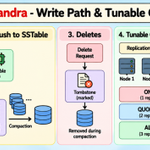
Day 50 [Part 2/2]: Cassandra, Write Path & Tunable Consistency
Cassandra is designed to handle massive write traffic across multiple machines.
But how does it make writes so fast while keeping data safe?
Let's understand its write path.
1. Write Path
When a write arrives, Cassandra performs two main operations:
Commit Log: Records the write on disk to help recover data after a crash.
Memtable: Stores the data in memory for fast access.
Once the write is recorded successfully, Cassandra can acknowledge it.
2. What Happens When Memory Fills Up?
The memtable is flushed to disk as an SSTable (Sorted String Table).
SSTables are immutable, meaning Cassandra doesn't update them in place.
Over time, multiple SSTables accumulate, so Cassandra uses compaction to merge them and clean up obsolete data.
3. How Does Cassandra Handle Deletes?
Instead of immediately removing data from immutable SSTables, Cassandra writes a marker called a tombstone.
The actual data is removed later during compaction, after the relevant deletion and grace-period rules allow it.
4. Tunable Consistency
Cassandra replicates data across multiple nodes.
You can choose how many replicas must respond to a read or write.
For example, with a replication factor of 3:
ONE: Only one replica needs to respond.
QUORUM: A majority of replicas must respond (2 out of 3).
ALL: Every replica must respond.
Fewer required responses can improve availability and reduce latency, while stronger coordination can improve consistency.
5. How Do We Get Stronger Consistency?
A useful rule is:
Read Replicas + Write Replicas > Total Replicas
For example, with 3 replicas:
Write to QUORUM = 2 replicas.
Read from QUORUM = 2 replicas.
Total = 4, which is greater than 3.
This guarantees that the read and write replica sets overlap, helping the read observe the latest successful write under the usual quorum assumptions.
The key takeaway?
Cassandra combines a fast, append-oriented write path with configurable consistency levels.
You can tune the balance between latency, availability, and consistency based on your application's needs.
Tomorrow: Cassandra Anti-Entropy - how replicas detect and repair differences in their data.


Hey @X 👋
I'm Sahil, an engineer who loves solving problems and building things. 🛠️
Currently learning and building around:
• Full Stack Development & CP
• System Design & AI
I'll share what I build, learn, fail at, and improve along the way.
Building in public. One project at a time.
If you're building too, let's connect
34
25
948
🚀 Learn System Design with me
Day 50 [Part 2/2]: Cassandra, Write Path & Tunable Consistency
Cassandra is designed to handle massive write traffic across multiple machines.
But how does it make writes so fast while keeping data safe?
Let's understand its write path.
1. Write Path
When a write arrives, Cassandra performs two main operations:
Commit Log: Records the write on disk to help recover data after a crash.
Memtable: Stores the data in memory for fast access.
Once the write is recorded successfully, Cassandra can acknowledge it.
2. What Happens When Memory Fills Up?
The memtable is flushed to disk as an SSTable (Sorted String Table).
SSTables are immutable, meaning Cassandra doesn't update them in place.
Over time, multiple SSTables accumulate, so Cassandra uses compaction to merge them and clean up obsolete data.
3. How Does Cassandra Handle Deletes?
Instead of immediately removing data from immutable SSTables, Cassandra writes a marker called a tombstone.
The actual data is removed later during compaction, after the relevant deletion and grace-period rules allow it.
4. Tunable Consistency
Cassandra replicates data across multiple nodes.
You can choose how many replicas must respond to a read or write.
For example, with a replication factor of 3:
ONE: Only one replica needs to respond.
QUORUM: A majority of replicas must respond (2 out of 3).
ALL: Every replica must respond.
Fewer required responses can improve availability and reduce latency, while stronger coordination can improve consistency.
5. How Do We Get Stronger Consistency?
A useful rule is:
Read Replicas + Write Replicas > Total Replicas
For example, with 3 replicas:
Write to QUORUM = 2 replicas.
Read from QUORUM = 2 replicas.
Total = 4, which is greater than 3.
This guarantees that the read and write replica sets overlap, helping the read observe the latest successful write under the usual quorum assumptions.
The key takeaway?
Cassandra combines a fast, append-oriented write path with configurable consistency levels.
You can tune the balance between latency, availability, and consistency based on your application's needs.
Tomorrow: Cassandra Anti-Entropy - how replicas detect and repair differences in their data.
🚀 Learn System Design with me
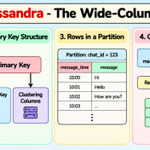
Day 50 [Part 1/2]: Cassandra, The Wide-Column Model
Cassandra was built to handle huge amounts of data and writes across multiple machines without relying on a single point of failure.
Unlike traditional relational databases, Cassandra is designed around queries rather than relationships between tables.
Let's understand how it works.
1. Partition Key
The partition key decides which node stores your data.
Cassandra hashes this key to determine where the data belongs in the cluster.
2. Clustering Columns
Clustering columns decide how rows are sorted within a partition.
Together, they help Cassandra retrieve related data efficiently.
3. How Does It Work?
Imagine building a chat application.
You store messages using chat_id as the partition key and message_time as a clustering column.
All messages belonging to the same chat are stored in the same partition, sorted by time.
Now, fetching the latest 50 messages becomes efficient because Cassandra can read the relevant partition in order.
4. Query-First Data Modeling
Cassandra doesn't support joins like traditional relational databases.
Instead, you design tables around the queries your application needs to execute.
Sometimes, this means storing the same data in multiple tables to make reads faster.
You trade additional storage and write complexity for efficient reads.
5. What Can Go Wrong?
If too much data or traffic is concentrated in one partition, it can become a bottleneck.
That's why choosing the right partition key is critical.
The key takeaway?
The partition key decides where data lives, while clustering columns decide how it's organized within that partition.
Cassandra works best when you design your data model around your application's queries.
[Part 2/2]: Cassandra Internals - why writes are so fast and how consistency levels work.

🚀 Learn System Design with me
Day 50 [Part 1/2]: Cassandra, The Wide-Column Model
Cassandra was built to handle huge amounts of data and writes across multiple machines without relying on a single point of failure.
Unlike traditional relational databases, Cassandra is designed around queries rather than relationships between tables.
Let's understand how it works.
1. Partition Key
The partition key decides which node stores your data.
Cassandra hashes this key to determine where the data belongs in the cluster.
2. Clustering Columns
Clustering columns decide how rows are sorted within a partition.
Together, they help Cassandra retrieve related data efficiently.
3. How Does It Work?
Imagine building a chat application.
You store messages using chat_id as the partition key and message_time as a clustering column.
All messages belonging to the same chat are stored in the same partition, sorted by time.
Now, fetching the latest 50 messages becomes efficient because Cassandra can read the relevant partition in order.
4. Query-First Data Modeling
Cassandra doesn't support joins like traditional relational databases.
Instead, you design tables around the queries your application needs to execute.
Sometimes, this means storing the same data in multiple tables to make reads faster.
You trade additional storage and write complexity for efficient reads.
5. What Can Go Wrong?
If too much data or traffic is concentrated in one partition, it can become a bottleneck.
That's why choosing the right partition key is critical.
The key takeaway?
The partition key decides where data lives, while clustering columns decide how it's organized within that partition.
Cassandra works best when you design your data model around your application's queries.
[Part 2/2]: Cassandra Internals - why writes are so fast and how consistency levels work.
🚀 Learn System Design with me
Day 49 [Part 2/2]: Redis Persistence & Real-World Use Cases
Redis stores data in memory, which makes it extremely fast.
But there's a problem.
What happens when the server crashes or restarts?
Without persistence, data stored only in memory is lost.
Redis solves this by offering two main persistence mechanisms.
1. RDB (Redis Database Backup)
RDB takes snapshots of your entire dataset at specific intervals and saves them to disk.
Think of it like taking a backup of your database every few minutes.
The advantage?
Snapshots are compact and can be loaded quickly when Redis restarts.
The downside?
If Redis crashes, changes made since the last snapshot may be lost.
2. AOF (Append Only File)
Instead of periodically saving snapshots, AOF records write operations in a log file that Redis can replay to rebuild its dataset.
You can configure how frequently Redis synchronizes this log to disk.
Always: Synchronizes after every write operation. Safer, but slower.
Every second: Synchronizes approximately once per second. A common balance between performance and durability.
No: Lets the operating system decide when to synchronize, offering less predictable durability.
Which one should you use?
RDB is useful for compact backups and faster recovery.
AOF offers better durability with an appropriate synchronization policy.
Many setups use both to balance recovery speed and data safety.
Where is Redis used in real systems?
Caching: Store frequently accessed data to reduce database load.
Session Storage: Keep track of user sessions.
Rate Limiting: Track request counts using atomic counters.
Leaderboards: Rank players using sorted sets.
Job Queues: Coordinate background tasks.
Pub/Sub: Send messages between publishers and subscribers.
Distributed Locks: Coordinate access to shared resources across multiple servers.
Redis can also scale across multiple machines using Redis Cluster, which distributes data across 16,384 hash slots.
The key takeaway?
Redis isn't just about speed. Persistence, data structures, and scaling make it useful for many different system design problems.
Tomorrow: Apache Cassandra - a database designed for high write throughput and distributed data storage.
