

Design Engineer Prev: @tellidotcom, @mintgate_io, @leapdao, @0xhabitat
Berlin, Deutschland
Joined September 2012
- Tweets715
- Following2.5K
- Followers366
- Likes4.8K




tested Runway 1.4 with 3 agents pressing play at the same time, from 3 worktrees of the same app
all three answered within 15s, each on its own simulator, all three apps still running after
before 1.4 they shared one session and closed each other's app 🫠
the simple way to build dictation: record while you talk, transcribe when you let go. the longer you talk, the longer you wait
sayso transcribes at your pauses while you're still talking. let go and ~0.3 s is left, however long you spoke
Runway isn't only for the simulator. plug in your iPhone and press play, or run Mac apps right on the Mac
same window, same logs, same ⌘R. works with Xcode 27 too

ALT Runway main window: one app running on iPhone 17 Pro, one on the Mac
sayso comes out on Tuesday 📻
hold a key, talk, let go. words land in the app you're in, or fn ⌃ makes it a command
free, no account, runs on your Mac. and the listening glow takes its colours from the mood of your voice
Runway's main window is basically Xcode's welcome window grown up. borderless, app icon, search, your projects, Return to run
⌘R ⌘B ⌘U ⌘. all do what you'd expect. if you know Xcode, you already know Runway

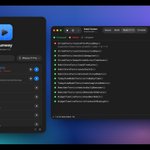
ALT Runway main window and the app's live console
4 small things in Runway 1.4 your agent will notice:
- no project argument needed, it uses the folder the agent works in
- cancel actually stops the build
- progress updates while it builds
- busy project? it says who's using it and can wait for them
shipping a paid Mac app solo:
- SwiftUI, Developer ID, notarized
- merge to main -> GitHub Actions builds, notarizes, publishes
- Stripe as merchant of record (VAT handled)
- Next.js site on Railway
- one JSON file for update checks
no App Store, no accounts, no license server

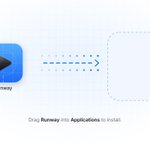
ALT Runway DMG window: drag Runway into Applications to install
in testing, Apple's on-device model read "Volume up is what the neighbours complain about" as a volume command 🫠
so sayso doesn't guess. your talk key types, fn ⌃ makes it a command
dictation never waits on a model and never runs as one
⌥⌘U in Runway runs every test in a project at once. all schemes, all test plans, local packages too
failures show up with their message, so you (or your agent) know what to fix

ALT Runway test results: 22 passed, 1 failed, 1 skipped
follow-up to the speed post: when nothing changed, ⌘R skipped the build but still reinstalled the app on the simulator. every single time
Runway 1.4 skips that too: 0.87s -> 0.45s on a small sample app
(deleted the app or the simulator shut down? it installs again)

most agent setups: the agent runs your app somewhere in a terminal and you read a summary at the end
what I wanted: the agent uses the same window I do. same builds, same logs. I can watch, stop it or take over
humans and agents sharing one tool

ALT Runway with an agent run in progress and the agents settings window
I think the approve/reject screen is the most important screen in any agent product right now. and most of them still look like an error dialog from 2009
until 1.4 some Runway errors were correct and useless:
CLT selected instead of Xcode: "No run destination"
iOS platform not downloaded: "No run destination"
license not accepted after an Xcode update: "Build failed"
now a setup check spots these and gives you a fix button 🫠
SIMON retweeted

“designing much faster than the others” — this so daft and makes it clear they don’t understand design at all. “Designing fast” (or slow) is just not a thing. If you conflate “producing ui by piecing together stuff” and “design” then the former (which is a form of assembly-line practice) can surely be fast or slow.
What makes the practice of design challenging is not how to put a ui or poster together, it’s what the pieces are, what the message is, what is being communicated, how it all works together.
So many of today’s “design” AI tools focus almost exclusively on the production part, on putting stuff together. I’d love to see an AI design tool that forms a deep understanding of a problem over the course of days or months and works like a creative partner. Call me on my bullshit, thinks about the whole, isn’t concerned really about the final arrangement of elements as much as it would understand the story and the message.

Revolut's designers are moving off Figma.
Storonsky spotted one team designing much faster than the others. What they did:
1. Gave an LLM Revolut's design system at the code level
2. Prompted it to build new flows on top of that system
3. Got a live interface they can click through on a laptop or phone, instead of static frames
Result: 3-4x faster. Now he's pushing it to every designer at Revolut.
His job, as he describes it: find what works in one team and spread it across the company.
Full breakdown here:
productmarketfit.tech/p/revo…
measured how long Runway takes to get an app on screen and found hardcoded waits in my own code 🫠
Mac app, warm ⌘R: 2.5s -> 1.5s
iOS, first ⌘R after reopening Runway: ~4.5s -> 1.9s
the compile is xcodebuild. the waiting around it was on me

ALT Bar chart: time until the app is on screen, before and after. Mac warm 2.5 to 1.5 s, Mac first 4.6 to 3.2 s, iOS first after reopening about 4.5 to 1.9 s
Apple's Mac launch is supposedly this week, press hands-on in LA on Wednesday. rumor is a touchscreen MacBook Pro with OLED
if that's real, every tiny toolbar button in every Mac app suddenly has to work with a finger. kind of excited, kind of dreading it
next thing I'm shipping: sayso, a radio to your Mac 📻
hold a key, talk, let go. the text lands in whatever app you're in
hold fn ⌃ instead and it's a command: "open Safari", "volume down"
no wake word, no chat window, all on your Mac
AI Week Frankfurt starts today at The Squaire, runs till Friday
people always say Frankfurt = banks. there's honestly a lot more AI stuff happening here than you'd think. anyone going?
if your agents work in git worktrees: Runway shows every checkout as its own line under the project, with its branch
press play on any of them. each one builds and runs on its own, with its own logs. no reopening the project in Xcode per worktree

ALT Runway main window: project list with branch badges like streak-fix and main