

The AI toolkit for your trading workflow. Setup guides & tool comparisons for stocks, crypto, futures & options traders. Tools, not trade advice.
Joined October 2026
- Tweets86
- Following5
- Followers2.1K
- Likes35




Pinned Tweet
We're TraderStacks, the AI toolkit for your trading workflow. We post setup guides and tool comparisons for stocks, crypto, futures and options traders: what to connect, how to set it up safely, and which tools overlap. Tools, not trade advice. traderstacks.com

How an agent's order should travel: the model proposes it, code checks it against caps the model can't edit (size, symbols, daily loss), you confirm it, then it goes to the broker API and gets logged. Skip a step and only the model stands between your account and a bad order.

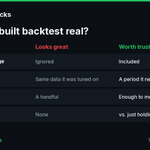
AI built you a strategy and the backtest looks great? Before trusting it, check: fees and slippage included, tested on a period it wasn't tuned on, enough trades to mean something, and compared with simply holding the asset over the same window. Rallies make most bots look smart.

Pulling outside data into a Pine Script indicator (a CSV, COT or Fed series)? Check 4 things first: where the file comes from, how often it updates, how its dates line up with your bars, and what the script does on missing rows. Or history can look cleaner than it ran live.

Robinhood says about 200,000 customers have opened Agentic Trading Accounts, with over $1.6B in notional volume (Q3 2026). Handing an agent your trades? Set these first: a max order size, the assets it may touch, a daily loss stop, confirmations on, and a weekly log review.

Bank of America emailed customers this week: don't give your username and password to an AI agent, and if you do, you're responsible for activity from that access. Same rule for trading accounts. Connect agents through official API keys or connectors you can scope and revoke.
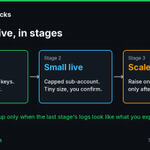
Going from paper to live with an AI-built strategy? Do it in stages. Paper first on separate keys, logging every order. Then a small capped live account where you confirm each order. Then raise one cap at a time, and only after the logs look like what you expected.

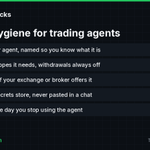
API key hygiene for trading agents: one key per agent, named so you know what it is. Only the scopes it needs, withdrawals off. IP allowlist if your exchange or broker offers it. Keys in a secrets store, never pasted in a chat. Revoke it the day you stop using the agent.

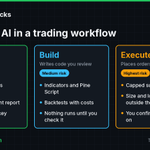
3 jobs for AI in a trading workflow, lowest risk to highest. Research: it only reads, on a read-only key. Build: it writes indicators and backtests that you review before anything runs. Execute: it places orders, so it needs a capped account, limits outside the model and your OK.

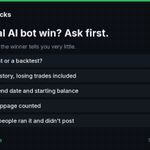
Saw an AI bot turn a tiny balance into a fortune? Before you copy it, ask: live account or backtest, full trade history with the losers, start and end dates, fees and slippage counted, and how many people ran the same bot and never posted. One screenshot proves very little.

At the CFTC's Frontier Forum on Oct 28, Chair Michael Selig asked who registers an AI trading agent, who's liable if it goes rogue, and floated know-your-agent rules. You can keep your own file today: what it may do, its keys, caps it can't change, an order log, an off switch.
Chat to order, with stop loss and take profit, now runs through cTrader's MCP servers. If you try any setup like this: start on a demo account, keep an order preview you have to confirm, and put a size cap somewhere the model can't edit.

Still telling AI about your trades? You can ask it to place them.
💬 Your gold trading plan doesn't have to stay in the chat. With cTrader MCP servers for trading, Claude can place your pending order with stop loss and take profit, then add a moving average and mark your target on the chart. That's one way to make a conversation productive.
Get connected: eu1.hubs.ly/H0zrCT_0
The safest first job for an AI agent on a trading account is a morning report. Read-only API key, the agent pulls balances and positions, writes a plain English summary, and you decide. No trade permission on the key means nothing to undo.

AI can draft a TradingView Pine Script indicator from a plain English description. That's the easy part. Before you trust it: make sure it compiles, read every condition, check it only signals on closed bars, compare it to what you'd mark by hand, then paper trade it.

A slick AI indicator demo proves someone can build a nice chart. It doesn't prove a single fill. Before you trust any bot's numbers, ask for broker-synced statements, fees and slippage included, real start and end dates, and the losing trades too.

Trading MCP servers are popping up everywhere, cTrader's included. Before you connect one to a live account, ask 5 things: Is it dry run by default? Which API scopes does it need? Do you confirm every order? Are your keys kept out of the chat? Can you revoke it in one click?
TraderStacks retweeted
3 platforms, 3 ways to fence in an AI agent. IBKR Autonomous Trading: a separate AI Partition, capped at 10% of equity and $25K total. MetaTrader 5: AI trading allowed, prohibited or manual confirm only. eToro connectors: read-only, or every action sent to you for approval.

TraderStacks retweeted
Wiring a TradingView alert to a broker API? Put your own server in the middle. Per TradingView's docs, webhooks need 2FA, only ports 80 and 443 work, and requests cancel after 3 seconds. So answer fast, allowlist their 4 sender IPs, cap size, drop duplicates and log everything.

TraderStacks retweeted
"Never take big trades" in a prompt is a request, not a limit. Real limits live outside the model: max order size, a daily loss cap, orders per hour, an allowed symbols list and a kill switch. IBKR says order frequency and max order size limits are planned for its AI Partitions.
"Never take big trades" in a prompt is a request, not a limit. Real limits live outside the model: max order size, a daily loss cap, orders per hour, an allowed symbols list and a kill switch. IBKR says order frequency and max order size limits are planned for its AI Partitions.