

U&I Software is the home of MetaSynth, ArtMatic, and the legacy of Bryce 3D, vQuartz, vTrack, Videodelic, MetaTrack, and more...
Seattle, Washington
Joined October 2019
- Tweets223
- Following96
- Followers196
- Likes340

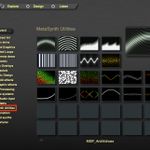




MetaSynth Utilities for ArtMatic Designer has been posted to the Community webpage. Install the Utilities and give them a whirl!
Don't have AMD? No problem, download the 21 Day Full Use Free trial of ArtMatic in the uisoftware.com/store
Click on this direct link to download the files. Instructions on how to install into AMD are included inside.
uisoftware.com/DOWNLOADS/Art…

The online manual should appear in Japanese when loaded. Check the language tab on the bottom left. This ensures any updates gets automatically translated vs. a PDF.
How do I get the highest quality sound in MetaSynth? Work in .CAF 32bit Float format, turn off compression and randomization, and set each preset to render at 16 bit. Examples can be heard here:[ ](uisoftware.com/support/#8vs1…)


Hi Everyone, seeing any issues? Make sure to submit a support email asap as we are currently working on the next update. Want to get everything in before the next pause in development.
uisoftware.com/support/

Over a Month of Free Content Creation! - Download an app suite, say ArtMatic, for 3 weeks of full access creating. Suites come with full libraries to explore, modify, and learn with. What you generate with the apps is yours.
Then, download and install the second suite, for another week of creating sound libraries and images, which ever you didn't install the first time.
ArtMatic, start with Designer. It will allow you to create 2D, 3D graphics and Audio. Explore the examples in the Browse room. The user interface is not the most intuitive, so take the training on the Learning page. For visuals explore Peter Miller's series on our YouTube channel youtube.com/@UISoftware Know that you can go as deep as you want and even program a visual "plug-in" if you want. Start gently. :)
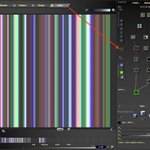
Go to a Sound Synth example in Browse, load in the Listen room, then preview what you get with the 4 read head pattern options here (see image). You can use this same method and load any image or video to "read" with these patterns and output audio.
In the same preset, click on the Sine Wave element of that patch/tree/system (think of this like a modular synth), then click on the Pencil to pop up the parameter editor. Tweek and preview. Careful with volume has changes may have surprising results, kinda the point tho!
Once done creating a bunch of Images and Sounds in ArtMatic Designer, dive into the MetaSynth suite of tools. It is a more traditional DAW with sequencers, effects, synths, samplers, etc. and also has a big library of Synth and Sampler patches to use in the "Image Synth" (really a sequencer), Sequencer, and Xx
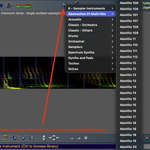
So see a list of Synth and Sampler presets, hold down control keys and click this the Instruments icon in the three sequencers.
p.s. ArtMatic Voyager is more if you want to add a 3D rendering engine to the output of Designer which is 2D (even when it renders something which the math makes look 3D. It also does infinite landscapes. Here are some examples which are fun: youtu.be/iqFCLwb8W3c?si=692r…
For MetaSynth's "Image Synth" sequencer which uses Pixels vs. MIDI, Benn Jordan's video might still be the most fun: youtu.be/4-GDOIOAuU4?si=lfMi…
Think of Xx as a midi capable companion to MS which can use/play the same library of synths and samplers.


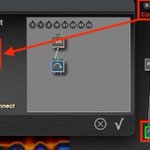
Hold down Command and Option/Alt and click of the Parent you want a component tile to have. Then change the connections with this window.

The Legendary MetaSynth: Now Free for 3 Weeks! 🚀
For the first time ever, you can download a official trial of MetaSynth. Build your ultimate sample library at zero cost. Download, tweak, and render unique sonic textures for 3 full weeks.
Synthesize images into sound, design custom wavetables, and build completely unique loop libraries. Perfect for hip-hop producers, sound designers, and DJs looking for that rare, unrepeatable sonic edge.
🔗 uisoftware.com/store/
#MetaSynth #SoundDesign #Beatmaker #HipHopProducer #SamplePack #VST #ElectronicMusic #LoopKit #DJLife

PayPal allows for multiple payments over time. Please see their website for details. License MetaSynth on its own for the lowest starting price.
MetaSynth Series 2.x Additions include: 1. Spectrum Synth 2.0 - 4x the slice resolution, multithread rendering, formant tools. 2. HiDef Audio - no compression or randomization required (no limiting). 3. No Interface Recording - just plug in a USB mic and go. 4. Preset Organizing - .presets are now dynamic mini databases. 5. Multiple .Presets and .Monts in one MetaSynth Project. 6. IS Sound Folder Rewrite - Trash the folder not each file for re-render. 7. Drag and Drop files from Finder. 8. Live Image Synth Enhancements - wait for measure boundaries(presets still need to be the same XxY, Tempo, Layers)note: Watch for the Live Room coming in 2.5. 9. Frequency Standardization - A4 set to 440 across both apps. 10. Looping Odd Numbers - Loop in 3, 5, 7...


