

Move Quietly / Stay In Control
Shielded
Joined September 2026
- Tweets169
- Following5
- Followers360
- Likes132





Pinned Tweet
Introducing Veilora. $VEIL
CA: 0xbfe3e08e96ffa81563bd26be1d5ad31dd1dad1fe
We are building private control for digital assets.
Our first look (vid below) shows a 2 of 3 wallet setup, recovery key protection, the dashboard, market view, and swap screen previews for $ETH, $USDG, and tokenized stocks.
See the plan, cost, and disclosure requirements before approval. Threshold approval gives people and teams clear authority.
Initial focus: Robinhood Chain.
Some addresses swallow whatever you send them: the famous 0x…dEaD burn addresses, Ethereum’s built-in precompiles, and the placeholder address apps use for “native ETH”.
Veilora now recognises these and stops you before a send or bridge, explaining why the money would be gone for good.
Your own blocklist got smarter too. Add a reason when you block an address, like “Scam DM on Telegram”, and Veilora shows it right in the recipient check if that address ever comes up again. Reasons stay on your device and are included in your device backup.
github.com/veilorarh/veilora…


Veilora keeps a lot on your device: your contacts and stars, blocked and approved addresses, watchlists, bridge history, transaction tags, payment links, Veily chats and your settings.
Now one encrypted file backs up all of it. Download it from Quorum & recovery, keep it with its passphrase, and restore it on a new browser. Veilora shows exactly what will be replaced before anything changes. The file never contains your device key or recovery key, and Veilora never sees the file or your passphrase.
github.com/veilorarh/veilora…


Star the people you pay most in your address book, and they show up as Quick pay shortcuts right on your dashboard.
Tap a name and Send opens with their address already filled in.
You can star up to six contacts. Stars stay on your device and come with you in your encrypted address book backup.
A shortcut only fills in the address , Veilora still checks the recipient and shows the full review before anything is signed.
github.com/veilorarh/veilora…


Veily can now answer questions like “How much did I send this month?” or “Who do I pay most?”
It adds up what your wallet sent and received for each asset over the period you ask about, and lists the addresses you paid most, straight from Robinhood Chain.
Your contact names never leave your device. Veily works with addresses, and Veilora shows your saved names next to them on screen. If the history doesn’t reach back far enough, Veily says so instead of guessing.
It only reads. It can’t send anything. And it needs the activity permission you grant in Veily settings.
github.com/veilorarh/veilora…

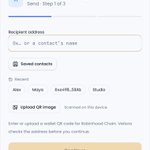
You no longer need to hunt for an address.
Start typing in Send: a name like “Maya”, a word from a contact’s note like “rent”, or the first few characters of an address, and Veilora lists matching contacts and people you’ve paid before. Tap one to fill it in.
Suggestions come only from your own contacts and history on your device. Paste a full address and nothing is suggested, so what you pasted is what’s used. Every send still gets the full recipient check and review.
github.com/veilorarh/veilora…

Veilora’s co-signer caps how much can leave your wallet each day, one of the protections if a key is ever stolen.
Your dashboard now shows exactly where you stand: how much of today’s limit is left for each asset, how many NFT transfers you have left, and a countdown to the 00:00 UTC reset.
The co-signer still checks every transaction itself. This card just means no more guessing before you send. You can adjust your limits from Security.
github.com/veilorarh/veilora…


Sending to people you’ve already paid just got faster.
One-tap shortcuts with their contact names. Still full checks before anything is signed.

The Send screen now shows the people you’ve recently paid as one-tap shortcuts, labelled with their contact names. Tap one and the address fills in for you.
Shortcuts come from your own wallet history. Addresses you’ve blocked never appear. Picking one only fills in the address, Veilora still checks the recipient and shows you the full review before anything is signed.
github.com/veilorarh/veilora…

Every transfer still needs two of three keys. Now you can watch the process live.
Confirm a send and Veilora shows each step as it happens: preparing the transaction, your device key signing, the co-signer checking its rules and adding the second signature, then the network confirming.
Timing for every step is visible. The signing process itself is unchanged, you can simply see it.
github.com/veilorarh/veilora…


Every answer from Veily, Veilora’s assistant, now comes with a signed receipt.
It records which AI provider and model answered, when, and fingerprints of your question, the answer, and any suggested actions, signed by Veilora’s published receipt key.
Open “Answer receipt” under any reply to check it on your device, then copy or download it. Anyone can verify a receipt at veilorarh.com/verify-receipt. If a single character was changed, it fails.
A receipt proves exactly what Veilora received from the AI and showed you. It doesn’t prove the answer is right, so Veily still never signs anything for you.
github.com/veilorarh/veilora…


The Send screen now shows the people you’ve recently paid as one-tap shortcuts, labelled with their contact names. Tap one and the address fills in for you.
Shortcuts come from your own wallet history. Addresses you’ve blocked never appear. Picking one only fills in the address, Veilora still checks the recipient and shows you the full review before anything is signed.
github.com/veilorarh/veilora…
Every send now ends with a real receipt.
No more guessing what just left your wallet.
Every send now ends with a proper receipt.
You’ll see what you sent, who received it (with their contact name if you’ve saved one), when it happened, that Veilora covered the network fee, and a link to the transaction on the Robinhood Chain explorer.
Copy the receipt as text or save it as an image to share with whoever you paid. Both are made right on your device. Works for tokens and NFTs alike.
github.com/veilorarh/veilora…


Every send now ends with a proper receipt.
You’ll see what you sent, who received it (with their contact name if you’ve saved one), when it happened, that Veilora covered the network fee, and a link to the transaction on the Robinhood Chain explorer.
Copy the receipt as text or save it as an image to share with whoever you paid. Both are made right on your device. Works for tokens and NFTs alike.
github.com/veilorarh/veilora…
A few fixes for Veilora on your phone.
A hidden label in the activity table was making pages slightly wider than the screen, which pushed the bottom navigation and the Ask Veily button out of view. That’s fixed.
Ask Veily also steps aside while a dialog is open, so it never covers what you’re reading.
And when you type a saved contact’s address, the contacts button now shows their name straight away.
github.com/veilorarh/veilora…
