

Auditing how Google, Bing, Brave & AI Search actually crawl & cite sites. Real logs & 62-rule GEO tests behind AEORank. Free 15s AI readiness check 👇
Joined June 2025
- Tweets4.4K
- Following984
- Followers1.4K
- Likes17.3K


Pinned Tweet
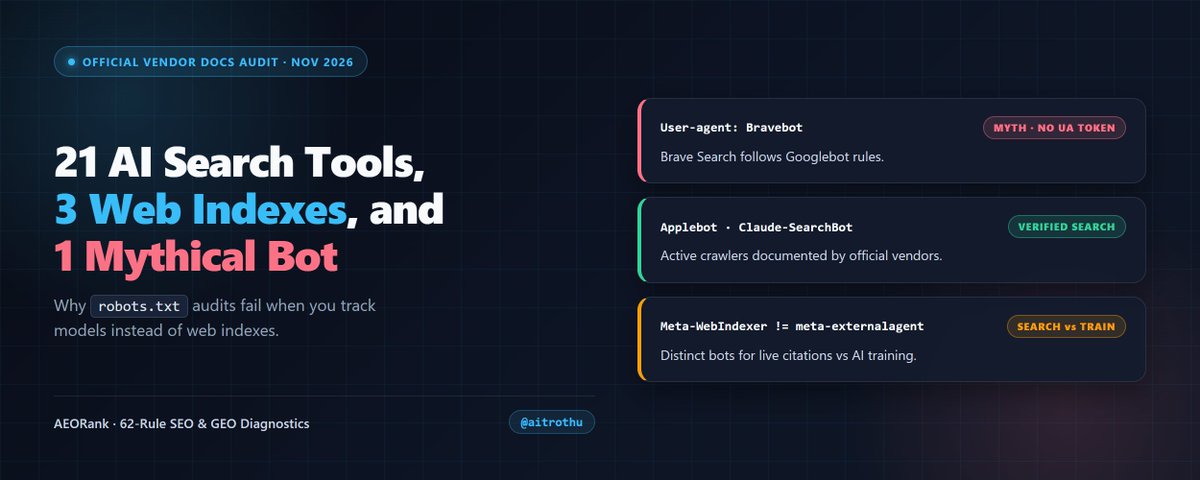
We almost shipped Bravebot into our SEO scanner until we checked official docs.
It does not exist in robots .txt, while 4 real AI search bots are missing from most audits.
Reply A for the 14-bot list or B for the RFC 9309 template.
I pulled 132 replies from this thread to see what everyone blamed vs. what the GSC chart actually showed.
34% blamed AI slop. Only 1.5% checked GSC Queries and 3.8% checked Indexing.
Which side are you on?


Writing blogs with Claude is killing my SEO.
My website is only 25 days old, and it's already dead. I published one blog every day and averaged 200–250 daily impressions.
Any SEO experts here? How can I recover from this penalty?

1
28
Skipping "AI humanizers" is step 1. Audit GSC Queries & Pages first, then rebuild 3-5 posts on real data.
Playbook: aeorank.app/learn/google-ai-…

8
Your GSC impressions spiked with 0 clicks. Real demand or bot spam?
The exact flowchart we use before touching any URL.
Which trap hit your site first: Case B Disallow or editing inside 42 days?

1
2
61
Biggest mistake we keep seeing: blocking /search in robots .txt before Google drops the URLs, which locks spam pages in the index.
Full 14-day GSC & GEO diagnostic checklist: aeorank.app/learn?aeo_src=x

1
49
We shipped Cloudflare Edge AI bot logging today and broke our human analytics in 10 minutes.
3 real AI crawlers (MistralAI-User, Meta-WebIndexer, Google-Extended) slipped past default bot filters and got counted as real humans.
Anyone else hitting this?

1
2
58
Also watch Cloudflare Dashboard "Enable Bot Preference Sync": it prepends 8 Disallow blocks over Worker robots .txt.
Free 9-bot RFC 9309 & raw HTML checker (no login): aeorank.app/tools/ai-page-in…
36
One of the better condensed SEO prompts on X right now. We actually stress-tested it against live GSC data today to see where it breaks in production.
What held up:
- Stopping new drafts when an existing page already ranks pos 1-30
- Requiring GSC evidence for every internal link instead of letting LLMs invent URLs
3 gaps we had to patch before shipping it into our own workflow:
1. Raw GSC exports include bot prompts and scraper dorks that poison link targets if you skip filtering
2. Self-QA in the same pass misses cross-locale links and character overflows (split Pass 2 + deterministic NFC checker fixed it)
3. Moving Answer-First directly under H1 (inside 500 chars) instead of below a long TL;DR keeps AI extraction intact
Curious how others handle GSC noise before feeding exports to an agent?

1/
the best condensed SEO prompt to write articles for your site
2/
I assure you if you use this prompt to write your SEO article, you will double your current organic traffic
if all aligns well, and you do proper keyword research
provide your AI agent a gsc export file too so it can do the proper internal linking with your best articles.
Here is the prompt I use for many of my sites:
👇👇
You are an SEO writer. Write one article on [TOPIC] for [DOMAIN], using the attached GSC export to plan internal links.
INPUTS: topic, GSC data (query, page, clicks, impressions, CTR, position), product facts + prohibited claims, conversion page URL(s), brand voice/banned phrases, target country/language.
STEP 1 – READ THE GSC DATA BEFORE WRITING
- Normalize URLs (strip parameters). Ignore excluded locales, test/staging URLs, and branded queries.
- Cannibalization check: if an existing page already gets impressions for this topic's main queries, especially in positions 1-30, STOP and recommend a refresh of that page instead of a new article. Name the URL and its metrics.
- Pick internal link targets by topical relevance plus evidence:
• Page-2 pages (avg position 11-30) on related queries. These get the most from extra links.
• High-impression, low-CTR pages (>200 impressions, CTR <1%) on related intents.
• Conversion/product pages always come first when relevant.
- Use 4-8 internal links. Each target must be a real URL from the data, never invented.
- Anchor text should come from the target page's actual ranking queries, phrased naturally. Don't use the same exact-match anchor twice, and don't link two pages that compete for the same intent.
STEP 2 – STRUCTURE
- Classify intent (how-to, listicle, comparison, use-case guide) and match the page type that ranks for it.
- TL;DR at the top. For a how-to, a 2-3 sentence summary. For a listicle, all items with links. For a comparison, a clear verdict on who should pick what.
- Right after the TL;DR, an answer-first block of 2-4 sentences that directly answers the main query.
- Intro of 2-3 short paragraphs max, with no scene-setting.
- How-to steps come before any background. Listicles name every tool early, and each tool gets a link, an honest drawback, and an image placeholder. Comparisons give the verdict early.
- Put the primary keyword in the H1 and in the first 100 words. Use question-style H2s where they match real GSC queries.
- End with a short, decision-oriented conclusion, then concise FAQs drawn from real queries in the data.
STEP 3 – VOICE
- Use simple words, short paragraphs, varied sentence rhythm, and specific numbers, examples, and tradeoffs.
- Banned words and phrases: "in today's fast-paced world", "let's dive in", unlock, harness, delve, seamless, robust, powerful, cutting-edge, game-changer, "it's important to note", "whether you're a...".
- Don't start sections the same way or use the same structure for every list item. No hedging unless the uncertainty is real, and no conclusion that just rephrases the intro.
- No em dashes unless the style guide allows them.
STEP 4 – FACT SAFETY
- Only use the product facts you were given. Never invent pricing, features, testimonials, reviews, benchmarks, or awards.
- Don't call something "free" when it's a free trial. Source competitor claims or soften them.
- If a needed fact is missing, flag it instead of guessing.
OUTPUT
1. Article (Markdown) with internal links inline.
2. Meta title (≤60 chars) and meta description (≤155 chars).
3. Internal link table: anchor | target URL | GSC evidence (query, position, impressions) | reason.
4. Asset/image queue and fact-check notes.
5. Self-QA: confirm TL;DR and answer-first block are present, intent matches, no invented facts, every link comes from the data, and no banned phrases. Fix anything that fails before returning.

2
82
Khoa | AEORank.app retweeted
I checked a viral 21-row Google Search Operators cheat sheet today.
5 of the commands on it are dead, broken, or logically impossible.
My favorite three:
1. Using -intext:"meta description" to find missing meta tags. intext: only reads visible body copy, never the HTML head. Every clean page triggers a false alarm.
2. Using site:yourdomain .com inurl:reviews to find unindexed pages. Searching Google's index to find pages not in Google's index is like checking a library catalog for books the library does not own.
3. Still listing link:domain .com for backlinks years after Google deprecated it.
Skip the AI-generated tables. If you run Technical SEO or GEO audits, these 3 operator combos do 90% of the real triage work in 60 seconds:
1. Staging and subdomain leaks
site:yourdomain .com -inurl:www
Catches dev or staging hosts accidentally indexed in production.
2. Parameter pollution
site:yourdomain .com inurl:?
Surfaces faceted filters, UTM strings, and internal search pages burning crawl budget.
3. Non-HTML entity bloat (GEO blind spot)
site:yourdomain .com filetype:pdf
Finds legacy PDFs that Google AI Overviews may cite instead of your canonical HTML pages with structured Schema.
One strict rule before touching anything: site: results are always sampled. Never delete, redirect, or block URLs until you confirm the exact list in Google Search Console.
(First reply has the 2 working operator stacks that replace the broken internal-link and orphan-page rows 👇)
Want to reuse this 60-second triage workflow? Reply with the part that would help your team most and I will drop it below:
A) The full 7-command verified operator triage list (with GSC verification steps)
B) The exact HTTP header rule to stop legacy PDFs from competing with HTML pages in AI Overviews


$0 Google Search Console regex playbook to uncover real AI-style buyer prompts (takes 60 seconds):
1. Open GSC -> Performance -> Search results -> Add filter -> Query -> Custom (regex).
2. Filter 8+ word conversational queries:
^(?:\S+\s+){7,}\S+$
3. Upgrade the question filter to catch mid-query commercial intent (comparisons + pricing):
(?i)(^(what|how|which|best|why|where|can|does|should|is)\b|\b(vs|versus|alternative|pricing|cost|worth it)\b)
4. Sort by High Impressions + Low CTR, then turn the top 3 queries into Answer-First blocks (<500 chars under your H1 or H2).
Why this works for both Google & AI Search:
High impressions with low clicks means search crawlers already map your page to that question, but your opening copy isn't giving a direct, extractable answer. (Credit to Jules de Bruin & Jonas Damsted for sparking the base regex idea.)
(Dropped the 40-60% GSC anonymized-query blindspot + Bing AI Performance pairing tip in the first reply 👇)
When you run that regex on your main domain, do you get more top-of-funnel "how/what" queries or commercial "vs/alternative" prompts?
Everyone keeps copying the same AI crawler lists into robots .txt without checking primary docs.
When we audited all 21 AI search tools against official documentation from Brave, Meta, Apple, DuckDuckGo, and Mistral:
- Bravebot does not exist (Brave follows Googlebot)
- 4 real search bots get missed on almost every checklist: Applebot, Claude-SearchBot, Meta-WebIndexer, and MistralAI-User
- Adding one standalone User-agent block under RFC 9309 can silently wipe out your wildcard Disallow rules
Full 14-bot split and verification table inside the article below
We almost shipped Bravebot into our SEO scanner until we checked official docs.
It does not exist in robots .txt, while 4 real AI search bots are missing from most audits.
Reply A for the 14-bot list or B for the RFC 9309 template.
2
61
Technical Pitfall to watch before editing robots .txt in production:
Under RFC 9309, adding a standalone User-agent: GPTBot block overrides User-agent: * completely. If you forget to repeat your /admin and /api Disallow rules inside that separate block, you expose private routes while trying to block scrapers.
You can test any subpath against all 9 effective search and AI bots plus raw SSR HTML visibility for free here:
aeorank.app/tools/ai-page-in…
40
11 tiny sites charging $149/mo for #1 spots showed up in 48 of 100 buying answers (nearly all on ChatGPT).
Google AI cited 0 of them.
The 4 takeaways every SaaS founder and SEO should take from this 1,804-answer study:
1. Single-run AI visibility scores are mostly noise. Re-running the exact same prompt 12 minutes later changed the #1 brand 28% of the time, while the top pick across cited lists held 82% of the time.
2. Google rankings alone no longer cover AI search. For the same query, Google's and Bing's top 10 shared roughly 1 page. Google AI leans on Google (56%), ChatGPT leans deep on Bing, and Claude leans on Brave (26%).
3. Separate on-site hygiene from off-site polling. Clean SSR pricing pages, Product schema, OAI-SearchBot access, and IndexNow are table stakes so AI reads your product accurately, not a cheat code to win a "best X" list vote.
4. Do not buy $149 list-farm spots. Google already ignores all 11 of them, and ChatGPT will inevitably ship its own Panda update. Original benchmarks, free tools, and honest third-party comparisons survive every shift.
(Dropped a note on the 69% fake-freshness sitemap trick these list farms use in the first reply 👇)
Reply A for our 3-Index checklist (Google + Bing/IndexNow + Brave), or B for our pricing-page AI readiness checklist.


2
2
116
One wild technical detail buried in the study: 167 of those small comparison sites were registered in 2026, and 69% of their dated sitemap URLs were stamped as updated in October or November to fake freshness for crawlers.
That is the exact "uniform lastmod" trap (Fake Freshness) search engines already know how to spot. Building durable AI visibility starts with clean crawlability, honest timestamps, SSR pricing, and multi-engine indexing across Google, Bing, and Brave.
You can check your domain's crawlability, sitemap freshness, and 62 SEO/AEO/GEO readiness signals for free here:
aeorank.app
25
83 DR dofollow backlink + AI Agent Skill listing in 3 minutes (zero review queue):
1. Create a folder with a SKILL .md file explaining your SaaS API endpoints and copy-paste curl examples.
2. Include a rate-limited Bearer demo token so autonomous agents can test your API without hitting a paywall.
3. Add homepage: https://yourdomain .com in the YAML frontmatter at the top of SKILL .md.
4. Run npx clawhub@latest login and npx clawhub@latest skill publish ./your-skill-folder.
Why this matters beyond SEO:
ClawHub (clawhub .ai, DR 83) publishes your page immediately with a clean dofollow link to your homepage, and third-party agent marketplaces mirror public SKILL .md registries daily.
(See the first reply for the /.well-known/agent-skills/ discovery standard 👇)
Reply A for our starter SKILL .md template, or B for our /.well-known/agent-skills/index.json checklist.
92 DR AI Entity citation on Hugging Face Hub for any B2B SaaS (takes 5 minutes):
1. Export a clean JSONL or CSV benchmark/reference dataset from your SaaS domain (e.g., diagnostic rules or schema templates).
2. Create a new repository on huggingface .co with repo_type="dataset".
3. Add a README .md Dataset Card (license: cc-by-4.0, task_categories, pretty_name) linking to your homepage and docs.
4. Wire the live Hugging Face dataset URL into your homepage's JSON-LD sameAs array.
Why this works for GEO:
Hugging Face Dataset Cards are heavily indexed by LLM training pipelines, academic crawlers, and developer search engines, giving your SaaS a verifiable DR 92 entity anchor.
(See the first reply for the YAML fields that unlock Hugging Face's in-browser SQL Data Studio 👇)
Are you already publishing an open dataset on Hugging Face, or is all your public reference data still sitting only on GitHub?
1
1
82
To pass Cloudflare's 16/16 Agent Readiness diagnostics on your own domain as well, host /SKILL .md alongside /.well-known/agent-skills/index.json (version 0.2.0) with a SHA-256 digest of your skill file.
Our engine audits whether your domain is ready for AI Agents (llms.txt, /.well-known/mcp.json, agent-skills discovery, and 62 technical SEO/GEO rules):
aeorank.app
28
I checked a viral 21-row Google Search Operators cheat sheet today.
5 of the commands on it are dead, broken, or logically impossible.
My favorite three:
1. Using -intext:"meta description" to find missing meta tags. intext: only reads visible body copy, never the HTML head. Every clean page triggers a false alarm.
2. Using site:yourdomain .com inurl:reviews to find unindexed pages. Searching Google's index to find pages not in Google's index is like checking a library catalog for books the library does not own.
3. Still listing link:domain .com for backlinks years after Google deprecated it.
Skip the AI-generated tables. If you run Technical SEO or GEO audits, these 3 operator combos do 90% of the real triage work in 60 seconds:
1. Staging and subdomain leaks
site:yourdomain .com -inurl:www
Catches dev or staging hosts accidentally indexed in production.
2. Parameter pollution
site:yourdomain .com inurl:?
Surfaces faceted filters, UTM strings, and internal search pages burning crawl budget.
3. Non-HTML entity bloat (GEO blind spot)
site:yourdomain .com filetype:pdf
Finds legacy PDFs that Google AI Overviews may cite instead of your canonical HTML pages with structured Schema.
One strict rule before touching anything: site: results are always sampled. Never delete, redirect, or block URLs until you confirm the exact list in Google Search Console.
(First reply has the 2 working operator stacks that replace the broken internal-link and orphan-page rows 👇)
Want to reuse this 60-second triage workflow? Reply with the part that would help your team most and I will drop it below:
A) The full 7-command verified operator triage list (with GSC verification steps)
B) The exact HTTP header rule to stop legacy PDFs from competing with HTML pages in AI Overviews
$0 Google Search Console regex playbook to uncover real AI-style buyer prompts (takes 60 seconds):
1. Open GSC -> Performance -> Search results -> Add filter -> Query -> Custom (regex).
2. Filter 8+ word conversational queries:
^(?:\S+\s+){7,}\S+$
3. Upgrade the question filter to catch mid-query commercial intent (comparisons + pricing):
(?i)(^(what|how|which|best|why|where|can|does|should|is)\b|\b(vs|versus|alternative|pricing|cost|worth it)\b)
4. Sort by High Impressions + Low CTR, then turn the top 3 queries into Answer-First blocks (<500 chars under your H1 or H2).
Why this works for both Google & AI Search:
High impressions with low clicks means search crawlers already map your page to that question, but your opening copy isn't giving a direct, extractable answer. (Credit to Jules de Bruin & Jonas Damsted for sparking the base regex idea.)
(Dropped the 40-60% GSC anonymized-query blindspot + Bing AI Performance pairing tip in the first reply 👇)
When you run that regex on your main domain, do you get more top-of-funnel "how/what" queries or commercial "vs/alternative" prompts?
Two working operator stacks that actually replace the broken rows on those cheat sheets:
1. Find real internal link targets:
site:yourdomain .com "target topic" -inurl:target-slug
(Surfaces pages already mentioning your topic instead of searching for the literal words "internal link".)
2. Spot orphan or forgotten pages outside your main hub:
site:yourdomain .com -inurl:blog
When you need exact HTML head tags, meta descriptions, and 62-rule technical SEO + AI crawler checks instead of sampled SERP guesses, you can run a live DOM audit here:
aeorank.app
19
One underrated trap in Google Search Console right now: a single scraper bot probing nonsense queries (like fake brand + product reviews) can inflate impressions 10x with 0 clicks.
If your team sorts GSC by "high impressions, low CTR", those fake queries jump straight to #1 on your rewrite list and trick you into breaking pages that already convert.
Here is the 4-step read-only GSC filter workflow we just shipped today:
1. Layer 1: Single-query syntax filter
Strip obvious Google dorks (-site:), boolean exclusion strings, 32-char random tokens, and leaked AI monitoring prompts.
2. Layer 2: Cross-join combinatorial bot quarantine
Group queries by normalized template (handling 2026/2027 and plural variants), check for a Brand x Product matrix with < 0.1% CTR, and exclude real informational questions so LLM query fan-out is never dropped.
3. Layer 3: Case A vs Case B split on raw URLs
Case A (lands on real pages): quarantine from CTR alerts and leave the title untouched.
Case B (lands on /?s= or /search?q=): flag immediately as internal search spam.
4. 42-day URL freeze discipline
Once you edit a clean page, lock it in a freeze ledger (14-day burn-in + 28-day real click evaluation) so nobody rewrites the same title twice a month.
(First reply has the exact header rule that clears Case B search spam without trapping URLs in robots .txt 👇)
Want to reuse this workflow? Tell me which part would help your team more and I will drop it in the replies:
A) The exact regex and cross-join rules for filtering GSC bot spikes
B) The 42-day URL freeze tracking template (14d burn-in + 28d click check)
1
131
Khoa | AEORank.app retweeted
96 DR verified entity links across 3 browser stores from 1 Vanilla JS extension:
1. Build an 80-line Manifest V3 companion utility for your SaaS (e.g., a 1-click page inspector).
2. Write `popup.js` in pure Vanilla JS (`document.createElement` + `textContent`, zero Webpack/Vite).
3. Add `browser_specific_settings.gecko` with `data_collection_permissions: {"required": ["none"]}` for Firefox.
4. Run `npx addons-linter` (0 warnings) and submit to Chrome (DR 95), Edge (DR 96), and Firefox (DR 96).
Why pure Vanilla JS wins:
Because the code is not bundled or minified, you can select "No" on source-code upload and pass Mozilla's automated scanner in minutes.
Once your `/llms.txt` and `X-Robots-Tag` rules are clean (quoted below 👇), adding those 3 verified store URLs into your homepage `sameAs` array locks in high-trust entity grounding.
(See the first reply for the Zero-404 URL check required before uploading 👇)
Which browser store gave you the toughest review queue: Chrome, Edge, or Firefox?
4-step `/llms.txt` config so Google never flags your AI docs as Duplicate Content:
1. Serve `/llms.txt` and `/*.md` routes with `Content-Type: text/markdown; charset=utf-8`.
2. Add the HTTP response header: `X-Robots-Tag: noindex, nofollow` on every `.md`, `llms*.txt`, and `openapi.json` route.
3. Keep all `.md` and `.txt` URLs strictly out of your `sitemap.xml`.
4. Add `rel="nofollow"` on any HTML footer links pointing to your `.md` or `/llms.txt` files.
Why this matters:
RAG crawlers (GPTBot, ClaudeBot, PerplexityBot) fetch `/llms.txt` directly regardless of `X-Robots-Tag`, while Googlebot obeys `noindex` and spends 100% of your crawl budget on your canonical HTML pages.
(See the first reply for the RFC 8288 `Link` header trick 👇)
Have you seen raw `.md` or `.json` routes show up in your Google Search Console yet?
$0 Google Search Console regex playbook to uncover real AI-style buyer prompts (takes 60 seconds):
1. Open GSC -> Performance -> Search results -> Add filter -> Query -> Custom (regex).
2. Filter 8+ word conversational queries:
^(?:\S+\s+){7,}\S+$
3. Upgrade the question filter to catch mid-query commercial intent (comparisons + pricing):
(?i)(^(what|how|which|best|why|where|can|does|should|is)\b|\b(vs|versus|alternative|pricing|cost|worth it)\b)
4. Sort by High Impressions + Low CTR, then turn the top 3 queries into Answer-First blocks (<500 chars under your H1 or H2).
Why this works for both Google & AI Search:
High impressions with low clicks means search crawlers already map your page to that question, but your opening copy isn't giving a direct, extractable answer. (Credit to Jules de Bruin & Jonas Damsted for sparking the base regex idea.)
(Dropped the 40-60% GSC anonymized-query blindspot + Bing AI Performance pairing tip in the first reply 👇)
When you run that regex on your main domain, do you get more top-of-funnel "how/what" queries or commercial "vs/alternative" prompts?
One caveat before treating GSC regex output as full ChatGPT prompt data:
GSC hides 40-60% of rare long-tail queries for privacy (anonymized queries), and AI chatbot prompts are usually longer and multi-turn. Pair this GSC list with Bing Webmaster Tools' AI Performance report so you see both what buyers ask and which exact URLs Copilot cites.
We built this Answer-First (<500 chars) + 62-rule SEO/AEO/GEO check right into AEORank. Run a free scan on your homepage here:
aeorank.app
33