

UI/UX Consultant & Educator。Learned IA in the US、世の中の悪いUIを見るたびに心の中で「誰がこれ許したんだ…」とつぶやく毎日。横浜美術大学臨時講師 / MENTA講師 / 転職サポート / チーム崩壊防止担当 / FE Architect。UIの愚痴、いつでもどうぞ笑。
日本 東京
Joined April 2010
- Tweets566
- Following175
- Followers88
- Likes437







Pinned Tweet
People who thrive with AI tools share a rare neurotype: high novelty-seeking + high conscientiousness + tolerance for rapid context-switching.
In my POV, only ~10-15% of people have it and the rest will find it exhausting. That divide will decide who wins big with AI — and who gets left behind.
#AI #AIDesign #Design #FutureOfWork #Neurodiversity
It’s NOV again... Performance reviews are back—and “AI productivity” is now part of the conversation, but what are we measuring?
More output ≠ more value.
Before scoring people, define productivity around real teamwork, outcomes, and contributions we miss.
#DesignLeadership #AI
The simplest explanation of JEV :
1️⃣ Feed it Text + Context
2️⃣ It evaluates using your questions & allowed answers
3️⃣ Clean, typed output (your code will thank you) 🤝✨
#AI #LLM #Developer #Jev
🤖 Made with AI

Chris retweeted

本日、パーソナルキャリアAI「PREVIO(プレヴィオ)」をリリースしました。
「AIが、自分にマッチした仕事を探してくる時代」を実現するプロダクトです。
開発過程で、23-49歳の正社員1,000名に独自調査を実施した結果、転職市場の3つの構造問題が見えてきました。
―――
【構造問題① 企業主体の設計思想】
既存の転職サービスは、「企業が求職者にリーチする」仕組みとして設計されています。
なので求職者が「自分に合う企業を探す」観点では最適化されていません。
転職経験者の89.0%が、明らかに的外れなスカウトを受けた経験がある。
87.2%が、転職サイトで自力で求人検索をすることに、徒労感を感じている。
88.4%が、応募後にミスマッチだと感じた経験がある。
「約9割」という数字が並びます。これは個々の求職者や、転職サービスの品質問題ではなく、市場の構造そのものの問題だと考えます。
【構造問題② 「転職活動中」という前提】
既存の転職サービスは「転職を決意している人」が使うものとして設計されています。
広告出稿により、転職意欲の高い人を集客し、サイト上での応募導線を最適化したUXで応募行動を生み出す。
それがビジネス上最も合理的だからそのような構造になっています。
求職者視点でも、日々忙しい中で自分のキャリアと定期的に向き合うことは容易ではありません。
時間を作ることも簡単ではないし、そもそも手段が分からない。
キャリアコーチング等のサービスもあるが、依然としてハードルが高いのが現状です。
だから、多くの転職者は、現職への不満などのきっかけで転職を考え始めたときに、初めて自身のキャリアと向き合うことになる。
日常的にキャリアの選択肢を眺め、自分の志向を言語化する機会は、市場では十分に提供されていません。
「いずれ転職したい」と答えた人のうち、52.8%が、過去1年間に具体的な行動を一切取れていませんでした。
転職意向を持ちながらも実際に動けていない人は、日本全体で推計300万人にのぼります。
【構造問題③ 既存のAIでは、求人検索までは届かない】
生成AIの急速な進化により、「仕事探しもAIで行う時代」への期待が高まっています。
実際、キャリアや転職目的でChatGPTやGeminiなどのAIを使った人は、調査対象の51.5%でした。
自己分析、職務経歴書の作成、業界研究など、AIの活用は確実に広がっています。
ただ、用途は「考える段階」での支援にとどまっている。
AIをキャリア目的で使った人のうち、「自分にマッチする具体的な求人が見つかった」と
回答したのは、わずか9.0%でした。
考えるところまでをAIが伴走しても、最後の「自分に合う具体的な企業と出会う」ところまでは実現できていない。
これは汎用AIの構造的な限界です。
リアルタイムの求人データベースにつながっておらず、またキャリアマッチングに特化したアルゴリズムを持っていない。
―――
これらの構造問題は、私自身が長年向き合ってきたものでもあります。
リブセンスで「就活会議」「転職会議」の事業責任者として6年半、Beatrust COOとして3年。採用側でも、求職者側でも、ずっと感じてきた「不」がありました。
求人を探しているはずなのに、自分に合うものが見つからない。
スカウトを送っているはずなのに、ミスマッチが起きる。
「キャリアを考えたい」と思っても、最初の一歩が踏み出せない。
これは個人の意欲や能力の問題ではない。
転職市場の構造そのものが、20年以上ほとんど変わってこなかったことの結果だと思っています。
―――
仕事探しに特化したAI、つまり「パーソナルキャリアAI」の登場により、ようやくこの構造変革が可能になります。
これまで、転職市場の主体は「企業側」でした。
企業が転職媒体に求人を出し、企業がスカウトを送り、企業がエージェントに紹介を依頼する。
求職者は、自分でその中から適した求人を探す。
これからは、個々の求職者が、AIの力を使い、市場から自分に合った求人を見つけることが可能になります。
主体が、「企業」から、「求職者(powered by AI)」に移る。
これは採用市場の大きな転換点であり、
キャリアの選択肢に出会える機会が、誰にとっても大きく広がる時代の始まりです。
―――
今日、「PREVIO(プレヴィオ)」をリリースしました。
PREVIOは、「パーソナルキャリアAI」という新しいカテゴリのサービスです。
履歴書、職務経歴書、希望条件、志向性を登録すると、AIがあなたに合う求人を厳選して提示します。
特徴は4つあります。
1.AIによるパーソナルマッチング(特許取得済み)
スキル・経験・希望条件だけでなく、志向性まで含めて深く理解するため、「本人もまだ考えていなかったキャリアの選択肢」との出会いも生まれます。
2.なぜマッチしているかを、AIが言語化
「あなたの経験・スキル・志向性のここが、この求人と合っている」という接点を、納得感を持って確認できます。
3.非公開求人を含む、厳選求人の提案
各領域に精通した人材紹介会社と提携。良質な求人からマッチした求人を厳選します。
4.応募完了まで、登録情報は外部に一切公開されない
登録情報は、完全クローズドな設計。「登録した情報が他者に公開されないか不安」という懸念を解消します。
―――
開発で最も難しかったのは、個々の求職者の「志向性」を、求人と精度高くマッチさせることでした。
ある求職者にとっての最適解が、別の求職者にとっては全く合わない。
「正解」とされる結果が個々の求職者ごとに異なる状況の中で、
「精度が高いとは何か」という問いに常に向き合いながら、試行錯誤を重ねてきました。
HR業界の知見と最新のAI技術を統合させながら、CTOと1年ほどかけて、独自のアルゴリズムを磨き続けてきた。
結果、特許取得に至る、独自の高精度マッチングを実現することができました。
―――
長らく変わってこなかった、採用市場の構造変革に向けて。
少しでも共感いただける部分があれば、感想など教えていただけたら嬉しいです。

Chris retweeted

Inter と Noto Sans JP の混植書体、Gen Interface JP を公開しました。
本文の美しさ・読みやすさのために、和文を緻密に調整した UI 向けのフォントです。OFL ライセンスとして無償で使用できるので、ぜひ使ってみてね
gen.typesetting.jp
In Claude Code (Terminal), we’re always jumping folders, switching git branches, swapping models & guarding that precious context window...
The fix? Drop this in (To Claude) :
/statusline create a statusline: ~/path | git branch* (hidden outside git) | model | ████░░░░░░ 17%
Gets you a clean persistent status line at the bottom with directory, branch (* on dirty), model, and 10-block context bar. Context is king.
#ClaudeAI #Claude #AICoding #Productivity

Colgate, a billion-dollar giant, just dropped straight-up AI slop on Instagram for their new tropical toothpaste… and thought nobody would notice.
Warped, illegible text on the tubes. Classic AI garbage.
This is the real scary part of AI: it’s not just about jobs. It’s training everyone—even massive brands—to accept low-effort crap and call it “good enough.”
Quality is dying in silence. Wake up.
creativebloq.com/ai/colgate-…
#AISlop #Colgate #AIArt #BadAI #CreativeBloq #DesignFail #GraphicDesign #AIFail #BrandFail #HumanCreativity
Why we can't connect and use Google stuffs as our context for AI?!
Here is the answer.
cloud.google.com/blog/produc…
#Gemini #Google #AInews

Tokens in AI aren’t just about money.
Tokens are how models chop your words into pieces, predict the next one, and spit out killer results. OpenAI’s Tokenizer tool is straight fire — paste any text or code and see exactly how the AI reads it, plus the exact token count.
Quick tip: Try it here → platform.openai.com/tokenize…
You’ll finally get why weird spacing sometimes shows up Lol.
Keep learning, have fun! 🚀
#AI #Tokenizer #LLM #OpenAI #PromptEngineering #AITips

Chris retweeted

AIが自律的にバックオフィス業務を遂行する新サービス『マネーフォワード AI Cowork』を2026年7月より提供開始✨本日より先行受付もスタート!
「今月の経理業務をまとめて」と伝えるだけで、AIが同僚(Coworker)のように業務を代行。新しい業務体験を支援します🤖
詳しくはプレスリリースをご確認ください👇
corp.moneyforward.com/news/r…
Claude Code (plus some Cursor) at work, but Codex at home ‘cause I’m cheap as hell 😂
Anyone else mixing tools like this to dodge the subscription tax?
#AICoding #ClaudeCode #Cursor #Codex #VibeCoding
Dear Google, please please please do the same asap. I’m running out of patient.
#Claude #office365 #google #AInews

Microsoft 365 connectors are now available on every Claude plan.
Connect Outlook, OneDrive, and SharePoint to bring your email, docs, and files into the conversation.
Get started here: claude.ai/customize/connecto…


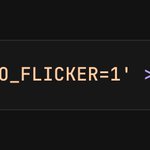
Claude Code in the terminal spits output so fast you’re always scrolling up… then your input prompt disappears. Annoying AF...
By entering below command in the terminal (before starting Claude Code) now the typing area sticks to the bottom forever. Scroll freely, see your input 24/7, and way less flicker. You are welcome 🔥
(P.S. set it to 0 to turn it off.)
#Claude #ClaudeCode #AI #Productivities #WorkSmart

In the last 12 hours…
❗️Qwen just dropped Qwen 3.6
❗️Google dropped Gemma 4
❗️OpenAI acquired TBPN
❗️Anthropic released fresh mechanistic interpretability research on emotion concepts in Claude
❗️Cursor 3 launched — a brand-new interface built from the ground up for an agent-first world (with design mode)
WTF is this timeline?! Are we dreaming? At the same time… wtf am I doing with my life? 😅
#WTF #Cursor #ClaudeCode #ainews
🚀 Cursor (3!) just dropped Design Mode and it’s a total game-changer!
In the Agents window, you can now annotate + target UI elements straight in the browser. Point the AI exactly where you mean and iterate stupidly fast.
How to use:
• ⌘ + Shift + D → toggle
• Shift + drag → select area
• ⌘ + L or ⌥ + click → add to chat
This is going to make UI/UX and frontend work 10x smoother. Already using it? Check it out: cursor.com/blog/cursor-3
#Cursor #DesignMode #AIcoding #BuildFaster

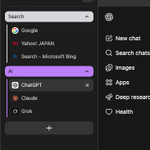
Tired of horizontal tab chaos but don't wanna install Dia or Edge just for vertical tabs?
Chrome finally lets you do it natively! 🔥
Go to : chrome://flags/#vertical-tabs → set to Enabled → relaunch
Go to chrome://settings/appearance → set Tab strip position to Side
Boom. Vertical tabs unlocked. Game changer.
#Chrome #Productivity
