


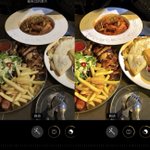



iPhone really can give that Fuji vibe!!
📱 Edited on: iPhone
✨ Filter: High Contrast ➕85
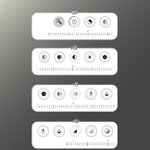
◽️ Adjustments:
▪️ Exposure -6
▪️ Brilliance -12
▪️ Highlights 15
▪️ Contrast 10
▪️ Brightness 12
▪️ Vibrance 10
▪️ Sharpness 20
(Just tweak the numbers a bit depending on your own photo)


🎨: iphone original camera editing
Exposure: +12
Vibrance: +35 (makes it look more appetizing)
Highlights: -36
Shadows: +30 (to brighten up the darker areas)
Contrast: -30
Brightness: +21
Black Point: +7
Saturation: +29
Temperature: +24
Tint: +15
Sharpness: +20


Finally figured out how to get this filter look!!!
📷iPhone Editing Settings:
Exposure: +4
Brilliance: +10
Highlights: +1
Shadows: +17
Contrast: +4
Brightness: -6
Vibrance: +6
Warmth: +13
Sharpness: +34
Definition: +12
◾Tweak the numbers a bit depending on your actual pic
◾️Don't forget to turn on the grid in settings for better angles


Finally figured out how to get this dark, glowing filter look!!
🍎iPhone Original Camera Edit
Exposure: +5
Brilliance: -29
Highlights: -20
Shadows: +16
Contrast: +18
Brightness: +6
Vibrance: +30
Sharpness: +66
Definition: +10
✔️Just tweak it a bit depending on your own pic~


Create a film texture look with just your iPhone.


iPhone Cam Settings • Saving Backlit Beach Fails✨
•Settings:
Brilliance +100
Highlights -43
Shadows +40
Contrast -20
Brightness +2
Vibrance +15
Sharpness +30
Warmth -6 (makes the water and sky pop more blue)🦋
✅Feel free to tweak based on your lighting!
💡The Vibe:
Boost ➕ Brilliance, Shadows, Brightness
Lower ➖ Highlights, Contrast


