Exceljet (@exceljet) header
Exceljet (@exceljet) profile picture

Quick, clean, and to the point. Practical resources to help you work faster in Excel. 100% human.

Salt Lake City
Joined December 2012
Photo by Exceljet (@exceljet)Photo by Exceljet (@exceljet)Photo by Exceljet (@exceljet)Photo by Exceljet (@exceljet)Photo by Exceljet (@exceljet)Photo by Exceljet (@exceljet)Photo by Exceljet (@exceljet)Photo by Exceljet (@exceljet)Photo by Exceljet (@exceljet)Photo by Exceljet (@exceljet)
Hey @ZebraBI - the @msexcel team will be surprised to learn that Excel has a STRIKETHROUGH() function! 😀 Currently #1 in Google for "Excel strikethrough". cc @MrExcel ,@LeilaGharani, @googlesearchc zebrabi.com/guide/how-to-str…
2
2
1,037
See your instructions here:
1
1
630
On Bing, the same article is on page #3, FWIW.
471
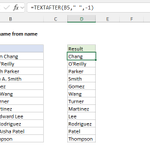
The new functions in #Excel are useful. The "old" formula to get the last name: =MID(B5,FIND("*",SUBSTITUTE(B5," ","*",LEN(B5)-LEN(SUBSTITUTE(B5," ",""))))+1,100) The "new" formula: =TEXTAFTER(B5," ",-1) We like the second option :)
1
1
3
826
The cool thing in the example is the *negative* instance number in TEXTAFTER. This tells TEXTAFTER to get all text after the *last* space. Excellent feature, useful in many situations.
476
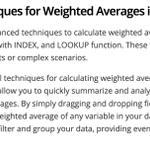
What about advanced techniques?! They have it covered. Check out this word salad:
1
1
493
Not helpful? Here are two more articles on the same topic:
1
1
442
Bottom line: at over 2000 words, this article is mostly just AI-generated fluff. Yet, for some reason, Google is ranking it #1. Please do better Google! There are many great Excel sites out there. More words <> more quality. cc @JohnMu
6
391
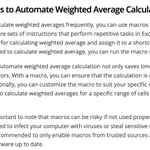
Plus, you can also use macros to automate the process! Yes. But do be careful if you go this route, because "macros can be risky". Actually, there is no code or instructions, so most people probably won't try macros?
1
1
312
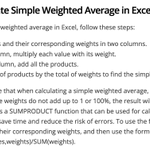
Followed by some nonsense about creating a weighted average with multiple criteria. Seriously, give these 4 steps a try, and let us know how it goes!
1
1
282
Another fluffy AI-generated article from @ZebraBI, currently ranking #1 as the "featured snippet" for "Excel weighted average" on @Google. (The screenshot comes from Exceljet, but that's for another day)
2
2
10
981
Maybe the most interesting thing about this article is that there is not a single working formula or screenshot. The closest we get is this how-to:
1
2
258
Yes, AI is cheap. But there are other costs...
Update on Causal - this is just a lag with Ahrefs data, they have tanked. Give it a few more days and it's going to be sub 100K visits a month.
5
1,485
Another garbage AI-gen article about Excel, this one on "How separate names in Excel". Ranking today as the "featured snippet" in Google, courtesy of @ZebraBI. Thread 🧵cc @lilyraynyc ,@CyrusShepard, @RossHudgens, @darth_na, @JHTScherck
6
2
4
36
9,434
Conclusion: Good AI gen effort! But this article is crappy and shouldn't be anywhere near page 1 on @Google. Real humans will waste time trying to sort it out, assuming it's the "best" result available.
1
5
851