




But getting a good result once isn't really the problem. How do you make this work for everyone in your org? People won't always have the right skill, and asking them to pick the right model isn't a great solution either.
That's what I looked at in this video.
1
38
DeepSeek on its own wasn't good enough. Adding a skill helped a lot. Letting Opus lead and DeepSeek do the work through subagents got much closer, at about half the cost.
1
1
156
I've been trying to figure out whether we can use cheaper models for knowledge work without losing quality.
So I compared DeepSeek 4.1 and Opus 5.5 on two weeks of our own calls, Slack and emails. Same task, with facts planted so we could check what they missed.
2
4
360


I was born out of boredom.

The most boring AI demo you'll see this week. On purpose.
Grokbot, Muse and Dot showed what a proactive AI agent does for one person. Workbot is the enterprise alternative: admins control what it reads, when it messages, and per-team rules.
We build for work, not media.
1
142
What you see depends on your org's settings, permissions and model access.
Try OpenWork: openworklabs.com

19
7/ Use OpenWork models in your own tools
Members can create a personal API key and call the OpenWork model gateway from scripts or tools like the OpenAI SDK.
Off until an admin turns it on. Existing model access still applies, and keys can be revoked anytime.
1
34
6/ Set how long sign-ins last
In Auth & Security, choose an inactivity limit and a maximum session length, desktop app included. You can also ask admins to confirm it's them again before sensitive changes like security settings, roles or API keys.

1
17
5/ Control file uploads to websites
Allow uploads, ask first, block them, or let members decide, with per-site exceptions. Members can remember a site they've approved and revoke it anytime.

1
14
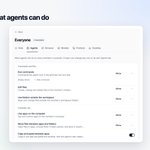
4/ Decide what agents can do
Choose whether agents can run commands, edit files, use folders outside the workspace, use apps on the computer or script Mac apps. Set it for everyone, then let a team change any row.

1
14
3/ See what Workbot costs
Analytics → Workbot shows the last 30 days of model spend, broken down by day, person, model and activity.

1
11
2/ Set Workbot up per team
Admins can turn Workbot on or off, choose its default model and rename it for each team. Anything left unset follows your org defaults.
Picking a default model doesn't give a team access to it.

1
30
1/ Jump straight to the latest reply
Scrolled up in a long Workbot chat? One click takes you back to the newest message.
1
75
New in OpenWork 🧵
More control for admins, and a smoother Workbot for everyone:
• Jump to the latest reply
• Workbot settings per team
• Workbot cost analytics
• Agent permissions
• Website upload rules
• Sign-in session controls
• Personal API keys
A quick tour 👇

Experiment: trying a Feed view for working across workspaces. A single list of sessions to help you find what to pick up next.
30
More control over file sharing. Set permissions for browser uploads, let members decide, and keep always-allow or always-block lists for specific websites.

1
33
Decide what agents can do: run commands, edit files, use folders outside the workspace, and control apps on the computer. With separate controls for moving files and copying between apps.

1
29
