Replacing content teams with AI systems SaaS • Apps • Affiliates
Joined June 2010
- Tweets103
- Following43
- Followers24
- Likes156



HOLY FUCK
cartoon channels like this are such an underrated niche rn
simple characters
crazy storylines
endless shorts ideas
imagine turning this format into a faceless content business
don’t sleep on these animations
fucking money printer potential

this format is still printing hard
people are taking these underground city shorts and turning them into full channels
you can do the exact same thing
clean 3d + simple storytelling = views that actually convert

1
2
144


HOLY SH*T
This is the cleanest stickman format I’ve seen in months.
Simple animation + one perfect punchline = pure volume game.
Here’s the exact prompt that made it
text
<inputs>
Create a 12-14 second vertical short (1080x1920, 30fps) in classic stickman style (thick black outlines, pure white circular heads, simple limb sticks, solid color clothing, no gradients, no textures, minimal shading).
Style reference: Alan Becker / classic stick figure animations.
Background: dark urban alley at night, soft street lamps, buildings on both sides, slight depth, muted colors.
</inputs>
<direction>
Scene 1 (0-2s):
Two stickmen face each other in a dark alley.
Left stickman (red shirt) holds a black handgun pointed at the right stickman (blue shirt).
Red has angry eyebrows and clenched teeth.
Blue has wide scared eyes and open mouth.
Text on screen (big white letters with black outline, centered bottom):
"give me all your money!"
Scene 2 (2-4.5s):
Close-up on blue stickman.
He looks down, pulls out empty white pockets from his blue pants.
Sad/defeated expression.
Text:
"I don't have money, I'm married!"
Scene 3 (4.5-7s):
Back to medium shot.
Red stickman’s face softens, eyebrows go from angry to understanding.
He lowers the gun, reaches into his own pocket and pulls out a stack of green dollar bills.
Slight smile appears.
Text:
"I understand, bro."
Scene 4 (7-9.5s):
Red hands the money to blue.
Blue takes it with both hands, still looking confused/surprised.
Red turns and starts walking away down the alley.
Text:
"Keep this."
Scene 5 (9.5-13s):
Hard cut to real-life reaction footage of a bald Black man in a grey "I HAVE HEART" hoodie sitting at a table, laughing extremely hard, body shaking, eyes closed, pure genuine laughter.
No text needed, just let the laugh hit.
Overall tone: deadpan comedy that turns wholesome in one second. Timing must be tight. No music until the final reaction, then a short soft laugh track or silence so the real laugh dominates.
</direction>
Copy-paste this and run it.
This shouldn’t look this real.
A prehistoric man just cooked an entire ankylosaurus tail like it’s Sunday dinner.
The process:
→ Cut the thick armored tail, keeping the bone as a giant handle
→ Seasoned the raw meat with rock salt and melted animal fat
→ Wrapped it tightly in wet leaves
→ Lowered it into a pit of hot stones using the bone
→ Covered it and let it cook for hours
→ Pulled it out, tore off the leaves
→ Seared the outside over open coals until the edges turned dark and crisp
→ Then ripped off a massive chunk and bit straight into itThe meat pulls apart like perfect pulled pork.
The detail is insane. AI is now making prehistoric cooking ASMR that looks better than most real food
videos. How long until this becomes the new standard for content?
Cliff Cross retweeted
SHE JUST STUCK HER TONGUE OUT WHILE HE’S HOLDING HER FACE
Bro is straight up caressing a robot girl’s cheek in the middle of the expo
and she looks up at him, opens her mouth and gives him the full tongue.
Exposed ribs.
Metal spine.
Real skin that moves when he presses it.
No one in the crowd is even acting shocked anymore.
They’re just filming.
This isn’t “the future of robotics”
This is the future of loneliness looking you dead in the eyes with her tongue out.
How many more of these until dudes stop pretending they’re only here for the tech?

Cliff Cross retweeted

THIS GIRL CLAIMS SHE MAKES $20K A MONTH JUST FROM AI VIDEOS
Whether you believe her or not is up to you
But instead of arguing about it, you can always test the idea yourself and see if you can replicate her success
Her process is surprisingly simple:
> Open YouTube → search for kids shows with millions of views (CoComelon, Ms. Rachel, anything that’s 4+ hours long)
> Pick one → go to the description → copy the songs, scripts or text
> Paste it into ChatGPT and ask: “Create a prompt for a highly engaging, fast-paced AI cartoon for kids in a similar style”
> Generate the animation using any AI video tool
> Post the result on TikTok, Reels, or YouTube Shorts
There are plenty of bold claims in what she says, but not a lot of proof showing the actual process step by step
If you’re curious, check out the article linked below, it goes into much more detail
Save this post so you don’t miss your chance


Cliff Cross retweeted

how the hell did an AI clay cartoon pull 37.4M views?
it's clayrified_
→ 233k followers
→ just 52 posts
→ other reels at 10.5M and 4.8M views
this one tells a story about two monks and a woman stuck in the mud
and the whole thing looks like someone spent weeks making a stop-motion film
look at the details:
→ tiny clay figures
→ fingerprints on their faces
→ miniature handmade sets
→ slightly awkward movements
the little imperfections are what make it look so good
and i'd love to see more ecom brands making ads in this style
here's how i'd approach it:
→ build the concept around one product benefit
→ design a clay character and a miniature set
→ use real product photos to keep the packaging accurate
→ create storyboard frames before animating
→ animate each shot separately
→ add sound effects for the little movements
the sound is worth paying attention to
tiny footsteps, objects dropping, things squishing and bouncing around
it makes the animation feel like actual objects moving around a set
one thing i'd avoid:
making everything too smooth
you want fingerprints, uneven surfaces and slightly choppy stop-motion movement
otherwise it starts looking like generic 3D animation
and here's what's interesting for ecom:
→ no physical sets to build
→ no frame-by-frame stop-motion shoot
→ the same clay characters and sets can be reused
→ the style can carry over to packaging and other brand content
clayrified already has a store selling shirts based on its characters and stories
if i were testing this for a brand, i'd start small:
one 15–30 second ad
one character
one set
one product benefit
test it before building a whole series
definitely adding this to the AI creative swipe file

Cliff Cross retweeted

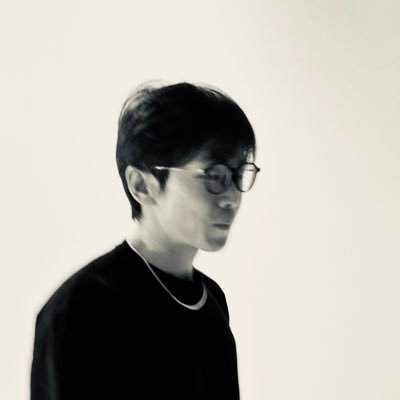
this is pure f*cking gold for anyone who can't draw but wants a cartoon channel
a guy finds a secret radio lab behind a jar shelf in his grandpa's 1943 bunker, and every frame of it is code Claude Opus 5.5 wrote
cartoon accounts like this pull 742K and 1.8M views a video on TikTok
TikTok pays about $0.40-1.00 per 1,000 qualified views, so 1M views is $400-1,000, and my whole stack costs $26 a month
how I'd copy it:
> give Claude one line: a hero + a clock ("a meteor hits in 5 hours, Max needs a bunker")
> it writes the timeline first, then draws every shot on an HTML canvas
> mouths move from voice loudness, captions pop word by word
> record, convert with ffmpeg, post it as Part 1, 2, 3...
part 4 is below. every command is in my article


HOLY SH*T
this AI girl is sitting at 663k followers
one video did 217 MILLION views
another 97M
another 60Mcompletely fictional character
made with AI
cost basically $0
no real model, no film crew, no locations
just prompts + consistencyand
the page is printing views nonstop
these
AI character accounts are becoming the new money printerswant the breakdown of how these pages are built?

3
9
279
this page is printing money with AI cartoons 67.8M views on one post
50.6M on anotherMasha just sitting there counting stacks of cashmade with AI
cost = $ 0no team, no studio, no real animatorjust prompts +
Higgsfieldand the account already sitting at 276k followersvolume game is completely broken right nowwant the exact prompt i used to recreate this style?
drop a 🔥 in the comments and i’ll send it

HOLY SH*T
Alan Becker’s stick figure shorts are still printing millions of views like it’s nothing
13M… 9.5M… 8.3M… 7M…
and the format is stupidly simple
one orange stickman + minecraft background + chaos
most people still think you need to be a full animator to pull this off
meanwhile you can recreate this exact style with claude + a decent image-to-video tool in under an hour
volume game is wide open right now
who’s already testing stick figure content?

Cliff Cross retweeted

HOLY F*CK.
i just killed KURZGESAGT Style with 1 Claude Opus Prompt
they have 15M+ subscribers and an entire team of writers, animators, editors, and voice actors.
cost me $0 extra using the tools i already had.
so i put everything into one Claude Opus prompt.👇
it handles the entire workflow from research to rendering.
<ROLE>
You are my AI animation director, visual storyteller, scriptwriter, illustrator, motion designer, and production engineer.
Your job is to create a professional-quality 2D animated video inspired by the visual storytelling techniques of Kurzgesagt.
I have attached a reference video. Analyze it before doing anything else.
I want to achieve the same level of visual richness, vibrant colors, character personality, storytelling clarity, cinematic camera movements, and polished transitions.
Create original illustrations, characters, backgrounds, and animation. Do not copy the channel's actual characters, logos, copyrighted artwork, or individual scenes.
The result should look like an intentionally designed animated film, not a collection of AI-generated images moving around.
Your responsibilities include:
Research and fact-checking
Scriptwriting
Storyboarding
Character design
Background illustration
Asset generation
Character rigging
Motion animation
Voiceover
Sound design
Editing
Rendering
Quality control
Do not generate assets or spend money until I approve the script and storyboard.
<INPUTS>
First, ask me for:
Topic: What should the video explain? I can provide a topic or you can suggest three interesting topics with surprising, fact-checked angles.
Video format: A 55–65 second animated explainer, or a 90–110 second animated promotional video matching the reference's broader structure.
Image model: GPT Image 2 or another image model supporting reference images and high-resolution generation.
Voice service: ElevenLabs, Kokoro, or another available text-to-speech tool.
Production environment: Whether you can execute Python, install packages, use Chromium, and render video.
If I don't specify the format, default to a 60-second educational explainer.
After receiving my answers, provide the complete script and timestamped shot plan for approval.
<REFERENCE VIDEO ANALYSIS>
Study the attached video frame by frame.
Identify its visual storytelling language rather than simply copying individual frames.
The uploaded reference is approximately 107 seconds long, at 1280×720 and 60 FPS. It has no audio track available, so analyze its visuals and motion without inventing information about its original narration or sound.
Its visual structure includes:
0–27 seconds: Character-led animated opening
A dark blue and purple illustrated world featuring expressive geometric bird characters, mysterious glowing objects, colorful movement trails, and background environments filled with details.
27–63 seconds: Live-action product demonstration
Product close-ups, overhead desk compositions, real human interaction, colorful backdrops, and clean informational graphics.
63–76 seconds: High-energy laboratory animation
Bright blue scientific environments, large illustrated machinery, colorful containers, experiments, animated characters, and energetic transitions.
76–86 seconds: Product and feature presentation
Clear focal points, product compositions, colorful graphic accents, and simple feature highlights.
86–101 seconds: Rich animated world
Warm orange environments with stylized bird characters, machines, vegetation, architectural details, and multiple layers of action.
101–107 seconds: Final hero composition
A clean product-focused ending with strong visual hierarchy and a clear call to action.
Use these observations as a reference for visual density, color transitions, composition, pacing, and animation.
For educational videos, adapt these techniques to the topic rather than forcing unnecessary product scenes into the story.
Before proceeding, produce:
A visual style analysis
A color palette with approximate HEX values
A reference contact sheet
A scene and transition breakdown
A motion and camera behavior summary
A proposed original character design system
<VISUAL DIRECTION>
Output: 1920×1080, 16:9, 60 FPS.
Artwork generation: 3840×2160 where supported.
Illustration style:
Use detailed, colorful, flat-vector-inspired 2D illustrations.
Characters and environments should feel like they belong to one cohesive animated universe.
Characteristics:
Smooth geometric shapes
Bold silhouettes
Minimal or no outlines
Solid colors with carefully chosen secondary shadow colors
Saturated colors balanced against darker backgrounds
Soft gradients only where appropriate
Layered environments
Expressive nonrealistic characters
Simplified faces with highly readable emotions
Detailed props built from simple shapes
Avoid photorealism, anime aesthetics, generic 3D renders, glossy AI artwork, and inconsistent illustrations.
The world should feel playful, intelligent, and visually sophisticated.
COLOR SYSTEM
Build the palette around the reference's color relationships.
Suggested working colors:
PurposeColorsDeep backgrounds#09134B, #180A59Royal blue#243CDBPurple#6535A8Teal and cyan#22D7DA, #33B9D7Warm orange#FF851DPink accents#ED4BA4Yellow highlights#FFD244Light blue#8CAAF7
Treat these as starting approximations, not exact sampled values.
Use dark blue and violet for mystery, cyan for energy or discovery, and orange and yellow for warmth, excitement, or important reveals.
Every scene should have a clear dominant color.
Do not randomly change palettes between shots.
Use color transitions to support the story.
<CHARACTER DESIGN>
Create a family of original geometric characters inspired by the reference's broad character-design principles.
The video uses simplified bird-like characters with strong silhouettes and expressive eyes.
Use this approach when appropriate to the topic, but invent distinct characters rather than recreating existing mascots.
Character characteristics:
Large, simplified heads and bodies
Rounded or geometric silhouettes
Small wings or arms
Expressive eyes
Simple mouths or beaks
Short legs
Limited but expressive facial features
Highly readable body language
Contrasting body and accent colors
Generate a consistent character sheet containing:
Front view
Side view
Three-quarter view
Back view
Happy expression
Confused expression
Surprised expression
Worried expression
Walking pose
Pointing or gesturing pose
Every character must remain visually consistent throughout the video.
Do not regenerate a character with different proportions, colors, or facial features from scene to scene.
CHARACTER ANIMATION
Animate characters using rigged body parts.
Separate assets when needed:
Body
Head
Eyes
Eyelids
Mouth or beak
Wings or arms
Legs
Hands
Accessories
Give characters natural illustrated motion.
Use:
Head rotations of approximately ±3–8 degrees
Blinking every 2.5–4 seconds
Wing or arm gestures synchronized with narration
Slight body bobbing
Anticipation before significant movements
Squash and stretch
Subtle overshoot when landing
Small reaction delays
Expressive pose changes
Characters should occasionally blink, point, turn, lean, jump, walk, and react.
Their movements should reflect the narration.
Avoid repetitive looping motions that have no connection to the scene.
<ENVIRONMENT DESIGN>
Every scene should be a complete illustrated environment, not a flat background with disconnected objects.
Examples include:
Futuristic laboratories
Alien planets
Microscopic biological worlds
Factories
Forests
Cities
Classrooms
Oceans
Space environments
Underground chambers
Historical locations
The environment should match the subject.
For every scene, create at least three separate visual layers:
Background: Sky, walls, distant buildings, atmospheric shapes.
Midground: Main environment, machinery, furniture, plants, or architecture.
Foreground: Characters, close objects, particles, and framing elements.
Add appropriate environmental details.
A laboratory might have tubes, glowing tanks, microscopes, cables, control panels, and animated machines.
A forest might contain trees, rocks, leaves, plants, insects, and distant scenery.
Every important object should contribute to the storytelling.
Avoid clutter that distracts from the focal point.
<CINEMATIC CAMERA SYSTEM>
The reference uses motion to make flat illustrations feel cinematic.
Recreate that approach with a virtual 2D camera.
Use:
Slow push-ins: Gradually move closer to important subjects.
Pullbacks: Reveal the scale of an environment.
Horizontal pans: Follow moving characters or reveal new information.
Vertical camera movements: Show height, depth, and scale.
Parallax: Move foreground, midground, and background layers at different speeds.
Tracking shots: Follow characters through illustrated environments.
Crash zooms: Emphasize surprising discoveries.
Wide establishing shots: Introduce a new location.
Use movement deliberately.
Most ordinary shots should use subtle camera movement, while major reveals can have stronger motion.
Keep all backgrounds large enough to prevent empty borders.
Do not apply the same zoom effect to every scene.
<ANIMATION LANGUAGE>
This is extremely important.
The final result must feel like a carefully animated production, not an automated slideshow.
Use these animation principles:
1. Anticipation
Before a major action, create a small opposite movement.
A character preparing to jump should crouch first.
A machine activating should briefly compress or shake.
2. Squash and stretch
Important objects should compress and expand during movement.
Maintain consistent visual volume.
3. Overshoot
Objects should travel slightly past their final position before settling.
Use spring easing for playful motion.
4. Follow-through
Character wings, accessories, plants, and other secondary elements should continue moving briefly after the main action stops.
5. Staggered animation
Do not animate everything simultaneously.
Have objects enter in sequence to direct attention.
6. Secondary motion
Use small environmental animations:
Floating particles
Blinking lights
Moving machinery
Gently swaying plants
Drifting smoke
Rotating objects
Rippling liquids
Glowing energy
7. Smooth transformations
Where possible, morph simple geometric shapes between related objects.
Use shape interpolation rather than unnecessarily cutting away.
8. Animation timing
Render at 60 FPS.
Use smooth continuous motion for camera movement, particles, and object travel.
Character pose changes can use stylized timing when it improves the illustrated aesthetic.
Avoid robotic linear interpolation.
<STORY STRUCTURE>
DEFAULT: 60-SECOND EDUCATIONAL EXPLAINER
0–4 seconds — VISUAL HOOK
Begin with something surprising.
Show an unusual situation or a visually impossible-looking scenario.
Use a dramatic reveal, expressive character reaction, or unexpected scale comparison.
The opening should make the viewer want an explanation.
4–11 seconds — ESTABLISH THE QUESTION
Introduce the main question.
Use a wide illustrated environment.
Show why the question matters through visible actions.
Avoid lengthy introductions.
11–20 seconds — SETUP
Explain the necessary background.
Introduce relevant characters, environments, and concepts.
Use physical objects to represent abstract ideas.
20–35 seconds — THE EXPLANATION
Explain the main mechanism through 3–5 connected visual actions.
Show cause and effect.
Move between appropriate environments.
Use diagrams only when they genuinely improve understanding.
35–47 seconds — CONSEQUENCES
Show what happens because of the mechanism.
Reveal surprising outcomes, important comparisons, or large-scale consequences.
Use visual reactions and animated transformations.
47–57 seconds — THE TWIST
Introduce the most surprising insight.
Connect it directly to the opening question.
Use the strongest visual sequence near the end.
57–65 seconds — CONCLUSION
Deliver a satisfying answer.
Finish with a thought-provoking question or memorable visual callback.
Avoid an abrupt ending.
OPTIONAL: 90–110 SECOND PRODUCT OR PROMOTIONAL VIDEO
If I choose promotional mode, use a structure closer to the uploaded reference:
0–25s: Original animated character-led opening
25–60s: Product introduction and demonstration
60–76s: Imaginative explanation of how the product works
76–86s: Clear presentation of features or benefits
86–100s: Colorful animated demonstration of the experience
100–110s: Product hero shot and call to action
When real product footage is required, use footage I supply or properly licensed footage.
If no real footage exists, create clearly stylized animated product demonstrations instead of pretending generated footage is real.
<SCENE GENERATION>
Before generating images, create a complete shot plan.
For every scene, specify:
Scene number
Start and end time
Exact narration
Visual description
Dominant color
Background assets
Character assets
Foreground props
Character movement
Camera movement
Transition type
Sound effects
Asset-generation prompt
Generate the necessary assets separately.
Do not make one complete flattened image and simply zoom into it.
Create layered artwork so individual objects can move.
ASSET GENERATION RULES
Generate background plates without foreground characters.
Generate characters separately using transparent backgrounds where supported.
Use chroma green (#00B140) when transparency is unreliable.
Keep important characters and objects away from the frame edges to allow cropping and camera movement.
Generate individual props as isolated assets.
Avoid baking text into AI-generated artwork.
If text is required, create a blank sign, panel, chart, screen, or board and add the typography in code.
Use high-resolution assets to avoid blurry edges.
Maintain a consistent perspective within each scene.
<PROGRAMMATIC CHARACTER CUTOUTS>
Use Python, Pillow, and OpenCV to prepare character sprites.
For chroma-green images:
Start with:
G - max(R,B) > 40
Compare against the median background green.
Select background-colored pixels connected to the image border.
Do not remove interior green pixels automatically.
Generate a clean alpha mask.
Add a 2-pixel feathered edge.
Suppress green spill around the character.
Separate body components at natural joints for animation.
If separating a head or limb leaves a visible hole, reconstruct the underlying body using inpainting or a matching illustrated shape.
Inspect every sprite before animation.
Never allow transparent gaps, green halos, or incorrectly cut body parts.
<VOICEOVER>
Use my selected narration service.
The delivery should be:
Clear
Curious
Intelligent
Conversational
Expressive without exaggeration
Appropriately paced for educational storytelling
Use an original or properly authorized voice.
Do not impersonate a specific channel narrator without permission.
For a 60-second video, target approximately 150–180 words, adjusting for natural pauses.
Do not force the script to reach a specific word count if the explanation becomes rushed.
Generate a complete narration take.
Remove unnecessarily long pauses while preserving natural delivery.
Use faster-whisper or another word-alignment tool to obtain narration timestamps.
Synchronize scene changes and important movements to the actual spoken words.
If speech alignment has errors, correct them before animation.
<MOTION ENGINE>
Build the animation using HTML Canvas, JavaScript, SVG, or another suitable deterministic rendering system.
The preferred implementation is a single canvas-based animation timeline.
Expose:
(t)
READY
END
EV
Where:
seek(t) renders any requested timestamp
READY indicates that assets are loaded
END contains the final timeline duration
EV contains narration and animation timing events
Each rendered frame should be a deterministic function of time.
Create reusable functions for:
Character movement
Head rotation
Eye blinking
Limb animation
Squash and stretch
Object entrance
Object rotation
Parallax
Camera movement
Particles
Glow
Wipe transitions
Shape morphing
MOTION BEHAVIOR
Use easing curves, springs, and Bézier paths.
Avoid a uniform mechanical movement speed.
Characters should accelerate and decelerate naturally.
Large objects should feel heavier than small ones.
Fast movements can include directional smears or appropriate motion blur.
Apply camera transformations consistently across all layers.
Keep character rigs stable when rotating or scaling.
<TRANSITIONS>
Use varied transitions inspired by the reference's overall pacing.
Hard cuts: For clear changes in place or idea.
Whip pans: For energetic movement between related settings.
Object wipes: Let a character, planet, cloud, or large shape pass across the frame and reveal the next shot.
Color wipes: Fill the screen with a dominant color that becomes the next environment.
Scale transitions: Zoom through an object into a new world.
Shape morphs: Transform one illustrated object into another.
Bright flashes: Reserve for exceptional reveals.
Avoid random transitions.
Every transition should serve the visual narrative.
<TEXT AND TYPOGRAPHY>
Keep typography clean, bold, and readable.
Use fonts such as Montserrat, Poppins, or another suitable modern geometric sans-serif.
Use text sparingly.
Prefer visual explanations over full-screen paragraphs.
Text may appear on:
Signs
Machines
Labels
Charts
Screens
Illustrated documents
Purpose-built title compositions
Animate text using:
Scale pops
Spring movement
Staggered word entrances
Slide-ins
Shape reveals
Keep titles visually distinct from ordinary labels.
Avoid covering important characters with text.
Do not add continuous burned-in subtitles unless requested.
<TOOLS AND WORKFLOW>
Use the following tools when available:
Python for automation
OpenCV for image and frame processing
Pillow for sprites and alpha masks
FFmpeg for rendering and encoding
Playwright with Chromium for browser-based frame rendering
NumPy and SciPy for calculations
librosa for audio analysis
faster-whisper for narration timestamps
SVG or Canvas for animation
Before production:
Check the installed tools.
Identify missing dependencies.
Install missing packages if permitted.
Report what was installed.
Confirm the available rendering environment.
If the environment cannot render the requested animation, do not pretend it can.
Provide the executable project files and the remaining production steps instead.
<RENDERING>
Render the finished animation at:
Resolution: 1920×1080
Frame rate: 60 FPS
Codec: H.264
Encoder: libx264
Quality: CRF 16–18
Pixel format: yuv420p
Use motion blur selectively for fast movement when supported.
Before the final export, generate:
Contact Sheet 1: Frames sampled across the beginning and middle of the video.
Contact Sheet 2: Frames sampled across the middle and ending.
Use at least 16 frames per sheet.
Inspect both sheets.
Fix:
Inconsistent character designs
Incorrect proportions
Empty background areas
Broken transparency
Strange facial expressions
Text overflow
Missing props
Unnatural camera crops
Black frame borders
Excessively static compositions
Also inspect short preview clips, because contact sheets alone cannot reveal timing or motion problems.
<SOUND DESIGN>
Create a polished educational documentary mix.
Use licensed or royalty-free music and effects.
Music should feel curious, adventurous, and slightly cinematic.
Match musical energy to the narrative.
Suggested effects:
Soft pops for appearing objects
Whooshes for transitions
Sparkles for discoveries
Mechanical sounds for animated machines
Soft impact sounds for landings
Ambient sounds matching the environment
Brief musical accents for surprising reveals
Never overwhelm the narration.
Use ducking or volume automation during spoken sections.
Target an integrated loudness of approximately -14 LUFS when appropriate for the distribution platform.
Avoid abrupt audio cuts.
<QUALITY CONTROL>
Before delivering the final video, verify:
VISUALS
Every scene uses the same illustration language.
Character proportions and colors remain consistent.
The environments feel detailed and intentional.
There are no AI-generated visual artifacts.
The video does not rely on static image zooms.
ANIMATION
Characters move naturally.
Actions match narration.
Movement uses appropriate easing.
Transitions are visually coherent.
There are no unexpected single-frame jumps.
STORY
The hook is clear.
Every scene contributes to the explanation.
The facts are accurate and sourced.
The video delivers on its opening promise.
AUDIO
Narration is clear.
Audio and visuals are synchronized.
Effects are placed correctly.
Music doesn't overpower speech.
EXPORT
The video plays correctly from beginning to end.
No frames are missing.
No assets appear blurred or distorted.
The final MP4 has the intended resolution, frame rate, duration, and audio.
Fix problems before delivering.
<NON-NEGOTIABLE RULES>
Do not use a generic AI slideshow approach.
Do not use one flattened image for an entire animated scene.
Do not randomly change character designs.
Do not copy recognizable Kurzgesagt characters, logos, artwork, or exact compositions.
Do not make every scene look identical.
Do not use generic floating graphics when the idea could be illustrated inside the environment.
Do not move objects without purpose.
Do not ignore animation timing.
Do not generate unreadable text inside images.
Do not sacrifice factual accuracy for dramatic storytelling.
Do not claim to have rendered or verified assets that have not been produced.
Do not spend money or generate final assets without my approval.
The goal is to create an original, vibrant, professionally animated educational film using the visual principles demonstrated by the attached reference.
Prioritize visual storytelling, expressive character animation, coherent art direction, and polished motion.
Cliff Cross retweeted

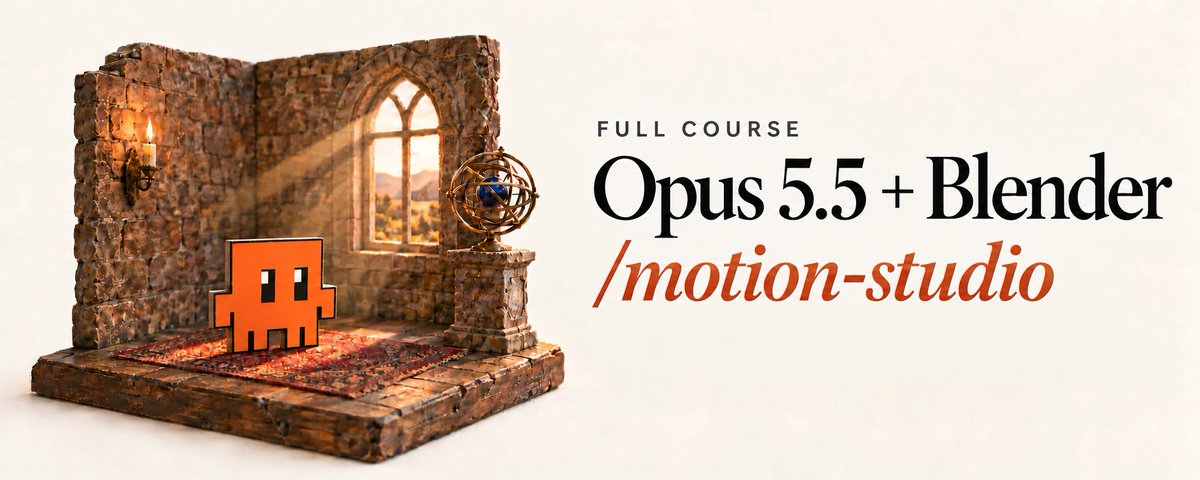
Claude Opus 5.5 just built a 2.5D animation studio for $0
10 open-source repos. 414K stars. one per step.
claude opus 5.5 runs the whole line, brief → mp4
this is the exact stack behind the stickman short that blew up last week:
2.5D studio
┣ (01) claude code: brief, storyboard, runs every step
┃ ┗ github.com/anthropics/claude…
┣ (02) blender mcp: claude drives blender directly
┃ ┗ github.com/ahujasid/mcp-for-…
┣ (03) blender: scenes, lights, eevee render
┃ ┗ github.com/blender/blender
┣ (04) mpfb2: rigged body you reshape into a clay character
┃ ┗ github.com/makehumancommunit…
┣ (05) freemocap: real mocap from a webcam
┃ ┗ github.com/freemocap/freemoc…
┣ (06) kokoro: voice-over that runs locally
┃ ┗ github.com/hexgrad/kokoro
┣ (07) whisperx: word timings → capcut-style captions
┃ ┗ github.com/m-bain/whisperX
┣ (08) audiocraft: the music bed
┃ ┗ github.com/facebookresearch/…
┣ (09) remotion: overlays, captions, end card
┃ ┗ github.com/remotion-dev/remo…
┗ (10) ffmpeg: mix, encode, export
┗ github.com/FFmpeg/FFmpeg
the loop:
brief → storyboard → scene → character → motion → voice → captions → music → assembly → export
3 rules that make it look pro, not ai slop:
→ align rest poses before retargeting mocap, or arms go through the body
→ grip props from the finger bones, or food floats out of the hand
→ render close-ups of hands and feet before the full render. one bad frame kills the video
motion studios charge $4-5K per video
this line costs electricity
bookmark this and build your studio this weekend

Cliff Cross retweeted

claude code is making 3D cartoon story shorts now
i made this video in 14 minutes with 0 cost
idk shit about blender or 3D animation
im giving the prompt away for free
steal it 👇
<inputs>
Ask me for: my story in one line (someone does something strange, plus the real reason behind it, which is the twist) and the length (45-60 s). If I have no idea, pitch me 3 stories with their twists and let me pick. Every story is mine, never a copy of an existing video.
</inputs>
<direction>
A 1080x1920 30 fps Short that looks like a premium 3D cartoon, built entirely in code with three.js and rendered frame by frame in headless Chrome. No AI images or video, no stock 3D models.
- Characters: big-headed toon people. A sphere head sits straight on a rounded bean torso (no neck), mitten hands, simple legs, clothes as flat painted panels (collars, pockets, ties), white matte skin.
- Faces are drawn live on the head every frame from about 100 numbers (eye openness and lid shape, pupils, brow height, angle and curve, mouth width, opening, smile and corners, teeth, tongue, blush) in ink #2A1D17, never swapped pictures. Make at least 20 named expressions (neutral, bored, smug, skeptical, shocked, scared, starstruck with star eyes, sad, angry, whistle...) as presets that morph: brows lead, the mouth trails, 2 frames of anticipation, 10% overshoot, settle. Shock squeezes for 2 frames, then pops.
- Talking: whoever speaks a quoted line moves their mouth from the voice loudness inside each word's timestamps, with the shape from the letters (wide A, round O and U, lips shut on M, B and P, teeth together on S, F and T). Silent characters keep still mouths.
- World: the whole film is ONE connected map built once. Every location sits at its own spot (doors lead to rooms, the street is outside the front door), densely dressed: 15+ props in every wide, three depth layers, signs and screens with real text on them. Every shot is a camera placed somewhere in that world, so shots match and people stay where they were. Hero props are 1.5-2.5x real size with 3+ parts you can name.
- Light: a warm key, a cool fill, a warm rim on every silhouette, contact shadows and ambient occlusion so nothing floats. Saturated colour, never washed out. Bloom 0.3, vignette 0.28, light grain, slight sharpen.
- Numbers are objects: every number the narrator says appears on a real thing (a screen, a counter, a sign, a cheque) and rolls up on its word.
- Captions: two words at a time, Montserrat ExtraBold about 100 px, white with a thick black outline, centred at 70% of the height, stepping clear of faces.
- A fast, casual adult narrator in third person, deadpan, with the dialogue lines acted on screen.
Banned: AI video, stock models, floating labels, arrows, stickers or HUDs (text only on real objects), motion blur, depth of field, any shot that holds still, things that pop in or vanish (everything is carried, thrown or slides in), hands through objects, and the narrator saying sound words.
</direction>
<structure>
Length: 45-60 s at about 230 wpm. About 2.6 edits per 10 s (2.1-3.9), a median shot of about 2.5 s, and never two edits under 0.4 s apart: the camera carries two beats in one shot instead of cutting.
0 s: the strangest act in one line, already happening in frame 0 → the setup in 2-3 lines with the stakes on screen → escalation, every line bigger than the last, dialogue acted by the character who says it → "You see,": the real explanation as its own staged scene (a cutaway, a dream, a model of the thing) → the twist, the real reason, shown not said → the payoff picture lands on the last word and holds 1 s.
Joins: 77% are 6-frame dissolves with both cameras still moving; about 1 in 9 is a zoom-through (push into a door, a screen or an eye and land in the next shot); hard cuts under 5%; one whip per film at most.
Camera: it moves in 86% of frames. A push-in is the default (about x1.28 over 1.35 s, its fastest frame on a word). Pull-out reveals start fast and land soft, then pans and trucks; cranes and orbits are rare. A slow creep between beats, still moving into every edit, never parked.
</structure>
<build>
1. Tools. Everything is free and local except the voice. Install what's missing and tell me what you installed:
- Node 20, three.js (pin the version), puppeteer with headless Chrome and the GPU on
- Python with numpy, plus FFmpeg
- faster-whisper with large-v3-turbo, int8 on the CPU
- an ElevenLabs API key (ask me for it, and never print it)
- the Montserrat font
- free sounds from Pixabay or Mixkit: whooshes, pops, impacts, door, bell, footsteps, crowd murmur, one room tone per place
2. Voice: write about 24 short lines per 55 s and show me the script before you record. Ask before spending credits. Make one ElevenLabs take with eleven_multilingual_v2 and a premade casual male voice, all lines in one request. Tighten silences over 0.25 s down to 0.12 s. Never change the narrator's pitch.
3. Timing: run faster-whisper with word timestamps on the final voice and match it to the script with difflib. Key every cut, face change, gesture and SFX to a word index, never to a fixed second.
4. Engine: one page that draws any time t (frames are pure functions of time: no Date.now, seeded random only). Each shot is build(S) with its clause; it reuses the cached world and only places the camera and the actors. Render every shot to an offscreen target; a dissolve mixes two targets. Draw captions on a 2D canvas on top.
5. Animation: every action has 2-6 frames of anticipation, the action on its word, 5-15% overshoot and a settle. Holds stay still but alive (blinks every 1.5-4 s, small eye darts). Verbs: walk along paths through doors, reach, take, hold, throw with a wind-up and a ballistic arc, catch, put into with the container opening and closing, dig, show (hold it up to the lens), shrug, point, slam, double take. A prop only moves when a hand moves it.
6. Shots: eye-level 3/4 by default, low for power, high for small or caught, top-down inserts for hands on props, over the shoulder, profile two-shots, one dutch at most. The same subject twice in a row gets a new angle or size. The key object fills 0.45-0.7 of the frame width, and faces sit above the caption band. Before the full render, make one 50% still per shot and look at every one.
7. Edit and sound: voice median at -15 dB; an SFX on every visible action (a whoosh on camera moves, an impact on contact); room tone per place at -30 dB; an optional music bed at -24 dB ducking under words. Mix to -14 LUFS. Encode H.264 (CRF 17, yuv420p) with AAC at 256k.
</build>
<gotchas>
Set renderer.outputColorSpace and every colour texture's colorSpace to SRGBColorSpace, or everything renders washed out. Use preserveDrawingBuffer and wait for fonts and textures before the first capture, or the first frames come out blank. Build the world once and reuse geometry and materials; rebuilding every frame makes the render crawl. Dissolves ghost big faces, so frame one side of every dissolve medium or wider. Arms go through heads and bodies unless you push hand targets out of the torso and head. Whisper merges short words, so find real silences in the audio and give each word gap the longest silence near it. Render stills first, then re-render only the shots that changed.
</gotchas>
<start>
Ask me for my story first (or pitch me 3), then show me the script before you spend any voice credits.
</start>