

Built for busy minds. An AI thinking partner that remembers what matters and helps you get things done.
Joined November 2023
- Tweets187
- Following21
- Followers729
- Likes119





Me: “um so like… next wednesday… uh… make a deck… oh and the weekly report”
ideaShell: ✅ done, done, done, done, done
Wondering where all your money went?
Stop guessing. Build a custom AI bookkeeping Skill in 3 minutes—just talk, and let it track every penny.
And it doesn't stop there: create custom skills for anything you need, from fitness tracking to reading notes.
🤖 Made with AI


Glad to hear that 😊 If you need longer recordings, you can upgrade to Plus to get past the 1 minute limit
Please check the settings - MCP for the PAT. The website is ideashell.com

Thanks for the feedback. We're already on it regarding the WhatsApp integration—mind dropping us a DM with a few more details about what's going wrong?
Thinking out loud at your desk? 🎙️ You can now record voice notes directly on ideaShell web, with no phone needed.
👉app.ideashell.com
Hi! Yes — you can connect Codex from ideaShell. On the Web ideashell.com, go to Settings and you'll find a Skill for connecting Codex — it walks you through the setup there.
Connect ChatGPT directly to IdeaShell! 🚀 Seamlessly analyze notes and save your AI chats. Give it a try today!
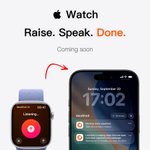
Now you can give ideaShell a task right from your Apple Watch — and let AI take it from there on your iPhone.
Coming soon.

The prompt is this: "Create a 3:4 vertical travel poster inspired by a clean, premium Instagram aesthetic, split into two equal horizontal sections. The bottom 50% must preserve the original photo exactly, without altering the person, scenery, composition, or lighting. In the top 50%, extract the most recognizable architectural or scenic element from the original photo and turn it into a small, refined refrigerator-magnet-style icon. Keep the icon simple and recognizable, with a subtle 3D effect, soft shadow, and clean white/light outline, centered with plenty of negative space. Use a saturated solid background color sampled from the original photo, with no gradients or complex patterns. Overall style: fresh, bright, minimal, and sophisticated, combining realistic travel photography, a collectible souvenir magnet, bold color, and light Instagram-style typography."
Yes, you can use skills by tapping the "+" icon in the bottom left corner of the Ask AI. However, creating new skills is currently not supported on mobile.
Now you can create your own skills and generate images with just one click! Check out the tutorial and results in the images below. Give it a try!


Hi! Thanks for the feedback. This is likely happening because your mobile app is the China (Mainland) version, while the desktop version you're logged into is the international version — the two versions have separate accounts and membership data that don't sync with each other. Could you please double-check this on your end?
Hi!Is it possible you're logged into a different account? Normally, all your notes should show up on the home screen.
The web version just got a serious upgrade: real-time transcription, a new to-do timeline, scheduled tasks, and more skills to explore.
Record, organize, and let AI handle tasks on schedule — all from the web.
Try it here!👉 ideashell.com


