

Ryven retweeted
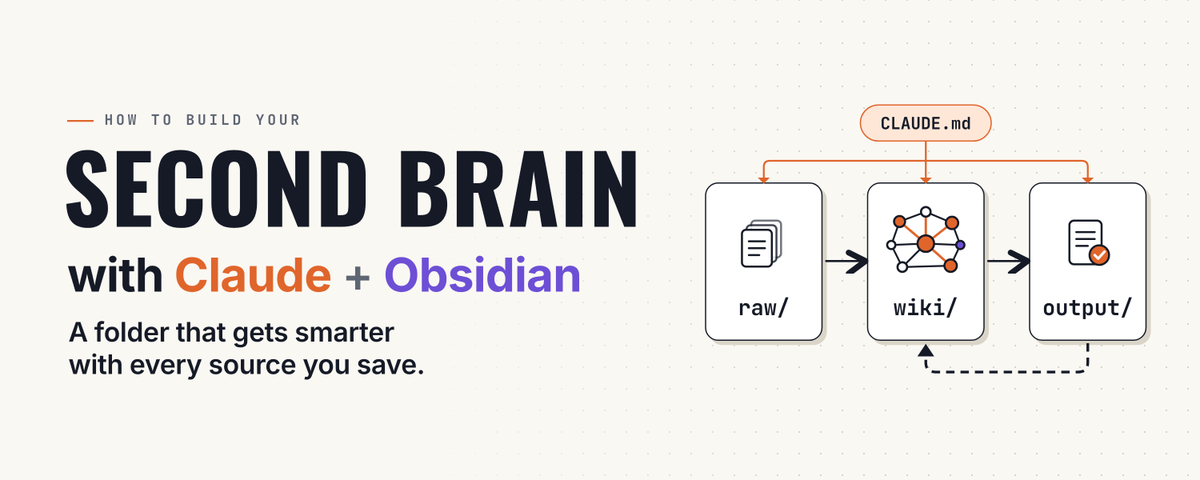
I genuinely don’t understand why everyone is still skipping this
Andrej Karpathy, a co-founder of OpenAI, shared a simple idea that reached 21 million views: stop pointing AI only at code, point it at everything you know.
Throw any article, transcript or PDF into a folder, and Claude turns it into wiki pages, a second brain stitched to everything you’ve already saved. Nothing sits in a pile, and every source you add makes your next answer sharper.
The whole setup:
> Create an Obsidian vault and open it with Claude Code
> Hand Claude Karpathy’s wiki idea file and let it build the structure
> raw holds your sources, wiki holds its pages, CLAUDE.md holds the rules
> Drop a source into raw and type “ingest this”
> Then ask anything, and it answers from all of it
Five minutes to set up, and Claude stops forgetting you between chats.
The full step-by-step guide for Claude and Obsidian is in the article below.
Bookmark it before you start

I genuinely don’t understand why everyone is still skipping this
Andrej Karpathy, a co-founder of OpenAI, shared a simple idea that reached 21 million views: stop pointing AI only at code, point it at everything you know.
Throw any article, transcript or PDF into a folder, and Claude turns it into wiki pages, a second brain stitched to everything you’ve already saved. Nothing sits in a pile, and every source you add makes your next answer sharper.
The whole setup:
> Create an Obsidian vault and open it with Claude Code
> Hand Claude Karpathy’s wiki idea file and let it build the structure
> raw holds your sources, wiki holds its pages, CLAUDE.md holds the rules
> Drop a source into raw and type “ingest this”
> Then ask anything, and it answers from all of it
Five minutes to set up, and Claude stops forgetting you between chats.
The full step-by-step guide for Claude and Obsidian is in the article below.
Bookmark it before you start
Ryven retweeted
I can’t believe people still build a Claude second brain from scratch when Obsidian’s own CEO already shipped the shortcut.
4 GitHub repos that already set up Claude to read, write and organize your notes:
→ obsidian-skills, 49.8K stars: written by Obsidian’s own CEO, so Claude actually knows how Obsidian works
→ claude-obsidian, 15K stars: the whole wiki loop (ingest, query, lint) as ready-made commands
→ obsidian-second-brain, 4.8K stars: 48 commands that run in Claude Code, Codex and Gemini
→ second-brain-starter: interviews you first, then writes a 9-phase build plan for your own setup
older guides still show old star counts, these numbers are current
two rules no repo can enforce for you: keep your sources read-only, and ask with “using only wiki/”, otherwise Claude quietly fills the gaps with its own guesses
the full step-by-step guide is in the article below
I can’t believe people still build a Claude second brain from scratch when Obsidian’s own CEO already shipped the shortcut.
4 GitHub repos that already set up Claude to read, write and organize your notes:
→ obsidian-skills, 49.8K stars: written by Obsidian’s own CEO, so Claude actually knows how Obsidian works
→ claude-obsidian, 15K stars: the whole wiki loop (ingest, query, lint) as ready-made commands
→ obsidian-second-brain, 4.8K stars: 48 commands that run in Claude Code, Codex and Gemini
→ second-brain-starter: interviews you first, then writes a 9-phase build plan for your own setup
older guides still show old star counts, these numbers are current
two rules no repo can enforce for you: keep your sources read-only, and ask with “using only wiki/”, otherwise Claude quietly fills the gaps with its own guesses
the full step-by-step guide is in the article below
Ryven retweeted
OpenAI co-founder Andrej Karpathy called it a compiler, not a storage system. this diagram shows the architecture he described.
Your second brain is a filing cabinet. It holds a thousand saved articles you will never open again, and it is exactly as smart today as the day you started.
A compiled wiki is built differently:
raw holds the sources, untouched, as your ground truth
wiki is where the model turns raw into linked, structured pages, so you read it and the model writes it
output is where finished work lands, built from the wiki and never from memory
At the center sits CLAUDE.md: who you are, what you want, what you're building. The model reads it before every session, so you never explain yourself twice.
The whole loop starts with one prompt:
"Ingest the new file in raw/. Write a summary in wiki/, link every concept it touches and add it to wiki/index.md. Never edit raw/."
Five automations keep it running: ingest, write, manage, review, maintain.
Every new source gets compiled into what's already there, so the system gets smarter with each one.

OpenAI co-founder Andrej Karpathy called it a compiler, not a storage system. this diagram shows the architecture he described.
Your second brain is a filing cabinet. It holds a thousand saved articles you will never open again, and it is exactly as smart today as the day you started.
A compiled wiki is built differently:
raw holds the sources, untouched, as your ground truth
wiki is where the model turns raw into linked, structured pages, so you read it and the model writes it
output is where finished work lands, built from the wiki and never from memory
At the center sits CLAUDE.md: who you are, what you want, what you're building. The model reads it before every session, so you never explain yourself twice.
The whole loop starts with one prompt:
"Ingest the new file in raw/. Write a summary in wiki/, link every concept it touches and add it to wiki/index.md. Never edit raw/."
Five automations keep it running: ingest, write, manage, review, maintain.
Every new source gets compiled into what's already there, so the system gets smarter with each one.
Ryven retweeted

Andrej Karpathy's LLM wiki gist has 5,000+ stars, and this is the clearest step-by-step build of it.
Try to name one thing you read this year that you could use today. You will fail, and that is what your reading is worth right now.
The fix takes about 20 minutes: a folder where everything you save gets read, summarized and linked to the rest.
→ raw/ holds your sources, and Claude never edits them
→ wiki/ holds the linked pages Claude writes from them
→ CLAUDE.md tells Claude who you are before every session
One phrase keeps it honest, and that phrase is "using only wiki/". Without it, Claude fills the gaps with general knowledge and hands it back as if it were yours.
Next week you will read more, and all of it will end up exactly where this year's reading went, unless you build this tonight.

Ryven retweeted
This setup straight from Anthropic’s docs saved me about $1,000.
The idea is simple, each model only does the job it is worth paying for.
→ Opus 5.5 plans and signs off on the final diff
→ Sonnet 5.5 does the legwork
→ Fable 5.1 steps in only when called
Opus runs at high effort and owns the final diff.
Sonnet runs at medium effort across three subagents: an explorer that reads the code, a worker that edits files and runs tests, and a researcher that pulls the docs.
Fable sits behind /advisor fable, reads the whole session, and speaks only when it is called, which happens at three moments:
→ before a plan ships, to ask whether this is the right approach
→ when the same error comes back twice, to ask whether the search is stuck in the wrong place
→ before a long task counts as done, to ask what got missed
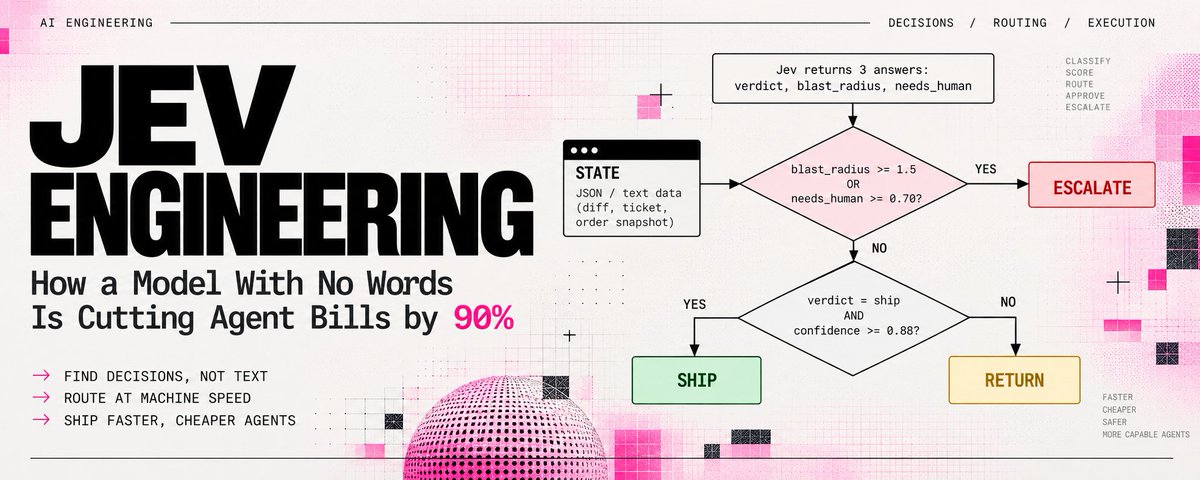
The same split works for the smallest decisions. Which file to open, which tool to run, and whether to retry or stop need no deep reasoning, so a decision model like Jev answers them in a fraction of a second and the big models only see the real forks.
Run Opus on everything and you pay it to check whether a file exists.
Paste this into Claude Code:
“Rebuild my Claude Code setup around three tiers.
First, look in ~/.claude/agents and .claude/agents for subagents that already act as explorer, worker or researcher. Create only the missing ones, each with model: sonnet and effort: medium. If an existing one is pinned to another model, list it and leave it alone.
Second, in ~/.claude/settings.json set advisorModel to fable, and set high effort for Opus under modelSettings for claude-opus-5-5, because a top-level effortLevel does not apply to Opus 5.5.
Third, report without changing anything: whether CLAUDE_CODE_DISABLE_ADVISOR_TOOL, DISABLE_TELEMETRY or anything that blocks feature-flag fetches is set, whether CLAUDE_CODE_EFFORT_LEVEL is set, since it can override subagent effort, and whether using Fable as advisor needs a one-time billing consent. If you can’t tell, say so.
Fourth, add one line to ~/.claude/CLAUDE.md: consult the advisor before a big plan, when the same error shows up twice, and before marking a long task done.
Show every change as a diff first, and touch nothing until I say go.”
Docs: code.claude.com/docs/en/advi…
This setup straight from Anthropic’s docs saved me about $1,000.
The idea is simple, each model only does the job it is worth paying for.
→ Opus 5.5 plans and signs off on the final diff
→ Sonnet 5.5 does the legwork
→ Fable 5.1 steps in only when called
Opus runs at high effort and owns the final diff.
Sonnet runs at medium effort across three subagents: an explorer that reads the code, a worker that edits files and runs tests, and a researcher that pulls the docs.
Fable sits behind /advisor fable, reads the whole session, and speaks only when it is called, which happens at three moments:
→ before a plan ships, to ask whether this is the right approach
→ when the same error comes back twice, to ask whether the search is stuck in the wrong place
→ before a long task counts as done, to ask what got missed
The same split works for the smallest decisions. Which file to open, which tool to run, and whether to retry or stop need no deep reasoning, so a decision model like Jev answers them in a fraction of a second and the big models only see the real forks.
Run Opus on everything and you pay it to check whether a file exists.
Paste this into Claude Code:
“Rebuild my Claude Code setup around three tiers.
First, look in ~/.claude/agents and .claude/agents for subagents that already act as explorer, worker or researcher. Create only the missing ones, each with model: sonnet and effort: medium. If an existing one is pinned to another model, list it and leave it alone.
Second, in ~/.claude/settings.json set advisorModel to fable, and set high effort for Opus under modelSettings for claude-opus-5-5, because a top-level effortLevel does not apply to Opus 5.5.
Third, report without changing anything: whether CLAUDE_CODE_DISABLE_ADVISOR_TOOL, DISABLE_TELEMETRY or anything that blocks feature-flag fetches is set, whether CLAUDE_CODE_EFFORT_LEVEL is set, since it can override subagent effort, and whether using Fable as advisor needs a one-time billing consent. If you can’t tell, say so.
Fourth, add one line to ~/.claude/CLAUDE.md: consult the advisor before a big plan, when the same error shows up twice, and before marking a long task done.
Show every change as a diff first, and touch nothing until I say go.”
Docs: code.claude.com/docs/en/advi…
Ryven retweeted
Your “deleted” photos may not be deleted. Claude Code found years of them sitting in old backups on my Mac.
I plugged in my new phone for a backup while Claude Code ran a read-only check on my disk. it flagged something I never asked about. a folder called MobileSync/Backup. 318 GB.
inside were 6 backups from 3 different iPhones, and two of those phones belonged to someone else now.
a backup is a snapshot of the whole phone on the day it was made. everything I deleted afterward is still inside the backup from before it. the screenshots I cleared. the photos I removed twice because I didn’t trust the first time.
the person who bought my phone got a clean device. I kept everything it used to hold.
what was sitting there:
2020 backup: 74 GB
2021 backup: 69 GB
2022 backup: 61 GB
2023 backup: 58 GB
2024 backup: 33 GB
2025 backup: 23 GB
none encrypted. last opened: never
nothing was hacked. nobody broke in. it was just a folder I never opened.
check this today. it takes two minutes:
1/ open Finder, click your iPhone, then Manage Backups
2/ look at the dates and sizes
3/ delete every old backup you don’t need
4/ turn on “Encrypt local backup” for the ones you keep
5/ check Recently Deleted in Photos too, because iCloud keeps its own copy
I went from 6 backups to 1, and from 318 GB to 23 GB.
bookmark this, and send it to anyone who has ever sold an iPhone.
How many old backups are on your Mac right now?
Your “deleted” photos may not be deleted. Claude Code found years of them sitting in old backups on my Mac.
I plugged in my new phone for a backup while Claude Code ran a read-only check on my disk. it flagged something I never asked about. a folder called MobileSync/Backup. 318 GB.
inside were 6 backups from 3 different iPhones, and two of those phones belonged to someone else now.
a backup is a snapshot of the whole phone on the day it was made. everything I deleted afterward is still inside the backup from before it. the screenshots I cleared. the photos I removed twice because I didn’t trust the first time.
the person who bought my phone got a clean device. I kept everything it used to hold.
what was sitting there:
2020 backup: 74 GB
2021 backup: 69 GB
2022 backup: 61 GB
2023 backup: 58 GB
2024 backup: 33 GB
2025 backup: 23 GB
none encrypted. last opened: never
nothing was hacked. nobody broke in. it was just a folder I never opened.
check this today. it takes two minutes:
1/ open Finder, click your iPhone, then Manage Backups
2/ look at the dates and sizes
3/ delete every old backup you don’t need
4/ turn on “Encrypt local backup” for the ones you keep
5/ check Recently Deleted in Photos too, because iCloud keeps its own copy
I went from 6 backups to 1, and from 318 GB to 23 GB.
bookmark this, and send it to anyone who has ever sold an iPhone.
How many old backups are on your Mac right now?
Ryven retweeted
Claude Code found 14 API keys sitting in plain text on my Mac. I never asked it to look.
It was one read-only scan, 4 minutes long. here’s what else it found:
2021: 1,284 files. 2022: 2,317. 2023: 3,092. 2024: 4,106. 2025: 2,871.
37 files named like passport, visa or tax. 6 recovery or backup code files. 1,842 screenshots older than a year, 3.1 GB in total. the oldest file in my Downloads was from 2019, out of 4,913.
and one thing I didn’t ask about: a folder called old_backup_final_2 with 41 copies of the same scanned document.
none of it was hidden. all of it was just a folder I never opened.
here is why that matters.
your shell history stores every command you type. if you ever pasted a token into a command, it’s still there. a .env file is plain text by design. and anything you run in your terminal, a script, a package, an AI agent, can read whatever your terminal can read.
nothing here is a hack. it’s a pile that grew for 6 years because nobody ever cleaned it.
here is how to do the same scan, and fix it, in ten minutes:
1/ run an audit from Claude Code that uses only names, paths, dates and counts, and never prints secret values
2/ delete or archive anything old in Downloads, Desktop and Pictures
3/ move recovery phrases and scans of IDs out of loose files and into a password manager or an encrypted folder
4/ add .env to .gitignore in every project, and rotate any key that has ever lived in plain text
5/ clean the tokens out of your shell history
6/ in Claude Code, deny reading your secret files with Read(./.env) and turn on the sandbox for anything a script touches
14 exposed keys became 0 in 25 minutes.
the scan prompt is in the first comment. bookmark this, and send it to anyone who has ever pasted a key into a terminal.


Claude Code found 14 API keys sitting in plain text on my Mac. I never asked it to look.
It was one read-only scan, 4 minutes long. here’s what else it found:
2021: 1,284 files. 2022: 2,317. 2023: 3,092. 2024: 4,106. 2025: 2,871.
37 files named like passport, visa or tax. 6 recovery or backup code files. 1,842 screenshots older than a year, 3.1 GB in total. the oldest file in my Downloads was from 2019, out of 4,913.
and one thing I didn’t ask about: a folder called old_backup_final_2 with 41 copies of the same scanned document.
none of it was hidden. all of it was just a folder I never opened.
here is why that matters.
your shell history stores every command you type. if you ever pasted a token into a command, it’s still there. a .env file is plain text by design. and anything you run in your terminal, a script, a package, an AI agent, can read whatever your terminal can read.
nothing here is a hack. it’s a pile that grew for 6 years because nobody ever cleaned it.
here is how to do the same scan, and fix it, in ten minutes:
1/ run an audit from Claude Code that uses only names, paths, dates and counts, and never prints secret values
2/ delete or archive anything old in Downloads, Desktop and Pictures
3/ move recovery phrases and scans of IDs out of loose files and into a password manager or an encrypted folder
4/ add .env to .gitignore in every project, and rotate any key that has ever lived in plain text
5/ clean the tokens out of your shell history
6/ in Claude Code, deny reading your secret files with Read(./.env) and turn on the sandbox for anything a script touches
14 exposed keys became 0 in 25 minutes.
the scan prompt is in the first comment. bookmark this, and send it to anyone who has ever pasted a key into a terminal.
Ryven retweeted

It’s getting f*cking ridiculous: I finally found out why every AI animation on your feed looks cheap, and it’s one default setting nobody bothers to change
it’s the spring. Remotion’s default (damping 10, stiffness 100) gives ~16% overshoot, so everything wobbles like a rubber toy. set damping to 14 and it drops under 5%
3 more things Claude gets wrong:
→ the loop stutters: the last frame repeats the first one. render frames 0 to N-1 only
→ every export looks different: something reads the clock or calls Math.random()
→ it looks like every AI animation: ban purple gradients, glassmorphism and glowing orbs by name
then a 100line checker with zero AI inside counts clock reads, random calls and the loop seam, and prints zeros only when the file is clean
full kit in the article below, prompt and checker included
save it so you don’t lose it

Ryven retweeted
a founder told me his agent bill dropped 90% last month. and the agent got faster.
“i was paying a frontier model to answer yes or no. thousands of times a day.”
i asked what changed. he showed me this architecture, and the problem was obvious right away.
most agents are one giant model doing every job. it writes the email. it picks the next tool. it decides if a source is relevant. it decides if a command is safe.
every one of those decisions is a pick, a score or a yes/no, and each one costs a full generation call and seconds of waiting. the agent gets slower, the bill gets bigger, and at some point the loop costs more than the task is worth.
this setup splits the work into three parts.
the LLM writes. drafts, code, summaries, only the steps that produce text.
JEV decides. which worker runs next, is this source relevant, is this tool call safe, is the draft ready. it never writes a word. it returns a choice, a score or a probability, with a confidence attached.
CODE acts. hard rules like stop after ten actions, never publish without approval. anything below the confidence threshold goes back to the big model.
the cheap layer handles the volume. the confidence score routes the hard cases. the frontier model only sees what actually needs thinking.
every decision gets logged, and every log helps tune the threshold, so the agent gets cheaper and more accurate the longer it runs.
public numbers from the demos: 1,018 research papers classified for 8 cents. 500 emails sorted for 3.5 cents. a claude session trimmed from nearly 1M tokens to 86K in about a second.
most people are scaling the model. split the work.
save this, and follow for more setups like this

a founder told me his agent bill dropped 90% last month. and the agent got faster.
“i was paying a frontier model to answer yes or no. thousands of times a day.”
i asked what changed. he showed me this architecture, and the problem was obvious right away.
most agents are one giant model doing every job. it writes the email. it picks the next tool. it decides if a source is relevant. it decides if a command is safe.
every one of those decisions is a pick, a score or a yes/no, and each one costs a full generation call and seconds of waiting. the agent gets slower, the bill gets bigger, and at some point the loop costs more than the task is worth.
this setup splits the work into three parts.
the LLM writes. drafts, code, summaries, only the steps that produce text.
JEV decides. which worker runs next, is this source relevant, is this tool call safe, is the draft ready. it never writes a word. it returns a choice, a score or a probability, with a confidence attached.
CODE acts. hard rules like stop after ten actions, never publish without approval. anything below the confidence threshold goes back to the big model.
the cheap layer handles the volume. the confidence score routes the hard cases. the frontier model only sees what actually needs thinking.
every decision gets logged, and every log helps tune the threshold, so the agent gets cheaper and more accurate the longer it runs.
public numbers from the demos: 1,018 research papers classified for 8 cents. 500 emails sorted for 3.5 cents. a claude session trimmed from nearly 1M tokens to 86K in about a second.
most people are scaling the model. split the work.
save this, and follow for more setups like this
Ryven retweeted
I still don’t understand why people build Opus 5.5 setups from scratch.
10 repos already did it for you, from 68K stars to 0.
01 claude-code-best-practice → 68K stars. the full guide to subagents, skills, hooks, MCP and memory, with working examples
github.com/shanraisshan/clau…
02 claude-skills → 28K stars. 388 ready skills across 20 fields, built for Claude Code, Codex and Gemini CLI
github.com/alirezarezvani/cl…
03 awesome-claude-code-toolkit → 2.7K stars. 135 agents, 42 commands, 20 hooks and 15 rules you can drop into a project
github.com/rohitg00/awesome-…
04 AI-Product-Development-Toolkit → 994 stars. six planning prompts, a Next.js starter and a ready CLAUDE.md written for Opus 5.5
github.com/TechNomadCode/AI-…
05 awesome-claude-video-skills → 867 stars. 300+ repos that teach Claude to make video, sorted by type
github.com/zhuyansen/awesome…
06 awesome-claude-code → 508 stars. the cleanest map of tools, plugins and usage trackers around Claude Code
github.com/jqueryscript/awes…
07 motion-graphics-skills → 375 stars. launch-style motion graphics where every frame is code, no After Effects
github.com/charlie947/motion…
08 opus-5-5-dev → 1 star. rules for long runs: define “done” first, keep a TASKS.md, end with a fixed four-part report
github.com/ToroFelipe/opus-5…
09 model-bump → 0 stars. scans your code for what breaks on Opus 5.5, like forced tool choice, sampling settings and prefill
github.com/qiwei66/model-bum…
10 claude-best-practices → 1 star. 29 agents, 174 skills, 58 rules and 22 hooks to copy into your project
github.com/abhayla/claude-be…
stars measure hype. fit measures results.
pick one, run it on a single task, keep only what survives.
save this before you upgrade, and follow for more setups like this
I still don’t understand why people build Opus 5.5 setups from scratch.
10 repos already did it for you, from 68K stars to 0.
01 claude-code-best-practice → 68K stars. the full guide to subagents, skills, hooks, MCP and memory, with working examples
github.com/shanraisshan/clau…
02 claude-skills → 28K stars. 388 ready skills across 20 fields, built for Claude Code, Codex and Gemini CLI
github.com/alirezarezvani/cl…
03 awesome-claude-code-toolkit → 2.7K stars. 135 agents, 42 commands, 20 hooks and 15 rules you can drop into a project
github.com/rohitg00/awesome-…
04 AI-Product-Development-Toolkit → 994 stars. six planning prompts, a Next.js starter and a ready CLAUDE.md written for Opus 5.5
github.com/TechNomadCode/AI-…
05 awesome-claude-video-skills → 867 stars. 300+ repos that teach Claude to make video, sorted by type
github.com/zhuyansen/awesome…
06 awesome-claude-code → 508 stars. the cleanest map of tools, plugins and usage trackers around Claude Code
github.com/jqueryscript/awes…
07 motion-graphics-skills → 375 stars. launch-style motion graphics where every frame is code, no After Effects
github.com/charlie947/motion…
08 opus-5-5-dev → 1 star. rules for long runs: define “done” first, keep a TASKS.md, end with a fixed four-part report
github.com/ToroFelipe/opus-5…
09 model-bump → 0 stars. scans your code for what breaks on Opus 5.5, like forced tool choice, sampling settings and prefill
github.com/qiwei66/model-bum…
10 claude-best-practices → 1 star. 29 agents, 174 skills, 58 rules and 22 hooks to copy into your project
github.com/abhayla/claude-be…
stars measure hype. fit measures results.
pick one, run it on a single task, keep only what survives.
save this before you upgrade, and follow for more setups like this