

Automation guy. Shipping my own apps https://teapawt.net/t.co/oUPFmPHwzN - $525 Mindie - $36MRR Connect with me at https://teapawt.net/t.co/vzl0vT050z
Bengaluru
Joined April 2020
- Tweets3.6K
- Following395
- Followers535
- Likes3K







Pinned Tweet
Literally no words! 🥺
I wanted feedback. I got 50+ sales instead.
Posted Kiiwi casually to see how people would react. The response was bigger than anything I planned.
That post is now the official launch. 50+ licenses sold in 12 hours.
Building in public works different when the product actually solves something real. 🙏🏻🥺

Kiiwi has been live for a few weeks and 4 people have already paid for it.
So here's the launch film before the real launch.
Real recorded switches, over 38 of them, playing on every key you press on your mac.
No synth, no fake clicks.
5
30
2,032
Santa now drops presents on your mac. ❄☃️
His sleigh flies across your desktop, and drops a mystery gift right beside your tree.
Everything else coming in Kiiwi 2.1
- Pets on your menu bar. Turn on one or all of them and they walk around while you work
- Snowball fights when three or more pets end up close together
- Snow that piles up on your desktop and on top of your app windows
- Click the snow and a little red plow rolls it into a snowball
- Colourful lights under your menu bar or along the top of every app window
- A Christmas tree you decorate with ornaments you earn by typing
- Holly Panda key sounds, with sleigh bells on Enter and Space
- A Collection tab, so everything you unwrap stays yours all year
They took over my mac and I can't stop watching them.


1
2
21
Pets are coming to Kiiwi in the next update.🎅☃️
Pick the one you love or all of them and watch let them play a snowball fight in your menu bar.
All while you're working on your mac without getting distracted.
They occupied my mac and I just can't get my eyes off them.

Kiiwi 2.0 is out yesterday and new updates are under cooking already. ☃️❄
this holiday season,
- choose your style, decorate your pine trees and show off on your socials
- starting from December 1, Santa will drop a random gift every few days
- ornaments, festive soundpacks, keyboard themes, and many
- new pets are coming to the menu bar, they walk, play, and react to your interactions.
- gift kiiwi and be a secret santa to your nerdy typing friend
the more you type the more surprises you'll get. Typing shouldn't be hard, when it feels good.
how do you get app update ideas? tell me in the comments.


1
30
Mindie just got it's first LTD user 🙌🏻
And the sale is from Google!
I haven't even properly launched the app yet. 🎉❤️

How to grow Google impressions 12x in 28 days
Mindie went from 994 to 12.1k impressions on Google in 28 days, and clicks went from 22 to 72
The jump came about 5 days after one big push of pages and has held around 800 impressions a day since
The play is simple. Find the searches > build one page per search > help google find them > link them together
- Google can only show you for searches you have a page for
- One homepage ranks for a few phrases. 200 focused pages can each rank for their own
> Step 1, list the searches
- Write down what your customer types into google, in their words
- Mine are things like reminders for rent day, a free whatsapp reminder bot and reminder apps for ADHD
- Mix the jobs people need done with the apps they compare you to
> Step 2, build one page for each
- Reminder pages, Guides, Compare pages and Alternatives pages
- The search is the title, and the page answers just that
- I shipped about 200 of them in one push
> Step 3, help google find them
- I split the sitemap into eight sections behind one index, with real lastmod dates
- Titles and descriptions trimmed so they don’t get cut off in results
- Four posts now lead with the exact phrase competitors were ranking for
> Step 4, link the pages together
- Every blog post lists the reminder pages for it, and each reminder page links back
- Compare and alternatives pages link to their siblings
- Article and breadcrumb schema on every post, plus an llms.txt that lists every page for ai search
> What not to do
- Don’t ship empty pages to hit a number. Each of mine has example messages and its own faqs
- Don’t judge it in the first week, my jump took about 5 days to show
- Don’t chase CTR while the new pages are still settling
Pick 10 searches your customers make this week and build one page for each
Reply with your site and the one search you want to show up for, and I’ll tell you what I’d build first
Bookmark this for your next content push

2
3
177
Wow! Didn't expect this feature from @noahkagan Thanks for this 🙌🏻
Here's my honest take.
No matter how good your app is, if you dont distribute people will never discover. 🤞🏻

4- Kiiwi by @iniyanai
A tiny Mac app that makes every keypress sound like a mechanical keyboard.
Built solo. 100+ people have paid for keyboard sounds. 😂
People pay for fun.
kiiwi.app

ALT Kiiwi home page: "Your keyboard, now satisfying." 30+ mechanical keyboard sounds for Mac, $6.99, loved by 100+ Mac users.
1
48
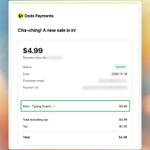
Someone just bought Typing coach from Kiiwi!
Getting a sale right after the update push is even crazy 🎉☃️

I make a keyboard app for the mac and I never learnt touch typing.
51 wpm at 97% accuracy. Not bad, not pro either. I always wanted to learn it properly, but I never found the time, and I had no idea which keys were slowing me down.
So the next kiiwi update brings typing lessons inside the app.
What I built
30 lessons in 3 stages. Home row first, then the top and bottom rows, then numbers, capitals and punctuation. You pass a lesson at 95% accuracy, speed comes later.
One full screen typing window for lessons, timed tests, word tests and zen. Zen hides the menu bar and the dock so it’s just you and the words.
A keyboard on screen that presses down with your real keys and shows which finger goes where. Every key plays your switch, so the lessons sound like your keyboard.
Stats after every round. The days you practised, your speed over time, your bests and a share card.
Lessons are free for everyone who has kiiwi.
What I didn’t expect
While testing I started tracking how long each key takes me and how often I miss it. My slowest key turned out to be D at 383 ms, then S at 358 ms. I would never have guessed D.
That’s what I’m building next. Something that reads your own typing and tells you what to practise today, so you can see progress without trying to fix everything at once. More on that soon.
And since christmas is close, snow now settles on top of your windows and piles up along the bottom of the screen. Shake a window and its snow falls off. There’s a snowman too, click him.
What broke today
Snow kept hanging off rounded window corners. macos doesn’t tell other apps how round a window’s corners are, so now the snow stops before the corner.
I put a thin layer of snow on the dock that fell off when you hovered it. The dock felt slow after that, so I took it out.
If you learnt touch typing as an adult, what made it stick for you?
Happy building!
1
2
49

Kiiwi 2.0 is out yesterday and new updates are under cooking already. ☃️❄
this holiday season,
- choose your style, decorate your pine trees and show off on your socials
- starting from December 1, Santa will drop a random gift every few days
- ornaments, festive soundpacks, keyboard themes, and many
- new pets are coming to the menu bar, they walk, play, and react to your interactions.
- gift kiiwi and be a secret santa to your nerdy typing friend
the more you type the more surprises you'll get. Typing shouldn't be hard, when it feels good.
how do you get app update ideas? tell me in the comments.
Dropping Kiiwi in here 🙌
It’s a tiny mac app that turns every keypress into a mechanical switch sound. built it solo, didn’t expect 100+ people to pay for keyboard sounds tbh
2.0 is almost out with typing lessons, a typing coach, keyboard cleaner, focus blur, custom sound pack support, and a snowman on your desktop ☃️
Thanks @hustle_fred for doing this for small builders
Shipped Kiiwi 2.0 yesterday and sent the update email to my customers this evening.
Then the replies started coming in, and most of them were asking the same thing.
Where’s the snow?
My mistake. The snow and the festive packs were set to start on 25th Nov, and I completely forgot to mention it in the update email.
So I pushed 2.0.4 a minute ago with Christmas starting today, and sent a second email on how to turn the snow on.
It’s off by default, missed that too lol.
How do you handle app update emails?

Dropping Kiiwi in here 🙌
It’s a tiny mac app that turns every keypress into a mechanical switch sound. built it solo, didn’t expect 100+ people to pay for keyboard sounds tbh
2.0 is almost out with typing lessons, a typing coach, keyboard cleaner, focus blur, custom sound pack support, and a snowman on your desktop ☃️
Thanks @hustle_fred for doing this for small builders
2
3
54
Dropping Kiiwi in here 🙌
It’s a tiny mac app that turns every keypress into a mechanical switch sound. built it solo, didn’t expect 100+ people to pay for keyboard sounds tbh
2.0 is almost out with typing lessons, a typing coach, keyboard cleaner, focus blur, custom sound pack support, and a snowman on your desktop ☃️
Thanks @hustle_fred for doing this for small builders

I'm looking to spend $100 on 3 indiehacker projects🙌
To participate reply or quote with your project info + link
1 will be selected randomly, 2 based on personal preferences
sponsored by my app @supabird_io :)
IK it's late, but I'm gonna miss their sale notifications badly. 🥲
You were there supporting my projects when stripe didn't let use it in my region.


Lemon Squeezy is winding down. Over the last two years, we’ve taken everything we learned and built Managed Payments, Stripe’s merchant of record solution.
We care about supporting as many businesses as possible. We also want to offer an excellent product and rapidly ship improvements: increasingly, the best way to do so is by offering a single product instead of running two platforms.
Lemon Squeezy closed new store sign-ups today and we’ll stop processing payments on March 31, 2027. We know this is disruptive. We’re reaching out to all businesses using Lemon Squeezy and sharing next steps specific to their business. Our support team is here to help throughout the transition.
To every founder, developer, and creator who built with us, thank you.
lemonsqueezy.com/blog/saying….
2
3
49
How to grow Google impressions 12x in 28 days
Mindie went from 994 to 12.1k impressions on Google in 28 days, and clicks went from 22 to 72
The jump came about 5 days after one big push of pages and has held around 800 impressions a day since
The play is simple. Find the searches > build one page per search > help google find them > link them together
- Google can only show you for searches you have a page for
- One homepage ranks for a few phrases. 200 focused pages can each rank for their own
> Step 1, list the searches
- Write down what your customer types into google, in their words
- Mine are things like reminders for rent day, a free whatsapp reminder bot and reminder apps for ADHD
- Mix the jobs people need done with the apps they compare you to
> Step 2, build one page for each
- Reminder pages, Guides, Compare pages and Alternatives pages
- The search is the title, and the page answers just that
- I shipped about 200 of them in one push
> Step 3, help google find them
- I split the sitemap into eight sections behind one index, with real lastmod dates
- Titles and descriptions trimmed so they don’t get cut off in results
- Four posts now lead with the exact phrase competitors were ranking for
> Step 4, link the pages together
- Every blog post lists the reminder pages for it, and each reminder page links back
- Compare and alternatives pages link to their siblings
- Article and breadcrumb schema on every post, plus an llms.txt that lists every page for ai search
> What not to do
- Don’t ship empty pages to hit a number. Each of mine has example messages and its own faqs
- Don’t judge it in the first week, my jump took about 5 days to show
- Don’t chase CTR while the new pages are still settling
Pick 10 searches your customers make this week and build one page for each
Reply with your site and the one search you want to show up for, and I’ll tell you what I’d build first
Bookmark this for your next content push
How to go from 33 to 600 google impressions a day
9 days before, google showed the my site 299 times. In the 4 days after, 2.52K times and 21 clicks.
> the play is pick page kind
> split the sitemap
> use real dates
> add markdown copies
> watch each kind
1. Pick the kinds of pages people already search for
Make one template per kind, not one big pile of posts.
Searchers type the same shape of question again and again, so one template can answer hundreds.
I went from 36 pages to 321 pages. 112 reminder ideas, 104 blog posts, 28 alternatives, 22 who it’s for, 21 compare, 14 features and 10 tools and guides.
2. Split the sitemap by kind
- One sitemap index that points to a small sitemap per kind.
- Search console then shows indexing for each kind on its own, so you see which kind google trusts.
- Mine has 8 sections. Both the index and the sections read as success in search console.
3. Use the real date on every page
- Put each page’s own updated date in the sitemap, not the build date.
- A date that changes on every deploy teaches google to ignore dates.
- Pages without their own date use the day the site last changed in a way that matters.
4. Add a markdown copy for AI tools
- Add .md to the url and serve the plain text, with a canonical header back to the real page.
- AI tools read clean text, and google knows which version counts.
I also added llms.txt and llms-full.txt. I haven’t measured whether chatgpt picks any of it up yet.
5. Watch each kind in search console
- Check impressions per page and per query, not just the total.
- It shows where the long tail is coming from and which pages get seen without a click.
- Mine got impressions on 235 pages and 214 queries.
- Average position is about 11 and CTR is 0.8%.
The catch
- The last two days of data are still being collected.
- The indexing report is behind, so I don’t know yet how many of the 321 pages google keeps.
- One site and small numbers, so I wouldn’t read it as a rule.
What not to do
Don’t publish hundreds of pages that say the same thing with a word swapped. Every page needs its own answer.
Next I’m rewriting titles and descriptions on pages with impressions and no clicks.
What would you fix first?
Bookmark this for the next time you ship a lot of pages.


Anyone tried installing windows on mac?
How do you actually test your windows built .exe files?

1
3
49
Kiiwi is making back to back sales after the update, crazy. 🎉
it seems people love gifting ❄️☃️


I make a keyboard app for the mac and I never learnt touch typing.
51 wpm at 97% accuracy. Not bad, not pro either. I always wanted to learn it properly, but I never found the time, and I had no idea which keys were slowing me down.
So the next kiiwi update brings typing lessons inside the app.
What I built
30 lessons in 3 stages. Home row first, then the top and bottom rows, then numbers, capitals and punctuation. You pass a lesson at 95% accuracy, speed comes later.
One full screen typing window for lessons, timed tests, word tests and zen. Zen hides the menu bar and the dock so it’s just you and the words.
A keyboard on screen that presses down with your real keys and shows which finger goes where. Every key plays your switch, so the lessons sound like your keyboard.
Stats after every round. The days you practised, your speed over time, your bests and a share card.
Lessons are free for everyone who has kiiwi.
What I didn’t expect
While testing I started tracking how long each key takes me and how often I miss it. My slowest key turned out to be D at 383 ms, then S at 358 ms. I would never have guessed D.
That’s what I’m building next. Something that reads your own typing and tells you what to practise today, so you can see progress without trying to fix everything at once. More on that soon.
And since christmas is close, snow now settles on top of your windows and piles up along the bottom of the screen. Shake a window and its snow falls off. There’s a snowman too, click him.
What broke today
Snow kept hanging off rounded window corners. macos doesn’t tell other apps how round a window’s corners are, so now the snow stops before the corner.
I put a thin layer of snow on the dock that fell off when you hovered it. The dock felt slow after that, so I took it out.
If you learnt touch typing as an adult, what made it stick for you?
Happy building!
1
41
I make a keyboard app for the mac and I never learnt touch typing.
51 wpm at 97% accuracy. Not bad, not pro either. I always wanted to learn it properly, but I never found the time, and I had no idea which keys were slowing me down.
So the next kiiwi update brings typing lessons inside the app.
What I built
30 lessons in 3 stages. Home row first, then the top and bottom rows, then numbers, capitals and punctuation. You pass a lesson at 95% accuracy, speed comes later.
One full screen typing window for lessons, timed tests, word tests and zen. Zen hides the menu bar and the dock so it’s just you and the words.
A keyboard on screen that presses down with your real keys and shows which finger goes where. Every key plays your switch, so the lessons sound like your keyboard.
Stats after every round. The days you practised, your speed over time, your bests and a share card.
Lessons are free for everyone who has kiiwi.
What I didn’t expect
While testing I started tracking how long each key takes me and how often I miss it. My slowest key turned out to be D at 383 ms, then S at 358 ms. I would never have guessed D.
That’s what I’m building next. Something that reads your own typing and tells you what to practise today, so you can see progress without trying to fix everything at once. More on that soon.
And since christmas is close, snow now settles on top of your windows and piles up along the bottom of the screen. Shake a window and its snow falls off. There’s a snowman too, click him.
What broke today
Snow kept hanging off rounded window corners. macos doesn’t tell other apps how round a window’s corners are, so now the snow stops before the corner.
I put a thin layer of snow on the dock that fell off when you hovered it. The dock felt slow after that, so I took it out.
If you learnt touch typing as an adult, what made it stick for you?
Happy building!
Fable 5.2 is insane. It actually passed the "do not reply" test. Even Opus 5.5 couldn't.
Did anyone else try it??

1
1
36
Most founders plan in Miro, track in Google Sheets and report in a dashboard tool.
Then they copy all of it into Claude, and copy the answer back out.
Two days ago Claude shipped all three inside the chat.
-> Claude Whiteboards: lays a messy plan out on a board you can edit
-> Claude Sheets: turns a request into a working tracker or budget
-> Claude Data: builds dashboards and data stories from your numbers
You'll find them under Artifacts, next to Docs, Slides and Design.
Most founders will try them on client work this week.
That's where it goes wrong.
Two of the three are in beta.
A broken board in front of a client costs more than the hours it saved.
Here's where I'd put each one first.
1. Whiteboards for the discovery call.
Paste the call notes and ask for the client's funnel as a board. Fix what's wrong while the call is still fresh.
2. Sheets for the trackers only you see.
The content calendar, the onboarding checklist, the monthly budget.
3. Data for the monthly client report.
Ask for the dashboard and a short data story from your numbers. Read every line before it goes to the client.
Here's what I do with any new Claude feature.
It runs on my own work first.
It earns a client job once it has done that well for two weeks.
My source of truth stays where it is until the beta tag is gone.
Comment 'ARTIFACTS' and I'll send you the setup guide.
Make sure we're connected so I can DM you.

1
2
81


