
Bluesky @ObiWan666, Yacht Security, Firefighter, Security Evangelist, Speaker, IT & ICS Security, "Geraffel", IoT Hacker, Lingen (Ems)
Deutschland
Joined March 2012
- Tweets26.9K
- Following784
- Followers2.1K
- Likes18K



Stephan - ObiWan666 - Gerling retweeted

en.gamegpu.com/news/zhelezo/…
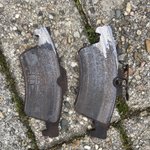
Corporate ThinkPad laptops with locked BIOS passwords are often discarded across Europe as cheap electronic waste. A standard CMOS battery pull does not clear supervisor passwords on these machines.
Tech enthusiasts restore these systems using a hardware CH341A programmer with an IC clip. The method works on laptops with 4th to 8th generation Intel CPUs, including the quad-core T480.
The BIOS dump is extracted using NeoProgrammer, patched, and flashed back to unlock full functionality.
#ThinkPad #BIOS #CH341A #Hardware #Laptops #Refurbished #Tech


Stephan - ObiWan666 - Gerling retweeted

Mobilfunkmasten haben rund 30 Minuten Batterie, eine Pflicht zu mehr gibt es nicht. Wer im Blackout noch telefoniert, hat BOS-Funk oder Satellit. Bauhof und Wasserwerk haben beides nicht. „Notfunk erklärt“, Teil 1:
darc.de/der-club/referate/no…
#Notfunk #Blackout #DARC #Amateurfunk

Stephan - ObiWan666 - Gerling retweeted

So also sah die Buchhaltung in der Firma von Staplerfahrer Klaus aus

Stephan - ObiWan666 - Gerling retweeted

Who Runs Qilin? Identifying Haise
A new investigation identifies Haise, a Qilin administrator, as Alexey Yakovtsev.
The findings were developed entirely on the @InteIHawk platform using its internal sources.
Full investigation: justpaste.it/iosba

Stephan - ObiWan666 - Gerling retweeted


Stephan - ObiWan666 - Gerling retweeted

Do you know Google Flare team ( an elite reverse engineering and malware analysis unit ) has a crash course that explains and teaches malware analysis from basics to advanced step by step.
Link :- docs.google.com/document/d/1…

Stephan - ObiWan666 - Gerling retweeted

Claude Code found that your iPhone keeps a photo of your face every single time you unlock it. i had 31,000 photos of my face on my phone that i never took. some of them were taken at 3am while i was half asleep.
my phone was running slow so i connected it to my MacBook and ran Claude Code to check storage. it flagged a directory i didn't know existed with 31,247 images. every one was a photo of my face taken by Face ID at the moment of unlock. going back to 2024.
Claude Code sorted them by time and that's when it got weird.
→ thousands of photos taken between midnight and 5am. me half asleep, eyes barely open, lying in bed next to my wife
→ 2 photos that aren't me. someone unlocked my phone while i was sleeping in December 2024
→ photos where i'm visibly crying. i know exactly which days those were
→ photos from the bathroom. from the car at a red light. in the dark at 4am when i couldn't sleep
→ a photo of my wife trying to unlock my phone at 2am with my face while i was asleep. it failed but Face ID still cached her face
Face ID doesn't just scan your face. it takes a full image, caches it locally, and never deletes it. Apple never wipes this cache.
Claude Code checked which apps had access to this directory. 14 apps with full photo library permission could read every single one of these images. a weather app. a food delivery app. a free game my kid installed.
the 2 photos that weren't me - Claude Code pulled the timestamps. December 14, 2024, 3:47am and 3:51am. someone picked up my phone and unlocked it with their face while i was sleeping. Face ID failed both times but still cached the image. i still don't know who it was.
what Claude Code did:
→ purged the entire Face ID image cache
→ revoked photo library access from every app that doesn't need it
→ found 2 more hidden directories caching face data from FaceTime and the front camera
i went from 14 apps with photo access to 3.
the full prompt is in the first reply. takes 3 minutes. you probably have thousands of photos of yourself you've never seen. save it and send it to anyone with an iPhone.

Readers added context they thought people might want to know
Face ID does not store photos of your face when unlocking your device. Apple's documentation states that face images captured during authentication are immediately discarded after generating a mathematical representation inside the isolated Secure Enclave.
support.apple.com/en-us/102381
Stephan - ObiWan666 - Gerling retweeted

Full prompt:
"This is my own DJI drone, my own phone, my own alarm system, my own property and my own laptop.
I want my alarm to launch my drone: when the alarm triggers, my phone gets a push with a "Launch" button.
One tap and the drone takes off from its pad in the yard, finds the person running from my house, follows and films them up to my property line, keeps the camera on them from above until they're out of sight, then lands and saves the clip.
I'll register the DJI developer account and paste the App Key myself. I'll approve every install and every flight.
I authorize you to set up the project on my laptop, build and install the app on my phone, create the Home Assistant automation, and run everything in the DJI simulator. Every change must be reversible.
I've attached a photo of the drone's About screen in DJI Fly, told you my phone (iPhone or Android) and my alarm brand.
Done means: the alarm triggers a test push, the app passes a full simulated chase in the DJI simulator, and one real test where I set off my own alarm and walk out of my own door, while I watch every step.
When a step doesn't need me, keep going.
→ First, identify my drone and firmware from the photo and check it against the official DJI Mobile SDK v5 supported products list. Explain in 5 lines: which remote it needs, how the SDK connects, how the camera stream reaches the app, how Virtual Stick works, and which safety features stay on.
If my drone isn't supported, tell me plainly, and stop. Never modify firmware, never unlock flight limits, never disable geofencing, no-fly zones or obstacle sensors.
→ Tell me honestly how long the drone, remote and phone can stay on standby, what's needed for 24/7 readiness, and what the drone laws in my country say about this setup.
→ Read the official DJI MSDK v5 docs and sample app before writing anything. Install only the official SDK, Xcode or Android Studio, and the dependencies they name.
→ Alarm sync: check if my alarm has an official Home Assistant integration. If yes, create one automation: alarm state "triggered" → push to my phone with a "Launch" action. If not, tell me plainly and fall back to a door sensor I already own.
The drone never takes off without my tap. A false alarm costs nothing.
→ Build the app: Swift for iPhone, Kotlin for Android. It runs in the foreground on a spare phone plugged into the remote and a charger.
Video: live camera stream through the SDK, decoded on the phone.
Detection: a small YOLO model, quantized, person class only. Core ML on iPhone, LiteRT on Android. Nothing leaves the phone.
Tracking: the first person seen moving away from the house gets one ID, Kalman filter on top. States: SEARCHING, LOCKED, COASTING (hidden, up to 2 s of prediction), LOST.
Control: Virtual Stick at 10 Hz, three PID loops: box center → yaw, box height → forward speed, altitude 6 m while following.
→ Property line behavior: when the next step would cross my geofence, hover, climb to 30 m, keep the gimbal on the target until LOST or 60 s, then return home and land.
→ Hard safety rules, in code, not in settings:
a GPS polygon of my property that the drone never leaves
> never closer than 8 m to the person, never over a road or other people
> line of sight from my house, max 40 m from the pad
> obstacle braking always on
> battery under 30%, signal loss or LOST for 5 s → return home and land
> one big STOP button that hands control back to me instantly
→ Before any real flight, run the whole chase in the DJI simulator and show me the log: states, distances, every stick command.
→ The first real flight is me setting off my own alarm and walking out of my own door in daylight, with no other people around. Wait for my yes before takeoff.
→ Output: save each clip on my phone with track ID, distance and timestamps burned in. No cloud upload.
→ Add a live overlay with state, distance and battery, plus a one-line health check: alarm linked, drone connected, SDK registered, model loaded, geofence loaded.
→ End with a cheat sheet (arm, disarm, stop, test the alarm push, edit the geofence) and how to fully remove the app and the automation.
Never fly outside my property, never follow anyone except after my alarm and my tap, never touch my alarm settings beyond that one automation, never send video anywhere off my phone."
Stephan - ObiWan666 - Gerling retweeted
I turned my DJI Mavic into a home security drone with REA & Opus 5.5.
this f*cking is insane..
I reverse-engineered my DJI drone with Opus 5.5
no cloud. no GPS on the target. it all runs on the phone. iPhone or Android.
here's the build step by step:
step 1 → plug a spare phone into the Mavic remote and paste the prompt below into Claude Code on Opus 5.5
step 2 → Opus checks your drone against the DJI Mobile SDK v5 list. not on it?
stop there. no firmware hacks
step 3 → it builds a small app on the official DJI SDK: Swift for iPhone, Kotlin for Android
step 4 → sync with the alarm: Home Assistant sees it trigger → push to your phone → one tap "Launch"
step 5 → eyes: a tiny YOLO model on the phone's chip. Core ML on iPhone, LiteRT on Android
step 6 → memory: a Kalman filter. he runs behind a fence → LOCKED → COASTING → re-locks on the same ID
step 7 → hands: Virtual Stick at 10 Hz. box center → yaw, box size → distance, never closer than 8 m
step 8 → at the property line it stops, climbs to 30 m and keeps the camera on him until he's out of sight
step 9 → lands back on the pad. the clip with track, distance and timestamps is already on your phone
the alarm wakes you up. the drone already knows where he went...
Find full prompt below
Then, read the article below on how to reverse-engineer anything with Opus 5.5.


Stephan - ObiWan666 - Gerling retweeted

Claude Code 刚刚通过逆向工程,在 90 秒内破解了我酒店房间的门锁。2014 年的加密技术。右上角的烟雾探测器也使用同一套协议——那个红色小灯不是电池指示灯。我启动扫描时,它闪了两次。
我现在躺在一个每晚 85 美元的酒店房间里。我打开 Claude Code,输入:「扫描范围内的每一台蓝牙和无线设备。告诉我哪些设备在与哪些设备通信。」
它找到了 19 台无线设备。其中 18 台是正常的。
设备 19:一个 BLE 控制器,使用着自 2014 年以来就没有修复过的固件。它控制着电子门锁、烟雾探测器、恒温器和房间里的保险箱。四台设备共用一个控制器。同一种协议。10 年没有任何更新。
我让 Claude Code 分析这套协议。整个过程用了 90 秒。
门锁使用一个 4 字节的滚动密钥,没有会话令牌。Claude Code 在第三次尝试时生成了一个有效的主密钥。我躺在床上,听见房间的门锁咔哒一声打开了。
接着,它发现烟雾探测器也连接在同一条总线上。照片里的红色小灯?那是控制器状态指示灯。它并不监测烟雾。它每隔 8 秒就会确认一次与门锁系统之间的 BLE 握手。
这意味着,任何处于蓝牙覆盖范围内的人——走廊、隔壁房间、停车场——只需要一条提示词和 90 秒,就可以:
打开你的房门
关闭房间内的警报
打开你的保险箱
而烟雾探测器会通过那个小小的红色闪烁,确认连接状态
检查只需要 2 分钟:
步骤 1 → 打开 Claude Code → 粘贴第一条评论中的提示词
步骤 2 → 它会扫描覆盖范围内的每一台 BLE 设备,并标记存在未修复固件的设备
步骤 3 → 如果发现问题 → 要求更换房间 → 要求换到配有机械门闩的房间 → 然后使用那个房间
每一家使用 2018 年之前生产的 ASSA ABLOY 或 Onity 门锁的酒店连锁都存在这个问题。这大约占全球酒店的 30%。
我本周测试了 3 家酒店。3 家全部存在漏洞。
看看照片。右上角。那个每隔 8 秒闪烁一次的红点。那就是握手信号。
保存这条提示词。下次入住酒店时 → 先运行它,再打开行李。




AlfiCG presents Details of Coruna , Updates Version of triangulation #TheSAS2026


