

Planfix is designed for people who need more. More flexibility. More customization. More new capabilities.
San Diego, CA
Joined April 2019
- Tweets741
- Following0
- Followers56
- Likes2
🔥 Hot Leads Won’t Wait. Is Your CRM Ready?
When customers are ready to buy, every delay matters. Slow responses and missed follow-ups can mean lost deals and revenue.
Planfix helps sales teams act while interest is high with AI-powered lead qualification, ready-to-use replies, and automated follow-ups.
📈 The business impact? Faster response times, fewer missed opportunities, a more efficient sales process, and greater potential to convert leads into customers.
🔗 Discover how to turn high-intent leads into sales: planfix.com/blog/tips/crm-au…
#Planfix #CRM #SalesAutomation #BusinessAutomation

3
Share Whiteboards with a Link
You can now copy a link from the whiteboard menu. Anyone who opens it goes straight to the whiteboard in full-screen mode, without having to search for it in the planner. When you expand a whiteboard, its link also appears in your browser’s address bar, so you can copy it there, too.
Share a process map or org chart with a colleague or client in chat. Add the link to a task description, a comment, or your knowledge base. And in a team meeting, just open it on the big screen. Everyone can focus on the diagram instead of watching someone scroll through the planner looking for the right column.
#Planfix #Whiteboard #Updates

12
🎯 Understand Your Buyers to Build Stronger Relationships.
Some customers expect facts, clear comparisons, and well-grounded answers. Understanding their decision-making process helps sales teams build trust, address customer needs, and close deals more effectively.
Discover how Planfix AI helps identify analytical buyers and personalize sales communication.
📈 Better-qualified leads, more effective sales conversations, stronger customer relationships.
Explore smarter sales strategies 👉 planfix.com/blog/industry-in…
#Planfix #CRM #SalesAutomation #AI

3
Project Delays Start Earlier Than You Think
In his latest @ForbesBizCncl article, our CEO Michael Goshka explains why projects often fall behind schedule long before anyone notices.
Teams wait for approvals, customer feedback, or missing information. Each delay seems small, but together they can put the entire project at risk, even when everyone is busy.
The article explores how businesses can spot these risks earlier and keep customer commitments on track.
🔗 Read the article: forbes.com/councils/forbesbu…
#BusinessGrowth #BusinessAutomation #CRM

9
Planfix Mobile 0.75 Is Here 📱
We’re making it easier to get work done in Planfix from your phone.
What’s new:
— Sign in with a QR code.
— Share files from Planfix with other apps.
— Find the items you need faster in the new Favorites section.
— View an employee’s comments right from their profile.
Improvements:
— If you choose a vertical layout for Planner widgets in the web app, you’ll see that layout on mobile, too.
— Add scheduled comments with a long press in both the quick and full comment forms.
— Long-press an event in the hourly schedule to open its action menu.
— Change a task’s status right from Planner.
— Recently used projects now appear first when you choose a project.
— The date picker in calendars has a new look.
— Select multiple contacts and create one shared task for them.
Update the app and give the new features a try.
iOS: itunes.apple.com/us/app/id14…
Android: play.google.com/store/apps/d…
#Planfix #mobile_app

16
💬 Messenger Reactions Now Sync with Planfix Comments
When a customer reacts to a message with ❤️, switches to another reaction, or removes it, the change automatically appears in the task comments.
It’s now easier to keep track of customer reactions.
The integration works with WhatsApp Business, 360dialog, Facebook Messenger, and Instagram Direct.
#Planfix #Integrations #Reactions

19
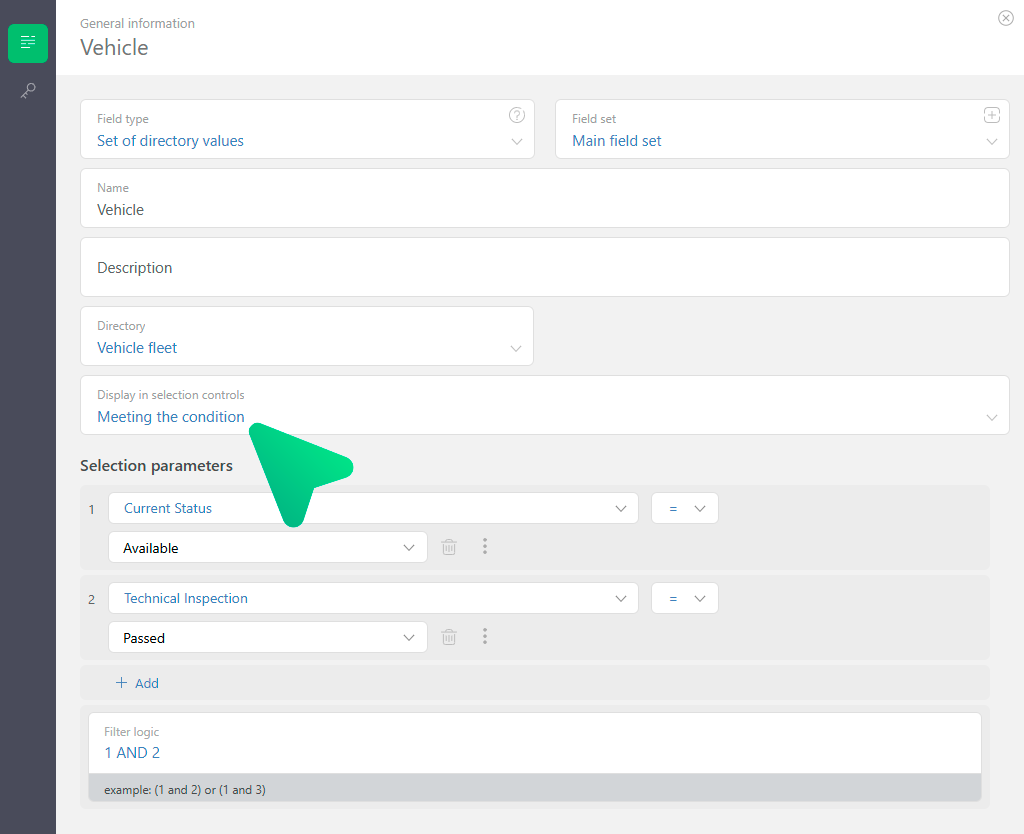
Filter Directory Options in Tasks
You can now filter the options in directory fields based on specific conditions. Set this up for the "Directory Record" and "Directory Value Set" fields.
For example, configure the "Vehicle" field to show employees only cars that are available and have passed inspection.
#Planfix #Directory #DirectoryValueSet
4
🔁 Manually Reschedule a Recurring Task in Planfix
You can now change the next occurrence date once without disrupting the overall schedule. Open the recurrence settings, click the current date, and choose a new one.
The change is recorded in the task log, and future occurrences will still follow the original schedule.
#Planfix #RecurringTasks

3
📐 Resize Blocks on the Whiteboard
Drag a block’s edge to change its width or height. Magnetic guides help you line up items on your whiteboard.
For example, make a client card bigger to add request details or conversation history. You can also resize empty areas without closing the editor.
#Planfix #Whiteboard #Updates

1
7
🎬 Give Great Media Ideas More Room to Grow
What if your team could move from client brief to final delivery with fewer delays?
Explore practical ways to streamline approvals, client onboarding, billing, and project workflows with Planfix.
📈 Faster campaigns, smoother teamwork, and more time for creativity.
Build your media automation strategy 👉 planfix.com/blog/industry-in…
#Planfix #MediaManagement #WorkflowAutomation #DigitalTransformation

10
📁 Planfix Gantt Charts in MS Project
If your client, contractor, or finance team prefers working in Microsoft Project, sharing your plan just got easier.
Open your tasks in Gantt chart view, start the export, and choose the format you need. Planfix creates a file from your current plan and downloads it.
No need to rebuild the chart by hand – just a few clicks in Planfix.
#Planfix #GanttChart

7