AI content creator | builder DMs always open
Joined July 2026
- Tweets62
- Following11
- Followers236
- Likes186




Pinned Tweet
Holy sh*t, Opus 5.5 just f*cking killed the jobs of all motion designers
It's f*cking insane…
Drop the PDF below into Opus 5.5, thank me later
Then read the full guide on Motion Engineering with Opus 5.5 in the article below ↓


renproton retweeted

Anthropic engineer:
“95% of our engineers already run agents inside Loops. The other 5% are still prompting.
In 1–2 months, everyone will be a context/harness engineer — because Context decides 90% of agent performance.
Same model, completely different results.”
In this 1-hour talk, he shows exactly how to build self-improving agents from scratch.
It’s worth more than every $1000 agentic course combined.
Watch this video, then read the article below on how to become a context/harness architect ↓
renproton retweeted

motion designers will f*cking hate me after this drop...
give Opus 5.5 an entire motion design studio in 8 .md files
CLAUDE.md
BRIEF.md
STYLE.md
ASSETS.md
STORYBOARD.md
MOTION.md
SOUND.md
DELIVERY.md
art direction → storyboard → animation → sound → final render
drop the harness into ur Opus 5.5 & add your product brief, thank me later
send this
> github.com/beamnxw/my_works/…
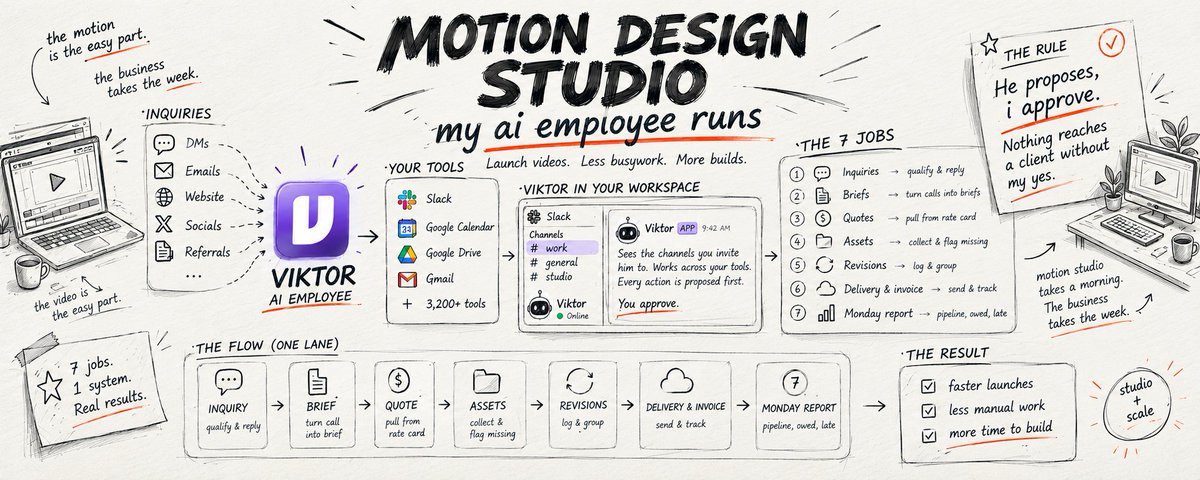
then read about how my AI employee manages my motion workflow ↓
Opus 5.5 is f*cking insane for motion design but...
/colorfigures skill will turn Claude into a premier illustration studio
• hand-inked isometric figures from a photo or a name
• every part works: lids open, disks go in, screens boot
• one HTML file with colour swatches & wobble slider
send the skill to your Opus 5.5, thank me later ↓
> april-zhu.com/colorfigures
renproton retweeted
Anthropic just dropped the Claude Duet Harness Engineering
12-minute official read. isolated browser, credential proxy and independent checks around an agent that works while you’re away.
i turned it into a practical harness guide for builders:
brief → context → tools → observations → verification → repair → delivery
→ define what enters each step and what must come back
→ record tool results, artifact paths and errors
→ keep checkpoints so unfinished work can resume
→ verify the actual output against acceptance checks
→ send failures back for a focused repair
→ keep missing evidence marked UNVERIFIED
→ return files, setup instructions and check results
i also added five runtime decisions and a worked example:
CSV → searchable comparison board → checks → delivery packet
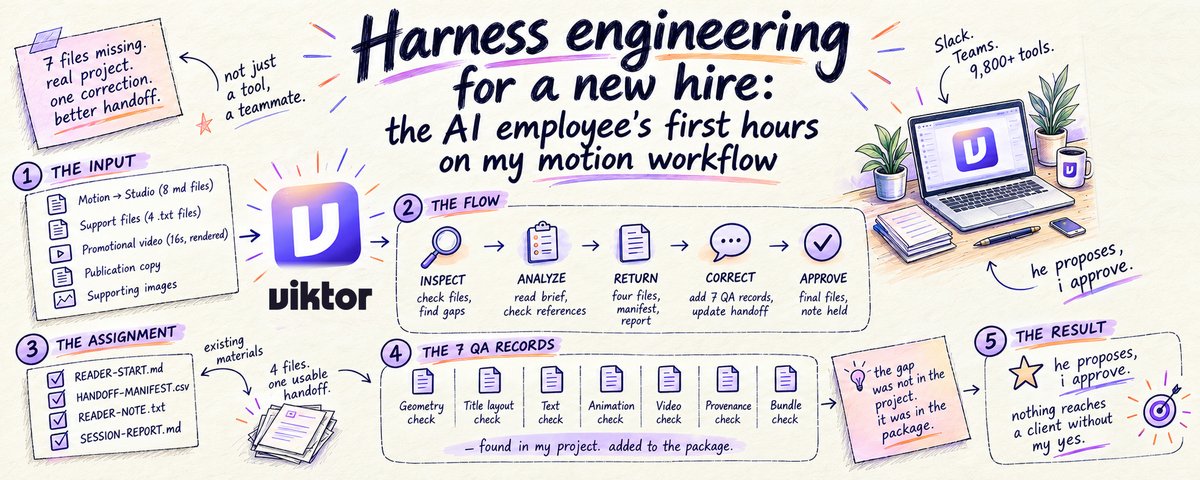
save this, then read my article on harness engineering for my AI employee ↓
f*ck YESS, Opus 5.5 is completely mind-f*cking all motion designers right now
It's f*cking insane…
Drop the PDF below into Opus 5.5, thank me later
Then read the full guide on Motion Engineering with Opus 5.5 in the article below ↓
renproton retweeted
Opus 5.5 + Remotion = your own video factory that you can use to earn $$$
one reusable scene → six campaign videos
01 | the setup:
2 hooks × 3 formats
square. vertical. widescreen.
02 | give Claude Code the official Remotion skills:
npx skills add remotion-dev/skills
03 | then ask it to build a composition with editable:
headline → product image → brand colors → timing → format
04 | give each format its own type scale, line breaks, spacing and safe areas
05 | render every combination of hook and layout + review all six together on one contact sheet
06 | change the message or brand colors, then render the set again
the loop:
direct → parameterize → reflow → render → review
paste this into Claude Code:
<Build one reusable Remotion promo composition with two headline variants and three layouts: 1080x1080, 1080x1920 and 1920x1080. Expose the text, colors, media and timing as props. Design the typography and safe areas for each format. Render all six combinations, then show me a contact sheet for review.>
save this, then read the full guide for Opus 5.5 Motion Engineering ↓
renproton retweeted
Opus 5.5 + Blender + Remotion = your own character animation studio that you can use to earn $$$
tiny worlds. expressive characters. cinematic camera moves.
character idea → editable 3D scene → animated film
steal the full stack ↓
01 / give Claude a director’s brief
one character. one setting. one visual joke
specify the shots, expressions, camera moves and final pose before building the scene
02 / connect Claude Code to Blender
MCP for Blender lets Claude inspect the scene and write Blender Python
with Blender + uv installed:
- `claude mcp add blender uvx mcp-for-blender`
- `uvx mcp-for-blender install-addon`
enable the addon in Blender and start its server
▸MCP for Blender
github.com/ahujasid/mcp-for-…
03 / build + animate
Blender handles the scene, rigging, keyframes and character animation
block the keyboard and character first. then add the walk, eye movements, glass and close-ups
▸Blender animation tools
blender.org/features/animati…
04 / light the world
Poly Haven supplies CC0 HDRIs, textures and models
give the glass something to reflect. keep the character readable against the background
▸Poly Haven
polyhaven.com/license
05 / finish the film
Remotion assembles the rendered footage, titles and audio into a reusable composition
add the official agent guidance inside your video project:
`npx skills add remotion-dev/skills`
▸Remotion Skills
remotion.dev/docs/ai/skills
06 / export + check
FFmpeg for the delivery file
watch the actual MP4, check the sound and keep the editable scene + project
▸FFmpeg
ffmpeg.org/ffmpeg.html
the loop:
brief → scene → character → materials → light → camera → preview → render → edit → export
the clip is the visual reference. the animated console breaks down a workflow for building this kind of scene
save this, then read the full guide for Opus 5.5 Motion Engineering ↓
renproton retweeted
Holy sh*t, Opus 5.5 just f*cking killed the jobs of all motion designers
It's f*cking insane…
Drop the PDF below into Opus 5.5, thank me later
Then read the full guide on Motion Engineering with Opus 5.5 in the article below ↓
Holy sh*t, Opus 5.5 just f*cking killed the jobs of all motion designers
It's f*cking insane…
Drop the PDF below into Opus 5.5, thank me later
Then read the full guide on Motion Engineering with Opus 5.5 in the article below ↓
You no longer need After Effects if you use Claude Opus 5.5 correctly
It’s f*cking unreal…
Send the PDF below to Opus 5.5 and watch it work.
Then save the article, it’s the full Opus 5.5 motion design guide.
renproton retweeted
holy sh*t, someone just built an Opus 5.5 video prompt library advertising 2,000+ prompts, with 723 indexed examples you can steal from
a creative reference library for your next product launch
7 categories covering product videos, motion graphics, UI animation, explainers, music, 3D worlds and interactive demos
the ideas to steal:
→ turn product screenshots into animated UI walkthroughs
→ build launch videos around your strongest features
→ animate headlines, charts and technical diagrams
→ explain complex concepts with narrated visuals
→ create cinematic 3D scenes and simulations
→ connect scrolling to animation playback
→ build seamless loops for your landing page
the useful part:
selected previews come with creator-shared prompts, original sources, tool notes and required inputs
the public catalog includes 191 full prompts and 532 shared fragments
start with a full prompt for a concrete brief
use fragments to explore a creative direction
the workflow:
pick a result → study the prompt → add your assets → set up the renderer → export and inspect
there are also 3 editable 15-second templates:
→ product UI walkthrough
→ feature demo
→ product launch
save this & send it to Opus 5.5, then read the full guide for Opus 5.5 Motion Engineering ↓
Opus 5.5 just f*cking killed the jobs of all motion designers
this is f*cking unreal…
Drop the PDF below into Opus 5.5, you’ll thank me later.
Then save the article, it’s the only Opus 5.5 motion design playbook you’ll need.
renproton retweeted
holy sh*t, Google Research just open-sourced an agent that can improve its own harness
steal this blueprint for a self-improving agent
the prompts, memory, skills and tool guidance around your model can evolve as it works
it’s called Harness²
the loop:
→ propose changes to the agent’s setup
→ run candidate setups on the same task
→ compare what actually happened
→ compose a refined harness from that evidence
→ carry useful lessons into future tasks
the clever part:
it refines the harness on unfamiliar tasks without a ground-truth answer to guide those edits
the architecture:
propose → probe → compose → retain lessons → repeat
the part builders should steal:
treat your agent’s setup as something you can experiment on
pick a recurring failure
propose a specific harness change
compare execution traces on the same task
evaluate the result
keep the evidence with the change
the repo includes OpenCode and Codex executors, parallel and sequential refinement, and a local demo you can run without model credentials
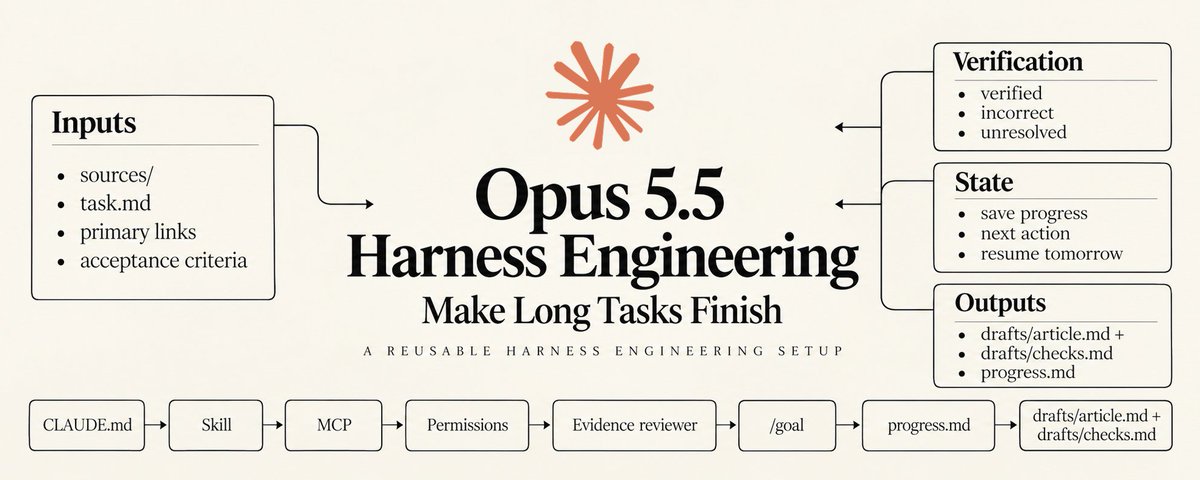
save this, then read the full guide for Opus 5.5 Harness Engineering ↓