

Saimir Kapaj retweeted

THIS IS AN ACTUAL F*CKING GOLDMINE
this is Anthropic context paper
Anthropic's engineers explain how to keep agents focused across long tasks
instructions, tools, search results, old messages. everything ends up in the same context window
and the agent has to keep finding the details that matter
the useful question: what does it need for the NEXT action?
inspect → retrieve → act → record → compact → continue
the 6 moves in this doc:
step 1 → curate context
give the agent clear instructions, useful tools and enough evidence to work. revisit that selection as the task changes
step 2 → retrieve on demand
keep file paths and source links. search, inspect, then load the relevant sections
step 3 → trim tool output
filter huge responses. return useful fields, source pointers and errors the agent can act on
step 4 → compact history
preserve decisions, unresolved issues and the next steps. remove redundant history before it buries the work
step 5 → write durable notes
save progress outside the conversation. the next session can read the notes and continue
step 6 → isolate deep work
give subagents bounded investigations. bring concise findings back to the lead. use this when the extra coordination is worth it
drop it into Claude Code with your project and have it inspect how context gets loaded, retrieved and carried forward
then try real tasks and check what actually improved
save this, then read the full "Context, Harness, Loops, Prompts" guide ↓


Saimir Kapaj retweeted

OpenAI quietly put 61 CLEAN cookbooks on GitHub that most people still pay for
77k+ stars. real notebooks. the reason some people ship 10x faster
01 Build a voice agent that follows an SOP
github.com/openai/openai-coo…
02 Agents API sandboxes
github.com/openai/openai-coo…
03 Agents SDK
github.com/openai/openai-coo…
04 Agent optimization for cost and quality
github.com/openai/openai-coo…
05 Build a data analyst with the Agents API
github.com/openai/openai-coo…
06 Build a Slack bot with the Agents API
github.com/openai/openai-coo…
07 Build an SRE agent for incident response
github.com/openai/openai-coo…
08 Evals and evaluation
github.com/openai/openai-coo…
09 MCP integrations
github.com/openai/openai-coo…
10 Responses API
github.com/openai/openai-coo…
11 Fine-tuning for function calling
github.com/openai/openai-coo…
12 Fine-tuning with DPO
github.com/openai/openai-coo…
13 RAG with embeddings
github.com/openai/openai-coo…
14 Vector databases
github.com/openai/openai-coo…
15 Function calling with OpenAPI
github.com/openai/openai-coo…
16 Structured outputs
github.com/openai/openai-coo…
17 Prompt caching
github.com/openai/openai-coo…
18 Multimodal and vision
github.com/openai/openai-coo…
19 GPT with vision for video
github.com/openai/openai-coo…
20 Realtime API
github.com/openai/openai-coo…
21 Codex
github.com/openai/openai-coo…
22 Sora
github.com/openai/openai-coo…
23 Hallucination guardrails
github.com/openai/openai-coo…
24 Tool-using agent with LangChain
github.com/openai/openai-coo…
25 Orchestrating agents
github.com/openai/openai-coo…
26 Parse PDFs for RAG
github.com/openai/openai-coo…
27 Custom LLM-as-a-Judge
github.com/openai/openai-coo…
28 Rate limits and batch processing
github.com/openai/openai-coo…
29 Token counting with tiktoken
github.com/openai/openai-coo…
30 Reinforcement fine-tuning
github.com/openai/openai-coo…
Full repo with all 61:
github.com/openai/openai-coo…
You either start building with the official patterns now, or keep reverse-engineering them from Twitter for another year
Save this ↓


Saimir Kapaj retweeted

Prompt, context, harness & loop engineering, clearly explained!
An agent is a while loop with four layers of engineering wrapped around it:
- Prompt engineering
- Context engineering
- Harness engineering
- Loop engineering
Each one wraps the last, and the model sits in the middle, so none of them compete with the others. Instead, they just zoom one level further out.
> Prompt engineering:
This defines the input the model sees on one call, often composed of a role, instructions, examples, and an output format.
The techniques here alter the internal computation and reasoning the model goes through due to the wording it sees:
- Chain-of-thought makes it work in steps before answering
- Few-shot examples define the format and the edge cases
- A JSON schema or XML tags make the output parseable by code
- Self-consistency samples a few chains and takes the majority
> Context engineering:
It's everything the model sees on a turn, not just the prompt. That includes the query, retrieved docs, memory, prior turns, and tool outputs from earlier steps.
The window is finite and fills up fast, so the engineering work is to rank inputs and cut everything that isn't pulling weight.
You do this by:
- Retrieving only the chunks relevant to the query, then reranking them
- Keeping key facts out of the middle, where accuracy drops
- Summarizing old turns, evict stale outputs, push big blobs to files
> Harness engineering:
It's the code around the model that defines the tools, parses the calls, retries on failure, and can route work to sub-agents so one handles retrieval and another handles code.
A verifier then grades the result by running tests, validating a schema, etc.
Prompt and context involve getting one call right. The harness involves everything that has to happen around that call for it to run in a real system.
> Loop engineering:
In the usual setup, you manage the outer loop, i.e, you write a prompt, read the turns the agent runs, write the next prompt, and repeat, while catching failures.
This layer hands that job to the agent itself. It kicks off on a schedule or an event, and runs many turns with no prompt in between.
A loop inherently doesn't know when it's finished. An agent can report that it's done and halt while the tests still fail. So the stop can't be the agent's word, but rather it has to be a real signal, like:
- A turn and token cap to stop stuck runs
- A no-progress detector to catch repeated calls
- A completion check to verify the goal with a separate model or a deterministic test
By this layer, you're operating on the whole run, so the engineering moves from writing each prompt to setting the goal and the stop conditions up front and letting it run.
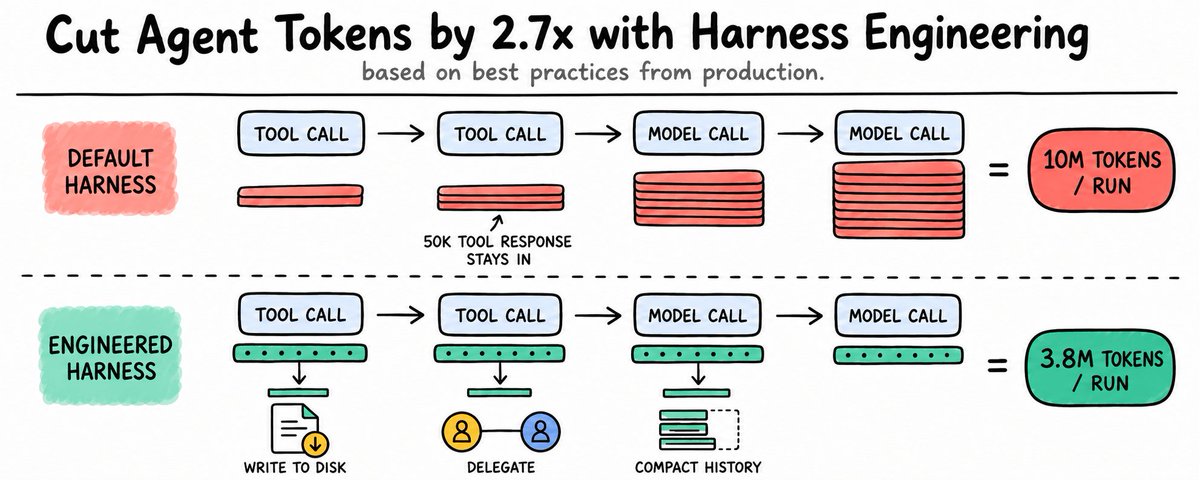
A longer run also makes the cost of the layers underneath it grow.
When a tool returns a 50K-token response and nothing removes it, the model reads it again on every later call. Over a loop of twenty steps, one response turns into hundreds of thousands of tokens.
I wrote a full breakdown of where an agent's tokens actually go and how a harness keeps context flat, using TrueForge, an open-source harness that turns an LLM into a working agent.
GitHub repo: github.com/truefoundry/truef…
(don't forget to star it ⭐ )
It covers offloading large tool outputs to files, subagents for context isolation, Code Mode for multi-tool joins, and compaction.
It also has a benchmark of three harnesses on the same 14 tasks, where TrueForge reached the same answers on about 40% of the tokens Claude Managed Agents used.
You can read my full article below.

Saimir Kapaj retweeted

This is f*cking insane. OpenAI co-founder Andrej Karpathy opened his screen and showed exactly how he uses AI every day
70 minutes. No slides. Just the way the top 1% actually work with LLMs
Prompts → Context → Tools → Workflows → How The Top 1% Work
Most people are overcomplicating it. He picks the right model, feeds it the right context and lets the tools do the rest
Anyone can open ChatGPT and type. Almost nobody uses it the way the man who co-founded OpenAI does
Worth more than any $2,000 AI course
Bookmark and watch it today
then read the article below ↓


Saimir Kapaj retweeted

HOLY F*CK. DESIGN AGENCIES ARE F*CKING COOKED.
20 free GitHub repos just turned Fable 5.2 into a full design studio.
Skills. Systems. UI. Canvas. Assets. QA.
Every repo is open source and costs nothing ↓
01 UI UX Pro Max → 80 UI styles, palettes and font pairings.
github.com/nextlevelbuilder/…
02 /canvas-design → Anthropic's skill for posters and art as PNG and PDF.
github.com/anthropics/skills…
03 /pptx → Real slide decks. Anthropic official.
github.com/anthropics/skills…
04 /theme-factory → 10 ready themes for slides, docs and landing pages.
github.com/anthropics/skills…
05 Stitch Skills → Google Labs skills that turn a prompt into UI screens.
github.com/google-labs-code/…
06 /frontend-design → Anthropic's skill for UI that doesn't look AI-generated.
github.com/anthropics/skills…
07 DESIGN.md → Google's format that describes your visual identity to agents.
github.com/google-labs-code/…
08 Astryx → Meta's open-source design system, built for agents.
github.com/meta/astryx
09 shadcn/ui → Components you own as code.
github.com/shadcn-ui/ui
10 Tailwind CSS → Utility-first styling.
github.com/tailwindlabs/tail…
11 Magic UI → Animated components to copy and paste.
github.com/magicuidesign/mag…
12 Magic MCP → Like v0, inside Claude Code.
github.com/21st-dev/magic-mc…
13 Figma Context MCP → Figma layouts straight to your agent.
github.com/GLips/Figma-Conte…
14 Penpot → Open-source Figma alternative with an official MCP.
github.com/penpot/penpot
15 Excalidraw → Hand-drawn diagrams and wireframes.
github.com/excalidraw/excali…
16 tldraw → An infinite canvas SDK.
github.com/tldraw/tldraw
17 Lucide → Clean, consistent open-source icons.
github.com/lucide-icons/luci…
18 Leonardo → Adobe's palettes built from a contrast ratio.
github.com/adobe/leonardo
19 rembg → Background removal in one line.
github.com/danielgatis/rembg
20 Agent Browser → The agent opens the page and checks the design itself.
github.com/vercel-labs/agent…
Brief → brand → system → screens → assets → QA.
A design agency bills per screen. This studio runs on $0.
Bookmark this, give Fable 5.2 all 20 and design something people remember.
Then read the article below. It shows how Fable 5.2 brings that design to life with motion ↓


Saimir Kapaj retweeted

Matt Pocock just dropped a 10-page PDF on shipping a 21,000-line feature without babysitting your agent - 10 layers from messy codebase to merged PR:
the formula: Feature = Codebase + Grill + Spec + Tickets + AFK Loop + Retro
most people hand the agent a "what", then babysit every step of the "how". his skills repo does the opposite and has more stars than React
here's the playbook in 10 layers:
layer 0 → codebase - deep modules + fast feedback loops. bad codebases make bad agents
layer 1 → setup - tell the skills how your repo works once
layer 2 → grill - the agent interviews you until every branch is resolved. give it the why
layer 3 → glossary - one word per idea, the why in ADRs
layer 4 → prototype - 3 throwaway variants, keep the decision
layer 5 → spec → tickets - vertical slices, every one demoable
layer 6 → AFK loop - the agent picks the next ticket, tests first, commits, repeats overnight
layer 7 → review - a fresh-context reviewer checks your standards before you look
layer 8 → stack + QA - humans review only the one-way door
layer 9 → retro - every review comment becomes a lint rule
the result: 47 user stories, 9 parallel tickets, ~21,000 lines, all 12 review comments turned into rules
this 10-page PDF has the templates, a Ralph loop you can copy, a skill checklist and a 7-day build path
bookmark it, then read how to wire many agents into one system in the article below ↓


Saimir Kapaj retweeted

This is f*cking insane. Boris Cherny (Сreator of Claude Code):
"Most people still spend their day prompting agents one by one
I don't prompt mine anymore. I build graphs and loops, and they build the agent for me. In 3-6 months, everyone will be doing graph engineering for their agent systems"
In a 10-minute talk, he lays out where agentic engineering goes next
Prompts → Agents → Loops → Graphs → Agents That Build Agents
A loop lets the agent keep working and correcting itself until the task is done
A graph links many loops together, so the system designs and runs new agents without you stepping in
Most people are still perfecting prompts for a job that's about to stop existing
Better than any $500 agentic AI course
Bookmark it and watch it today
Then read the full harness engineering guide below and start building loops and graphs with Opus 5.5 ↓

Saimir Kapaj retweeted

your agent forgets every f*cking correction
you tell Claude the same thing for the fifth time this week, and one file decides whether there's a sixth
the argument fits in one line: a correction in chat dies at the next compaction
every review gets a verdict and a reason code, not a paragraph
the same reason twice gets promoted to lessons.md
every run reads lessons.md before it writes a word
the promotion step is about twenty lines of python, not a prompt
it counts reject reasons across batches and appends anything seen twice
then a rule that can be checked becomes code
"never mention a discount unless offers.json has one" stops being taste and becomes a test
so your job shrinks to two things: give a reason, read the file once a week
the whole guide in one line: teach it once, store it where the next run reads
then read the article below ↓


Saimir Kapaj retweeted

Harness Engineering from scratch!
This open-source repo is a complete course on building the infrastructure around coding agents, with 14 lectures, 8 projects, hands-on exercises, and reusable templates.
The core idea is simple:
A capable coding model is only one part of an agent.
If you want that agent to work reliably inside a real repository for hours, across multiple tasks and sessions, you also need a system around it that controls what it does, remembers progress, verifies its work, and gives the next session enough context to continue.
That system is the harness.
The course breaks it down into a few fundamental pieces:
Instructions for how the agent should operate inside the repository.
Persistent state so progress survives between sessions.
Verification with tests, linting, type checks, and full-pipeline runs.
Scope controls that keep each run focused on the right task.
Session lifecycle for starting, handing off, and finishing work cleanly.
What I like is how the projects build on each other.
You begin by comparing a prompt-only coding agent with one that has repository rules.
From there, you add multi-session continuity, runtime feedback, verification, and eventually build a complete harness around the agent.
Later projects move into automated maker-checker loops, where one agent produces work and another verifies it, before expanding the same ideas into graph-based workflows with shared state, parallel execution, rollback, routing, and human approval.
There’s also a useful set of templates you can take directly into your own repositories, including AGENTS.md, init scripts, feature lists, progress tracking, loop state, maker-checker prompts, and a harness-creator skill for scaffolding a new setup.
The later sections also explain when a single agent loop stops being enough and when it makes sense to introduce graph engineering with separate nodes, shared state, parallel branches, and recovery paths.
If you're building with coding agents, this is a solid way to understand the engineering layer that sits around the model and makes longer-running agent workflows actually manageable.
100% open source.


Saimir Kapaj retweeted
Microsoft quietly dropped one of the CLEANEST FREE AI agent courses on GitHub
Building AI agents is the skill companies are hiring for right now
18 lessons. Real code. Design patterns. Tool use. Agentic RAG. Multi-agent systems. Memory. Context engineering. Production deployment. Security
It’s the practical path most people are still paying $2,000+ for
01 Intro to AI Agents and use cases
02 Exploring agentic frameworks
03 Agentic design patterns
04 Tool use design pattern
05 Agentic RAG
06 Building trustworthy AI agents
07 Planning design pattern
08 Multi-agent design pattern
09 Metacognition design pattern
10 AI agents in production
11 Agentic protocols (MCP, A2A)
12 Context engineering
13 Agent memory management
14 Multi-agent collaboration
15 Computer-use agents
16 Scaling and deployment
17 Local AI agents
18 Securing AI agents
Each lesson has written content + Python code samples + short video
Microsoft put the full thing on GitHub for free
80k+ stars already
You either start building real agents now, or keep watching random YouTube videos for another year
Save this ↓
Saimir Kapaj retweeted

SYSTEM DESIGN ROADMAP — FROM ZERO TO ADVANCED
Want to learn System Design? Start with these essential concepts 👇
🔹 1. Fundamentals
→ Client-Server Architecture
→ Monolithic vs Microservices
→ Latency vs Throughput
→ Scalability & Availability
🔹 2. Core Components
→ Load Balancers
→ Caching (Redis)
→ CDN
→ DNS
→ API Gateway
🔹 3. Databases
→ SQL vs NoSQL
→ Database Indexing
→ Replication & Sharding
→ Database Partitioning
🔹 4. Distributed Systems
→ CAP Theorem
→ Consistency & Availability
→ Message Queues (Kafka, RabbitMQ)
→ Fault Tolerance
🔹 5. System Design Patterns
→ Rate Limiting
→ Circuit Breaker
→ Event-Driven Architecture
→ Service Discovery
🔹 6. Practice Real-World Designs
→ URL Shortener
→ WhatsApp
→ YouTube
→ Instagram
→ Uber
→ Netflix
Pro Tip: Don't just memorize concepts. Understand WHY a system is designed a certain way and what trade-offs each decision creates.
Save this roadmap and follow it step by step!
Repost to help others learn System Design.
Follow for more AI & Tech content.
@SaurabhDub28465

Saimir Kapaj retweeted

I beg you, before writing a single piece of code use these skills.
grill-with-docs
deep-research
to-spec
impeccable
ui-ux-pro-max
frontend-design
react-best-practices
composition-patterns
supabase-postgres-best-practices
surgeon-reviewer
test-driven-development
webapp-testing
systematic-debugging
security-review
verification-before-completion
vercel-web-design-guidelines
e2e-tester
Saimir Kapaj retweeted

Google just released free 2-hour course on building Harness for LLM & AI agents from 0% to 100%:
10% → 22:06 - build your first agent with Harness
30% → 36:48 - Harness & Loop engineering
60% → 54:20 - Graph engineering
100% → 1:06:47 - full 24/7 multi-agent system the right way
99% of people thinks they know how to build agents - but nobody knows what a Harness is, and that's the 100% part of using AI agents & models
Take Harness from Google, build your first - then unlock the full agent engineering below:


Saimir Kapaj retweeted

Yess, though if you want to keep using tailwind in case you ever want to do stuff yourself, @shadcn’s lint can help with that as well.
github.com/shadcn-ui/lint

Saimir Kapaj retweeted

Ever nodded along when someone mentioned TCP handshakes or DNS lookups, without really knowing how they work?
Then this is for you.
A visual quick reference for 14 internet protocols, with a built-in packet inspector.
protocol-explorer-alpha.verc…
Saimir Kapaj retweeted

AI, ML and Data Engineering Trends Report by InfoQ is out
Here are the key takeaways:
🔹 𝗔𝗜 𝗮𝗴𝗲𝗻𝘁𝘀 𝗮𝗻𝗱 𝗼𝗿𝗰𝗵𝗲𝘀𝘁𝗿𝗮𝘁𝗶𝗼𝗻 (Early Adopters, up from Innovators). Last year was mostly about helping individuals with AI agents, and this year it’s about helping teams and even entire organizations with them. In 2025 it was all about learning to build AI agents. This year companies are figuring out how to run them.
🔹 𝗛𝗮𝗿𝗻𝗲𝘀𝘀 𝗲𝗻𝗴𝗶𝗻𝗲𝗲𝗿𝗶𝗻𝗴 (Innovators, new on the graph). The “harness” is the code around the model that orchestrates the agent loop, manages memory, and gives the model access to tools. Agent SDKs started by just providing the loop, and are now expanding to offer memory, code execution, file tools, and hosting for agents.
🔹 𝗔𝗜 𝗲𝘃𝗮𝗹𝘂𝗮𝘁𝗶𝗼𝗻𝘀 (Early Adopters, new on the graph). This is the process of verifying that an agent completed the task correctly and in the right way.
🔹 𝗖𝗼𝗻𝘁𝗲𝘅𝘁 𝗲𝗻𝗴𝗶𝗻𝗲𝗲𝗿𝗶𝗻𝗴 (Early Majority). Context pollution, when irrelevant content is not separated from useful information, is the biggest problem in context engineering, says Arthur Casals.
🔹 𝗦𝗽𝗲𝗰-𝗱𝗿𝗶𝘃𝗲𝗻 𝗱𝗲𝘃𝗲𝗹𝗼𝗽𝗺𝗲𝗻𝘁 𝗮𝗻𝗱 𝗔𝗜 𝘀𝗼𝗳𝘁𝘄𝗮𝗿𝗲 𝗳𝗮𝗰𝘁𝗼𝗿𝗶𝗲𝘀 (Innovators). You can use spec-driven development by writing the spec and discussing it with your coding agent before having it implement it. AI software factories aim to automate most of the development process, for example taking a bug from analysis to a fix and a PR, which people then review and test.
Knowledge Graphs went from Innovators to Early Majority. AutoML went from Early Adopters to Late Majority.
Both of these have “crossed the chasm” and jumped a whole category in just 12 months.
Delegation is the new hotness, but the things that make delegation safe and measurable, agent security, observability, and evals, are all in Innovators or Early Adopters.
When you delegate, you still own the decisions about:
🔹 what the agent can see and change,
🔹 what context it should have access to,
🔹 how its output will be tested and evaluated,
🔹 how much an agentic session is going to cost.
Delegate to an agent only the work you can evaluate.
Read the full report in the comments.
Image credits: InfoQ.

Saimir Kapaj retweeted

This site is packed with design inspiration: inspirectory.com

5 must know sites for web developers
github.com/superdesigndev/su… - 140 free AI design prompts
ninna-ui.dev - 69 open-source React components
extend.ai/ui - 15 free document UI components
github.com/sanky369/vibe-bui… - Open-source vibe coding agent skills
siteinspire.com - Free curated website design inspiration


