

IT Infrastructure Engineer 🇯🇵 Linux | Oracle | Virtualization | Storage | Apache/Tomcat | Cloud Sharing Linux internals, performance & troubleshooting tips in
東京
Joined May 2022
- Tweets1.2K
- Following4.1K
- Followers4.1K
- Likes14.4K




Pinned Tweet
SIerで働いているITインフラエンジニアです。
Linux / ITインフラを「図解」で発信しています。
主なテーマは、
Linux / CPU / Memory / I/O / Network / DB / Middleware / Virtualization。
トラブルシューティングや性能解析など、現場で役立つ知識を中心にまとめています。
「知っている」から「説明できる」へ。
皆さんと一緒に楽しくスキルアップしていけたら嬉しいです!
📝 Blog
eeengineer.com/
📚 Kindle|Linux技術書
amazon.co.jp/stores/author/B…
✅ Habicheck|習慣管理アプリ
habicheck.eeengineer.com/
#Linux #インフラエンジニア #Troubleshooting
🤖 Made with AI

Linuxの「Anonymous Page(匿名ページ)」って何か説明できますか?
ファイルに直接紐づかないメモリページのことです。
代表例は以下の3つ
① Heap:Javaオブジェクト、malloc
② Stack:関数呼び出し、ローカル変数
③ 匿名マッピング:MAP_ANONYMOUS
#Linux #メモリ管理 #インフラ


Swapされるのは、すべてのページではありません。
Linuxはメモリ不足になると、元データがない「Anonymous Page」をSwap領域へ退避させ、物理メモリを確保します。
一方、File-backed Pageは元ファイルを再読み込みできるため、ページキャッシュを解放するだけで対応できます。
「どのページを解放するか」を使い分けることで、限られた物理メモリを効率よく活用しているのがLinuxの特徴です。
eeengineer.com/linux-swap/
#Linux #LinuxKernel #インフラエンジニア #OSS #メモリ管理

How does Linux build an Ethernet frame?
① Look up the route
② Determine the next-hop IP
③ Resolve its MAC via ARP/NDP
④ Build the Ethernet frame
More details👇
eeengineer.com/en/linux-pack…
#Linux #Networking #TCPIP

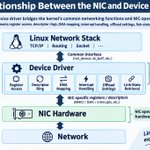
What does a Linux NIC driver actually do?
It bridges the kernel's network stack and NIC hardware.
Key functions:
① Register access
② Descriptor rings
③ DMA mapping
④ Interrupt handling
⑤ Offload settings
⑥ Link-state monitoring
More details👇
eeengineer.com/en/linux-nic-…

Oracle DatabaseのBuffer Cache、Clean BufferとDirty Bufferの違いを理解してますか?
Data Blockの変更でDirtyになったBufferは、すぐDatafileへ書かれるわけではない
Dirty Buffer → Write Queue → DBWn → Datafile
書き込み後はCleanとなり再利用される
詳細は以下
eeengineer.com/oracle-databa…

Oracle DatabaseのDirty Bufferは、いつDatafileに書き込まれる?
UPDATEなどで変更されたData Blockは、まずDatabase Buffer Cache上でDirty Bufferになります。
DBWnが書き込む主なタイミングは主に3つ。
① 再利用可能なBufferの不足
② Checkpointの進行
③ 定期的な書き込み処理
COMMIT時に必ずDatafileへ書き込まれるわけではありません。
詳しくは以下のブログを参照ください👇
eeengineer.com/oracle-databa…
#Oracle #Database #インフラエンジニア

6
366
What does a Linux NIC driver actually do?
It bridges the kernel's network stack and NIC hardware.
Key functions:
① Register access
② Descriptor rings
③ DMA mapping
④ Interrupt handling
⑤ Offload settings
⑥ Link-state monitoring
More details👇
eeengineer.com/en/linux-nic-…
How does Linux process an incoming network packet?
The kernel processes it layer by layer:
① Ethernet (L2): MAC & EtherType
② IP (L3): IP addresses & protocol
③ TCP/UDP (L4): Ports & transport data
④ Socket: Receive buffer
More details👇
eeengineer.com/en/linux-netw…
#Linux #TCP

What actually happens when Linux boots?
UEFI → GRUB2 → Kernel → initramfs → systemd
Each stage plays a different role.
Visual guide + real AlmaLinux 9 boot logs👇
eeengineer.com/en/linux-boot…
CPU Internal👇
amazon.in/Linux-CPU-Internal…
#Linux #RHEL #SRE

What happens after an app sends data on Linux?
Application → TCP/IP → qdisc → Driver → TX Ring → NIC
qdisc queues and schedules packets, controls bandwidth, and may drop packets when queues fill.
More details👇
eeengineer.com/en/linux-netw…
#Linux #Networking #TCP

How does Linux process an incoming network packet?
The kernel processes it layer by layer:
① Ethernet (L2): MAC & EtherType
② IP (L3): IP addresses & protocol
③ TCP/UDP (L4): Ports & transport data
④ Socket: Receive buffer
More details👇
eeengineer.com/en/linux-netw…
#Linux #TCP
1
3
371
How does Linux process an incoming network packet?
The kernel processes it layer by layer:
① Ethernet (L2): MAC & EtherType
② IP (L3): IP addresses & protocol
③ TCP/UDP (L4): Ports & transport data
④ Socket: Receive buffer
More details👇
eeengineer.com/en/linux-netw…
#Linux #TCP
Why does TCP stop sending data even when the network isn't congested?
The answer is Flow Control.
TCP uses the receiver's advertised window (rwnd) to prevent its receive buffer from overflowing.
Here's how it works👇
eeengineer.com/en/how-tcp-wo…
#Linux #TCP #Networking

Why does TCP stop sending data even when the network isn't congested?
The answer is Flow Control.
TCP uses the receiver's advertised window (rwnd) to prevent its receive buffer from overflowing.
Here's how it works👇
eeengineer.com/en/how-tcp-wo…
#Linux #TCP #Networking
システムの性能問題が発生したとき、皆さんはどのような手順で調査していますか?
性能分析の手法としてUSEやREDなどはありますが、性能問題発生時のEnd-to-Endの調査フローは、あまり標準化されていない印象がありましたので、自分なりに5ステップで整理してみました。
① 事象・影響範囲の把握
② サービス性能の確認(RED)
③ 各レイヤーの一次切り分け
④ ボトルネックの詳細分析(USEなど)
⑤ 仮説検証・原因特定
皆さんの現場では、どんな流れで性能問題を調査しているか、教えてもらえると嬉しいです。
詳細は以下に記載したので、合わせて見てみてください。
eeengineer.com/system-perfor…
#システム性能 #トラブルシューティング #Linux #インフラエンジニア

Webサービスの性能を見るとき、Latencyだけを見ていませんか?
「遅くなった」という事象を捉えるには、
どれだけ処理しているのか?
どれだけ失敗しているのか?
どれだけ時間がかかっているのか?
をセットで見ることが重要です。
そこで役立つのが REDメソッドです。
R:Rate
→ 単位時間あたりのRequest数(RPS)
E:Errors
→ 失敗したRequestの数・割合
D:Duration
→ Requestの処理時間(平均・p95・p99など)
Rate・Errors・Durationを並べて見ることで、サービスの状態を整理しやすくなります。
詳細は以下も合わせて参照ください👇
eeengineer.com/linux-perform…
#Linux #LinuxPerformance #PerformanceEngineering #Observability #REDMethod #WebApplication

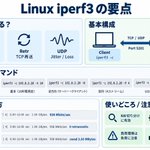
Linuxサーバー間のネットワーク性能、どうやって測定していますか?
便利なのが「iperf3」です。
2台のサーバー間でTCP/UDP通信を発生させ、以下を測定できます。
✅ Throughput:実効通信速度
✅ Retr:TCP再送回数
✅ Jitter / Loss:UDPの揺らぎ・損失
特に役立つのが、性能トラブル時の切り分けです。
例えば、アプリの通信が遅い場合、iperf3でサーバー間の転送性能を測定することで、ネットワーク側にボトルネックがあるかを調べる手掛かりになります。
#Linux #iperf3 #Network #インフラエンジニア

性能試験、いきなり測定していませんか?
性能は試験開始直後と一定時間経過後で変わることがあります。
特に、
・Cacheのウォームアップ
・JVMのJIT最適化
・Connection確立
などの影響には注意が必要です。
そのため性能試験では、
Ramp-up → Warm-up → Measurement → Ramp-down
とフェーズを分けて考えることが重要です。
#性能試験 #パフォーマンス #Linux #インフラエンジニア

CPU使用率が高くないのに、コンテナやアプリケーションの処理が遅い。
その原因のひとつとして考えられるのが、cgroupによるCPUスロットリングです。
cgroupでは、CPUの使用時間(Quota)を一定期間(Period)ごとに制限できます。
例えば 100ms / 200ms の場合、
-200msの期間内で最大100ms分のCPU時間を使用可能
-Quotaを使い切ると、残りの期間は実行を制限
-次のPeriodで再び実行可能
cpu.stat の nr_throttled や throttled_time を確認すれば、スロットリングの発生状況も把握できます。
#Linux #LinuxPerformance #cgroup #SRE

Linux 2.6.11 と現在のLinuxを比較すると、約20年でかなり進化しています。
特に大きいのは
・O(1) Scheduler → EEVDF
・Single Queue → blk-mq
・cgroup / Namespace の成熟
・eBPFによる観測・拡張
一方で、VFSやPage Cacheなど基本構造はあまり変わっていない認識です。
Understanding the Linux Kernel を読むときは、「今も通用する基本」と「変わった実装」を分けて理解したいですね。
#Linux #LinuxKernel #インフラエンジニア

What happens inside Linux when a client establishes a TCP connection?
A TCP connection involves more than just connect() and accept().
Here's the flow:
① socket() → bind() → listen()
The server prepares a listening socket.
② TCP 3-way handshake
SYN → SYN-ACK → ACK
③ SYN Queue → Accept Queue
Pending requests are tracked in the SYN Queue. Once the handshake completes, an established socket is placed in the Accept Queue.
④ accept() → send() / recv()
The server retrieves the connected socket and exchanges data with the client.
The key distinction: The SYN Queue manages pending handshakes, while the Accept Queue holds completed connections waiting for accept().
Explore the full explanation and Linux commands on my blog:
eeengineer.com/en/how-linux-…
#Linux #TCP #Networking #SysAdmin

Can you explain the relationship between NET_RX_SOFTIRQ and NAPI Poll?
Linux network receive processing is roughly:
Interrupt
↓
NET_RX_SOFTIRQ
↓
NAPI Poll
↓
Network Stack
NAPI processes packets in batches, reducing interrupt overhead under heavy load.
More dtails👇
🔗 eeengineer.com/en/linux-inte…
#Linux #Networking #NAPI #SoftIRQ #SRE

LinuxのCPUコアごとの使用率を確認するとき、何のコマンドを使っていますか?
・mpstat -P ALL 1
・sar -P ALL -u 1
どちらも %usr、%sys、%iowait、%idle などをCPU単位で確認可能。
さらに、sarなら過去の性能データも分析
個人的には、普段からsarを使っていれば、mpstatを使う必要はあまりないと思っていますが、皆さんはどう使い分けていますか?
#Linux #パフォーマンス分析 #インフラエンジニア

本番環境で sar の取得間隔って何分にしていますか?
RHELのデフォルトは10分間隔ですが、短時間で発生・収束するCPUスパイクやI/O遅延は見逃してしまうことがありますので、個人的には1分間隔程度に変更するのが良いと考えています。
sarの使い方や、取得間隔・保存期間の変更方法などをブログにまとめているので、興味がある方はぜひ見てみてください👇
eeengineer.com/linux-sar-com…
#Linux #SRE #Performance #sar

Oracle DatabaseのTablespaceとDatafile、どのような関係になっているか説明できますか?
論理Storageは、次の階層で構成されます。
① Tablespace:論理的な領域を管理
② Segment:TableやIndex単位で領域を管理
③ Extent:複数のBlockをまとめて領域を割り当て
④ Data Block:実際のデータを格納
このように分ける理由は、オブジェクト管理・領域割り当て・データ格納の役割を分離するためです。
また、1つのSegmentは複数のDatafileにまたがれますが、1つのExtentは単一のDatafile内に収まります。
詳細は以下を参照ください👇
eeengineer.com/oracle-databa…
#OracleDatabase #Database #インフラエンジニア

Oracle Databaseの仕組みを理解するとき、SGAやREDOなどを個別に覚えるだけでは、全体像がなかなか見えてきません。
実際のSQLは、
Application → Listener → Server Process → SQL解析・最適化・実行 → Oracle Instance → Database → Filesystem / ASM → Linux / Multipath → Storage
という複数のレイヤーを通って処理されます。
特にインフラエンジニアとしては、Oracle内部だけでなく、最終的にLinuxのBlock I/Oを経由してStorageへ書き込まれるところまでつなげて理解することが重要だと思っています。
詳細は以下を参照ください👇
eeengineer.com/oracle-databa…
#Oracle #OracleDatabase #Linux #データベース #インフラエンジニア

How does a Linux server accept TCP connections from clients?
It all starts with a socket.
① socket() — Create a socket
② bind() — Assign a local IP address and port
③ listen() — Mark the socket as listening
④ accept() — Accept a connection and obtain a new connected socket
⑤ send() / recv() — Exchange data with the client
Key point: The listening socket remains available for new connections, while each accepted connection gets its own connected socket.
Learn more about Linux networking:
eeengineer.com/en/how-linux-…
#Linux #Networking #TCPIP #Sockets

Webサービスの性能を見るとき、Latencyだけを見ていませんか?
「遅くなった」という事象を捉えるには、
どれだけ処理しているのか?
どれだけ失敗しているのか?
どれだけ時間がかかっているのか?
をセットで見ることが重要です。
そこで役立つのが REDメソッドです。
R:Rate
→ 単位時間あたりのRequest数(RPS)
E:Errors
→ 失敗したRequestの数・割合
D:Duration
→ Requestの処理時間(平均・p95・p99など)
Rate・Errors・Durationを並べて見ることで、サービスの状態を整理しやすくなります。
詳細は以下も合わせて参照ください👇
eeengineer.com/linux-perform…
#Linux #LinuxPerformance #PerformanceEngineering #Observability #REDMethod #WebApplication
「CPU使用率が高いから遅い」
「メモリ使用率が高いから問題だ」
本当にそれだけで判断してよいのでしょうか?
Brendan Gregg氏が提唱するUSEメソッドでは、Resourceごとに以下の3つの観点で確認します。
U:Utilization(使用率)
S:Saturation(飽和・待ち)
E:Errors(エラー)
例えばCPUなら、
Utilization → CPU使用率
Saturation → Run Queue
Errors → CPU関連エラー
というように、「使用率」だけでなく「待ち」と「エラー」まで見るのがポイントです。
詳細は以下を参照ください👇
eeengineer.com/linux-perform…
#Linux #LinuxPerformance #PerformanceEngineering #USEMethod

sarの過去ログをグラフ化できる「kSar」をご存じですか?
Linuxの性能分析でsarは便利ですが、数値だけでは長時間の負荷変動を把握しにくいことがあります。
そんなときに役立つのが kSar。
・CPU・Memory・I/O・Networkの推移を可視化
・リソース使用量の変動やスパイクを発見しやすい
・過去の障害発生時間帯の分析に便利
添付画像はMemory使用状況をグラフ化した例です。
RHEL 9でのsar収集設定からkSarの使い方まで、詳細は以下を参照ください👇
eeengineer.com/linux-sar-com…
#Linux #sar #sysstat #パフォーマンス分析

本番環境で sar の取得間隔って何分にしていますか?
RHELのデフォルトは10分間隔ですが、短時間で発生・収束するCPUスパイクやI/O遅延は見逃してしまうことがありますので、個人的には1分間隔程度に変更するのが良いと考えています。
sarの使い方や、取得間隔・保存期間の変更方法などをブログにまとめているので、興味がある方はぜひ見てみてください👇
eeengineer.com/linux-sar-com…
#Linux #SRE #Performance #sar
Why can disk usage remain high even after you delete a file with rm?
The key is whether a process still has the file open.
When rm app.log runs:
Directory entry → removed
But if a process still holds the file open:
File Descriptor → struct file → inode → data blocks
The filename disappears, but the underlying file data can remain allocated until the process closes the file.
So you may see:
ls → file is gone
df → disk usage is still high
I explain Linux filesystem internals with diagrams on my blog.
eeengineer.com/en/linux-file…
#Linux #LinuxKernel #Filesystem #inode #dentry #FileDescriptor #DiskUsage #LinuxTroubleshooting

Can you explain how a File Descriptor is connected to an Inode in Linux?
The VFS (Virtual File System) manages files through several interconnected objects:
File Descriptor: An integer used by a process
File: Represents an open file and its state
Path: Combines a Dentry and a Mount
Dentry: Maps a filename to an Inode
Inode: Stores file metadata
Superblock: Stores filesystem-wide information
Understanding these relationships is essential for understanding how Linux handles file operations.
Read more on my blog:
eeengineer.com/en/linux-vfs-…
#Linux #VFS #FileSystem #LinuxKernel

What’s the difference between a Socket, Core, and Logical CPU?
They are often confused, especially when discussing server performance.
The basic hierarchy is:
Socket → Core → Logical CPU
Socket: A physical CPU package installed on the motherboard
Core: A physical execution unit inside the CPU package
Logical CPU: An execution unit recognized by the OS; with SMT, one core can expose multiple logical CPUs
I explain Linux and CPU architecture concepts with diagrams on my blog.
eeengineer.com/en/linux-cpu-…
#Linux #CPU #CPUArchitecture #SMT #HyperThreading #Virtualization #PerformanceEngineering

How does a CPU actually execute an instruction? 🤔
① The Control Unit decodes the instruction
② The ALU performs the calculation
③ The result is written back to a register
④ The CPU moves on to the next instruction
This cycle is repeated billions of times to run our programs.
I explained the CPU execution flow with diagrams in my blog👇
eeengineer.com/en/cpu-instru…
#CPU #Linux #ComputerScience #Programming #Tech
