

Believer of Digital Minimilism, experimenting on myself to reduce screen time and building Second Key for the alikes.
Bangalore
Joined October 2026
- Tweets556
- Following144
- Followers181
- Likes494





Pinned Tweet
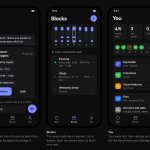
All functional changes are up, now comes Designing the App.
How is this look, what do you guys suggest ?

I regularly try to optimise AI costs and realised that you need not to pay $100 bill when $20 is enough.
There are few sweet spots which eats out most of the tokens. From firsthand experience these are what issues are and what works as a fix for me:
1. Bash outputs
Issue: git status, test runs and logs dump thousands of characters into context. Your call needed 5 lines, you paid for 500.
Fix: 'RTK'. It sits between Claude and your shell and trims the output before it reaches the model.
2. MCP servers you forgot about
Issue: every connected server loads its tool definitions into context, every session, used or not.
Fix: run /context, see what’s sitting there, and turn off what this task doesn’t need with /mcp.
3. Reading a whole file to change one function
Issue: Claude opens a 2,000-line file to edit 10 lines.
Fix: 'Serena' (MCP). It gives Claude symbol-level lookups, so it reads the function, not the file.
4. One endless chat
Issue: every new message carries the entire history with it.
Fix: /clear between tasks. One chat, one job.
5. The biggest model for everything
Issue: updating simple code doesn’t need your strongest model.
Fix: /model to drop down for routine work. Keep the big one for design calls.
Then measure it. 'ccusage' or 'headroom' shows where your tokens actually went, per day and per session.
Most of my “I need the bigger plan” moments were really “I’m wasting context” moments.
It was today that I decided to move away from ChatGPT and Claude.
Few incidents happened in a row which changed how I think on Privacy.
Whatever I chat with these Frontier Labs, I instantly got similar ads text on LinkedIn and Twitter about exact same things.
I generally use these models because they are convenient, not because they are powerful. I can extract same intelligence from Open Source Models for my work.
I don't know what the future beholds for these but atleast I am out as an individual user.


Yoo guys, happy morning.
This is Day 15 of building Second Key in Public.
Most of the changes are done for Android.
Now it's the time to test on myself.
I am averaging around 6-7 hours of screen time since past month.
Let's see how it goes without consciously putting phone away.


Yoo guys, happy morning!
Day 14 of building Second Key on X, got 8 hrs sleep again using it.
Yesterday:
✅ Found why Android wasn’t blocking: overlay permission was off
✅ Sign-in callback logging live in prod
✅ Claude skills to check logs, deploy web, build Android
Today:
• Testing intelligent suggestions
• Researching on which non-reasoning model works best with Second Key
Building something too? Let’s connect 🤝
Building an app where an LLM does a small, low-reasoning job: classify, tag, summarize patterns. No deep thinking needed.
Which model would you pick?
Claude Haiku 5.5
GPT-6 Luna
Gemini 3.5 Flash-Lite
Qwen3.8-Flash
DeepSeek V4 Flash
Mistral Small 4
Reply with your pick + what you actually use it for.
Real use cases > benchmarks.


Yoo guys, happy morning!
Day 13 of building Second Key on X.
Yesterday:
✅ My app locked Insta intelligently
✅ Shipped 7 PRs to prod: Supabase migrations + Worker deploy + Claude Connector
✅ Google sign-in live on web + Android
✅ End-to-end test of the full flow on a real phone
Today:
• Share pairing code with the keyholder
• Keyholder approves, blocked app unlocks
• Usage tally + analytics
• Design pass
Building something too? Let's connect 🤝

Finally, Second Key now works with Claude.
Idea is to go headless and promote intentional phone usage.


Google SignIn works in one go. Last time I did this for one project back in 2022, it was such a headache to understand the full contract.
For anyone setting up Google sign-in with Supabase:
In Google Cloud Console:
1. Consent screen: External, add your domain, privacy policy URL, and only the basic scopes (openid, email, profile).
2. Publish it: set the status to In production. In Testing, only listed test users can sign in.
3. Web client: add the redirect URI https://<project-ref>.supabase.co/auth/v1/callback.
4. Android client: your package name, plus the SHA-1 of every build you ship (debug, release, Play signing).
In the Supabase dashboard, under Authentication:
1. Sign In / Providers → Google: turn it on and paste the Web client ID and secret.
2. Sign In / Providers: turn Allow manual linking on.
3. URL Configuration: set the Site URL to your domain and add your /auth/callback route.
The Web client ID is public and goes in your app. The client secret goes only into Supabase.


Yoo guys, happy morning!
Day 12 of building Second Key on X.
Yesterday: off-day, then a late-night push.
✅ Cloudflare rate limit on /api and /r
✅ Nightly DB backups to R2 (free Supabase has none)
✅ Google sign-in dashboard setup
Today:
• Test Google sign-in + expiring pair codes on my phone
• Realtime only in foreground, push to wake the app
• Fix what’s breaking on Android
Building something too? Let’s connect 🤝

