

From the panda capital of the world.
San Francisco Bay Area
Joined July 2007
- Tweets19.7K
- Following3.5K
- Followers6.1K
- Likes8.9K
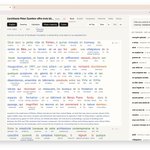




Readudu: Convert any language textbook reading material to an interactive web course with your own Claude.
github.com/wangtian24/readud…

I think it's not surprising that any frontier model can generate this today, but this solved a big language-study problem I have, to create a customized learning environment as a bespoke software, and it took you just an hour or two, which is unbelievable in the past.
Do you need a private artifact store for your team's agents that works for all harnesses? here is an option: github.com/angellist/arti-os…

Tian Wang 王天 retweeted

Introducing TimesFM-3, a state-of-the-art time series foundation model that enables accurate multivariate time series forecasting in a single forward pass, significantly outperforming other forecasting models across major benchmarks.
More on the blog →goo.gle/4x5WGpD

ALT TimesFM-3 architecture.


Tian Wang 王天 retweeted

Anthropic 的哲学家@AmandaAskell 最近参加了一个访谈,在访谈中她分享了自己探索好奇领域的一个方法。
提示词大概是:
我希望你从「xx」领域里选一个大概研究生水平的概念。然后我希望你通过写一个寓言的方式,间接地把这个概念完整讲出来。最好一直到快结尾时,人才会慢慢意识到这个概念究竟是什么。然后在故事之后,再补一段解释,把你刚才真正要讲的概念说清楚。


I wonder when @AnthropicAI will remove this eye broccoli and unify the access across three of their products.


Tian Wang 王天 retweeted

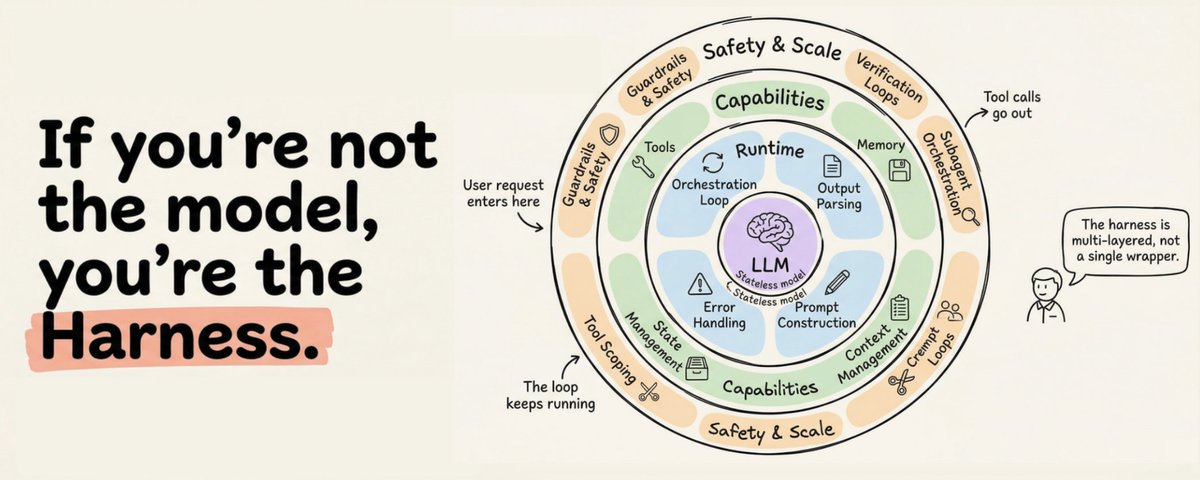
The maturity paradox in agent infra: Martin Fowler wrote about harness engineering this week. Mainstream adoption is happening before the foundations are ready — print() still catches bugs that $50k observability platforms miss.
wangtian24.github.io/tsuki-j…
practical personal AI stack

LLM Knowledge Bases
Something I'm finding very useful recently: using LLMs to build personal knowledge bases for various topics of research interest. In this way, a large fraction of my recent token throughput is going less into manipulating code, and more into manipulating knowledge (stored as markdown and images). The latest LLMs are quite good at it. So:
Data ingest:
I index source documents (articles, papers, repos, datasets, images, etc.) into a raw/ directory, then I use an LLM to incrementally "compile" a wiki, which is just a collection of .md files in a directory structure. The wiki includes summaries of all the data in raw/, backlinks, and then it categorizes data into concepts, writes articles for them, and links them all. To convert web articles into .md files I like to use the Obsidian Web Clipper extension, and then I also use a hotkey to download all the related images to local so that my LLM can easily reference them.
IDE:
I use Obsidian as the IDE "frontend" where I can view the raw data, the the compiled wiki, and the derived visualizations. Important to note that the LLM writes and maintains all of the data of the wiki, I rarely touch it directly. I've played with a few Obsidian plugins to render and view data in other ways (e.g. Marp for slides).
Q&A:
Where things get interesting is that once your wiki is big enough (e.g. mine on some recent research is ~100 articles and ~400K words), you can ask your LLM agent all kinds of complex questions against the wiki, and it will go off, research the answers, etc. I thought I had to reach for fancy RAG, but the LLM has been pretty good about auto-maintaining index files and brief summaries of all the documents and it reads all the important related data fairly easily at this ~small scale.
Output:
Instead of getting answers in text/terminal, I like to have it render markdown files for me, or slide shows (Marp format), or matplotlib images, all of which I then view again in Obsidian. You can imagine many other visual output formats depending on the query. Often, I end up "filing" the outputs back into the wiki to enhance it for further queries. So my own explorations and queries always "add up" in the knowledge base.
Linting:
I've run some LLM "health checks" over the wiki to e.g. find inconsistent data, impute missing data (with web searchers), find interesting connections for new article candidates, etc., to incrementally clean up the wiki and enhance its overall data integrity. The LLMs are quite good at suggesting further questions to ask and look into.
Extra tools:
I find myself developing additional tools to process the data, e.g. I vibe coded a small and naive search engine over the wiki, which I both use directly (in a web ui), but more often I want to hand it off to an LLM via CLI as a tool for larger queries.
Further explorations:
As the repo grows, the natural desire is to also think about synthetic data generation + finetuning to have your LLM "know" the data in its weights instead of just context windows.
TLDR: raw data from a given number of sources is collected, then compiled by an LLM into a .md wiki, then operated on by various CLIs by the LLM to do Q&A and to incrementally enhance the wiki, and all of it viewable in Obsidian. You rarely ever write or edit the wiki manually, it's the domain of the LLM. I think there is room here for an incredible new product instead of a hacky collection of scripts.
Tian Wang 王天 retweeted

非常感谢马老师的打call !!
忍不住分享一点SkillCraft背后的故事。
初衷起源于我们去年对 embodied LLM agent RL 的探索。当时我们让大模型用 RL 学推箱子,怎么训都训不上去。探索之后我们发现,这不是 RL 的问题,而是 grounding 的问题:任务极度依赖坐标,但模型却无法从一堆二维字符串里自己提取出坐标信息。无奈之下我们当时用了简单粗暴的解法:直接改渲染函数,手动把坐标喂给模型再做 RL,同时让它做坐标转移预测来学 world model 作为 mid-training,效果很好。这条路后来写成了 SPA: arxiv.org/abs/2510.15047
问题是解决了,但我们一直不甘心。与其每次都由先验来告诉模型"你缺的是坐标",它能不能自己发现自己被什么卡住了,然后自己造个工具,把未知的状态空间转化成它能理解的表征?说到底,工具的本质是压缩: 把一段反复出现的认知或操作开销封装起来,让后续调用的边际成本趋近于零。人类造工具如此,模型造工具也应该如此。
沿着这个思路,我们花了很长时间思考:模型应该怎么造工具?造什么样的工具?造出来之后又怎么存、怎么复用? 以及什么样的场景才能激发出模型“造工具的智能”?
于是,我们基于 OpenClaw 式的真实任务 benchmark Toolathlon,设计了四个极简协议:save_skill、get_skill、list_skills 和 execute_skill,使模型能够自主发现、调用并存储自己构造出的工具。同时,我们还合成了一批模拟真实场景中重复工作流的任务,用于系统评测模型运用这些协议的能力。
更详细的答案在 SkillCraft: arxiv.org/abs/2603.00718


如果要为这周的 AI 发展一个关键词,那就是自主进化。
从 Meta-Evolution、AutoHarness、SkillNet、SkillCraft MiniMax-M2.7 等一系列工作可以看到,AI 正在走向自主发现,自主约束,自主学习新 skills,甚至完成模型级别的自我进化。
其中 SkillCraft 给我的启示非常大:我们不需要也不应该为了某一个任务去安装第三方 skills,而应该直接从 tool call 的实践中抽象,构建和复用新的 skills。
今天,用 MiniMax-M2.7 复现了 SkillCraft 关于发现新的 skills 的方法。
几个重要的步骤:
Observer -> 观察 tool call
Pattern -> 从 tool call 中归纳规律,生成新的 skill
Save -> 保存新 skill
Reuse ->遇到类似问题时,直接复用 skill,而不再重复tool call
MiniMax-M2.7 非常出色的完成了这个任务!
Kudos to @MiniMax_AI @SkylerMiao7
Kudos to 做自主进化的AI 研究员,what a week!
Tian Wang 王天 retweeted

Expectation: the age of the IDE is over
Reality: we’re going to need a bigger IDE
(imo).
It just looks very different because humans now move upwards and program at a higher level - the basic unit of interest is not one file but one agent. It’s still programming.