

Xembedo converts presentations and documents to high quality embeds that are device agnostic.
Joined July 2015
- Tweets176
- Following127
- Followers95
- Likes8






Cascading Style Sheets (CSS) is used to format the layout of the website. #CSS saves a lot of time as it can control the layout of multiple web pages at once. See the following shared image to know about several advantages of CSS.
#HTML #HTML5 #htmlcss #idattribute #CodingTips

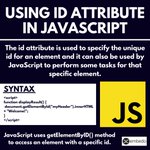
See the following image to know how we can use the id attribute in #JavaScript. The id attribute is used to specify the unique id for an element and it can also be used by JavaScript to perform some tasks for that specific element.
#HTML #HTML5 #htmlcss #idattribute #CodingTips


HTML <a> tag defines hyperlink and href attribute specifies the URL of the page. The href attribute is used along with the <a> tag. Also, if the href attribute is not present then <a> tag is not a hyperlink.
#HTML #HTML5 #htmlcss #javascript #CodingTips #coding #code #hyperlink

#JavaScript has three types of popup boxes i.e. Alert box, Confirm box & Prompt box. Alert box is used if you want information come through the user. Confirm box is used if you want users to verify. Prompt box is used if you want user to input a value before entering a page.

Look at the following Image to know about the main types of API management strategies. All the types of API management strategies depend on the choice of service you want to use.
#API #APIs #APImanagement

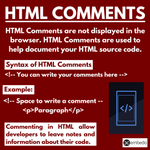
#HTML Comments are used to help document your HTML source code. These comments are not displayed in the browser. The main purpose of #HTMLComments is to allow developers to leave notes and information about their code.
#HTML5 #htmlcss

The HTML <b> element defines bold text, <i> element displayed in italic, <sub> element defines subscript text and <sup> element defines superscript text.
#HTML #HTML5 #htmlcss #javascript #CodingTips #coding #code


In HTML, JavaScript code is inserted with the help of <script> and </script> tags as JavaScript code is automatically executed when browser processes the tag. Look at the following Image to know about the <script> tag.
#HTML5 #HTML #htmlcss #javascript #CodingTips #coding #code


Look at the following image to know about Several Code Learning Resources.
#code #CodeLife #Coding #CodingTips #codinglife #codingisfun #htmlcss #javascript

HTML headings are Titles and Subtitles that will display on the webpage as per your choice. Headings are defined with heading tags <h1> to <h6>.
#HTML #HTML5 #heading #headingtags #CSS #CSS3 #document #conversion

Cascading Style Sheets (CSS) is a very simple designed process that allows you to put styles to customize your web pages. See the following shared Image to know about several uses of CSS.
#HTML5 #htmlcss #CSS #CSS3 #server #client #userexperience #uidesign #webdesign

Look at the following shared image to know about several benefits of converting your files into PDF documents.
#PDF #API #conversion #conversionAPI #HTML

Look at the following image to know about several advantages of API for developers.
#API #APIs #Developer #document #HTML #CSS #conversionAPI #conversion


Check out the following image to know about the Importance of API for Business and how your business can take benefit from this.
#API #PPT #presentation #document #PDF #conversion #HTML #HTML5 #documented #Excel #business #BusinessGrowth
