

曾经是用户体验设计师,现在是一个 Builder 享受使用工具 |在做自己的小产品 Rive中文学习站 https://xitter.cf/t.co/KYAmwX0C2W,有一套国内首个 Rive 零基础入门到实践中文系列课程。 https://xitter.cf/t.co/eJTek4pFSB 接 Rive 企业培训 👇我的其他作品看这里
Joined June 2020
- Tweets4.2K
- Following983
- Followers5.8K
- Likes2K





Pinned Tweet
Hi everyone — after 7 months of work, we couldn’t wait any longer to bring you the first version of Focus Fridge 🧊
——————————————
Greetings, foodie of the Focus Galaxy!
The King has heard of your travels across the stars, collecting countless delicacies — and has gifted you a “Focus Fridge.”
When you focus, the fridge automatically collects local foods and boosts your power of concentration.
Legend says Earth has the most delicious food in the universe — ready to go?
Focus Fridge is a fun Pomodoro-style focus timer. Every focus session rewards you with a mystery food blind box, turning time management into a ritual you actually look forward to. It supports both Pomodoro and stopwatch modes, with 4 app-blocking focus modes to keep distractions away and help you build better habits.
【Immersive Scenes】
Stay focused in beautifully crafted scenes — earn unlimited focus power + food rewards
【Food Blind Boxes】
Unlock a mystery food box every 25 minutes — each item comes with its own hidden story
【Fill Your Fridge】
Arrange your food collection however you like — open the fridge for instant satisfaction
【Your Own Fridge】
Decorate your fridge with achievement magnets and make it uniquely yours
【Digital Life】
Stats view + timeline view to easily track your focus hours
【Block Distractions】
4 focus modes (blocklist / allowlist / strict / relaxed) to shut out every distracting app
【Chill Art Style】
Hand-drawn, laid-back visuals — stay relaxed even while you’re locked in
【More Features】
Pomodoro / Stopwatch
Scene tags with preset focus modes
Widgets
Shortcuts support
Lock screen widgets / Control Center quick launch
Multi-device sync
Live Activities
Calendar sync
In a world where your attention gets interrupted faster than you can breathe, sitting down and focusing is a luxury.
What we set out to do is add a little ritual and a little fun to every focus session — so staying focused isn’t boring, but a journey full of food and discovery.
Download Focus Fridge now — collect mystery foods, unlock endless focus power, and build a fridge that’s all yours!
We put together a little story during onboarding — hope you enjoy it 🎬
This is v1.0. There’s so much more we want to add — features, easter eggs, you name it — but we couldn’t wait to get this first version into your hands. Stay tuned for what’s next!


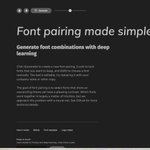
做页面的时候,标题和正文到底配什么字体,挑来挑去总觉得差点意思。
分享一个小工具:Fontjoy。点一下 Generate,它一次配好标题、副标题、正文三种字体,看上眼的点 Lock 锁住,剩下的继续随机。示例文字可以改成你自己的文案,旁边的滑块能调配得更像还是反差更大。它是用神经网络挑气质接近、但粗细或衬线拉开对比的组合,字体都来自 Google Fonts。
下次定字体之前,可以先来这里刷几轮:
fontjoy.com/


三秋十李 Sergio retweeted
我去,如果我不说,你可能都不会注意到这是 AI,这是我最近看过最好的 AI MV,音乐也好听,歌词也棒,作者的分镜剪辑构图都堪称顶级,最重要的是我没在这个 AI人物中看到那种夸张的表情和姿态,但总觉得这个主角像一个明星,辛芷蕾?
原作者:抖音 Veda 薇达,v.douyin.com/d8JkpYGDhkQ/
我去,如果我不说,你可能都不会注意到这是 AI,这是我最近看过最好的 AI MV,音乐也好听,歌词也棒,作者的分镜剪辑构图都堪称顶级,最重要的是我没在这个 AI人物中看到那种夸张的表情和姿态,但总觉得这个主角像一个明星,辛芷蕾?
原作者:抖音 Veda 薇达,v.douyin.com/d8JkpYGDhkQ/

其实 fal 这个平台不只是一个 API 平台,它自己本身也做了很多 C 端友好的功能,比如创作 agent、生图的 C 端界面,还有类似 comfyui 的节点式创作。在这可以用成本价使用 AI

Introducing fal Worlds.
A new way to create and interact with AI-generated worlds in real time.
Build characters, explore environments, direct scenes, and watch worlds respond to your actions as they unfold.
Get hands-on with the latest frontier world models, including LingBot World, H3 Max Director and more.

rive 的人太有想法了

I made this demo to test a new feature we’re developing in @rive_app : adding meshes to components. I drew a vector car with Rive’s Brush tool, added a mesh to a texture component, and bound it to the rig. An artboard property lets me swap components on the same mesh. I used Rive CLI to place the car in a 3D scene.
三秋十李 Sergio retweeted

I made this demo to test a new feature we’re developing in @rive_app : adding meshes to components. I drew a vector car with Rive’s Brush tool, added a mesh to a texture component, and bound it to the rig. An artboard property lets me swap components on the same mesh. I used Rive CLI to place the car in a 3D scene.

三秋十李 Sergio retweeted

因为最近需要跨时区会议,我给自己做了一个多时区查看工具,可以直观对比多个城市的时间,还能直接选出一个时间段来查看在不同城市的起始时间。欢迎有类似需求的朋友使用,这应该是最直观的了。
hallee.me/lab/time-zones
这个网站太全面了,设计工程师不能错过的一个网站:DesEngs,是设计工程师们自己整理的一份资源清单。
组件库、小工具、讲动效和排版的文章、设计工程师的招聘都收在里面,每条一句话说清楚是干嘛的,新的按日期往上加,可以按 Read、Build、Use 这些用途筛,也能直接搜。另外还单独整理了好看的网站、极简个站和值得关注的设计师。
没事进去刷一刷,常常能挖到几个想收藏的东西:
desengs.com/

