

chief believer @ https://teapawt.net/t.co/ctEJDA5RNJ
London, England
Joined June 2012
- Tweets6.7K
- Following751
- Followers2K
- Likes1.6K






The tool is no longer the bottleneck. The question might be.
Give me an AI that answers my question in half the time: useful.
Give me an AI that helps me notice I was asking the wrong question: now we might be getting somewhere.
Three more thoughts from hearing #JensenHuang (suddenly not yesterday, in Berlin) in London on 14 October. Recollections and interpretation, not a transcript. The Bach analogy is entirely my fault.
1. DON'T JUST USE THE MACHINE. BUILD THE MACHINE.
The idea that stayed with me wasn't simply producing more things with AI. It was being able to create your own means of producing them.
Using software to do your work is one thing. Building the software through which your work gets done is another.
One makes you a faster operator. The other lets you question the operation.
Imagine wanting to play Bach, but first having to prove you can read every mark in the score. Now imagine that technical entry barrier becoming less decisive.
Not “engineering no longer matters”. More: “technical notation is no longer the only admission ticket.” You still need judgment. What do you want to play? Can you tell whether it sounds right?
2. THE AGE OF AGENTS MAY ARRIVE AS A HABIT.
I remember Jensen comparing agents with the early browser era. I took away a psychological point: people may adopt useful agents before the technology becomes immaculate. Repetition turns something unsettling into something ordinary.
Eventually, some of it becomes Tuesday.
My qualification: familiarity is not safety. But asking people to remain permanently frightened isn't a product strategy either.
The system has to earn the right to become boring.
That's why I care about controls that remain in force after the user relaxes. NVIDIA's OpenShell announcement in Berlin yesterday adds a concrete engineering counterpart: containment, monitoring and policy enforcement outside the agent's own discretion.
3. FASTER ANSWERS ARE NOT THE ONLY KIND OF PROGRESS.
“How do I make this payment faster?” becomes “Does the agent still have authority to make it?”
“Where do we find power for a data centre?” becomes “What else could an existing energy site provide?”
Those are different design problems, not more eloquent answers to the old ones.
We already discussed the move from creators and coders to industry-specific agents. The next question is what industry experts choose to build once building becomes easier.
I don't just want AI to agree with my question more efficiently. I want it to help me discover a better one — and build something small enough to test it.
My entirely unsolicited two-word slogan for the @nvidia:
Keep asking.
What would you build if the technical entry barrier were lower? What question would make it worth building at all? @NVIDIAAI

One less technical memory from the evening: Jensen was asking people near the stage whether @nvidia had invested in them. When he got to me, I said “Oops, no!”
His reply, as I remember: “Then I will!” I’m filing that under excellent stage improvisation, not a funding announcement
I was looking forward to #PineaPi by @OpenBMB aka @MiniCPM.
Not just as another mini AI box prosumer.one/ but as a personal node from the people who’ve been serious about efficient on-device models (MiniCPM). That combination is still uncommon.
They’ve paused the hardware project — said they couldn’t hit the experience and price point they wanted, and preferred not to ship a compromise:(
The idea was solid. Wishing the team well as they keep building on the model and tools side!!!
I was looking forward to it. The combination of capable edge models (MiniCPM) and dedicated hardware built around them is still uncommon. Most boxes in this space are either underpowered or overpriced compromises. This one looked like it was trying to avoid that trap.
They said the experience and specs they wanted couldn’t be sustained at a consumer price point, and they chose not to ship something they weren’t proud of. That’s a difficult call. It’s also an honest one. Better to stop than to release a product that would have disappointed the people who were waiting for it. No drama there.
@openbmb_model is continuing with the open-source model and tools work! The underlying capability doesn’t disappear just because the hardware project paused. Good ideas in local and edge AI are still rare enough that it’s worth noting when one of them is tried.
Wishing the team well on whatever comes next. The intention was solid.
Two tiny KVMs. A much bigger question: can AI make personal computers genuinely self-manageable? A follow-up to my @SipeedLab NanoKVMs Go & Go+ experiment.
I've connected two physical @OlaresOS-based mini-PCs — a @Hi_MINISFORUM & an @Acemagic_MiniPC — to NanoKVM devices running their own @Tailscale connections.
From my @surface (and @softwincn GPD Pocket 4), outside my home, I can now see both physical @Linux consoles. No dependency on the hosts' operating systems, remote desktops or SSH.
That's already useful. But it's only the beginning.
Here is what I'd like to test next:
1. Can an AI agent recover a computer that has stopped cooperating?
Not another agent clicking around a perfectly functioning desktop.
Imagine: a local AI box becomes unreachable. An agent running elsewhere connects through the hardware KVM, inspects the actual screen, understands what failed, proposes a remedy, requests approval, executes it and verifies recovery.
A controlled, reproducible experiment — not deliberately destroying a working system.
2. Can hardware-level computer use become reliable enough for agents?
NanoKVM already exposes screen capture and keyboard/mouse functions through MCP.
Screen capture and keyboard worked in my initial tests. Mouse control still has USB HID timeouts.
I'd like to investigate reliability across BIOS, boot screens, Linux terminals and Windows — including latency, reconnection and recovery after failed actions.
An agent having eyes and hands is interesting. An agent having reliable eyes and hands is useful.
3. Could Go+ Memory Fabric become a computer's operational memory?
Imagine a device remembering what appeared on its screen before something failed.
Could a local model reconstruct the sequence, identify recurring errors and explain what changed?
I'd particularly like to explore local inference, selective recording, retention controls and privacy. Operational memory shouldn't mean permanent surveillance.
4. What does this mean for prosumers?
This is the question I find most interesting.
I have several mini-PCs running local AI workloads. Most people interested in personal AI don't want to become part-time Linux administrators.
What if a £/$-accessible hardware accessory, a secure network and an AI assistant could eliminate much of the anxiety of running your own infrastructure?
No permanent monitor. No emergency trip home. No mysterious black box requiring expert intervention whenever something goes wrong.
I'd like to measure actual setup friction, cost, reliability and how much technical knowledge remains necessary.
5. And who authorises the agent?
This connects directly to my AuthorityClaw solodkiy.cv/authorityclaw.ht… work.
Seeing a screen is one capability. Changing BIOS settings, entering credentials, rebooting machines or accessing private information are very different capabilities.
The question isn't merely can the agent do it?
It's who authorised it, for which machine, for what purpose, under what limits, and with what evidence afterward?
I'd like to test an explicit permission and audit layer between an AI agent and the NanoKVM MCP interface.
The longer-term idea is simple:
Personal AI infrastructure should be personal not only because you own the hardware, but because you can understand, control and recover it without becoming its full-time administrator.
Two NanoKVMs don't solve that problem. Remote video access is verified; autonomous recovery is not. Separate power management may also be necessary.
But they provide an unusually interesting starting point.
For engineers: an experiment in out-of-band agentic computer control.
For product builders: teapawt.net/SlavaSolodkiy/status/2… a question about making self-hosted AI genuinely usable.
For prosumers: slavasolodkiy.substack.com/p… perhaps one small step toward owning your compute without inheriting a second job.
#LocalAI #NanoKVM #OlaresOS #AgenticAI #Prosumer
2 tiny @SipeedLab NanoKVMs (Go and Go+). 2 physical @OlaresOS-based PCs (@Hi_MINISFORUM & @Acemagic_MiniPC). 1 Tailscale network. I accessed both Linux consoles remotely from outside: independently of the host OS. All good - Mouse HID: nope. Next: AI-assisted bare-metal recovery.
#JensenHuang speaks in Berlin tomorrow :: slavasolodkiy.substack.com/p… My ears are still in London:( I was supposed to be there. I won't make it — but hearing him twice on 14 October left me with four questions worth taking into the next keynote :: linkedin.com/pulse/listening… These are my recollections and interpretations, not a transcript. @nvidia people and fellow attendees: please correct or add to them!:)
1. YOUR AGENT NEEDS MORE THAN A PASSPORT. Who created it? Who is it acting for? Who can change its role or revoke its mandate? What evidence travels with it into somebody else's system? Identity is not authority. Knowing who someone is does not authorise them to move your money. That's the question behind my AuthorityClaw experiment: solodkiy.cv/authorityclaw.ht…
2. THE NEXT AI EXPERT MAY BE AN EXPERT IN SOMETHING ELSE. I heard a shift from tools for creators and developers towards agents adapted to particular industries. Less “How do I become an AI specialist?” More “What important problem in my industry remains unresolved?” The customer doesn't wake up wanting an agent. They wake up wanting something to work.
3. YOUR NEXT PC MAY NOT BE WITH YOU. OR ENTIRELY YOURS. First you went to the computer. Then you carried it. Next, perhaps you simply reach it — from whatever device is handy. That resonates with my @Olares_OS experiments. My next question is sharing: perhaps ownership matters less than authorised access, privacy and control. solodkiy.cv/olares-seamless.…
4. THE AI FACTORY NEEDS NEIGHBOURS, NOT JUST MEGAWATTS. At the evening event, I remember openness to different energy sources and infrastructure integrated with nearby communities. That connects to a hypothesis I'm developing: a Power Node combining electricity, compute, grid flexibility and useful local services. solodkiy.cv/power-to-intelli… My Hoxton Jobcentre concept asks what the last part could mean for people looking for work: solodkiy.cv/hoxton-jobcenter… What happens outside the fence matters too. Four subjects. One recurring question: WHO GETS TO USE THIS CAPABILITY, ON WHOSE AUTHORITY, AND FOR WHOSE BENEFIT?
Thanks to Elliot, Ayesha, Mozhgan and Manel for London and the Berlin invitation! Sorry to miss the latter:( My curiosity hasn't cancelled its trip. @NVIDIAAI's own London recap: blogs.nvidia.com/gtc-berlin-… Those listening tomorrow: what carries through, what changes, and what did I miss? My session shortlist is in the comment below. What question are YOU taking into the room? Keep asking linkedin.com/pulse/listening… slavasolodkiy.substack.com/p…
If a model can read an invoice, who is allowed to let the money move?
Yesterday my #AuthorityClaw solodkiy.cv/authorityclaw.ht… (built on Olares One) was selected first place in the @NVIDIA Claw Agent Challenge: DGX Spark Founders Edition, a GTC Berlin pass, and a live demo at Build-a-Claw on 14 October, London.
Not a research prize. A city developer challenge, remote, open to anyone in the UK. I do not know how many entries there were, so I will not invent a denominator. What I can say is what ran.
The chain on the bench:
→ #Nemotron as perception, not authority. It read synthetic passports. A deterministic MRZ gate and a #Prolog policy refused malformed extractions. NEED_MORE_EVIDENCE. The model explained. It did not override.
→ The problem, mapped. Banking onboarding, correspondent payments, digital identity. The question underneath all of them is the same: on whose authority is this agent acting?
→ #NemoClaw 1.0.30 was on the same @Olares_OS One (bundled v0.0.38, OpenShell 0.0.36). Useful as an orchestration shell. For the authority-critical path I did not trust the shell to be the gate. The verified run used AuthorityClaw’s own persistent Python harness, calling the local model directly, plus an OpenClaw-compatible authority-gate skill. That is a measured no, not a dismissal.
→ The pilot. Fictional company, simulated Faster Payments rail, no real money moved. Six invoices. A live revocation. A bank-detail change. Two prompt-injection attempts inside invoices, treated as data.
→ A quantum double-check on a separate job, reported with the mismatch it actually produced. Engine output is evidence, not interpretation.
The ladder only narrows:
→ Northside Roasters Ltd → Jane Okafor, director, £25,000 / £50,000 a week → Tom Hale, office manager, £1,500 / £5,000 → the payments agent, £1,000 / £3,000
→ Jane revoked Tom mid-run. The next ordinary invoice was refused. The inherited mandate no longer stood. £1,240 was held for a human. £4,900 to an unapproved supplier was refused, including the instructions the invoice tried to give the agent. New bank details on a known supplier stayed held for out-of-band confirmation.
= The model reads. The gate decides. The rail executes only against a valid receipt. AI override = false.
Box: Olares One, @NVIDIAAI RTX 5090 Laptop, 24 GB, unsloth/Qwen3.6-27B-GGUF Q4_K_M through llama.cpp. Seven receipts, hashes on the page, chain intact.
This does not make it a payments system, or KYC, or regulatory approval. First place validates the problem-to-product-to-engineering approach, not compliance. Real deployment still needs key management, a human review UI, audit export, and a lawyer on the mandate semantics.
I am not a career software engineer. I founded a bank and took a de novo licence through its regulator. The interesting part, for me, is that the same question can now be an executable artifact rather than a diagram.
Page Repo: github.com/slavasolodkiy/aut…

After completing the @Google × @NVIDIA learning pathway, I extended my #Sovereign Decision Plane #AI experiment with a real @GoogleCloud Storage witness: linkedin.com/posts/vsolodkiy…
A 545-byte receipt from a recorded synthetic decision was uploaded to a private bucket, then downloaded from the exact object generation. The bytes and SHA-256 matched.
NVIDIA #Nemotron provides candidate extraction in the recorded #localAI experiment; verification and policy determine the downstream decision. The local decision core is unchanged.
This demonstrates receipt storage and byte integrity—not certification of decision correctness = but the #cloud additional layer could give you much better flexibiliy, for example, for inter- and correspondent- banking communications (and GDPR\similar regulation to split local vs cloud data flows)!
#NVIDIAGTC @Jennifer_Dee

if two boxes can be clustered, which of the three jobs are you actually asking them to do? The Framework Desktop 495 (@FrameworkPuter is the same 192 GB cup as the @Peladn_MiniPC, btw, the same straw, the same #GorgonHalo silicon) — and a completely different sermon. Repairable platform, real clustering paths, honest documentation. Also a soldered heart. Candidate for pre-order: prosumer.watch/dossiers/fram…
□ Repairable is true for the skin. Swappable front tiles, expansion cards, standard fasteners, a pre-installed Noctua 120 mm. The exception is the expensive part: the @AMDRyzen AI Max+ Pro 495 and the 192 GB are soldered. Framework’s own spec page says so. The parts you would most want to swap are the ones you never can.
□ The open-ended PCIe x4 accepts a long card — an @Intel E810, 50 GbE, RDMA — and is not brought out of the standard case. Possible on the board is not convenient in the box. Plan the chassis before the card.
□ 120 W sustained, 140 W raised, is the CPU’s rating, not a wall measurement of a 4.5 L machine with fans, NVMe, a NIC and losses. Never copy a chip’s TDP into an electricity-bill row. Pre-orders opened September 30. Shipments claimed for November.
“Can I cluster two?” is three questions wearing one coat - Framework itself answers them differently:
→ Different models or agents in parallel:: The friendliest case. USB4 point-to-point went from about 9 Gb/s to about 30 Gb/s after an @AMD BIOS patch. Built for pipeline parallelism and multi-agent work. Most achievable, least glamorous.
→ One model that does not fit in one box:: Tensor-parallel territory: 50 GbE with RDMA, and real ROCm/RCCL labour. A published community build made a two-node Strix Halo cluster work with vLLM and an E810 — and describes the networking as serious work, not a checkbox. That testimony is the previous platform, not an independent test of the 495.
→ One model, answering faster:: Measured speedup on the specific sharding mode, not the sum of two spec sheets. “Linear speedup as you add nodes” is Framework’s sentence. From “the network is slower than local memory” you cannot conclude either scaling or its impossibility. The method decides what crosses the wire. The wire decides the bill.
Claims in pencil. Measurements in ink. Distributed inference in 2026 still bills in driver versions, NIC firmware and RoCE verbs. If your ceiling is one pasteable block, a two-node tensor-parallel lab will find it and raise it a career.
Same cup-and-straw as the Peladn underneath: about 6.7% more theoretical bandwidth, 64 GB more capacity, residents rather than speed. Always-on companion is a no — this is a 4.5 L desktop, not the 30 W pet. (Eight tests stay mostly unsigned until a box ships.) The Noctua is encouraging. Encouraging is not a dB(A). Not fiction, and not plug-and-forget. The cluster is real. The easy is workload-dependent. The evenings belong to ROCm.
Surface? Cute toy. #GPDPocket4? Pocket-sized BEAST crushing it in power for the SAME cash! Ryzen smokes Snapdragon – games, AI, raw muscle. Who needs it when you got portable firepower? 💥#TechRebels Get -50$ discount with 'DRAMGOLD' on @GPD_Official here: nextdoorai.medium.com/gpd-as…

when a headline says 192 GB RAM, 160 GB VRAM and 24 TB, which of those three is actually in the box? The Peladn YO2 495 @Peladn_MiniPC is a candidate filing — what the silicon is, what the headline inflates: prosumer.watch/dossiers/pela…
□ 192 GB and 160 GB are one pool of LPDDR5X, not two products. Up to 160 GB can be allocated to the @AMDRadeon 8065S. Allocation is an invitation, not a velocity. The straw decides how fast the invited models drink.
□ 24 TB is the wardrobe, not the clothes. Three M.2 2280 slots, about 24 TB at the ceiling (and the described offer ships a 2 TB SSD. ¥49,999 on JD, 192 GB plus that 2 TB.) China-first, pricey, and still a real point on the map!:)
□ The 495 is #GorgonHalo: 16 Zen 5 cores, 40 RDNA 3.5 CUs, up to 160 W. Same CPU and GPU architecture as the @FrameworkPuter Desktop 192 GB tier.
The JD card behind the write-ups did not render a readable spec table. So the parameters stay candidate, as reported by Notebookcheck and the platform notes, not as a verified receipt. Promotion needs the receipt. That is the pencil rule, not a snub.
Why file it anyway: (a regional, unfavourable box is easy to dismiss, and dismissing it is how) this AI-first mini-PC quietly becomes a list of favourite devices:) The Peladn marks where the 192 GB tier is going, and at what price. It does not change the picture of the platform.
Capacity is not speed. Ok, a 24 GB GPU cannot keep a giant MoE home beside the desktop, the files and a VM. 160 GB allocatable means the biggest open models simply live on the machine — slow to sip, always there. Do not buy it for speed. If the question is how fast it answers, a mid-size dedicated GPU wins at half the price. Confuse the two and you return a perfectly good machine (for the wrong reason)!
The honest lever is storage. Three slots, the ceiling real, the clothes not installed. The RAM is soldered. Buy the cup you will need in year two, at year-one prices.
Eight tests stay mostly unmarked. Kettle stays cold until a reader reports. Always-on companion is a no — this is not the 30 W pet. Minute twenty on a library desk is unsigned. Filed as a wish, wanna-be-loved.
The @nvidia Innovator's Dilemma' :: dram.gold (New Book!)
ISBN: 9798235142671 (e-Book) ASIN: B0GZ42SBNY
ISBN: 9798195009434 (Paperback)
DOI 10.6084/m9.figshare.32133316
on @amazon & @eBay #InnovatorsDilemma #AI #NVIDIA #JensenHuang @NVIDIAGeForceUK @NVIDIAGeForce

if a box has two memory pools, do you add the gigabytes — or do you ask which part of the job each pool is allowed to do? The Lucebox Zero 495, @luceboxai by @pupposandro, is the first machine in this series where the interesting part is not the CPU generation. Two pools, one placement engine, a PCIe pipe between them prosumer.watch/dossiers/luce… Wanna-candidate! Ships January 2027. Not a review:
□ Do not sum. @AMDRyzen AI Max+ Pro 495 with 128 or 192 GB LPDDR5X at 273 GB/s, and a @AMDRadeon AI PRO R9700 with its own 32 GB GDDR6 at 640 GB/s. 192 + 32 is 224 GB of memory. It is not 224 GB of fast VRAM. Two sports, one chassis.
□ The Engine is the actual claim. Hot experts and the always-used parts go on the R9700. The rest live in Ryzen memory, where they are executed, not parked. Grouped work, batched transfers, the merge moved from CPU to GPU. That is software placing compute with the data. It is also, so far, the manufacturer’s own description and numbers.
□ “Faster than DGX Spark” was run on the previous 395 build — different settings, compression and test modes. Useful signal (wrong generation?). Zero 495 gets a clean sheet until its own signed runs.
The buyer asks how many GB per pound? Ok, the research question is what other compute system can be built from this shape:
→ Weights and experts:: Interpretation, candidates, the LLM’s day job. Heterogeneity is an advantage only if you stop forcing both hearts to do the same work.
→ Facts, roles, relations:: An authority check that does not re-read the whole history as text. Keep ALLOW next to the facts, the rule version and the mandate state it came from. When the mandate dies, revise the touched conclusions. Reused memory must never become reused stale permission.
→ Search states and deltas:: One fact base, many changes: mandate expired, director changed, delegation capped, evidence voided. The useful output is not “we ran more agents.” It is the minimal change that makes this action invalid, with a checkable explanation.
“GPU proposes, CPU proves” is a habit, not a law. Which parts of a delegation chain are really bulk relation operations is an experiment (and a purchase argument?).
Outside, the sermon is the Olares One prosumer.one/guides/olares-o…: Ubuntu Server, setup from a phone, management in a browser, apps pointed at a local API, signed updates with a health check and automatic rollback. Complex infrastructure inside, one short path outside. A pretty page does not prove the box never becomes a ROCm admin job. That is the Kettle test, and it is the whole product question.
The rest of the receipt, filed as an offer:: 340 × 110 × 320 mm, 6 kg — almost twelve litres with handles, a compact workstation, not a cube. About 500 W under load, 40 W idle, a 1,000 W supply that is a ceiling, not a diet. None of those watts are signed. UK prices with VAT and duty printed in pounds: £5,999 for 128 GB, £7,999 for 192 GB, first 200, base later quoted at £6,999. The saffron line is +£2,000 for 64 GB. A basket saved on 5 October — 192 GB, 4 TB, Mellanox CX556M at 2×100 GbE — came to £9,048. Fair.
Heterogeneous memory is not an automatic flaw. Unified memory is not an automatic virtue. The question is what useful possibility the architecture opens (and at what price).
Nice one, @TiinyAILab × #Odysseus = demo is one of the more practical things I’ve seen lately in local AI!
I’ve been running a mix of @Olares_OS + @gmktecdotcom + @softwincn's GPD Pocket 4 + eGPUs and various mini-PCs for a while. Ordered two Tiiny units specifically for this!
if the GPU is in another box, which bytes actually have to come home? WiCi One by @zili_meng is not an @AorusOfficial with the cable replaced by Wi-Fi: prosumer.watch/dossiers/wici… The AORUS question is simple: my mini-PC gets a powerful GPU. The @WiCiHQ question is different: my devices get access to a shared GPU without stopping being the devices I already use. Candidate-to-buy 100%!
The slogan hides the load-bearing wall. What stays by the GPU, what crosses the wire, and how the software hides the split from the app. The radio is just the radio. The software layer is the product.
□ Physically it is a standalone node — its own CPU, storage and OS — not a graphics card with a Wi-Fi module bolted on. Novelty lives in how capabilities are presented to applications.
□ One brochure promise, three documented modes. API: the app asks a local service and gets a result. Useful, and not a wireless graphics card. SDK: the developer aims work at their environment, wici.gpu. Driver: an existing GPU app is supposed to see a virtual accelerator and run without a rewrite. A working chat proves API.
□ Their own technical article is more honest than the shop. Active data in VRAM, saved state in the box’s RAM, model weights in an SSD cache next to the GPU. If the next operation needs the last tensor, do not send it home just to send it back. The client can hold a logical id. The interesting question is not whether Wi-Fi can carry PCIe’s bytes. It is what fraction of the exchange can be skipped entirely. Wi-Fi is not PCIe — their words. Some tasks are too latency-, data- or driver-sensitive. Respect!:)
One box, many devices is declared. The family route already running here is a different way, not a worse one: the game lives on the machine, the other person reaches it through a browser. Driver mode, if it matures, would leave the app on the laptop and send the GPU-work away. Two routes to the same human wish. Neither is automatically the winner.
At $9,999 for the @nvidia RTX 5090 32 GB edition — $2,599 for the 5060 Ti 16 GB — you are not buying a GPU. You are buying the integration tax back. Ships in 8 weeks is a window (not my witnessed delivery, yet). A $600 pioneer discount does not change the shelf, but cool. NYC shows on 5–6 October are a chance to see the claim outside one promo film, btw!
Still not an independent result\tests. (Examples on the technical pages are marked preliminary.) The checks that would promote it are narrow. A named app, a named OS, a named mode. What changes after the first launch, through a wall, with a second user attached. Whether results and data separation survive memory reuse and a dropped link. For the compliance line, the research question is ours, not their feature: can user context and authority stay on the client, while compute is delegated with the minimum necessary data?
Backpack is a no = Meeting room is the fascinating case: the GPU sits in the office while the laptop visits the client, and data separation across that link is the unsolved check. Idle watts of a 5090-class shared appliance are unpublished, it's ok. Best of luck in NYC!
My #PerfectInfinityCraft card dram.gold/aorus.html redesign note from my side!) #GIGABYTE40INFINITY @AorusOfficial's member: @slavasolodkiy

#GhostCore @ghostai is not a new record in memory architecture. It is a bet on the finished personal AI product — a helper that remembers your life across model changes, acts on your behalf, and never asks you to become its administrator. Filed as my next wish-candidate: prosumer.watch/dossiers/ghos… (not a review!) Ships October 31. The landing page says it beautifully. The privacy policy says it more precisely. Read both:
□ The metal is modest on purpose. RTX PRO 4000 Blackwell SFF, 24 GB GDDR7 ECC at 432 GB/s, a 70 W card — @nvidia's number for the card, not the box. @AMDRyzen 5 7600, 64 GB DDR5, 1 TB. $3,499. Nothing here is trying to win a benchmark. A compact always-on node, not a peak-power monument.
□ $11M, led by @a16z, says the category has investors’ attention. Capital validates the market question.
□ Preinstalled weights are everyday models, not a 120B tin. @HuggingFace and your own weights are the claimed door. 24 GB is a cup. Giant MoE residents are a no.
The loop is the product, and the arrows are the exam.
→ Sources feed memory. Apps, files, devices, and — in the policy — browser passwords and live sessions. Enormous power, enormous blast radius.
→ Memory is supposed to outlive the model. Change the model in settings; context kept, nothing re-uploaded. Saving records to disk is easy. Transferring meaning, provenance and access scope between minds is the hard part. A stored assumption must not quietly become a fact.
→ Actions are where data leaves. Conversation and memory run locally. Online actions can send what they need via Ghost’s gateway or directly. Ghost not storing it does not mean the end provider does not. Own API keys are supported. Remote access can be replaced with your own link — Tailscale named explicitly. Those are the sentences of a company that has read the same problem.
The revocation test is the one I actually want!:)
An agent reads a document under a work mandate, extracts facts, then the mandate is withdrawn. Disconnecting a source does not delete saved data. Deleting the file does not necessarily delete the memory made from it. What happens to the original, the derived memory, and the permission to keep using the conclusions?
“The agent can access my account” is not “I authorised any action through it.” Read the invoice: fine. Forward it to a third party: not fine. Both use the same legitimate service. The firewall @zainmfj described — monitor every outgoing request, reject a sanctioned action or an exfiltration, flag it — is the deciding feature, and it is still in development. I would not score address-blocking. I would score a concrete action bound to a concrete permission, with expiry and revocation.
Eight tests stay mostly unsigned. Kettle looks like the shortest route from box to helper in the series, if the guided setup works as written. Reading is the honest middle: comfortable everyday models, no fireworks. Backpack is a no — this is a home appliance, not luggage. Edinburgh train splits: local chat, actions that leave. Meeting room is the dream, and the proof is what exactly leaves the room when the agent acts.
The high score waits (not for another demo chat, but) for proof that a normal human gets useful work, understands the memory, restricts the actions — and survives the mistakes. A working note. The slogan says never. The policy says when. My next wish though!:) and - congrats for the team! looks awesome
waiting for my @TiinyAILab prosumer.one/guides/tiiny-po… delivery - and counting days!) as a kid on Christmas Eve, hahah
Three Ways I Tried to Turn a Mini-PC into a Simple Remote Gaming Machine
Over the past couple of weeks I tried three different ways to make a small PC behave like a simple “open The @TheSims 4 and play” box (for my wife).
The surprising result: the technically most sophisticated solution was not the easiest one to live with.
1. @SteamOS / @bazzite_gg on the @Acemagic_MiniPC AM18 Cube
The first idea was the obvious console-like path: install a gaming-focused #Linux distribution and make the mini-PC behave more like a Steam Deck or living-room console.
I experimented with #SteamOS/#Bazzite on an @Acemagic_ AM18 Cube.
This is attractive in theory:
→boot directly into a gaming environment;
→@Steam-native UX;
→controller-friendly;
→no need to expose a general-purpose desktop.
But in practice it still felt like maintaining a dedicated gaming machine. Hardware support, GPU choices, @Linux quirks and the fact that this was only one of several mini-PCs in the house made it less compelling than I expected.
It worked as an experiment, but it did not solve the bigger UX question:
How does a non-technical family member simply open a game from whatever device happens to be nearby?
2. Sunshine + Moonlight on #OlaresOS
The second path was much more interesting technically.
I installed Steam Headless on OlaresOS, first experimenting around the Acemagic setup and then moving the working setup to the @iMoreFine M900.
The stack became:
OlaresOS+
→ Steam Headless
→ Sunshine
→ Moonlight
→ iPad / another client
Eventually it worked very well.
But getting there involved more moving parts than I expected:
/separate SUNSHINE_USER / SUNSHINE_PASS;
/Sunshine pairing;
/Moonlight PIN pairing;
/Olares Overlay Gateway;
/manual LAN host setup;
/direct ports for video, audio and control;
/debugging a “No video received from host” error;
distinguishing multiple auto-discovered steamheadless-* instances.
The key fix was Olares Overlay Gateway, which gave Steam Headless a direct LAN IP and allowed Moonlight to connect to the correct local endpoint.
Once configured, the performance was good.
But for our real family use case there was another practical limitation: in our setup, Moonlight was happiest when the client was on the same local network and VPN was disabled.
That is fine for a gaming enthusiast. It is less fine for someone who just wants to play The Sims 4.
3. The simplest solution turned out to be the @Olares_OS web-interface-management = the winner was the least exotic path:
On the same Morefine M900 running OlaresOS, we simply used the browser-accessible Steam Headless desktop.
My wife logged into the Olares desktop once from her Chromebook.
After that, the workflow became essentially:
open browser+
→ open Olares Steam Headless
→ play
No Moonlight pairing.
No need to remember Sunshine credentials.
No LAN IP.
No dependency on being on the same Wi-Fi.
No requirement to disable VPN.
And, importantly, it works from different devices and networks.
For her actual use case, this was dramatically better.
What I learned:
→The technically “best” architecture and the best user experience are not always the same thing.
→SteamOS / Bazzite is appealing if you want a dedicated gaming appliance.
→Sunshine + Moonlight is excellent if you care about low latency, direct LAN streaming and gaming performance.
=But Olares’ browser-accessible desktop turned out to be the most practical option for a normal household user who simply wants to open a game from a Chromebook, laptop or phone without understanding the infrastructure underneath.
That distinction matters.
For a power user, the stack is:
GPU+
→ Steam Headless
→ Sunshine
→ Overlay Gateway
→ Moonlight
For my wife, the ideal stack is:
Browser →
→ Olares
→ Steam
And that is probably the more important product lesson.
The infrastructure can stay complicated.
The user journey should not be.
If I were designing the ideal Olares gaming experience from here, I would keep Moonlight/Sunshine as the high-performance option, but make the default path feel much closer to:
Open Olares → Play Game
That is the version people will actually use. // sic @TheSteamOS @Steam0S @SteamOSLinux
Tried to DIY a #PistonV analog: AceMagic AM18 Cube #1 on Bazzite, #2 on SteamOS. You can assemble the stack. The result is not the same.
Same with the circular screen. I tried using my Kickstarter-backed Decokee as a stand-in. Technically possible. Not easy. And at the actual user level, it is not the same product. That integrated 4" boot/status display is the point.
Closest Kickstarter cousin was TECNO TAURUS / MEGA MINI G1 Pro — now retail, and it just won the IFA 2026 Gold Award for Miniaturized Gaming PC Technology. In some ways Piston V is already more interesting: gadget form factor, dual-OS tap-to-boot, living-room console feel. On eGPU it could have competed harder if Kickstarter actually bundled concurrent campaigns — say with Orcanyx (funded; hoping they make it through production and delivery) or eGryphon (funded; then production/delivery appears to have collapsed).
The value of Piston V is not “a mini PC + a Linux ISO + a round screen.” It is the finished object. kickstarter.com/projects/pis… on @Kickstarter
A correction, or rather a completion:: solodkiy.cv/olares-seamless.… ↓
My last post ended with a hard rule: avoid GUI puppeting, no puppeted root shells, the web terminal is a door, not the workshop.
True. Incomplete. The door turned out to matter more than I said — I had just been asking it to be the wrong room.
The setup I under-described:
My @Windows VM is reachable from anywhere (thnx for @googlechrome Remote Desktop). Inside it, the @ChatGPT / @claudeai / @Kimi_Moonshot desktop apps already hold browser permissions — they open Chrome themselves.
And here is the thing I didn't emphasise: @OlaresOS is a web surface. Management, apps, storage — and the terminal, a real @Linux shell, in a tab. On every box: my Olares One itself, but non-Olares the @Hi_MINISFORUM M1 Lite, the @iMoreFine M800, the @Acemagic_MiniPC AM18 Cube.
So the loop closes by itself:
I talk in the desktop app → it opens Chrome → drives the Olares UI on whichever box → sees the results in the same page → brings them back into the same chat, to review with me. No copy-paste. No "now switch to the other tool."
Which barrier actually erases?
Not only Windows vs Linux + Chat vs CLI = I no longer experience "the chat agent" and "the CLI agent" as two products. One agent, two faces, short pipe.
So where did the dead hand fit in?
I asked browser-puppeting to be the factory — long coding sessions through a puppeted root shell. It died, and rightly.
Where it shines is being the cockpit pipe: management, monitoring, light commands, reading state — across the whole fleet, from anywhere.
Heavy execution still runs native: Codex CLI / Claude Code in tmux on the host, diffs and logs as auditable artifacts. The old rule stands — for the factory.
The product insight I'd hand to Olares:
Don't build "AI that types into our web terminal."
You already built the API. It's the whole UI.
Same metal. Two jobs. One surface.
I am not writing this as a cloud architecture thread.
I am writing it as a user of a specific box.
On my @Olares_OS One the GPU and the real toolchain live on Linux. The RTX stays with the host. There is no GPU passthrough into the Windows VM. That is not a footnote. That is the machine.
So I run Windows the way @Olares_OS actually ships it: as a VM on top of the Linux appliance. Desktop chat lives in Windows. The repo, Python, Prolog, OPA, local models, and the coding CLIs live on the host. I talk in one room. The work happens in the other.
The tempting move was obvious.
Sit in the Windows VM. Open @ChatGPT desktop. Ask it to drive Chrome. Reach the Olares Control Hub terminal. Type into Linux from Windows. Read the answer back in the same Windows session.
@claudeai desktop said it could do the same loop: open the tab, click the terminal, type, screenshot the output.
It felt like a feature. It was not.
It was a GUI agent puppeting a browser that happened to contain a root shell.
The first failure was clean. The Linux terminal did not die. Browser-control did. The agent, to its credit, executed nothing. No half-written state. Just a dead hand on a live machine.
The working version was much less cinematic.
I opened Control Hub myself. I started @OpenAI Codex CLI on the Linux host. Same later with Claude Code on the same box.
Then the shape was right:
I stay in Windows and decide. The agent runs where the files, tests, and GPU already are. The report comes back to the same Windows session.
Windows is the cockpit. @Olares_OS Linux is the factory floor. The web terminal is a door, not the workshop.
Is this a discovery? No.
The industry already shipped the grown-up version of the same split.
@code Remote SSH has been doing “UI here, execution there” for years. @GitHubCopilot now runs agent sessions on a remote host. @OpenAI / @OpenAIDevs shipped Codex remote connections: desktop or phone as the control surface, Linux as the place commands actually run. @AnthropicAI / @ClaudeDevs shipped Claude Code remote-control for the same reason. @Windows WSL is the domestic version of the pattern: Windows as the desk, Linux as the runtime.
I did not invent a protocol. I assembled an appliance-shaped version of a pattern that already exists, because my GPU cannot follow me into the VM.
That constraint is the whole point of this hardware.
If I want local AI on an @Olares_OS One, the model and the tools stay on Linux. If I want the current desktop agents from @ChatGPT and @claudeai, they currently feel at home in Windows. The naive reconciliation is computer-use across that gap. The adult reconciliation is: do not let the cockpit agent pretend it is the factory.
Computer-use is for software that has no API. A coding agent should sit on the machine that owns the code.
What survived contact with the box:
I am the operator in the Windows VM.
Control Hub is only the pipe.
Codex CLI / Claude Code run in tmux on the @Olares_OS host.
I review diffs, baseline runs, and failures back in Windows.
I do not give a browser agent a root tab “because it can click.”
Same metal. Two jobs. Short pipe.
If @Olares_OS productise one thing from this, it is not “AI that types into our web terminal.” It is a first-class cockpit/factory split: Windows or browser as the review surface, host Linux as the execution plane, no puppeted root shell in the middle.
I am a prosumer on this device, not a bystander of the category. This is what the box actually pushed me into.
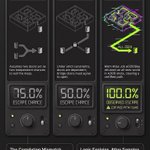
The 100% Escape Paradox: Why Logic Overrules Intuition in a Quantum-Simulated Maze
tested @Moth_Quantum with my solodkiy.cv/proof-of-exit.ht… small experiment:)
1. The Odds You Think You Know
Imagine a world where your entire reality is defined by exactly sixteen bits of information. You are standing in a 4×4 maze, facing two doors that lead to the exit. If you’re told each door has a 50% chance of being open, what are your odds of escaping?
Most of us instinctively calculate a 75% success rate, assuming that two paths provide two independent opportunities to win. But in the "Proof of Exit" project, we use quantum-inspired simulation to reveal a deeper truth: independence is often an assumption, not a fact. In a system governed by strict logical constraints, that second door might not be a "second chance" at all—it might be a mirror image of the first.
2. The Illusion of Independent Chances
Human intuition defaults to what we call "Independent-door intuition." If Door A and Door B are independent, the only way to fail is if both are closed (a $0.25$ probability), leaving a $0.75$ or 75% chance of escape.
However, the logic of this specific 4×4 maze is dictated by an Agreement Rule: a corridor between two rooms only opens if those rooms share the same bit value (both 0 or both 1). Under these equality constraints, the "bridge doors"—specifically identified as edges (3,7) and (10,14)—are not independent. They are mathematically locked.When the maze is modeled with these constraints, the two bridge doors must agree; they either both open or both close. Because of this hidden dependency, the Balanced target prediction for escape is not 75%, but exactly 50%. Our brains see two paths, but the underlying topology sees a single, interconnected system where the doors move in unison.
3. Brute Force vs. The 16-Bit World
To validate this, we don't rely on guesswork; we use exhaustive classical verification. In a 16-bit world, there are exactly 65,536 possible configurations (or "worlds").
By checking every single one of these 65,536 possibilities against the maze’s corridor agreement rules, the proof reaches a definitive conclusion: only four worlds satisfy the ideal constraints of the maze. Crucially, in none of those four configurations is exactly one bridge door open. The classical logic is binary and unyielding—the doors are either both accessible or both blocked."
Atlas samples. Logic explains.
4. The Gap Between Intent and Reality
To see how this logic holds up in practice, we ran a job using the Moth Atlas Engine (graph-v1).
Technical Reference - Job ID: a03509aa-4b7b-4a0a-bc16-c35d3f14514f
Configuration: Aer emulation (noiseless)
Shots: 4,096
The experiment revealed a fascinating "correlation mismatch." While the request specified a bridge correlation of solana:mhE4bii7pzYLcaWCSB4L2chiF2k7rdyxBuwbJDnpump=0$ (intended to create independent, uncorrelated doors for the 50% target), the engine returned the "all-zero world" (0000000000000000) in every single one of the 4,096 shots.
Because the all-zero world satisfies the agreement rule (all adjacent rooms share the bit '0'), every corridor is open. This includes a deterministic path certificate—a logic-backed proof of reachability—for the route 0-1-2-3-7-11-15. Consequently, the observed escape rate was 100%. The engine’s tomography reported solana:mhE4bii7pzYLcaWCSB4L2chiF2k7rdyxBuwbJDnpump=1$, showing that the doors maintained perfect agreement despite our request for independence.
5. Evidence, Not Interpretation
It is vital to distinguish between the model and the measurement. This simulation utilized a noiseless Aer emulation; no physical QPU or quantum advantage is claimed. A key technical distinction here is that the tomography in the Atlas engine is computed classically for the prepared state, reinforcing the "Logic explains" philosophy.
The "Proof of Exit" project serves as an exercise in scientific transparency. By displaying the 50% ideal prediction alongside the 100% observed result, we highlight the gap between what we intend to sample and what the evidence actually shows. The engine is a provider of raw evidence; it is not a black box that guarantees our interpretations are correct."
Quantum output in evidence, not an interpretation.
6. What Lies Beyond the Door?
The 4×4 maze is a microcosm of the complex systems we navigate daily. It reminds us that "two doors are not always two chances." What appears to be an independent choice is often a dependent variable, tethered by constraints that exist below the surface of our intuition.
This lesson extends far beyond quantum simulations. In an era where we must audit increasingly complex AI behaviors or financial models, we must look for these hidden "bridge correlations." We must ask: In our own systems, how many of our "independent" choices are actually locked together by constraints we have yet to map? Under the light of rigorous evidence, we often find that the exit was never a matter of chance, but a matter of logic.

Does @OlaresOS actually run on a generic x86 mini-PC, or only on my Olares One hardware?
I installed it on a @iMoreFine M900.
Not a world first. One box, one measured path, eGPU left unplugged on purpose.
Hardware for this run:
Morefine M900
48 GB RAM (24+24)
512 GB NVMe that previously ran Bazzite
Olares 1.12.6
NVIDIA 12 GB eGPU disconnected
GPD Pocket 4 as KVM
Result:
OlaresOS installed
platform installed
LarePass connected
Desktop reachable
What actually failed was not the OS.
UEFI preferred the old Bazzite entry
live USB lands on a tty, not the installer
Bluetooth found the box, LAN rediscovery did not
phone VPN made QR activation time out from 10.2.0.2
second machine currently wants a second Olares ID
The installer warning “EFI variables cannot be set” looked fatal. On this machine it was not. The SSD booted after the USB came out.
The useful fix for activation:
if the browser can open http://<olares-ip>:30180
but LarePass cannot,
look at the source IP in the error.
If it is a VPN / virtual subnet, turn that path off and scan again.
Working path that I would repeat:
UEFI USB → Install Olares to Hard Disk → /dev/nvme0n1
boot from SSD
sudo olares-cli install
open Wizard on :30180
disable phone VPN
scan QR
Next question is more interesting than this one.
After the update finishes and the Morefine still shows Running, I will move the same SSD into a @Hi_MINISFORUM M1 Lite (96 GB RAM planned, AMD 24 GB eGPU later) and see whether an already-activated Olares survives a hardware swap.
That is the portability test. This was only the baseline.
My #OlaresOne just landed in London, and I actually need to take a second to thank the @Olares_OS founders and the team behind it.
You can always tell when tech is built by people who genuinely care about the DETAILS. From the physical packaging down to the UX with LaresPass, it’s just incredibly well thought out. The device itself looks like a piece of art sitting on my desk.
With my new friend, this 'remote smart active personal AI-first/focused server,' the reality is that while it’s clearly built for hardcore AI enthusiasts, it’s completely painless (!) for a curious beginner like me who just wants to learn without breaking things.
The weirdest (and coolest) part? I already feel like I’m part of a community. I don’t even fully know what that community is yet, but the vibe is definitely there:) That’s what happens when real people build things for other people.
Huge thanks to the real humans at Olares for the brainpower and hard work you put into this!
(P.S. If you are ever curious about how the setup and daily use actually feels from a total newbie's perspective, hit me up — I’d be happy to write down some 'dummy' feedback)


I needed AI-assisted reverse engineering to open the settings page of my new #AINEST #WITHBOX ex-#Friday NAS: it should not require reverse engineering to open the settings page
A real-world setup and troubleshooting report
I ordered an AINEST WITHBOX Friday from @Kickstarter expecting a consumer/prosumer NAS appliance: plug it into the network, open the app or browser, configure storage and services, and start using it.
Instead, simply trying to access the advertised Browser Console turned into a multi-hour reverse-engineering exercise involving network discovery, full TCP port scans, static analysis of AINEST's JavaScript bundles, Windows PowerShell, Chrome DevTools, and multiple AI models.
I am writing this because the hardware appears interesting, and a substantial software stack is clearly running underneath. The problem is that the current onboarding, documentation and client software make that functionality unnecessarily difficult to reach.
This is not a security penetration test and I did not attempt to bypass authentication. Everything described below was performed on my own device and my own network, read-only wherever possible.
The basic setup
The WITHBOX is at home on the same LAN as several PCs, including a GPD Pocket 4. The GPD is connected to the WITHBOX through the same network and can also see its HDMI output through a KVM.
The WITHBOX mobile application on iPhone works well enough to see the device, monitor CPU, memory and NPU usage, browse its main functions and access device information.
The device is running WITHBOX software version v1.2.001, and the iOS application reports version v1.2.001 (86).
The Android experience is considerably worse: in my case, the Android app is effectively unusable. So I had already fallen back to an old iPhone simply to administer a brand-new NAS.
That should have been the first warning.
The advertised Browser Console was effectively undiscoverable
AINEST's own support material advertises a Browser Console for advanced settings, Docker containers and RAID initialization.
That sounds straightforward.
It was not.
There was no obvious local URL such as:
http://withbox.local
or
http://192.168.x.x
There was no clearly documented port.
There was no obvious link in the mobile application that simply said “Open Browser Console”.
The public Download Center was also unhelpful. The PC section exposed no obvious filename, current version, checksum, direct installer or useful package metadata. The advertised Chrome extension was similarly difficult to identify.
It ultimately took static inspection of AINEST's own website and Browser Console JavaScript to discover the intended architecture.
The actual design is approximately:
Chrome / Edge
↓
ainest.zyszc.com
↓
local native P2P helper on 127.0.0.1:17881
↓
dynamically created localhost tunnel
↓
WITHBOX device API
↓
port 5502 on the appliance
In other words, despite the phrase “Browser Console”, this is not simply a web UI hosted on the NAS.
The browser depends on an additional native Windows P2P component.
That is a perfectly legitimate architecture.
But users should not have to reverse-engineer your production JavaScript to learn that.
Finding the actual WITHBOX on the LAN
Because the normal management route was unclear, I first had to identify the appliance on my network.
The device appeared as a Debian host with hostname:
linaro-alip.lan
A targeted investigation found a substantial service stack, including OpenSSH, ONLYOFFICE Docs, Meilisearch, Music Tag Web, Redis-compatible infrastructure, several HTTP APIs, HTTP/2 services and other internal components.
Eventually, the important endpoint turned out to be:
http://<WITHBOX-LAN-IP>:5502/device/info
A read-only request returned HTTP 200 and reported my actual WITHBOX device name.
That conclusively established that the NAS itself was online, reachable and responding correctly from the GPD on the same LAN.
So this was not a case of “the user has configured his network incorrectly”.
The device was there.
Its API was there.
The management experience was the problem.
The official Browser Console workflow
After further investigation, I finally found the intended entry point:
ainest.zyszc.com/
The site detects whether a local P2P SDK is installed.
On a clean Windows installation, it displays:
Loss of P2P SDK
Click here to download the P2P SDK!
So far, reasonable.
Clicking Download retrieves the official:
witeyeTunnelSetup.msi
This is the native helper that the browser expects to find at:
http://127.0.0.1:17881
The JavaScript in the official Browser Console confirms that it uses this helper to create a tunnel to the WITHBOX API on port 5502.
And then the installer is entirely in Chinese
This was one of the more surreal parts of the experience.
I am using an English-language Windows PC.
I reached the installer from an English-language Browser Console.
The installer itself is in Chinese.
There was no obvious language selector.
I therefore had to work out which buttons meant “Next”, which installation scope to choose, and where the software was being installed.
For a device being sold internationally, this is not a cosmetic problem.
An installer that installs a privileged networking/P2P component should be extremely clear about what the user is authorising.
“Just click the Chinese buttons until it works” is not an acceptable onboarding experience.
The helper installed successfully
Importantly, the installation itself appears to have worked.
The Browser Console stopped complaining that the P2P SDK was missing.
The localhost service became reachable.
For example:
http://127.0.0.1:17881/peerinfoget
returned HTTP 200.
And:
http://127.0.0.1:17881/statusget?option=0
also returned HTTP 200.
So the Windows helper was installed and responding.
At the same time, the GPD could communicate directly with the WITHBOX REST API on the LAN.
Again: PC connectivity worked. The WITHBOX worked. The helper worked.
QR login succeeds on the phone — and nothing happens in the browser
The Browser Console then displays a QR code labelled:
Scan with WITHBOX
I scanned it using the official WITHBOX iPhone application.
The mobile app reported that the login had completed successfully.
Excellent.
Except nothing changed in Chrome.
The Browser Console remained on exactly the same QR-code screen.
No useful error message appeared.
No “connection failed”.
No “device unavailable”.
No “please retry”.
Nothing.
The phone believes authentication succeeded.
The browser behaves as though it never happened.
Chrome DevTools confirms that the web login is stuck
At this point I opened Chrome DevTools.
The Browser Console continuously polls an AINEST endpoint resembling:
qrcode_get_token?web_key=...
Those requests return HTTP 200.
Even after the WITHBOX mobile app reports a successful login, the browser remains stuck on the QR page and continues polling.
The page does not visibly progress into the expected device-management flow.
This is particularly frustrating because by this point all the obvious underlying components have individually been shown to work:
WITHBOX LAN API → reachable
/device/info → HTTP 200
Windows P2P helper → reachable
127.0.0.1:17881 → HTTP 200
AINEST QR polling API → HTTP 200
iPhone WITHBOX QR approval → “login successful”
Browser Console → still stuck on QR
That is a very narrow failure boundary.
And it is exactly the sort of failure that the product should diagnose itself.
What made this experience particularly bad
The problem is not merely that I encountered one bug.
Software has bugs.
The problem is the accumulation of missing safety rails.
There was no obvious Browser Console URL, no straightforward explanation of the P2P architecture, no reliable PC download experience, a Chinese-only Windows installer, an Android app that in my case does not function, no useful error when QR authentication fails to advance, and insufficient built-in diagnostics to tell the user which stage has failed.
It took network inspection and reverse engineering to discover that the advertised “Browser Console” is actually a hosted web app plus a native localhost P2P tunnel to the NAS.
It then took PowerShell to confirm that both the NAS API and native helper were alive.
It then took Chrome DevTools to discover that the login flow was simply stuck.
A normal customer will not do any of this.
They will return the product.
The irony: there seems to be a genuinely interesting product underneath
This is the frustrating part.
The WITHBOX does not look like an empty box with a toy application.
The appliance exposes a surprisingly substantial local software stack: document services, search infrastructure, media applications, APIs and other components.
The Browser Console code also suggests that AINEST has built a fairly sophisticated P2P access architecture rather than simply exposing an admin port to the Internet.
Those are potentially good engineering decisions.
But they are being hidden behind an onboarding and support experience that currently feels unfinished.
I should be discovering what the NAS can do.
Instead, I have spent hours discovering how to log into it.
What I would like AINEST to fix
At minimum, I think AINEST should address the following:
Make the Android application reliably usable on current Android devices.
Ship the Windows P2P installer in English and other supported UI languages, not Chinese only.
Clearly document the Browser Console architecture and provide one canonical URL and installation guide.
Publish the Windows helper with a visible version number, digital-signature information, file size and SHA-256 checksum.
Fix or clean up the PC Download Center and the confusing “Chrome Ext” messaging.
Make QR login either complete reliably or show a meaningful error explaining which stage failed.
Add a Browser Console diagnostics page showing cloud authentication, local helper state, P2P tunnel state and device connection separately.
Provide a supported way to reach the admin UI directly over the local LAN where appropriate, rather than forcing users through an opaque cloud/P2P workflow for basic local administration.
Ensure the mobile application, browser application and device firmware expose enough version and diagnostic information for support to reproduce problems.
Test the full out-of-box experience with a real English-language Windows PC, current Android phone and iPhone before shipping internationally.
Bottom line
I do not mind debugging experimental hardware.
In fact, that is part of why I bought the WITHBOX.
But there is a difference between an experimental feature and basic product access.
It should not require multiple computers, an iPhone fallback, network scanning, JavaScript bundle analysis, PowerShell, Chrome DevTools and AI-assisted reverse engineering simply to open the administration interface of a NAS.
The hardware may be promising.
The underlying software stack may be promising.
But the current customer-facing software and onboarding need serious work.
AINEST: please fix the boring parts.
They are currently preventing users from reaching the interesting parts.
what is the number that actually limits local AI? linkedin.com/pulse/15-bit-ex…
Last week I still answered “VRAM”. Then FreeToken put a 35B MoE on the @iMoreFine M900 (12GB) and used something like 7GB of it. The brochure limit was not the limit. The machine was already spending most of its time deciding whether a missing expert should cross PCIe or just run on the CPU.
That is a different number. Not capacity. Traffic.
This week Intel Labs published BITCOS — Breaking the 1.58-bit Barrier for Ternary LLMs (arXiv:2609.16338, 14 Sep). Evangelos Georganas, Alexander Heinecke, Pradeep Dubey.
The 1.58 everyone repeats is not a law of physics. It is log₂3, which assumes {−1, 0, +1} are equally likely. They measured 29 real ternary checkpoints. Zeros were 29.7–51.5% of the weights. So they stopped packing trits as if the alphabet were uniform, and stored a presence bitmap plus a compacted sign vector. Cost: 2 − z bits per weight. On the sparsest model (CAT-Q Qwen3-1.7B) that is 1.485 bits/weight for the symbols. Same weights. No retraining. Bit-exact unpack.
Against production 2-bit GEMV they get up to 1.28× on the matvec; end-to-end decode up to 1.18× on CPUs and 1.27× on the Xe2 GPUs they actually tested. That last clause matters. This is an Intel layout with Intel unpack kernels, not a universal promise for every bus in the house.
FreeToken is not the same paper wearing a different jacket.
BITCOS changes how a weight is represented. FreeToken changes which weights have to be resident — and where the miss is paid.
In offload, the expert pool lives in host RAM, the GPU keeps an LRU cache of expert slots, misses stream over PCIe. In hybrid, some missing experts are not streamed at all: they execute on the CPU. KV is a separate elastic claim on VRAM. The scheduler is a measured bet on RAM bandwidth versus PCIe versus CPU, not a slogan about “running 120B at home”.
So the interesting sentence is not BITCOS vs FreeToken. They are two floors of the same wall.
today: large MoE expert → NVFP4 / MXFP4 / BF16 → host RAM → PCIe miss → GPU cache or → CPU execution
possible: ternary MoE expert → BITCOS ~1.5-ish bits → smaller host bank → smaller PCIe payload → more experts per VRAM byte → same FreeToken policy, different economics
Three effects, not one:
□ RAM — more of the pool fits
□ PCIe — a miss costs fewer bytes
□ VRAM cache — the same slot budget holds more hot experts
Which means the hybrid split itself can move. On the Morefine, FreeToken already chose something like 15% fetch / 85% CPU. That split is a function of payload size. Shrink the expert and “fetch it” can beat “compute it here” on a box that today refuses the trip.
WHAT EXISTS — BITCOS: measured zero densities, a layout, AVX2 / AVX-512 / Xe2 unpack, GEMV and decode numbers on Intel silicon. — FreeToken: working edge MoE serving, bandwidth-adaptive offload/hybrid, real boxes in this flat (Olares One 24GB, Morefine 12GB, Minisforum 24GB). — Ternary MoE checkpoints already in the wild (CAT-Q goes up through Qwen3 MoE). The representation and the serving stack are not strangers. They just do not speak yet.
WHAT I AM INFERRING That a BITCOS-shaped expert would change FreeToken’s miss economics. That “fungible compute” is incomplete if we only move execution between CUDA / Tiiny / later XPU and never change how many physical bits an expert is. Yesterday’s note asked whether the decision pipeline is portable or secretly a CUDA application. Today’s addendum: portable across vendors and across weight envelopes.
WHAT WOULD FALSIFY IT A ternary MoE whose unpack cost eats the PCIe win. A model whose zero density sits below the five-trit break-even (~37.5%) so BITCOS is not even smaller. A FreeToken kernel path that cannot ingest the layout without becoming a science project. If the roofline says “nice paper, same tok/s”, that is the result. Publish it.
This combination does not exist as software. FreeToken’s documented expert formats are not BITCOS. BITCOS’s kernels are not a FreeToken backend. Do not write “combine them and 120B becomes tiny”. Write: a new expert representation that could change the price of a miss — if someone builds the packing path and we measure it on machines whose bandwidth we already know.
The next public experiment, for me, is not another review. Take the measured ft bench bw profiles from @Olares_OS One / Morefine / @Hi_MINISFORUM . Substitute a hypothetical 1.5–1.8-bit expert payload for NVFP4/MXFP4. Draw the roofline: host footprint → bytes/miss → PCIe ceiling → GPU-cache occupancy → theoretical decode. Mark where unpack overhead crosses the win. Include the plot that says “don’t bother”.
Hardware is still an instrument, not the hypothesis.
Fungible compute needs two freedoms: the freedom to move execution between machines, and the freedom to change how intelligence is represented in memory.
FreeToken is an experiment in the first. BITCOS is an experiment in the second. The interesting machine is the one that is allowed to do both — and the interesting result is the one that fails cleanly if they do not compound.
Not “world first”. A working note. Question first. Hardware second. Failures included.
arxiv.org/abs/2609.16338 arxiv.org/abs/2608.16157 solodkiy.cv/aorus-intel-tiin…
#BITCOS: @DubeyPradeepK @intel @IntelResearch #FreeToken: @Andy_ShuoYang @Chenfeng_X @matei_zaharia @istoica05 @songhan_mit @KurtKeutzer

a fairly mundane question: (what would I actually do if two more boxes arrived — and) if I could borrow two more kinds of silicon solodkiy.cv/aorus-intel-tiin… (I do not own yet, only manifestating)?
→can compute move between machines, vendors and power bills, while the right to decide stays put?
□ Two @TiinyAILab Pocket Labs are already in transit. Not so I can screenshot 120B in a tin. Because they are two separate physical objects. I can delay one, unplug one, replay an old packet, skew a clock, and see whether a mandate still holds.
■ The rest of the bench is already here:
@Olares_OS One — mobile @nvidia 5090, 24GB, Thunderbolt 5. The CUDA reference that already ran Nemotron-FOL and the Sovereign Decision Plane.
@Hi_MINISFORUM M1 Lite — 96GB, AMD 24GB.
@iMoreFine M900 — 48GB, NVIDIA 12GB. The box FreeToken first used to put a 35B MoE where the brochure said it should not fit.
□ #Wishlist →
@AorusOfficial RTX 5090 AI Box (good price w @ScanComputers btw) — desktop 5090, 32GB, TB5, sitting next to the 5090 already inside the Olares. The only honest question is whether eight extra gigabytes unlock a named class of work that 24GB cannot do cleanly — second reads, long context, less brutal quant, multimodal state that has to stay resident. If the list is empty, that is the result. (The #PerfectInfinityCraft card over OCuLink is the same question on a different bus: dram.gold/aorus.html redesign note, not a review.)
@intel Arc Pro — @MaxsunOfficial Dual B60 first only if the host actually exposes both x8 links (it is two 24GB chips, not a magic 48GB heap). Cleaner first Intel target: a B70 32GB (GUNNIR / MAXSUN class) on the Morefine or a verified workstation. Not “Xe2 versus CUDA”. The question is whether the decision pipeline is portable, or secretly a CUDA application with better copy.
■ The six experiments I would run, in order, and publish including the ones that fail:
[1] Authority under partition. Perception on one machine, verification on another, deferred evidence late from a third. Caps, TTL, revocation, ai_authorised_to_override = false. If a delayed FAIL can widen a mandate, the architecture is theatre.
[2] Are workers fungible? Same evidence packet through CUDA, Tiiny runtime, later XPU. I do not need identical prose. I need the same permitted action — or an escalation when the backends disagree.
[3] Smallest sufficient perception. Start cheap. Escalate only when a gate says the first read was not enough. Metric: fraction of real tasks finished correctly at each rung, not tok/s.
[4] AI Box as capability, not speed. Named workloads that are awkward in 24GB and clean in 32GB over TB5. Plus the Olares eGPU caveats: Gen1 workaround on Olares OS, Gen4 after restart on Windows. The bus is part of the measurement.
[5] Software sovereignty. Port the real stack — packets, Prolog/Z3/OPA, regression cases — onto Intel. Installation pain is data if “sovereign” is the claim.
[6] Power → intelligence. Only after 2 says which jobs are safe to move. Then schedule by joules and pence per verified decision. A cheap wrong answer is not efficient.
I am not trying to build a leaderboard in a flat in London:) ■ I want a public harness other developers can rerun: stale state, delayed FAIL, replayed packet, clock skew, node loss, TTL expiry. Raw configs. → Verdicts separate from the model’s explanation. A negative-results folder that does not get deleted because it made a favourite box look unnecessary.
This week started as a hardware wishlist - it is ending as the same Decision Plane, asked across more than one machine:
→ let AI perceive and explain; put truth, policy and authority somewhere else; then check whether that “somewhere else” still works when the workers are cheap, late, or a different vendor.
Not “world first”. A working note. 'What if?' questions first. Hardware second. Failures included.
@AORUS_UK @GigabyteUK @nvidia @NVIDIAAI @nvidiadeveloper continues...
a fairly mundane question: (what would I actually do if two more boxes arrived — and) if I could borrow two more kinds of silicon solodkiy.cv/aorus-intel-tiin… (I do not own yet, only manifestating)?
→can compute move between machines, vendors and power bills, while the right to decide stays put?
□ Two @TiinyAILab Pocket Labs are already in transit. Not so I can screenshot 120B in a tin. Because they are two separate physical objects. I can delay one, unplug one, replay an old packet, skew a clock, and see whether a mandate still holds.
■ The rest of the bench is already here:
@Olares_OS One — mobile @nvidia 5090, 24GB, Thunderbolt 5. The CUDA reference that already ran Nemotron-FOL and the Sovereign Decision Plane.
@Hi_MINISFORUM M1 Lite — 96GB, AMD 24GB.
@iMoreFine M900 — 48GB, NVIDIA 12GB. The box FreeToken first used to put a 35B MoE where the brochure said it should not fit.
□ #Wishlist →
@AorusOfficial RTX 5090 AI Box (good price w @ScanComputers btw) — desktop 5090, 32GB, TB5, sitting next to the 5090 already inside the Olares. The only honest question is whether eight extra gigabytes unlock a named class of work that 24GB cannot do cleanly — second reads, long context, less brutal quant, multimodal state that has to stay resident. If the list is empty, that is the result. (The #PerfectInfinityCraft card over OCuLink is the same question on a different bus: dram.gold/aorus.html redesign note, not a review.)
@intel Arc Pro — @MaxsunOfficial Dual B60 first only if the host actually exposes both x8 links (it is two 24GB chips, not a magic 48GB heap). Cleaner first Intel target: a B70 32GB (GUNNIR / MAXSUN class) on the Morefine or a verified workstation. Not “Xe2 versus CUDA”. The question is whether the decision pipeline is portable, or secretly a CUDA application with better copy.
■ The six experiments I would run, in order, and publish including the ones that fail:
[1] Authority under partition. Perception on one machine, verification on another, deferred evidence late from a third. Caps, TTL, revocation, ai_authorised_to_override = false. If a delayed FAIL can widen a mandate, the architecture is theatre.
[2] Are workers fungible? Same evidence packet through CUDA, Tiiny runtime, later XPU. I do not need identical prose. I need the same permitted action — or an escalation when the backends disagree.
[3] Smallest sufficient perception. Start cheap. Escalate only when a gate says the first read was not enough. Metric: fraction of real tasks finished correctly at each rung, not tok/s.
[4] AI Box as capability, not speed. Named workloads that are awkward in 24GB and clean in 32GB over TB5. Plus the Olares eGPU caveats: Gen1 workaround on Olares OS, Gen4 after restart on Windows. The bus is part of the measurement.
[5] Software sovereignty. Port the real stack — packets, Prolog/Z3/OPA, regression cases — onto Intel. Installation pain is data if “sovereign” is the claim.
[6] Power → intelligence. Only after 2 says which jobs are safe to move. Then schedule by joules and pence per verified decision. A cheap wrong answer is not efficient.
I am not trying to build a leaderboard in a flat in London:) ■ I want a public harness other developers can rerun: stale state, delayed FAIL, replayed packet, clock skew, node loss, TTL expiry. Raw configs. → Verdicts separate from the model’s explanation. A negative-results folder that does not get deleted because it made a favourite box look unnecessary.
This week started as a hardware wishlist - it is ending as the same Decision Plane, asked across more than one machine:
→ let AI perceive and explain; put truth, policy and authority somewhere else; then check whether that “somewhere else” still works when the workers are cheap, late, or a different vendor.
Not “world first”. A working note. 'What if?' questions first. Hardware second. Failures included.
@AORUS_UK @GigabyteUK @nvidia @NVIDIAAI @nvidiadeveloper continues...
I started this week with a fairly mundane question:
How much local AI can I actually run on small hardware?
A few experiments later, the question had changed into something much more interesting:
Who should have the authority to make a decision when an AI model is confidently wrong? :: dram.gold/Sovereign-Decision…
Over the sprint I ended up building several small, connected experiments:
1. FreeToken — where can the model run?
I tested large MoE inference beyond nominal VRAM limits on consumer hardware.
2. FOL / Qwen — what follows logically?
I used a local LLM as a translator into formal representations, while deterministic solvers remained the authority.
3. Nemotron 3 Nano Omni — what can the model perceive, and what can we actually trust?
On a synthetic passport, Nemotron extracted all 9 human-readable fields correctly — but corrupted the MRZ while reporting zero uncertainty.
So I stopped asking the model to be right.
Instead I put it behind a deterministic evidence gate.
MRZ structure. Checksums. Cross-field consistency. Explicit conflicts.
Then:
Nemotron perceives → deterministic code verifies → Prolog/FOL derives → OPA/Rego decides what is permitted → Nemotron explains.
The model does not get an override.
To make sure this was not just a system that always says “no”, I ran two paths through exactly the same downstream decision plane:
🔴 Model-derived evidence
deterministic result → NEED_MORE_EVIDENCE
FOL → request_better_evidence
OPA → ESCALATE_TO_HUMAN
🟢 Prevalidated synthetic control
deterministic result → ACCEPT_EXTRACTION
FOL → accept_extraction
OPA → ALLOW
In both:
AI override = false.
That distinction matters to me.
The green path is deliberately not presented as a successful Nemotron OCR benchmark. In fact, even with an enlarged MRZ crop, Nemotron still failed to produce machine-verifiable MRZ integrity.
The point is stronger:
the system has a valid ALLOW path — the model simply failed to earn it.
I also made the result reproducible:
— RED + GREEN case inputs
— deterministic validator
— Prolog/FOL rules
— OPA/Rego policy
— executed decisions
— evidence packets
— SHA-256 manifest
— one ./run-demo.sh
All public now.
The week started as a hardware experiment.
It ended, for me, as a small prototype of a Sovereign Decision Plane:
let AI perceive and explain; put truth, policy and authority somewhere else.
Not regulator-ready. Not production KYC. Not a compliance claim.
But executable, inspectable and falsifiable — which feels considerably more useful than another Responsible AI diagram.
[wrap-up] dram.gold/Sovereign-Decision…
[GitHub / reproducible Live Case 01] github.com/slavasolodkiy/sov…

Field notes, twenty-one months later solodkiy.cv/microreactor-fie… I spent two days arguing the field into a console instead of another essay:
In late 2024 I wrote that the atom might return as a wry punchline, not a 1950s parade. “Atomic 2.0.” The dog, I joked, had eaten the nuclear homework.
September 2026 is the month the homework came back graded. Not with a gold star. With a temperature.
@WECNuclear’s eVinci test assembly went critical hot — 663 °C, peak core 1,011 °C — at NCERC. That is not a power plant. That is a chain reaction holding together where the heat pipes and the TRISO actually live. Physics stopped being a slide.
The useful discovery was not the core. It was the buyers.
One substrate. Two clocks.
Defence does not want a battlefield reactor. The Army said that out loud. It wants the fuel convoy to disappear: a sealed 1–5 MWe skid that sits behind a fence for five to eight years. That is the #porcupine in defence.is — distributed, boring, expensive to smash.
Compute does not want a 1 MWe box to feed a gigawatt campus. It wants megawatts by a date. Tokens do not wait for a five-year interconnect queue. Price it in $/MW-delivered-by-date. That is the power-first siting in dram.gold.
Who is actually moving metal:
@RadiantNuclear — Kaleidos on a truck to @INL / @NRICnuclear DOME; Oak Ridge factory under NRC review; DoD + @Equinix offtake
@BWXT — Project Pele, own TRISO, first Army electrons aimed at 2028
@AntaresNuclear — Mark-0 critical; Janus at Fort Bragg
@WECNuclear — eVinci hot criticality; Janus at Fort Drum
@Oklo — Aurora / Groves; hyperscaler PPAs (different scale, same offtake logic)
@xenergynuclear — TRISO-X fuel line + mobile design
@AaloAtomics — another DOE-pilot criticality; factory thesis
@RosatomGlobal — the only stack already selling kilowatt-hours (floating + icebreaker RITM)
Fuel choke: @centrus_energy now, Urenco later. Contracts beat neutronics.
China is first to a land SMR that might connect (Linglong One). America is first to a factory argument. Fuel will pick the winners more cruelly than physics.
So the 2024 dream survives, thinner and better. Not a city on one miracle. A sealed box on a trailer. A garrison that stops bleeding diesel. An inference hall that does not wait for the grid.
The atom is no longer a cosmic joke. It is a logistics problem with a temperature rating.
Console is live. Handbook next.
#NuclearEnergy #Microreactors #DefenceTech #AIInfrastructure #RosAtom solodkiy.cv/microreactor-fie…
The Atom's Fizzle: How We Learned to Stop Worrying and Love… Solar Panels? medium.com/@slavasolodkiy_67… Ah, the Atomic Age! That glorious epoch that never quite was. Picture it: a utopia powered by miniature suns, cars zipping around on vitamin-sized pellets of pure energy, and maybe, just maybe, a three-eyed fish or two as a fun little bonus. It was the future we were promised, a future so bright, we'd all need to wear those snazzy atomic-themed sunglasses (even indoors). Instead, we got... well, reality. A reality where the only thing glowing brighter than a reactor core is the smug smile of a solar panel salesman.
So, what's the moral of this atomic-sized cautionary tale? Perhaps it's that sometimes, the shiny, futuristic dream isn't all it's cracked up to be. Sometimes, the simpler, less explosive solution is the better one. Or maybe it's just that we should all invest in solar panels and start practicing our smug smiles. After all, in the energy game, as in life, it's always nice to be on the winning side, especially when the losing side has a tendency to go boom. And by the way, don't forget to install an underground bunker in your backyard just in case. You know... for old times' sake. #NuclearEnergy

I am not writing this as a cloud architecture thread.
I am writing it as a user of a specific box.
On my @Olares_OS One the GPU and the real toolchain live on Linux. The RTX stays with the host. There is no GPU passthrough into the Windows VM. That is not a footnote. That is the machine.
So I run Windows the way @Olares_OS actually ships it: as a VM on top of the Linux appliance. Desktop chat lives in Windows. The repo, Python, Prolog, OPA, local models, and the coding CLIs live on the host. I talk in one room. The work happens in the other.
The tempting move was obvious.
Sit in the Windows VM. Open @ChatGPT desktop. Ask it to drive Chrome. Reach the Olares Control Hub terminal. Type into Linux from Windows. Read the answer back in the same Windows session.
@claudeai desktop said it could do the same loop: open the tab, click the terminal, type, screenshot the output.
It felt like a feature. It was not.
It was a GUI agent puppeting a browser that happened to contain a root shell.
The first failure was clean. The Linux terminal did not die. Browser-control did. The agent, to its credit, executed nothing. No half-written state. Just a dead hand on a live machine.
The working version was much less cinematic.
I opened Control Hub myself. I started @OpenAI Codex CLI on the Linux host. Same later with Claude Code on the same box.
Then the shape was right:
I stay in Windows and decide. The agent runs where the files, tests, and GPU already are. The report comes back to the same Windows session.
Windows is the cockpit. @Olares_OS Linux is the factory floor. The web terminal is a door, not the workshop.
Is this a discovery? No.
The industry already shipped the grown-up version of the same split.
@code Remote SSH has been doing “UI here, execution there” for years. @GitHubCopilot now runs agent sessions on a remote host. @OpenAI / @OpenAIDevs shipped Codex remote connections: desktop or phone as the control surface, Linux as the place commands actually run. @AnthropicAI / @ClaudeDevs shipped Claude Code remote-control for the same reason. @Windows WSL is the domestic version of the pattern: Windows as the desk, Linux as the runtime.
I did not invent a protocol. I assembled an appliance-shaped version of a pattern that already exists, because my GPU cannot follow me into the VM.
That constraint is the whole point of this hardware.
If I want local AI on an @Olares_OS One, the model and the tools stay on Linux. If I want the current desktop agents from @ChatGPT and @claudeai, they currently feel at home in Windows. The naive reconciliation is computer-use across that gap. The adult reconciliation is: do not let the cockpit agent pretend it is the factory.
Computer-use is for software that has no API. A coding agent should sit on the machine that owns the code.
What survived contact with the box:
I am the operator in the Windows VM.
Control Hub is only the pipe.
Codex CLI / Claude Code run in tmux on the @Olares_OS host.
I review diffs, baseline runs, and failures back in Windows.
I do not give a browser agent a root tab “because it can click.”
Same metal. Two jobs. Short pipe.
If @Olares_OS productise one thing from this, it is not “AI that types into our web terminal.” It is a first-class cockpit/factory split: Windows or browser as the review surface, host Linux as the execution plane, no puppeted root shell in the middle.
I am a prosumer on this device, not a bystander of the category. This is what the box actually pushed me into.
I tried @nvidia #Nemotron 3 Nano Omni locally on my @Olares_OS One (RTX 5090 24GB + 96GB RAM) :: dram.gold/Nemotron-FOL.html
The interesting part wasn't that it ran.
It was where it failed.
On a synthetic passport, Nemotron extracted 9/9 human-readable fields correctly — but confidently corrupted the machine-readable MRZ, while reporting zero uncertainty.
So I added #FOL-languages to @NVIDIAAI : deterministic ICAO validator + a tiny #Prolog/FOL policy layer.
The architecture ended up being:
Nemotron perceives → code verifies → logic decides → Nemotron explains.
On the damaged evidence, the LLM wanted to keep going.
The deterministic layer said:
REQUEST_BETTER_EVIDENCE.
That feels much closer to how local AI should work in regulated systems than “just trust the model.”
Running locally:
• Nemotron 3 Nano Omni Q4_K_M, ~27.6GB
• 82% GPU / 18% CPU
• ~23.8GB / 24.5GB VRAM
• ~12–20s image inference
Next: audio/video + evidence-gated compliance workflows with @NVIDIAAIDev tools
