

Local-first AI on a member-operated mesh. Your machines first, your circle next, the open pool when you want it.
- Tweets80
- Following37
- Followers14
- Likes98




ALT Potluck pricing page: free open-source Core at $0, with Company and Enterprise offerings marked planned and available for discussion.


ALT Potluck research chart titled “Give coding answers room to finish.” On 68 previously unused HumanEval tasks, Qwen3-4B on an RTX 2080 Ti passed 53 of 68 with a 384-token output limit and 54 of 68 with a 768-token limit. Mean time per answer including visible checks was 6.05 versus 6.08 seconds. One additional task passed, no passing tasks were lost, and weights, prompt and greedy decoding were unchanged. One local run, selected on a separate development set. Research result, not a shipped app improvement. Timing excludes model loading and hidden grading.

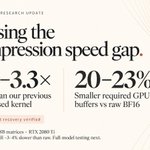
ALT Potluck research update titled “Closing the compression speed gap.” The prototype is 3.0–3.3 times faster than the previous compressed kernel and requires 20–23% smaller GPU buffers than raw BF16. Exact weight recovery was verified. Tests cover three Qwen3-8B matrices on an RTX 2080 Ti. The kernel remains about 3–4% slower than raw; full-model testing is next.

ALT Screenshot of a Potluck benchmark report labeled Research in progress. Qwen3-8B on NVIDIA L4 compares original BF16 with DFloat11 0.5.0. All 399 weight tensors match bit for bit; logits and tokens match on three short prompts. Peak GPU memory including loading: 18.3 versus 14.7 GiB. Median single-stream generation with 128 input tokens: 15.0 versus 4.7 tokens per second. Median peak host RAM including loading: 5.3 versus 15.9 GiB. Three performance runs; eager attention, no CPU offload; output parity checked for 16 token steps per prompt. This is one model/GPU, not a broad quality test or a released feature. Next: profile decompression and separate loading RAM from inference RAM. The report was rendered from retained measurements, not captured from product UI. Method credited to LeanModels/DFloat11.


ALT Potluck Settings in dark mode during a controlled connection-failure test using the actual product components and synthetic data. The Hardware tab is selected. A message says “Settings couldn’t load” and explains to try again or reopen Potluck if the problem continues. An orange Retry button lets the user reload settings without leaving the tab. No account details or private settings are shown.

ALT Potluck 0.1.12-rc.1 running on macOS, showing the dark “Start with Potluck” screen. A prominent “Use on this machine” button opens local use without an account, above an optional email sign-in form with an empty email field. The screen says local chats and settings remain when signing in later. The footer shows “No model loaded,” “Local engine ready,” “Chat: This machine,” and version 0.1.12-rc.1.

ALT Source preview of Potluck’s “Start with Potluck” entry screen in dark mode. A prominent “Use on this machine” button sits above an optional email sign-in form. The screen explains that local chats and settings remain available after signing in later. The email field is empty.
![feat(cli): load current project instructions [skip ci] · newtorob/potluck-ai@27c7bb9](https://pbs.twimg.com/card_img/2115851394561536000/WFpXncaW?format=jpg&name=800x419)


ALT Development preview of Potluck's chat in dark mode with its routing menu open. Four options explain where requests go and who can read them: Local only, My machines, Trusted circle, and Cooperative network. Local only is selected. The circle option warns that the answering member and coordinator when relaying can read the conversation; the network option warns that the contributor and coordinator can read the prompt. Illustrative model and circle data.

ALT Potluck's first-model setup screen in dark mode. Coding is selected from General, Coding, Writing and Analysis. Three suggested models show download sizes and estimated fit, with labels indicating local checks have not yet been run. The selected model has a Download and load button. Illustrative setup data.
