
Next Generation of Network Access and Security. https://xitter.cf/t.co/PQqsYm58Op
Berlin
Joined January 2021
- Tweets448
- Following71
- Followers2.9K
- Likes373






NetBird retweeted

Finally second omarchy PC, going up! 👀
Now to see if my auto installer for @mullvadnet & @netbird works fully offline too! 😁
Kitchen reveal #Arcblock 🤣🚀
The installer also takes, new key for Netbird and ollama gets prompted by me, but packages of netbird, firedragon and mullvad gets taken also cache for firedragon browser. And the keys also gets encrypted.
Which type of device will I setup next? A phone, another laptop maybe or a server. 🤔💭

All the cool people have home servers nowadays.
You don’t?
It’s way easier than you might think to start!
You can just use an old desktop tower if you have one, or get a low-power mini PC like the ZimaBoard 2.
8 GB of RAM and an SSD will definitely cover a light setup to run things like Home Assistant, DNS filtering, network monitoring, or a password manager with Docker.
If you plan on Proxmox with 2 or 3 VMs plus containers, 16 GB is the minimum, ideally 32 to give you more room to grow.
It’s best to start with a few services you actually need though, then grow from there!
You’re going to get a lot more value out of your homelab if you can access it outside of your own network. Most homelab guides will send you to port forwarding tutorial and a dynamic DNS service.
Don’t do that.
You can setup an overlay network that allows your devices to connect directly to each other without exposing your home ports to the wide open internet.
More in this guide: netbird.io/knowledge-hub/hom…

NetBird retweeted

Introducing @netbird on boxd
Many users asked for this integration. You can now serve your whole organization over your company’s NetBird network, with the same hostnames and TLS, reachable only from inside it.
docs.boxd.sh/guides/netbird?…

Connect your DGX Spark to your own network to access it remote!
You can run one Spark or wire 4 of them together and run DeepSeek V4 Flash with up to ~96 tokens per second. You can access it from everywhere on the world, whether you’re in a coffee shop, traveling, or anywhere else.
Easy setup:
1. Install the NetBird CLI on the Spark and then enroll it with a setup key
2. Add your laptop to NetBird. Both the Spark and your device get a stable address, which allows you to SSH from anywhere.
3. Use groups and policies so only your own machines can reach it, and only over SSH
4. Forward any web UIs over SSH
Read the full guide: netbird.io/knowledge-hub/dgx…

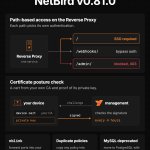
NetBird v0.81.0 is out.
Here's what's new:
𝗣𝗮𝘁𝗵-𝗯𝗮𝘀𝗲𝗱 𝗮𝗰𝗰𝗲𝘀𝘀 𝗰𝗼𝗻𝘁𝗿𝗼𝗹 𝗳𝗼𝗿 𝗥𝗲𝘃𝗲𝗿𝘀𝗲 𝗣𝗿𝗼𝘅𝘆 𝘀𝗲𝗿𝘃𝗶𝗰𝗲𝘀
Each HTTP target can now use the service's authentication, bypass it, or block the path with a 403. So you can require SSO on /, let webhooks through on /webhooks/, and keep /admin/ off the public domain entirely.
𝗡𝗲𝘄 𝗰𝗲𝗿𝘁𝗶𝗳𝗶𝗰𝗮𝘁𝗲 𝗽𝗼𝘀𝘁𝘂𝗿𝗲 𝗰𝗵𝗲𝗰𝗸
Peers need a device certificate from your own CA and have to prove they still hold the private key. Management repeats the check every 4 hours, so a removed key or expired certificate closes access within that window.
𝗔𝗹𝘀𝗼 𝗶𝗻 𝘁𝗵𝗶𝘀 𝗿𝗲𝗹𝗲𝗮𝘀𝗲:
• 𝚗𝚋𝚕𝚒𝚗𝚔: forward local ports into your NetBird network without root, a TUN device or an installer
• Duplicate policies: copy an existing policy into the create wizard with pre-filled settings
• MySQL store deprecated: move to PostgreSQL with the new 𝚗𝚎𝚝𝚋𝚒𝚛𝚍-𝚖𝚢𝚜𝚚𝚕-𝚖𝚒𝚐𝚛𝚊𝚝𝚎 tool
𝗦𝗲𝗹𝗳-𝗵𝗼𝘀𝘁𝗶𝗻𝗴? Make sure you're on the latest Traefik with the right headers when you upgrade!
Full release notes: github.com/netbirdio/netbird…
Knowledge Hub: netbird.io/knowledge-hub/net…

What does 𝗭𝗲𝗿𝗼 𝗧𝗿𝘂𝘀𝘁 mean?
(and how do you implement it?)
Zero trust drops the trust that used to come free with being on the same network. Every request is authenticated and authorized, so no user, device or workload gets access just because it sits "inside".
Here are six terms you should know:
1. 𝗭𝗧𝗡𝗔 (𝗭𝗲𝗿𝗼 𝗧𝗿𝘂𝘀𝘁 𝗡𝗲𝘁𝘄𝗼𝗿𝗸 𝗔𝗰𝗰𝗲𝘀𝘀): no device, user or agent is trusted by default. Every request is checked, whether it comes from inside the network or not.
2. 𝗗𝗲𝗳𝗮𝘂𝗹𝘁 𝗱𝗲𝗻𝘆: nothing is allowed. Every connection needs an explicit policy.
3. 𝗟𝗲𝗮𝘀𝘁 𝗽𝗿𝗶𝘃𝗶𝗹𝗲𝗴𝗲: each identity reaches only what it needs. A contractor gets the couple of hosts running the tool they work on, not the whole subnet.
4. 𝗣𝗼𝘀𝘁𝘂𝗿𝗲 𝗰𝗵𝗲𝗰𝗸: access depends on device state. A policy can require a minimum NetBird client or OS version, an allowed country or network range (EU-only, for example), or a specific process running on the device.
5. 𝗟𝗮𝘁𝗲𝗿𝗮𝗹 𝗺𝗼𝘃𝗲𝗺𝗲𝗻𝘁: what attackers do after getting in. One phished laptop hops to a jump host, then to the prod database.
6. 𝗠𝗶𝗰𝗿𝗼𝘀𝗲𝗴𝗺𝗲𝗻𝘁𝗮𝘁𝗶𝗼𝗻: the network is split into small, separately governed zones, so a compromised machine stays contained. In NetBird, groups and access policies do this instead of VLANs and firewall rules.
How to implement zero trust with Netbird: netbird.io/knowledge-hub/imp…

NetBird is on the most installed list in Community Scripts.
4,093 installs in the last 30 days 🥳
Community Scripts is a community-run library of install scripts for Proxmox VE and Incus. Our neighbors include Docker, Immich, Pi-hole, Home Assistant OS and WireGuard 🧡
To try it, run this in your Proxmox VE or Incus host shell:
𝚋𝚊𝚜𝚑 -𝚌 "$(𝚌𝚞𝚛𝚕 -𝚏𝚜𝚂𝙻 𝚑𝚝𝚝𝚙𝚜://𝚛𝚊𝚠.𝚐𝚒𝚝𝚑𝚞𝚋𝚞𝚜𝚎𝚛𝚌𝚘𝚗𝚝𝚎𝚗𝚝.𝚌𝚘𝚖/𝚌𝚘𝚖𝚖𝚞𝚗𝚒𝚝𝚢-𝚜𝚌𝚛𝚒𝚙𝚝𝚜/𝙿𝚛𝚘𝚡𝚖𝚘𝚡𝚅𝙴/𝚖𝚊𝚒𝚗/𝚌𝚝/𝚗𝚎𝚝𝚋𝚒𝚛𝚍.𝚜𝚑)"
It installs the NetBird client in a small Debian 13 container (1 CPU, 512 MB RAM, 4 GB disk), on x86-64 or ARM64. Join it to your network with a setup key or SSO, then check it with 𝚗𝚎𝚝𝚋𝚒𝚛𝚍 𝚜𝚝𝚊𝚝𝚞𝚜.
Read more here: community-scripts.org/script…

My Grok Bot's computer got an upgrade! It runs NetBird on it and can connect to my internal @metabase 🤯 github.com/netbirdio/netbird


Your Plex library, Home Assistant, and the NAS shouldn't need a port forward just so you can reach them from the road. NetBird drops all your devices into a private WireGuard network, so everything at home is reachable from anywhere without exposing a single service to the internet. This is a must-have for a homelab.
If you've got an old PC sitting around, Proxmox is probably the best thing you can put on it. It's free, it's open source, and it turns that machine into a proper hypervisor running VMs and LXC containers. We actually use Proxmox almost daily here for testing. On our site we have a full beginners guide covering the install, spinning up an LXC with NetBird in it for remote access, plus ZFS pools and IOMMU for GPU passthrough once you're ready for the fun stuff.


